Webapi: Asp .NET Core [feature / netcore]
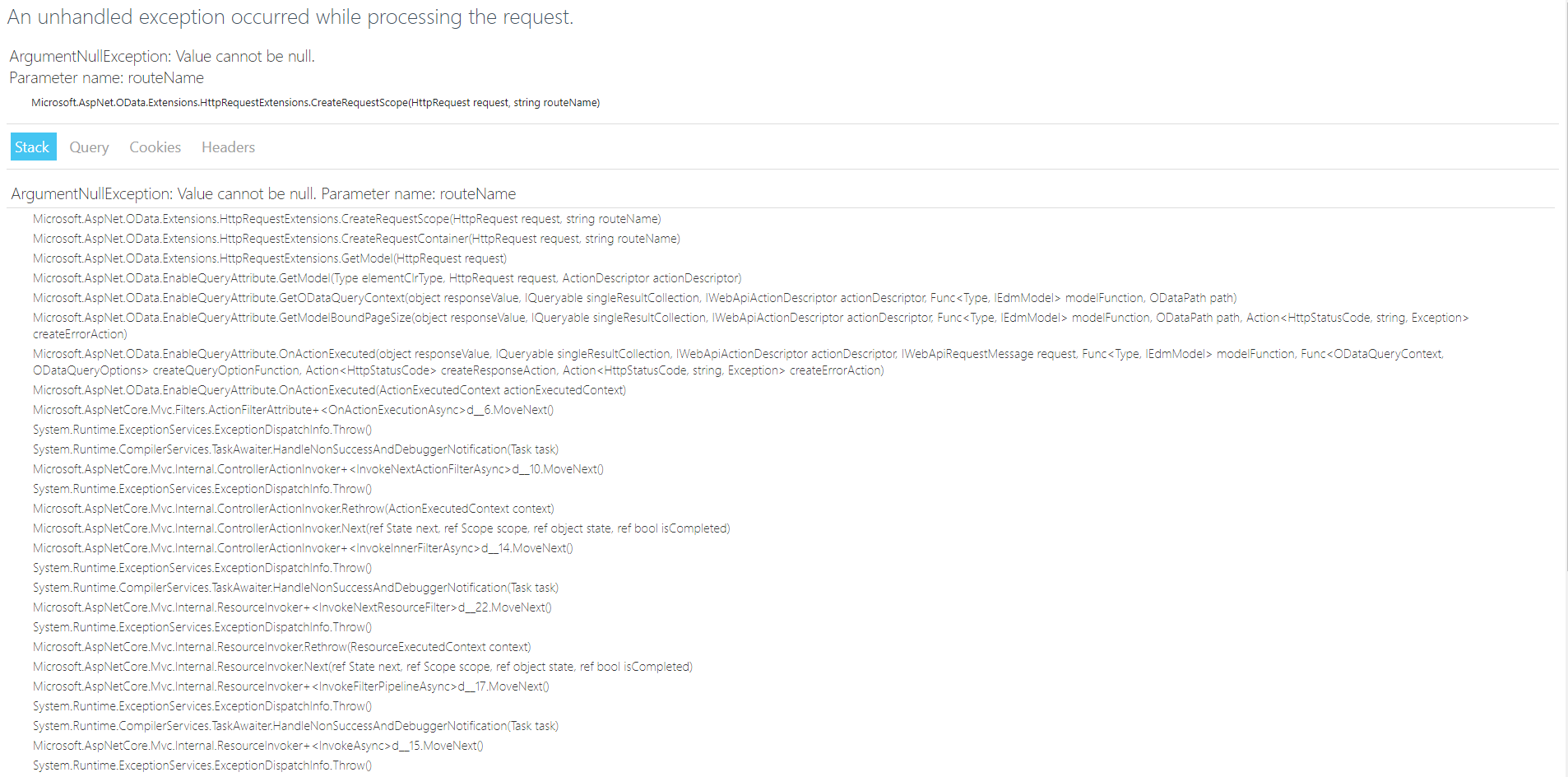
Error making request using [EnableQuery] and ODataController controler
 ErliSoares
All 23 comments
@ErliSoares - Can you provide some information about your startup, controller and the request url?
 robward-ms
on 22 Dec 2017
robward-ms
on 22 Dec 2017
Possibly a dup of #1175?
robward-ms
on 22 Dec 2017
@ErliSoares - Yep, it's a new issue that was caused by a last minute change. It occurs when a request is made on a non-OData route, which your project is configured to open (look in project properties, debug, app URL for the default URL). If you make a request against the configured OData endpoint, it should work as expected.
You can work around this issue by adding the following inside the UseMvc lambda, right below the call to MapODataServiceRoute():
routes.EnableDependencyInjection();
Where routes is the name of the IRouteBuilder lambda parameter.
robward-ms
on 22 Dec 2017
Many thanks for the feedback.
Take the delay, but it did not work to put the route.EnableDependencyInjection ();
I try to access a URL from a Swagger-generated file, but when I access the URL:
http://localhost:32769/api-docs/v1/swagger.json
This error occurs:
System.InvalidOperationException: No media types found in 'Microsoft.AspNet.OData.Formatter.ODataInputFormatter.SupportedMediaTypes'. Add at least one media type to the list of supported media types. at Microsoft.AspNetCore.Mvc.Formatters.InputFormatter.GetSupportedContentTypes(String contentType, Type objectType) at Microsoft.AspNetCore.Mvc.ApiExplorer.DefaultApiDescriptionProvider.GetRequestFormats(IApiRequestMetadataProvider[] requestMetadataAttributes, Type type) at Microsoft.AspNetCore.Mvc.ApiExplorer.DefaultApiDescriptionProvider.CreateApiDescription(ControllerActionDescriptor action, String httpMethod, String groupName) at Microsoft.AspNetCore.Mvc.ApiExplorer.DefaultApiDescriptionProvider.OnProvidersExecuting(ApiDescriptionProviderContext context) at Microsoft.AspNetCore.Mvc.ApiExplorer.ApiDescriptionGroupCollectionProvider.GetCollection(ActionDescriptorCollection actionDescriptors) at Microsoft.AspNetCore.Mvc.ApiExplorer.ApiDescriptionGroupCollectionProvider.get_ApiDescriptionGroups() at Swashbuckle.AspNetCore.SwaggerGen.SwaggerGenerator.GetSwagger(String documentName, String host, String basePath, String[] schemes) at Swashbuckle.AspNetCore.Swagger.SwaggerMiddleware.<Invoke>d__6.MoveNext() --- End of stack trace from previous location where exception was thrown --- at System.Runtime.ExceptionServices.ExceptionDispatchInfo.Throw() at System.Runtime.CompilerServices.TaskAwaiter.HandleNonSuccessAndDebuggerNotification(Task task) at Microsoft.AspNetCore.Diagnostics.DeveloperExceptionPageMiddleware.<Invoke>d__7.MoveNext()
My Startup class: Startup.txt
ErliSoares
on 23 Dec 2017
@ErliSoares - Looks like routebuilder.EnableDependencyInjection(); changed the error. It used to be the same error as #1175 but now the new exception looks like #1176, which you also filed. Do I have that correct? If so, lets us this one to track the 'No media types found' issue and close #1176 (since this one has more info).
I see you had added some code to add a media type to the odata formatters. This is close to the workaround I would suggest (but have not tried) except you are targetting the output formatters collection, not the input formatters. For the second block of code in your UseMvc(), I suspect something like this would work-around the issue:
foreach (var inputFormatter in options.InputFormatters.OfType
{
...
}
There is one input formatter being added by OData without any media types but it should be skipped for non-OData requests: https://github.com/OData/WebApi/blob/f140814fa7a300a88dad259124ddf45de6682bc0/src/Microsoft.AspNetCore.OData/Formatter/ODataInputFormatter.cs#L94-L98
Either removing it from the list of giving it a media type should mitigate the issue.
robward-ms
on 23 Dec 2017
'options.InputFormatters' worked.
Other errors that influenced, but it was mapping of the Entity Framework.
Thank you very much.
ErliSoares
on 29 Dec 2017
I'm having the same issue now. Exactly where did you put that foreach (var inputFormatter in ...) code?
 eloekset
on 18 Jan 2018
eloekset
on 18 Jan 2018
Workaround
```c#
public class Startup
{
public void ConfigureServices(IServiceCollection services)
{
services.AddMvc();
    services.AddOData();

    // Workaround: https://github.com/OData/WebApi/issues/1177
    services.AddMvcCore(options =>
    {
        foreach (var outputFormatter in options.OutputFormatters.OfType<ODataOutputFormatter>().Where(_ => _.SupportedMediaTypes.Count == 0))
        {
            outputFormatter.SupportedMediaTypes.Add(new MediaTypeHeaderValue("application/prs.odatatestxx-odata"));
        }
        foreach (var inputFormatter in options.InputFormatters.OfType<ODataInputFormatter>().Where(_ => _.SupportedMediaTypes.Count == 0))
        {
            inputFormatter.SupportedMediaTypes.Add(new MediaTypeHeaderValue("application/prs.odatatestxx-odata"));
        }
    });
}

public void Configure(IApplicationBuilder app, IHostingEnvironment env)
{
    var builder = new ODataConventionModelBuilder(app.ApplicationServices);

    builder.EntitySet<Product>("Products");

    app.UseMvc(routebuilder =>
    {
        routebuilder.MapODataServiceRoute("ODataRoute", "odata", builder.GetEdmModel());

        // Workaround: https://github.com/OData/WebApi/issues/1175
        routes.EnableDependencyInjection();
    });
}
}
```
 acjh
on 18 Jan 2018
acjh
on 18 Jan 2018
Good day everyone, how come when I added MediaTypeHeaderValue I got this error
'cannot convert from 'System.Net.Http.Headers.MediaTypeHeaderValue' to 'Microsoft.Net.Http.Headers.MediaTypeHeaderValue'?
Is there something I am missing here?
Note:
I finally solved the problem by converting System.Net.Http.Headers; to Microsoft.Net.Http.Headers;
 RanielQuirante
on 12 Jul 2018
RanielQuirante
on 12 Jul 2018
if I put this code
r.MapODataServiceRoute("ODataRoute","odata", builder.GetEdmModel(), new DefaultODataBatchHandler());
the odata doesn't show up and it says this "This localhost page can’t be found"
but when I use this code the odata shows up
r.MapODataServiceRoute("odata",null, builder.GetEdmModel(), new DefaultODataBatchHandler());
can someone explain why this is happens?
also, I would like to know what is wrong on the code that I used in this case... because the desired result that I want on swagger ui isn't really showing up...
 app.UseSwagger();
        app.UseSwaggerUI(c =>
        {
            c.RoutePrefix = "swagger";
            c.SwaggerEndpoint("/swagger/v1/swagger.json", "OData API V1");
        });
because every time I go to this link "localhost/swagger/index.html" I get this...
ObjektBrief OData API
v1
/swagger/v1/swagger.json
No operations defined in spec!
I hope someone can help me fix this problem...
RanielQuirante
on 12 Jul 2018
there is no paths and definitions when I clicked this "/swagger/v1/swagger.json" at swagger
https://localhost:44361/swagger/v1/swagger.json
{"swagger":"2.0","info":{"version":"v1","title":"OData API"},"paths":{},"definitions":{}}
Is this related as to why it shows 'No operations defined in spec!' at localhost:44361/swagger/…?
RanielQuirante
on 12 Jul 2018
@christianquirante As far as I can tell, Swagger doesn't support using OData in AspNetCore. If all you have are OData endpoints, that message is likely pointing this fact out. We have regular Controllers in our API in addition to the OData controller. Our Swagger UI is working, but we aren't seeing the OData endpoints.
 Kizmar
on 30 Jul 2018
Kizmar
on 30 Jul 2018
I have been playing with OData for the past few weeks and it was working fine until today. Suddenly, I started getting this error in swagger.
I honestly have no idea what exactly caused it to start breaking... the workaround of adding a dummy media type on the raw input formatter worked, but this is really scary stuff.
I'm actually assuming that reflection order somewhere is causing the behavior to change, because this started occurring on my end after adding a bunch of completely unrelated helper classes and such.
@KanishManuja-MS I know we've been discussing a few unrelated issues recently. Do you have any idea whatsoever about why this issue would start cropping up suddenly like I described above? I have literally changed NOTHING on my startup class logic: I extracted the EDM model builder into a separate class, added a few mappers and helpers, and when I went to test my changes I remembered "hey let's see swagger again" and it was broken.
Honestly, while the workaround above does work, it makes absolutely no sense to me and I'd rather avoid the confusing extra line of code in my codebase (BTW, only the raw input formatter needs to be touched. Lookping over output formatters has no effect as far as I could tell).
EDIT:
@ErliSoares , why did you close this issue? The only way to make it work is via a workaround: that's not a solution to the problem.
Can you please re-open this? We need to decide if this is a problem in the OData Input formatter configuration, or if it's a problem in the ApiExplorer implementation.
 julealgon
on 8 Nov 2018
julealgon
on 8 Nov 2018
It would appear there wasn't a very strong effort to determine the root cause of this. It took some spelunking, but I found it. The ODataOutputFormatter is not implemented correctly. It supports a scenario (validly for OData only) where the media type is derived from the incoming request and thus the formatter doesn't have any predefined media types. This breaks the inherited functionality of OutputFormatter. I've filed this issue as #1750. The fix is trivial.
The out-of-the-box implementations of OData inherently do not support the API Explorer, which is likely why these types of issues have not be discovered by the team or in testing.
 commonsensesoftware
on 8 Feb 2019
commonsensesoftware
on 8 Feb 2019
This might help some people?
https://github.com/Microsoft/aspnet-api-versioning/tree/master/samples/aspnetcore/SwaggerODataSample
 NBroomfield
on 9 Feb 2019
NBroomfield
on 9 Feb 2019
@NBroomfield thanks for the plug, but as the author of the example that you've referenced, it works because I handle and ignore the InvalidOperationException that gets produced. I hadn't previously figured out why this was happening. The referenced example will only work if you use OData exclusively. If you're mixing OData with non-OData controllers and Swagger, then this problem will crop back up (as I found). There isn't really a way to get _in front_ of the issue, which is why it _should_ be fixed in OData as it's the source of the behavioral change.
There are at least 3 interim workarounds:
- Remove the ODataOutputFormatter that has no registered media types (there's only 1)
a. This is an easy solution if you don't need the _raw_ support - Add any media type to the offending ODataOutputFormatter (as previously suggested)
a. The prevents the exception because the formatter never usesGetSupportedContentTypes
b. This will report a bogus media type that you might have to exclude or change elsewhere for Swagger - Adapt over or replace the offending ODataOutputFormatter with an implementation that does the correct thing
a. Consumers of InputFormatter and OutputFormatter already expectedGetSupportedContentTypesto returnnullor an empty list
commonsensesoftware
on 10 Feb 2019
@commonsensesoftware, thanks for the reply, that's really useful feedback, do you know if NSwag will work with Odata and dot net core?
NBroomfield
on 25 Feb 2019
I don't have a working sample, but - yes - it will work.
Unlike some other libraries that have provided Swagger support for OData in the past, API versioning isn't providing any direct Swagger support. What it provides is solid support for the _API Explorer_ API. Tools, such as Swagger generators like Swashbuckle and NSwag, then rely on _explored_ information to do their work. In this way we are _symbiotic_ without any direct dependencies on each other.
Based on a previous conversation with the author of NSwag, I know there was some work being done in the more recent versions to make things more easily light up. You'll need the following packages:
- API Versioning for OData on ASP.NET Core
- API Versioning API Explorer for OData on ASP.NET Core
- NSwag
For more information and NSwag configuration, you'll probably want to visit the NSwag repo. The API Explorer integrate is always the same. You just need: services.AddODataApiExplorer().
I hope that help.s
commonsensesoftware
on 25 Feb 2019
FYI in case it catches anyone else out.
In the above fix it is important that the line
services.AddOData();
comes before the line
services.AddMvcCore(options =>
It took me awhile to spot that one...
 ddunhill
on 21 Mar 2019
ddunhill
on 21 Mar 2019
@commonsensesoftware just curious. Wouldn't it be acceptable if the Raw ODataInputFormatter supported tex/plain as a media type?
 cecilphillip
on 18 May 2019
cecilphillip
on 18 May 2019
Workaround
public class Startup
{
    public void ConfigureServices(IServiceCollection services)
    {
        services.AddMvc();

        services.AddOData();

        // Workaround: https://github.com/OData/WebApi/issues/1177
        services.AddMvcCore(options =>
        {
            foreach (var outputFormatter in options.OutputFormatters.OfType<ODataOutputFormatter>().Where(_ => _.SupportedMediaTypes.Count == 0))
            {
                outputFormatter.SupportedMediaTypes.Add(new MediaTypeHeaderValue("application/prs.odatatestxx-odata"));
            }
            foreach (var inputFormatter in options.InputFormatters.OfType<ODataInputFormatter>().Where(_ => _.SupportedMediaTypes.Count == 0))
            {
                inputFormatter.SupportedMediaTypes.Add(new MediaTypeHeaderValue("application/prs.odatatestxx-odata"));
            }
        });
    }

    public void Configure(IApplicationBuilder app, IHostingEnvironment env)
    {
        var builder = new ODataConventionModelBuilder(app.ApplicationServices);

        builder.EntitySet<Product>("Products");

        app.UseMvc(routebuilder =>
        {
            routebuilder.MapODataServiceRoute("ODataRoute", "odata", builder.GetEdmModel());

            // Workaround: https://github.com/OData/WebApi/issues/1175
            routes.EnableDependencyInjection();
        });
    }
}
This answer should be in the documentation
 GustavoAmerico
on 21 Oct 2019
GustavoAmerico
on 21 Oct 2019
Workaround
public class Startup
{
    public void ConfigureServices(IServiceCollection services)
    {
        services.AddMvc();

        services.AddOData();

        // Workaround: https://github.com/OData/WebApi/issues/1177
        services.AddMvcCore(options =>
        {
            foreach (var outputFormatter in options.OutputFormatters.OfType<ODataOutputFormatter>().Where(_ => _.SupportedMediaTypes.Count == 0))
            {
                outputFormatter.SupportedMediaTypes.Add(new MediaTypeHeaderValue("application/prs.odatatestxx-odata"));
            }
            foreach (var inputFormatter in options.InputFormatters.OfType<ODataInputFormatter>().Where(_ => _.SupportedMediaTypes.Count == 0))
            {
                inputFormatter.SupportedMediaTypes.Add(new MediaTypeHeaderValue("application/prs.odatatestxx-odata"));
            }
        });
    }

    public void Configure(IApplicationBuilder app, IHostingEnvironment env)
    {
        var builder = new ODataConventionModelBuilder(app.ApplicationServices);

        builder.EntitySet<Product>("Products");

        app.UseMvc(routebuilder =>
        {
            routebuilder.MapODataServiceRoute("ODataRoute", "odata", builder.GetEdmModel());

            // Workaround: https://github.com/OData/WebApi/issues/1175
            routes.EnableDependencyInjection();
        });
    }
}
This answer should be in the documentation
Do you mean: **routebuilder**.EnableDependencyInjection(); ?
Otherwise, it was the solution for me too.
 robcube
on 25 Mar 2020
robcube
on 25 Mar 2020
Works to me. Important note: formatters must be fixed AFTER odata is registered. This is why my original code AddMvcCore(...).AddOData() didn't work. Be careful.
 Pzixel
on 13 Nov 2020
Pzixel
on 13 Nov 2020
Related issues
 MDzyga
·
5Comments
MDzyga
·
5Comments
 johnhzhu
·
4Comments
johnhzhu
·
4Comments
 VikingsFan
·
5Comments
VikingsFan
·
5Comments
 kpko
·
3Comments
kpko
·
3Comments
 rleos
·
5Comments
rleos
·
5Comments
Most helpful comment
Workaround
```c#
public class Startup
{
public void ConfigureServices(IServiceCollection services)
{
services.AddMvc();
}
```