Webapi: OData 4 $expand does not seem to work with custom function
I have a controller which returns a collection of Items in its default GET action, I then created a function to return Items based on a parameter value. The function works well however, when I call the $expand on a child collection it doesn't seem to work. Although it expanded the EF query to get child items but end results doesn't show children. $select seems to be working though
Not Working:
Things/ThingsNamespace.GetByLocation(LocationID=1)?$expand=RelatedToThings
Working:
Things?$expand=RelatedToThings
Things/ThingsNamespace.GetByLocation(LocationID=1)?$select=Name
Assemblies affected
Microsoft.AspNet.OData v5.9.0
Reproduce steps
See bug description
Expected result
It should expand the child collection of function restricted results
Actual result
Doesn't expand the child collection
Additional details
_Optional, details of the root cause if known. Delete this section if you have no additional details to add._
 rafeeqg
All 4 comments
@rafeeqg I can't repro it, could you share more code detail? Here are mine
model builder:
builder.EntityType<Customer>().Collection.Function("Test")
.ReturnsCollectionFromEntitySet<Customer>("Customers").Namespace = "Default";
controller:
[HttpGet]
[EnableQuery]
public IQueryable<Customer> Test()
{
    var db = new DbContext();
    return db.Customers;
}
query:
Customers/Default.Test()?$expand=Order
 VikingsFan
on 4 Jul 2016
VikingsFan
on 4 Jul 2016
Thanks @VikingsFan, I replaced IQueryable
Model Builder:
configuration.EntityType.Collection.Function("GetByLocation")
     .Returns<IQueryable<Thing>>()
     .Parameter<int>("LocationID");
Controller
    [EnableQuery(MaxExpansionDepth = 100)]
    [ODataRoute]
    public IHttpActionResult GetByLocation(int LocationID)
    {
         var db = new DbContext();
         var things = from thing in db.things
                                   where db.LocationDescendants(LocationID, true).Contains(thing.LocationID)
                                   select thing;
      }
Query
Things/ThingsNamespace.GetByLocation(LocationID=1)?$expand=RelatedToThings
rafeeqg
on 4 Jul 2016
For now we only support expand navigation property in entity type, so in function definition, you need specify it's collection from entityset.
VikingsFan
on 5 Jul 2016
Hi guys. We are facing the same issue here. Aparently the function works very well with other clauses as filter, select, top... However the expand does not provoke effects on the results.
We have already tried to change namespaces and did some other simple tests on returning types and function properties. But nothing was able to solve the issue.
On the SQL Profiler I can see the join from the expand, but it's data are not appended on the json result.
Could someone give a light on it?
Builder:
            var hotelsGetPrices = builder.EntityType<Hotel>().Collection
                .Function("CalculatePrices")
                .ReturnsCollectionFromEntitySet<Hotel>(HotelMap.Table.Name);
Function:
[HttpGet]
        [EnableQuery(
            MaxAnyAllExpressionDepth = 5,
            MaxExpansionDepth = 5,
            AllowedQueryOptions = AllowedQueryOptions.All
            )]
        public object CalculatePrices(ODataQueryOptions<Hotel> queryOptions)
        {
            var hotelHandler = roleBasedContext.GetHandlerFor<Hotel>() as HotelHandler;
            var source = hotelHandler.AsQueryable();

            queryOptions.ApplyTo(source);

            return source;
        }
Url:
/Hotel/Default.CalculatePrices()?$filter=Id eq 1 OK
/Hotel/Default.CalculatePrices()?$select=Title OK
/Hotel/Default.CalculatePrices()?$expand=Room NOT OK
Versions:
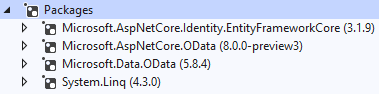
 engbryan
on 25 Jan 2021
engbryan
on 25 Jan 2021
Related issues
 rleos
·
5Comments
rleos
·
5Comments
 christiannagel
·
4Comments
christiannagel
·
4Comments
 ysmoradi
·
5Comments
ysmoradi
·
5Comments
 suadev
·
3Comments
suadev
·
3Comments
 abkmr
·
3Comments
abkmr
·
3Comments
Most helpful comment
@rafeeqg I can't repro it, could you share more code detail? Here are mine
model builder:
controller:
query:
Customers/Default.Test()?$expand=Order