Webannoyances: GitHub profile issues
URL(s) where the issue occurs
GitHub profiles, e.g.:
https://github.com/torvalds
Describe the issue
A new GitHub filter (2020-05-18) and an old one (2019-02-20) mangle the GitHub profile page.
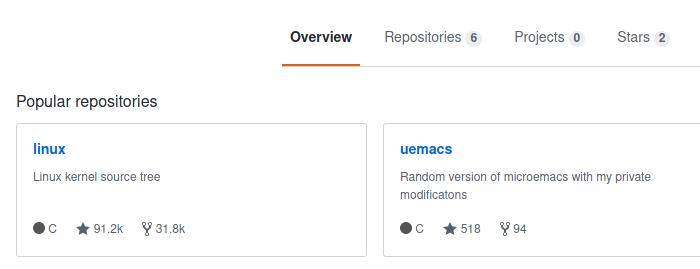
This rule causes the navbar at the top of the page to float over to the right of the screen when you scroll down and back up:
github.com##.js-sticky.js-sticky-offset-scroll...
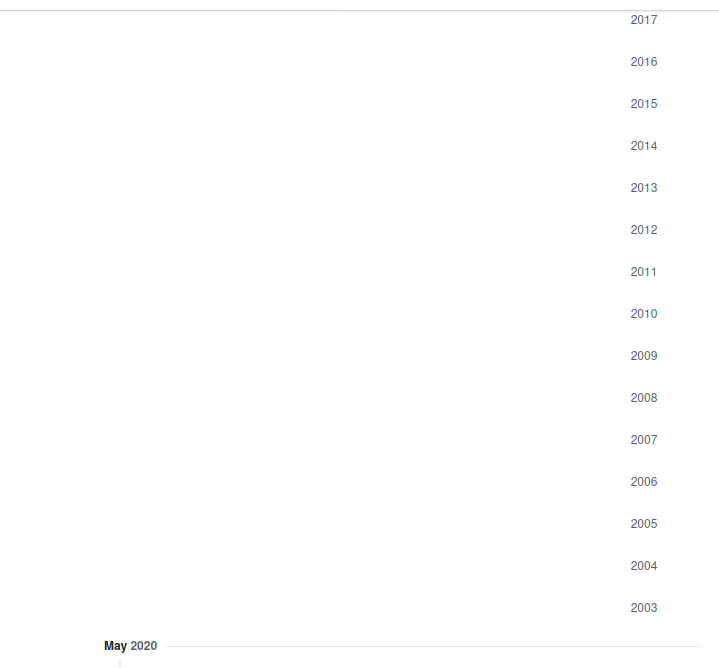
This rule breaks the year display when there's a long contribution activity list with many years, and the screen width is greater than ~1000 px, leading to a blank block with just the years on the rhs when you scroll down:
github.com##.profile-timeline-year-list...
Screenshots
Nav Bar
Year List
Versions
- Browser: Firefox 76.0.1
- Ad blocker: uBlock Origin 1.27.4
Notes
Thanks for maintaining this list! :+1:
 chocolateboy
All 7 comments
Thanks for reporting. I am unable to reproduce what you showed in your screenshot currently with my setup..... Before I try debug a bunch of different ways to reproduce, are you able to confirm you have latest filters and/or update your filters, and make sure the version is dated ! Last Modified: 10:37 2020-05-21?
There was a uBO bug related to the double nested sublist CSS_companion_filters.txt not being loaded and I also happened to notice when CSS_companion_filters.txt wasn't loading the profiles were also messed up. See: https://github.com/yourduskquibbles/webannoyances/issues/217 so if your list version is during that time period it may not be using the sublist. If it is that bug, there is an emergency release v1.27.6 of uBO stable incoming to fix this regression.
Alternatively, you can also test if this is your issue by adding the following filter from that list to your My Filters?
github.com##.gh-header .gh-header-shadow.box-shadow, .gh-header .sticky-content, .is-placeholder, .is-stuck + .toolbar-shadow, .is-stuck .diffbar .show-if-stuck, .is-stuck.gh-header-sticky.top-0.js-sticky-offset-scroll.js-sticky, .pr-toolbar-shadow, .toolbar-shadow, .user-profile-sticky-bar
 yourduskquibbles
on 21 May 2020
yourduskquibbles
on 21 May 2020
If this regression is causing the issue and you are stuck on uBO 1.27.4 you could temporarily _also_ subscribe to the css_companion_filters.txt list as custom list until 1.27.6 is rolled out. Paste the following URL https://raw.githubusercontent.com/yourduskquibbles/webannoyances/master/filters/css_companion_filters.txt under Import of Filter Lists tab

Then click yellow Apply Changes button at top of Filter Lists page.
yourduskquibbles
on 21 May 2020
Before I try debug a bunch of different ways to reproduce, are you able to confirm you have latest filters and/or update your filters, and make sure the version is dated
! Last Modified: 10:37 2020-05-21?
I am now, yes. I last updated an hour ago, so I was using the latest version from yesterday.
Alternatively, you can also test if this is your issue by adding the following filter from that list to your
My Filters?
Yes, that fixes both issues. Thanks!
If this regression is causing the issue and you are stuck on uBO 1.27.4
Thanks, I'm happy to use a workaround (I was previously disabling those rules by copying them into My filters and prefixing ~) until the next release of uBO.
chocolateboy
on 21 May 2020
FYI: just upgraded to uBO 1.27.6 (and restarted the browser) and I still see both of these issues if I disable the workaround. However, the issue goes away again if I subscribe to your css_companion_filters.txt list.
chocolateboy
on 21 May 2020
FYI: just upgraded to uBO 1.27.6 (and restarted the browser) and I still see both of these issues if I disable the workaround. However, the issue goes away again if I subscribe to your
css_companion_filters.txtlist.
Weird, I'm unable to reproduce on a clean chrome profile and uBO 1.27.6 loaded through Chrome extension store
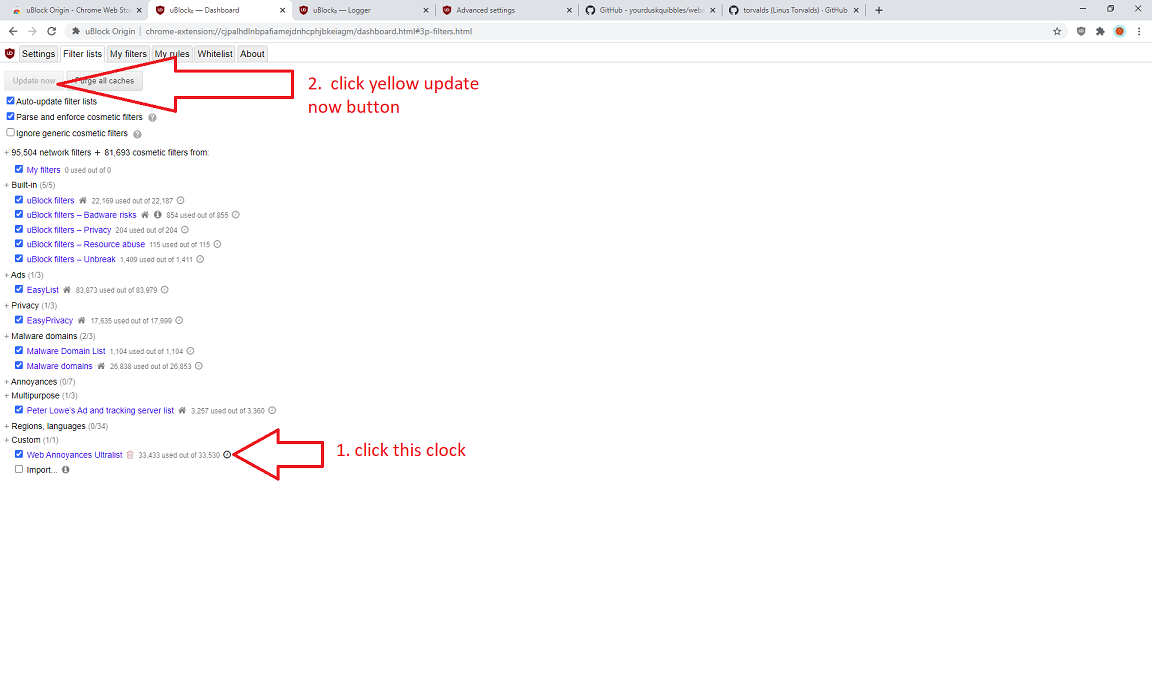
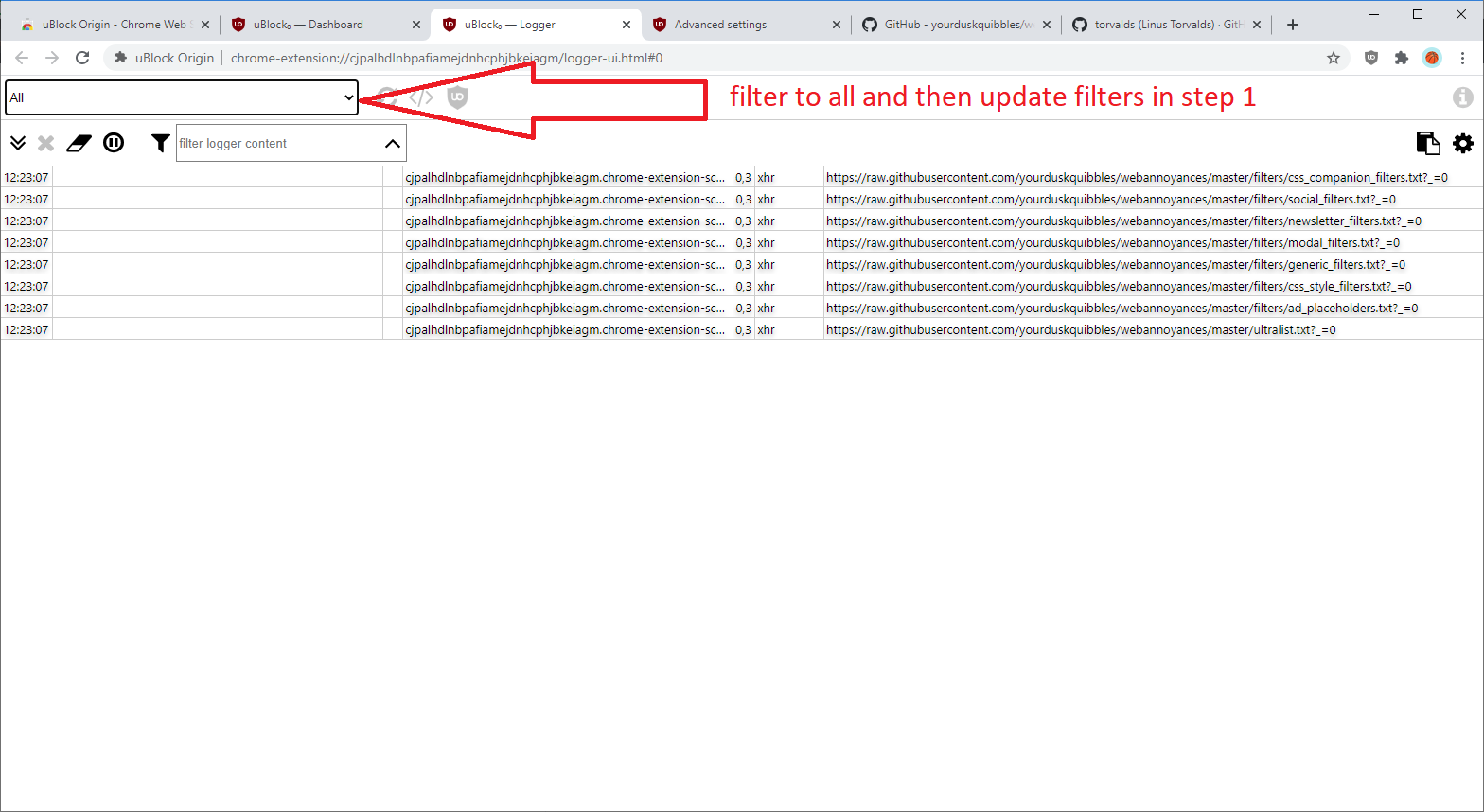
Are you able to open the uBO logger and then go to Filter Lists tab and purge cache of Web Annoyances and update the list [1] while you have the uBO logger open and filtered to all[2] and paste a screenshot or output?
[1] purge cache and update:
[2] Logger should look like this after filter update list (hopefully no error messages):
yourduskquibbles
on 21 May 2020
Thanks! I was only seeing the main list loading until I did one of the following (not sure which since I did both):
- Purged the cache and reloaded all lists
- Uninstalled this list and re-imported it
This has fixed the issue. Sorry for the noise.
chocolateboy
on 21 May 2020
Awesome, thanks for confirming! Not a problem as I am sure others are experiencing same issues so it is helpful to have all the steps written out anyways.
yourduskquibbles
on 21 May 2020
Related issues
 RedDragonWebDesign
·
4Comments
RedDragonWebDesign
·
4Comments
 prech
·
6Comments
prech
·
6Comments
 gasull
·
13Comments
gasull
·
13Comments
 rd-su
·
12Comments
rd-su
·
12Comments
 Omoeba
·
3Comments
Omoeba
·
3Comments