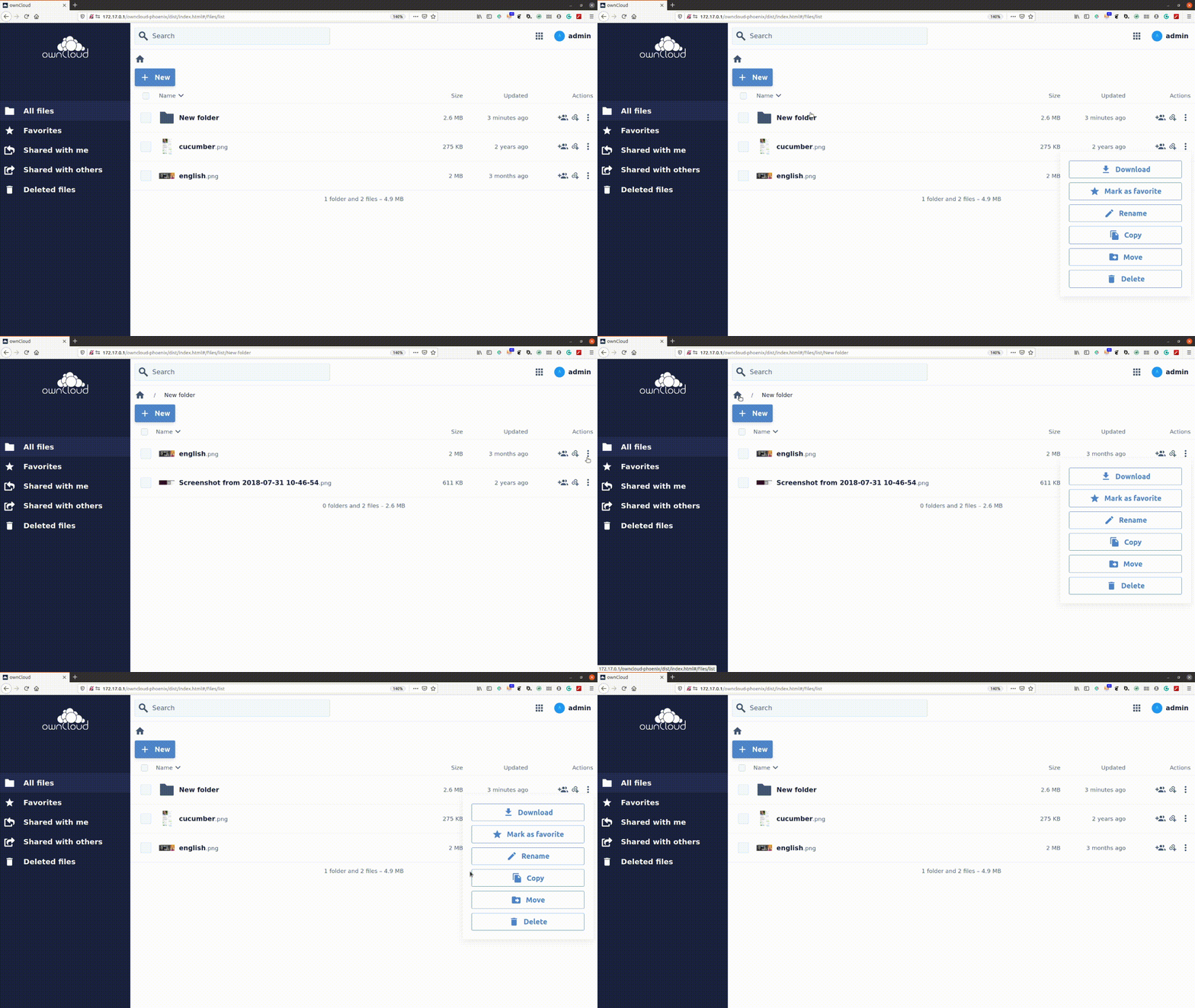
Web: navigating between folders does not close the action menu
 individual-it
All 5 comments
@individual-it we couldn't recreate this bug in the build from latest master head. pretty sure the bug has been fixed.
Should we add tests for this?
 saw-jan
on 21 Dec 2020
saw-jan
on 21 Dec 2020
@saw-jan we don't have this actions drop down anymore. Actions are now in the right sidebar as an accordion item. So bug-wise this can be closed. I think that tests for this are not needed - please reopen if you don't agree. :-)
 kulmann
on 21 Dec 2020
kulmann
on 21 Dec 2020
@kulmann we will add tests for futureproofing :smiley:
saw-jan
on 21 Dec 2020
@saw-jan you will need to think about what to check in the test scenario. It is often difficult to work out what things to check for "not existing".
There are an infinite number of things that should not be visible on the UI! For example, "Then a button to launch a rocket to Mars should not be visible", "Then a menu of choices of pizza should not be visible" ... So we have to have an "educated guess" about what "negative" things to test for.
 phil-davis
on 21 Dec 2020
phil-davis
on 21 Dec 2020
Well, with our implementation the expected behaviour changed. You could write a test, that if the right sidebar is opened and the accordion item with Actions is visible, it will still be visible when you select a different resource. And that it will display the correct, available actions for the selected resource type. That might be worth a test.
I.e. when the selected resource is a folder, the first action in the list of available actions will be to navigate into that folder. When the selected resource is a PDF file, the first action in the list of available actions will be to open the PDF file in a new browser tab. Etc.
kulmann
on 21 Dec 2020
Related issues
 dschmidt
·
6Comments
dschmidt
·
6Comments
 jnweiger
·
7Comments
jnweiger
·
7Comments
 LukasHirt
·
6Comments
LukasHirt
·
6Comments
 tomneedham
·
3Comments
tomneedham
·
3Comments
 butonic
·
8Comments
butonic
·
8Comments
Most helpful comment
@saw-jan you will need to think about what to check in the test scenario. It is often difficult to work out what things to check for "not existing".
There are an infinite number of things that should not be visible on the UI! For example, "Then a button to launch a rocket to Mars should not be visible", "Then a menu of choices of pizza should not be visible" ... So we have to have an "educated guess" about what "negative" things to test for.