Very often, I get people who want to claim an issue on Gitcoin but can't because they don't have ETH. Either there are no exchanges in their area, or they dont have the mone yto spend on gas.
Pursuant to making ethereum and Gitcoin accessible to everyone as broadly as possible, I would like to design a page entitled 'faucet' in which a user can go to the page and submit an application to receive a small amount of ETH.
The form should contain
- a Github Oauth button
- a comments field (for explaining why you need the ETH)
- an ETH address input field
- an email address input field
- a TOS acceptance checkbox input field
- a submit button
Functional spec:
- Design will be responsive
- All inputs are required.
- The form should not allow users to submit more than once per github account.
- when the form is submitted a new row will be stored in
FaucetApplication( a new model) - when the form is submitted, an email will be sent to
settings.SERVER_EMAILnotifying the admin of the faucet application.
Bounty
Scope of this bounty is to design a faucet input form page.
 owocki
All 23 comments
__This issue now has a funding of 0.1 ETH (74.96 USD) attached to it.__
- If you would like to work on this issue you can claim it here.
- If you've completed this issue and want to claim the bounty you can do so here
- Questions? Get help on the Gitcoin Slack
- $11963.83 more Funded OSS Work Available at: https://gitcoin.co/explorer
 gitcoinbot
on 27 Dec 2017
gitcoinbot
on 27 Dec 2017
Are you looking for someone to design the form as well as develop the functionality?
 mauri2015
on 27 Dec 2017
owocki
on 27 Dec 2017
mauri2015
on 27 Dec 2017
owocki
on 27 Dec 2017
just design for now @mauri2015 .. will bounty the fucntionality later
owocki
on 27 Dec 2017
__The funding of 0.1 ETH (73.4 USD) attached has been claimed by @PixelantDesign.__
@PixelantDesign, please leave a comment to let the funder (@owocki) and the other parties involved your implementation plan. If you don't leave a comment, the funder may expire your claim at their discretion.
- Learn more on the gitcoin issue page
- Questions? Get help on the Gitcoin Slack
- $11603.84 more Funded OSS Work Available at: https://gitcoin.co/explorer
gitcoinbot
on 27 Dec 2017
Claimed! @owocki
 PixelantDesign
on 27 Dec 2017
PixelantDesign
on 27 Dec 2017
@owocki Please clarify...
How does a user get to the faucet page? Where do you imagine the button/link living?
A user can only submit for ETH through github oauth correct? It's not either github OR using the form fields listed?
So the experience would be:
Click Sign In with Github > Authorize Gitcoin > Confirm Github Password > See page with the form fields listed above? User completes the form fields and clicks submit. Correct?
PixelantDesign
on 28 Dec 2017
How does a user get to the faucet page?
For now, we won't link it anywhere. it'll just be used to give to people who complain they can't use the system because they have no ETH on slack. if it's successful and it's not abused, we could scale it up and link it somewhere!
A user can only submit for ETH through github oauth correct?
yes.
Click Sign In with Github > Authorize Gitcoin > Confirm Github Password > See page with the form fields listed above? User completes the form fields and clicks submit. Correct?
Yes!
owocki
on 28 Dec 2017
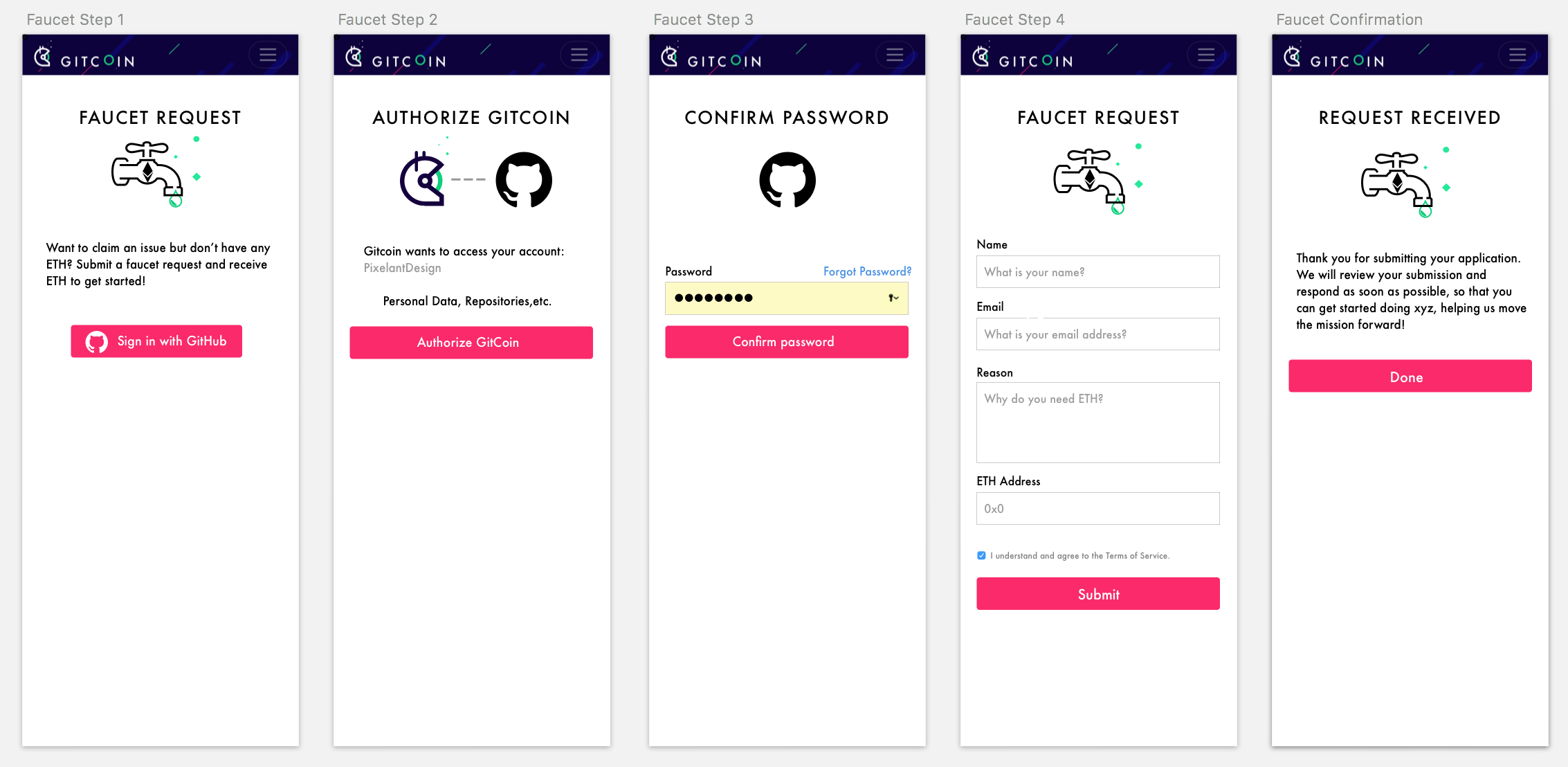
@owocki Thank you! Here is a first pass...
ASSUMPTIONS:
- Use standard Github Oauth flow
- Use standard Github button to build trust.
- Gitcoin does not have a faucet illustration.
PixelantDesign
on 28 Dec 2017
Thanks. I think it looks good.
Two points:
- One thought is that step 2 and 3 will be hosted on github.com, not gitcoin.co... so we wont control the branding or host the form. (see comment below)
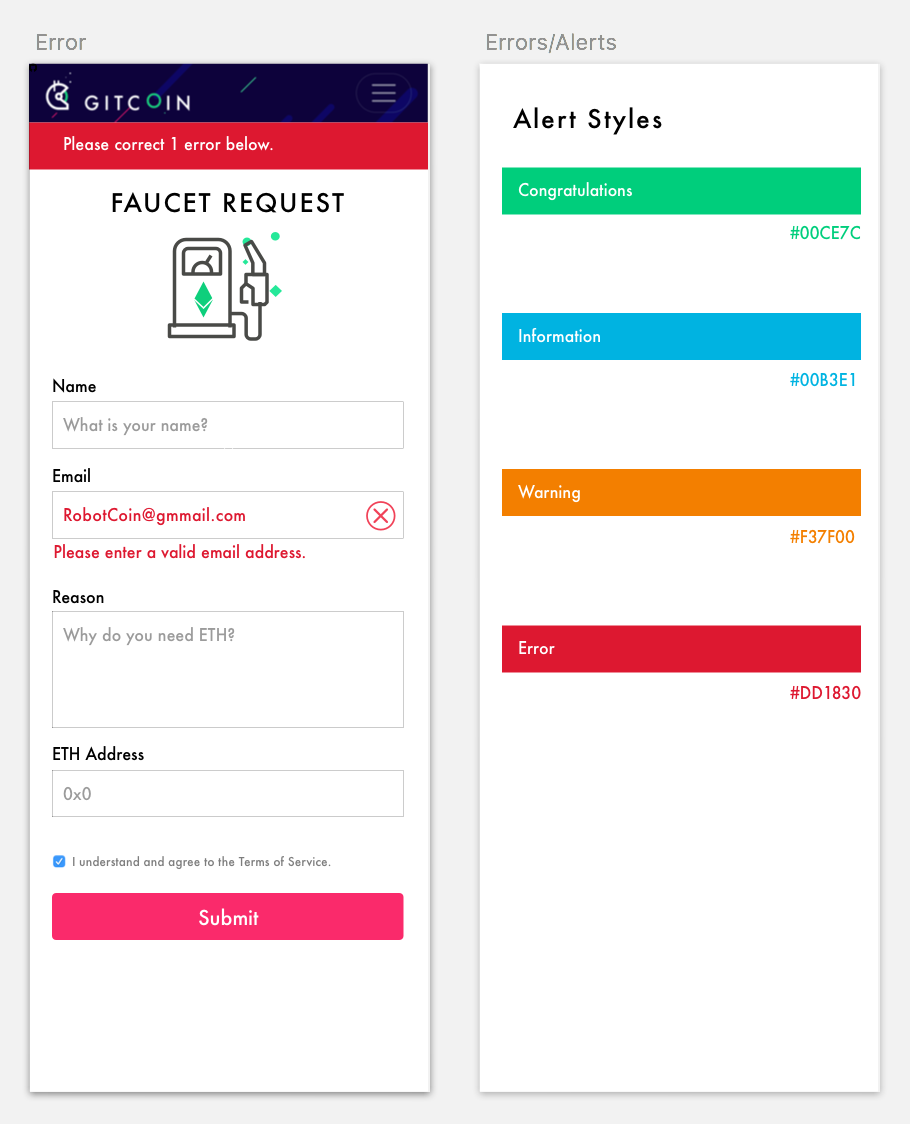
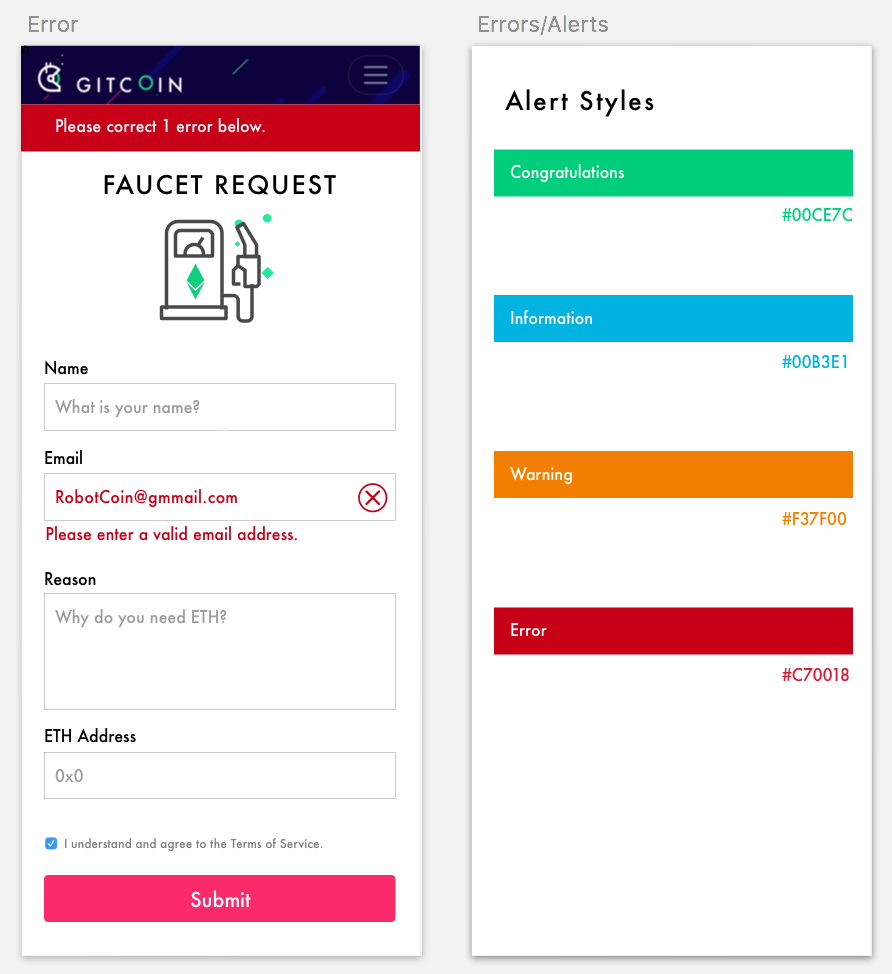
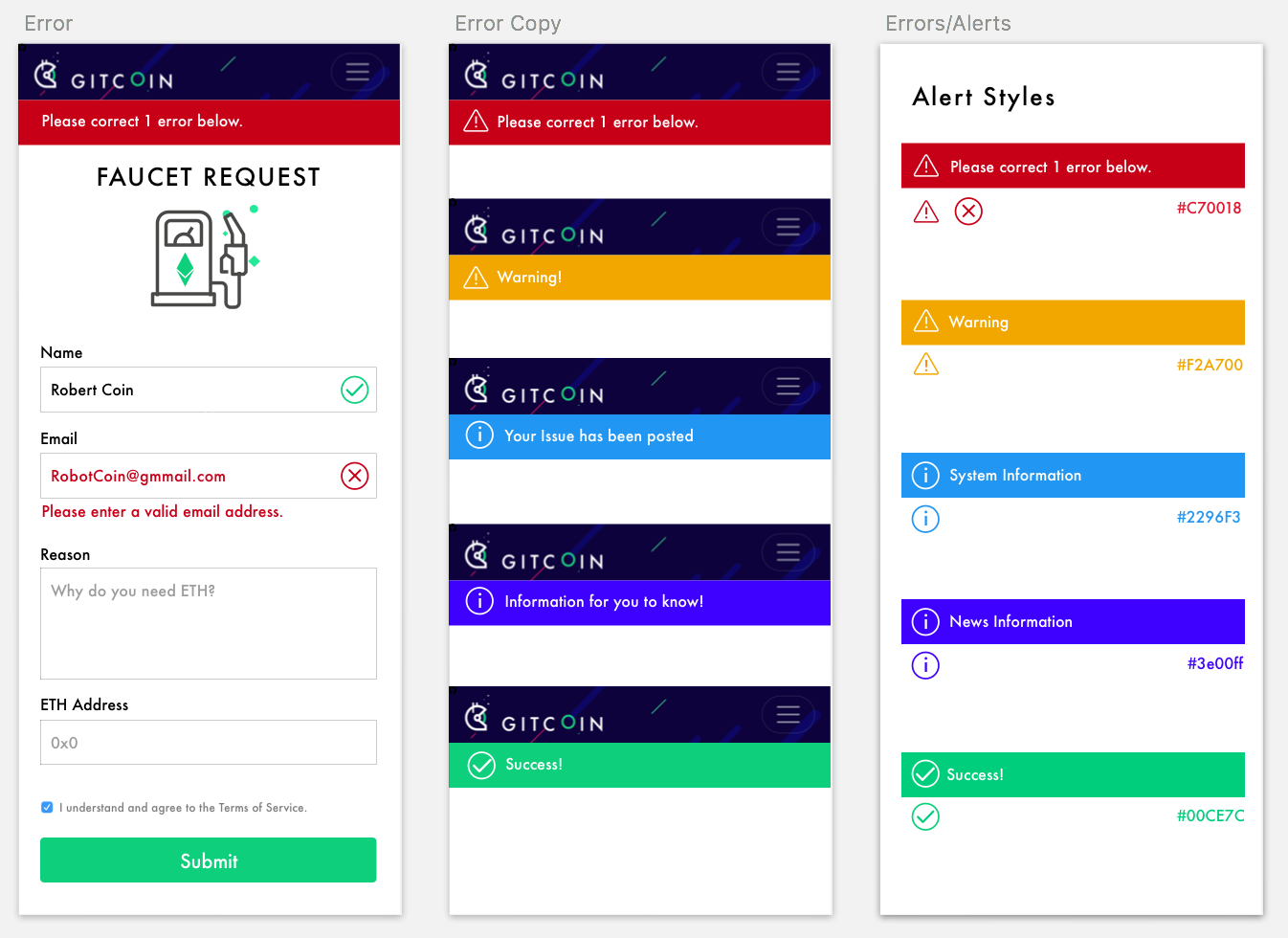
- Can we have a success/info/error message in this design? Maybe that's something that should be site-wide..
Here is what step 2/3 will look like for the user https://buildkiteassets.com/assets/docs/tutorials/github_enterprise/oauth-connect-00cac766bf41a75709091c1507a02b16413867ef600a25b338e3810109ab79b9.png
owocki
on 28 Dec 2017
@owocki I looked at this example and thought it was something that could be done.
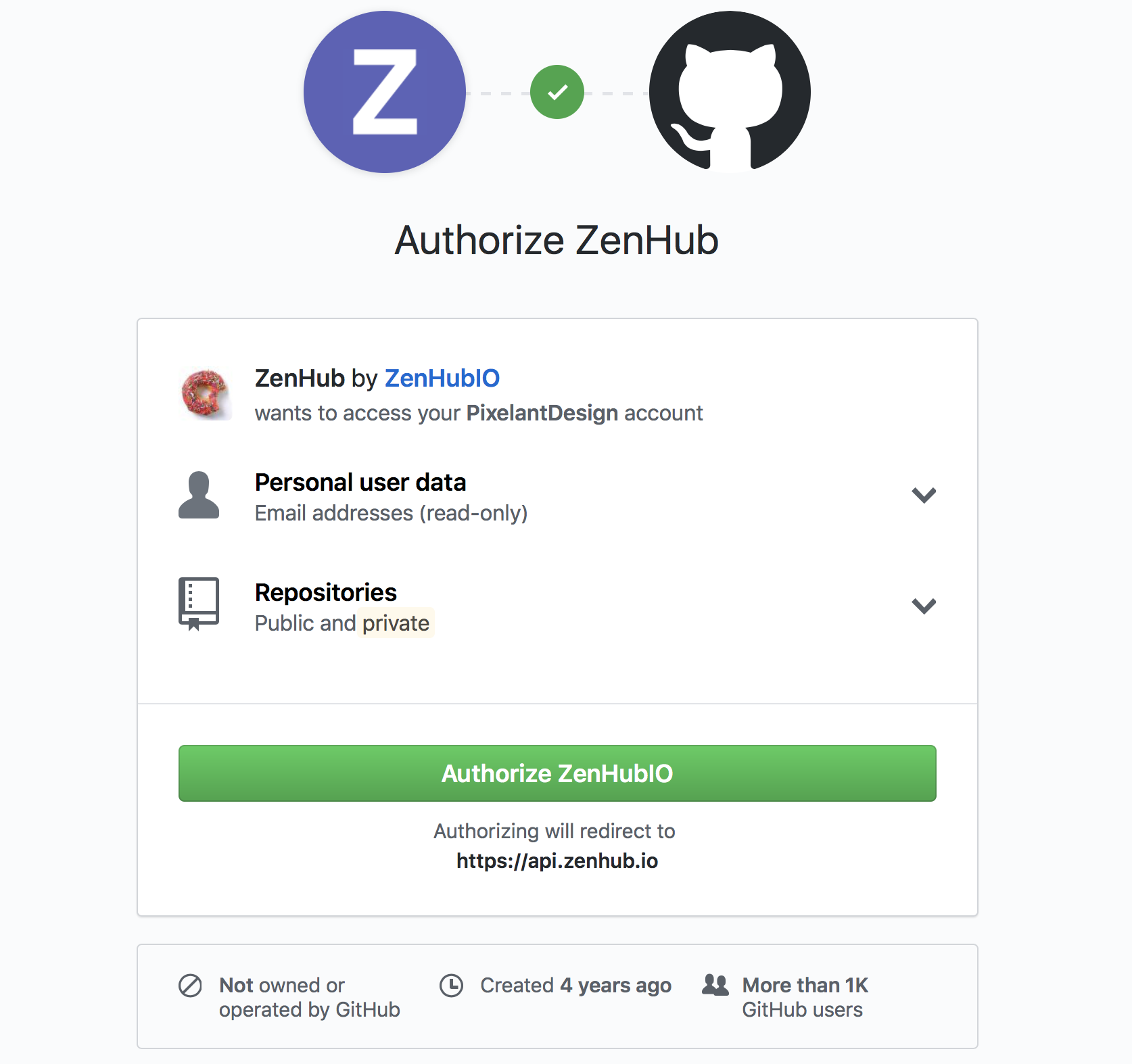
Sure! Will look at errors.
PixelantDesign
on 28 Dec 2017
@owocki Revised below!
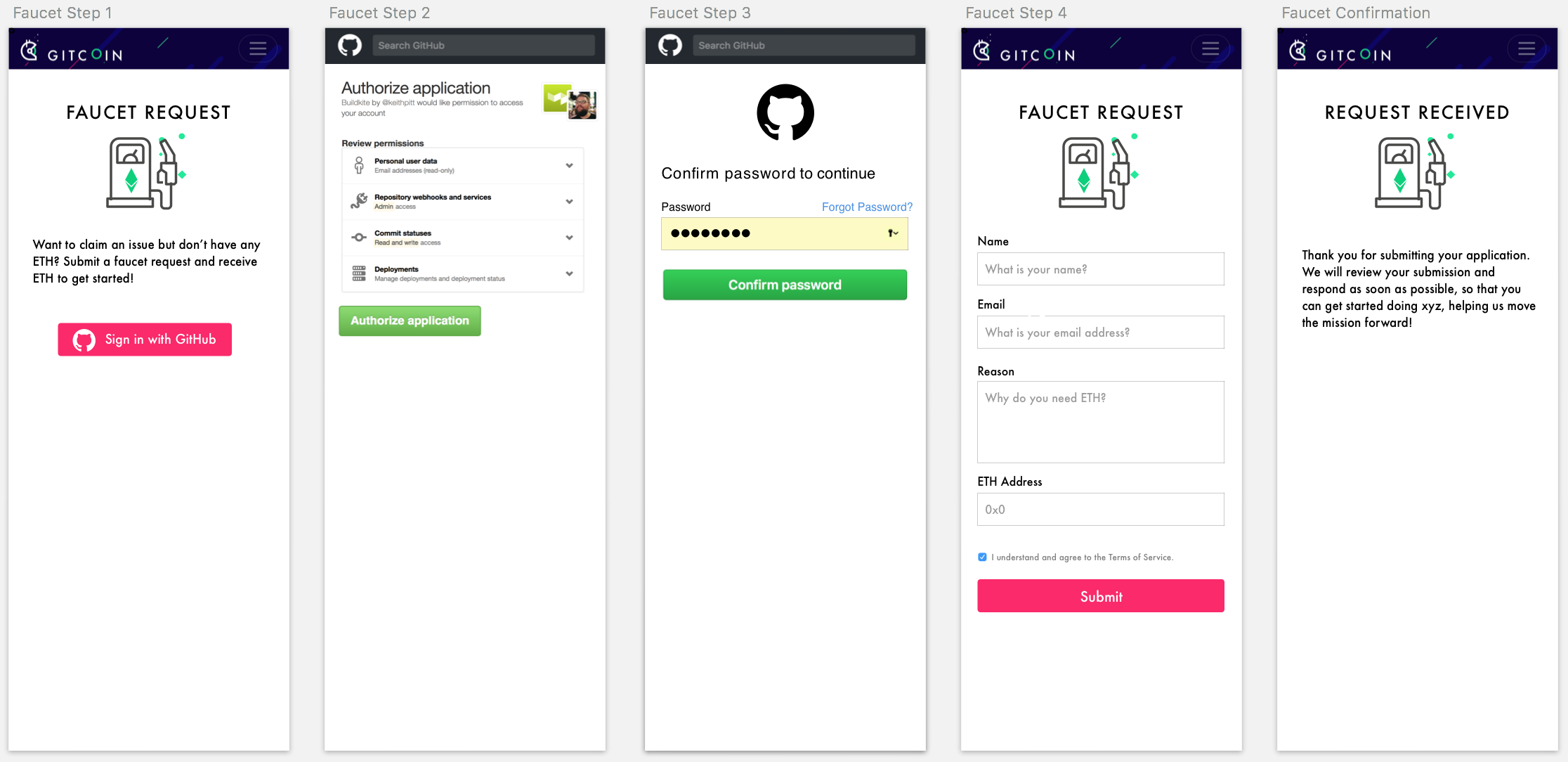
PixelantDesign
on 28 Dec 2017
@PixelantDesign do you mind if I give you some feedback as well?
mauri2015
on 28 Dec 2017
Error Screen: The red for the error message seems a little too bright to me, specially since the call to action button is bright pink.
Reques Received Screen: Maybe you can change the current icon to a checkmark or any other success icon. I feel like it can visually reinforce that the request has been received. You can probably add a success icon somewhere on the gas pump icon.
Looks great BTW!
mauri2015
on 28 Dec 2017
great feedback! Thanks @mauri2015!
PixelantDesign
on 28 Dec 2017
@owocki @mauri2015
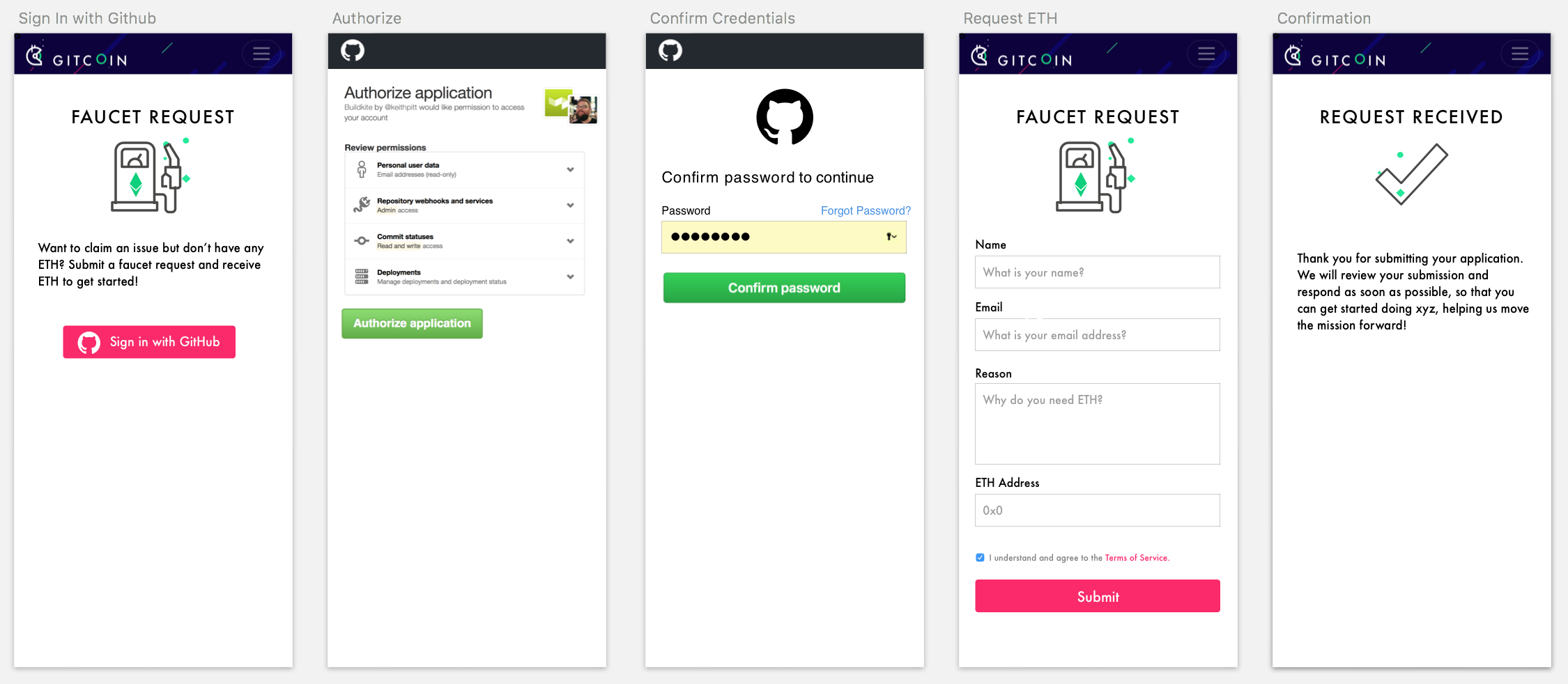
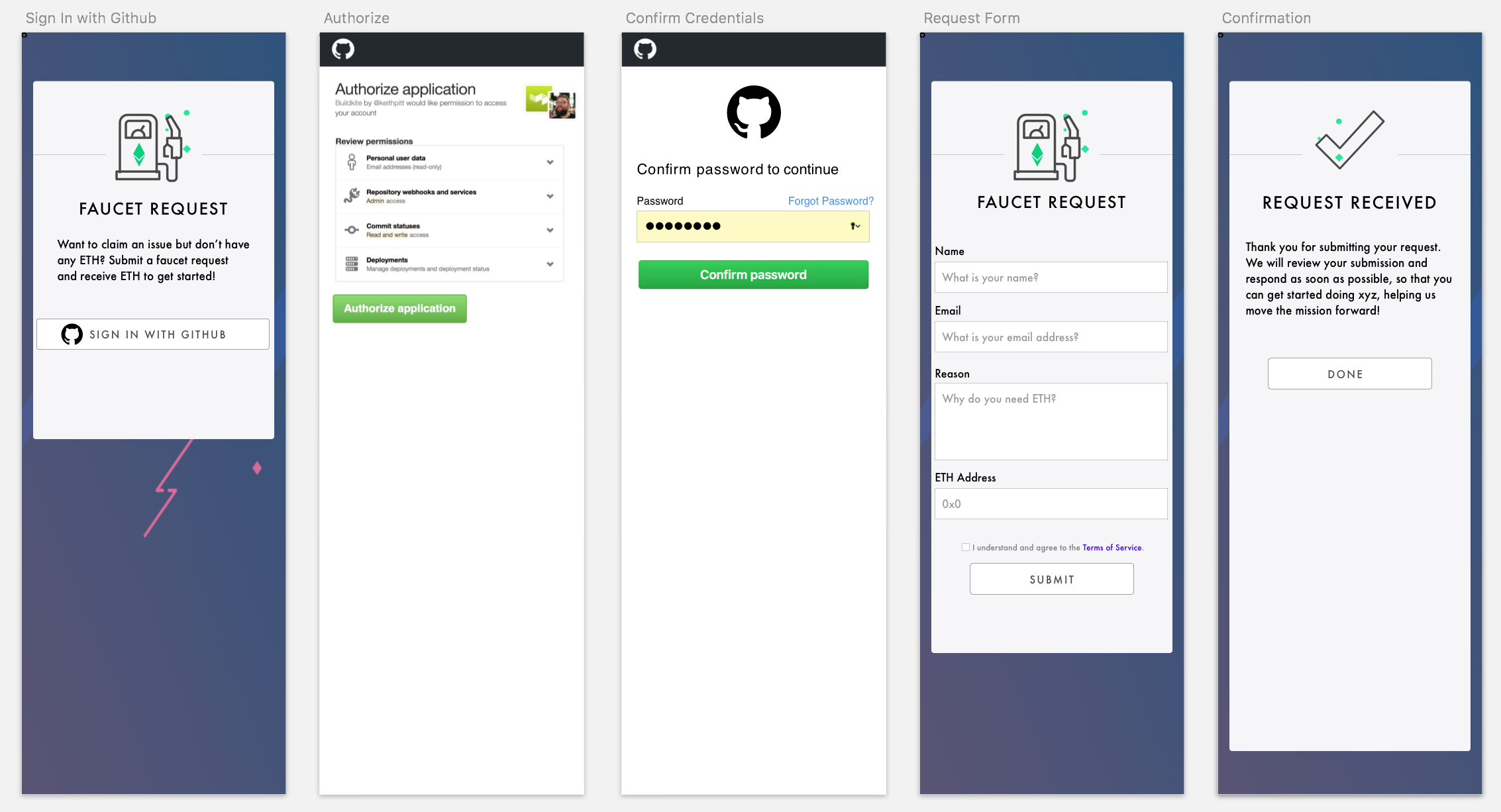
Here is the revised. Not loving the buttons transition through the flow (pink >green >pink). Thoughts?
Preference between these two?
Alerts/Errors
PixelantDesign
on 28 Dec 2017
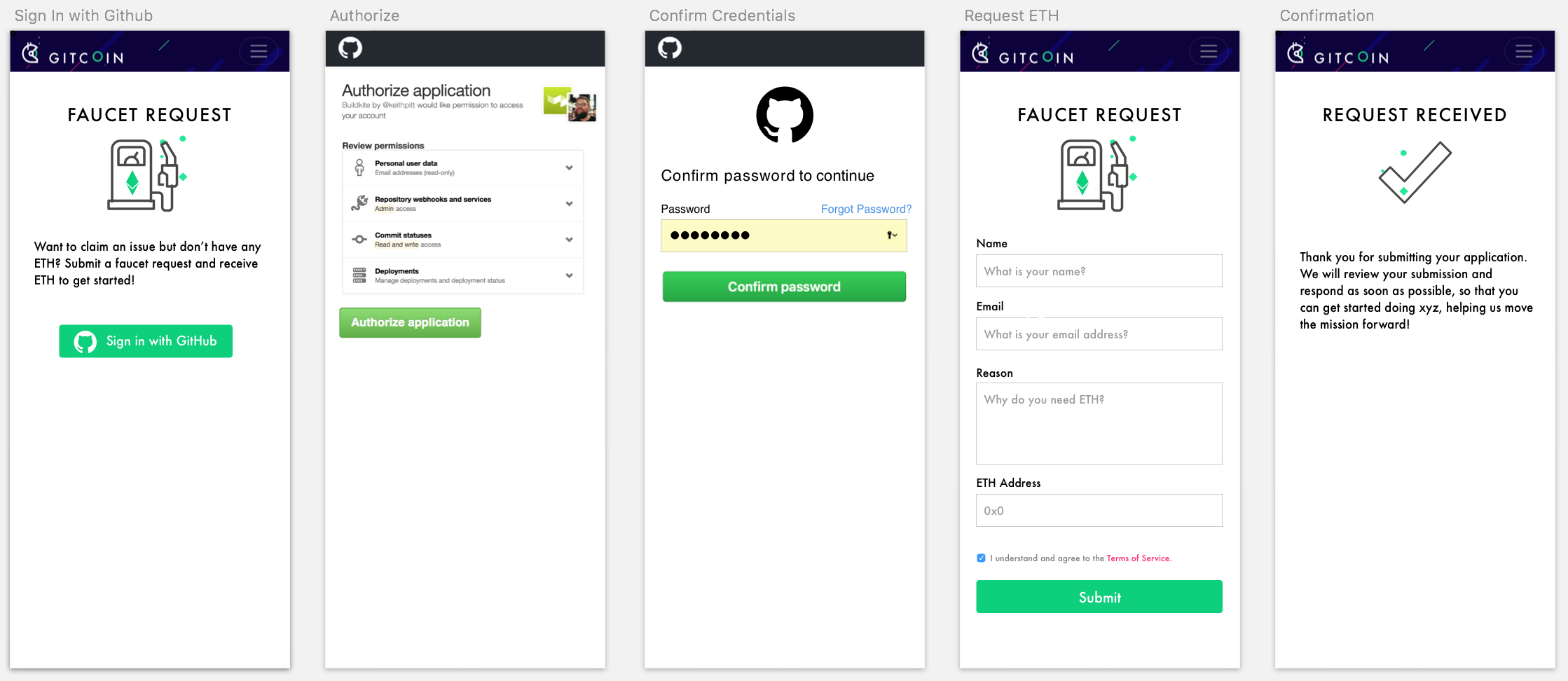
i prefer the simpler of the two (the first one). agree if we can update the buttons to be a consistent color that'd be preferable
owocki
on 28 Dec 2017
@owocki Revised attached!
PixelantDesign
on 29 Dec 2017
@owocki any other updates to this ticket?
PixelantDesign
on 30 Dec 2017
nope. paying out now
owocki
on 31 Dec 2017
__The funding of 0.1 ETH (73.56 USD) attached to this issue has been approved & issued to @PixelantDesign.__
- Learn more at on the gitcoin issue page
- Questions? Get help on the Gitcoin Slack
- $10882.51 more Funded OSS Work Available at: https://gitcoin.co/explorer
gitcoinbot
on 31 Dec 2017
Source Files can be found here...
Gitcoin_Faucet 2.zip
PixelantDesign
on 3 Jan 2018
Let's use this color green for legibility reasons #00B969
PixelantDesign
on 31 Jan 2018
Related issues
 abitrolly
·
4Comments
abitrolly
·
4Comments
 Makondor2
·
3Comments
Makondor2
·
3Comments
 ghost
·
3Comments
ghost
·
3Comments
 jasonrhaas
·
4Comments
jasonrhaas
·
4Comments
 NukeManDan
·
3Comments
NukeManDan
·
3Comments