Web-stories-wp: Ezoic compatibility: AMP Issue in Search Console
AMP Issue In Search Console
After posting my first web story I received an error in search console. The error reads "Tag 'amp-story' is not allowed to have any sibling tags ('body' should only have 1 child)."
I am not sure how to fix this error
Here is the url to my web story. https://digitalsheeo.com/stories/11-reasons-to-love-the-tasty-pins-pinterest-plugin/
Steps to Reproduce
I found it in search console
Additional Context
- Plugin Version: Version 1.0.0-beta.1
- Operating System: Mac Mojave 10.14.6
- Browser: Chrome
_Do not alter or remove anything below. The following sections will be managed by moderators only._
Acceptance Criteria
Implementation Brief
 JenTow
All 27 comments
Hi there
Please share the URL to your story
 swissspidy
on 25 Jul 2020
swissspidy
on 25 Jul 2020
https://digitalsheeo.com/stories/11-reasons-to-love-the-tasty-pins-pinterest-plugin/
I had shared it above under steps to reproduce the error. Sorry - I'm new to GitHub. Thanks for your help.
JenTow
on 25 Jul 2020
@JenTow not a problem and thanks for sharing the URL!
From what I can see, there is a validation error on the story page due to either a plugin or service placing the amp-analytics tag in the wrong place in the HTML of the page. (It should be inside the amp-story tag, but currently it outside of it as a sibling tag).
What are you currently using to implement Analytics on your site? I see references to ez-amp-analytics.
 ernee
on 27 Jul 2020
ernee
on 27 Jul 2020
I added the code myself without using a plugin. Does that help?
On Mon, Jul 27, 2020 at 11:24 AM Renee Johnson notifications@github.com
wrote:
@JenTow https://github.com/JenTow not a problem and thanks for sharing
the URL!From what I can see, there is a validation error
https://jumpshare.com/v/knw0Wqnf0zvrugKTQdWZ on the story page due to
either a plugin or service placing the amp-analytics tag in the wrong
place in the HTML of the page. (It should be inside the amp-story tag,
but currently it outside of it as a sibling tag).What are you currently using to implement Analytics on your site? I see
references to ez-amp-analytics.—
You are receiving this because you were mentioned.Reply to this email directly, view it on GitHub
https://github.com/google/web-stories-wp/issues/3448#issuecomment-664561798,
or unsubscribe
https://github.com/notifications/unsubscribe-auth/AQMT5UCN3YJX7U3RBHIX2C3R5XA5HANCNFSM4PHHIGAQ
.
JenTow
on 27 Jul 2020
@JenTow thanks for the info!
So the specification requires the amp-analytics tag to be within the amp-story tag. Could you provide more details about where you added the code?
Currently, the Site Kit plugin automatically places the amp-analytics tag properly if using its code snippet.
We're currently working on providing a way to add the tracking ID from a settings area in the Web Stories plugin Dashboard.
ernee
on 28 Jul 2020
I just deleted the code I had added and installed the site kit plugin. I had installed it in the header.php file before. I never used a plug in for analytics.
The only plug in I have for AMP that I know of is the beta.
Sorry for the newbie questions - but when you launch this to the public you’ll get tons of people like me :) Good practice!
Thanks again,
Jen
On Jul 27, 2020, at 4:59 PM, Renee Johnson notifications@github.com wrote:
@JenTow https://github.com/JenTow thanks for the info!
So the specification requires the amp-analytics tag to be within the amp-story tag. Could you provide more details about where you added the code?
Currently, the Site Kit plugin https://wordpress.org/plugins/google-site-kit/ automatically places the amp-analytics tag properly if using its code snippet.
We're currently working on providing a way to add the tracking ID from a settings area https://github.com/google/web-stories-wp/issues/3482 in the Web Stories plugin Dashboard.
—
You are receiving this because you were mentioned.
Reply to this email directly, view it on GitHub https://github.com/google/web-stories-wp/issues/3448#issuecomment-664698407, or unsubscribe https://github.com/notifications/unsubscribe-auth/AQMT5UEJG3VAC6GSDNN4HUDR5YIHJANCNFSM4PHHIGAQ.
JenTow
on 28 Jul 2020
I also received an email this morning saying that my images are not large enough for AMP. When I went to the documentation it is asking for an image that is at least 1200 px wide. Web story images are only 828 px wide. How do I fix this?
On Jul 27, 2020, at 4:59 PM, Renee Johnson notifications@github.com wrote:
@JenTow https://github.com/JenTow thanks for the info!
So the specification requires the amp-analytics tag to be within the amp-story tag. Could you provide more details about where you added the code?
Currently, the Site Kit plugin https://wordpress.org/plugins/google-site-kit/ automatically places the amp-analytics tag properly if using its code snippet.
We're currently working on providing a way to add the tracking ID from a settings area https://github.com/google/web-stories-wp/issues/3482 in the Web Stories plugin Dashboard.
—
You are receiving this because you were mentioned.
Reply to this email directly, view it on GitHub https://github.com/google/web-stories-wp/issues/3448#issuecomment-664698407, or unsubscribe https://github.com/notifications/unsubscribe-auth/AQMT5UEJG3VAC6GSDNN4HUDR5YIHJANCNFSM4PHHIGAQ.
JenTow
on 28 Jul 2020
@JenTow thanks so much for reaching out! It's definitely helpful for us too.
I just deleted the code I had added and installed the site kit plugin. I had installed it in the header.php file before. I never used a plug in for analytics.
Interestingly, I'm still seeing the error when I run the story in the AMP Test tool and see the same code in the source code (along with Site Kit's code).
Could you try clearing the cache in your caching plugin? We can then check the story again.
I also received an email this morning saying that my images are not large enough for AMP. When I went to the documentation it is asking for an image that is at least 1200 px wide.
Could you provide the full error message or perhaps a screenshot of what's reported in your Search Console account?
We are working on addressing an issue with the automatic sizing of the poster image for the story. It would be good to confirm if this is related.
ernee
on 28 Jul 2020
I did clear the cache (a couple of times to be safe). The only thing I can
think of is the beta plugin has a bug? I don’t have any other plugin that
adds analytics.
For the image issue, here’s a screenshot of the message I received.
Thanks so much for your help!
On Tue, Jul 28, 2020 at 10:29 AM Renee Johnson notifications@github.com
wrote:
@JenTow https://github.com/JenTow thanks so much reaching out! It's
definitely helpful for us too.I just deleted the code I had added and installed the site kit plugin. I
had installed it in the header.php file before. I never used a plug in for
analytics.Interestingly, I'm still seeing the error when I run the story in the AMP
Test tool
https://search.google.com/test/amp?url=https%3A%2F%2Fdigitalsheeo.com%2Fstories%2F11-reasons-to-love-the-tasty-pins-pinterest-plugin%2F
and see the same code in the source code (along with Site Kit's code).Could you try clearing the cache in your caching plugin? We can then check
the story again.I also received an email this morning saying that my images are not large
enough for AMP. When I went to the documentation it is asking for an image
that is at least 1200 px wide.Could you provide the full error message or perhaps a screenshot of what's
reported in your Search Console account?We are working on addressing an issue
https://github.com/google/web-stories-wp/issues/3297 with the automatic
sizing of the poster image
https://amp.dev/documentation/components/amp-story/#poster-guidelines-(for-poster-portrait-src,-poster-landscape-src,-and-poster-square-src)for
the story. It would be good to confirm if this is related.—
You are receiving this because you were mentioned.
Reply to this email directly, view it on GitHub
https://github.com/google/web-stories-wp/issues/3448#issuecomment-665173041,
or unsubscribe
https://github.com/notifications/unsubscribe-auth/AQMT5UAOMJA2SOWT3IXYQFLR54DG3ANCNFSM4PHHIGAQ
.
JenTow
on 28 Jul 2020
@JenTow sure thing and thanks for the details!
The Web Stories plugin wouldn't add the code from ez-amp-analytics. Note that I'm seeing the invalid block of code for amp-analytics from this source twice in the HTML of the page: at the beginning and the end of the body tag.
Are you also using the Ezoic service on your site? In one of the code blocks I see this:clientId(AMP_ECID_EZOIC)
For the image issue, here’s a screenshot of the message I received.
It doesn't look like the screenshot came through. You can drag and drop the screenshot to upload it to the comment as seen here.
ernee
on 28 Jul 2020
I also received an email this morning saying that my images are not large enough for AMP. When I went to the documentation it is asking for an image that is at least 1200 px wide. Web story images are only 828 px wide. How do I fix this?
Note that images are used in various places for stories and we crop the images if needed.
Looking at the story you shared earlier, I see that the featured image of your story (https://digitalsheeo.com/wp-content/uploads/2020/07/11-Reasons-To-Love-Tasty-Pins.png) is smaller than 1200px wide. So you'd need to make that bigger.
swissspidy
on 29 Jul 2020
@ernee
Are you also using the Ezoic service on your site? In one of the code blocks I see this:
clientId(AMP_ECID_EZOIC)
I'm seeing the same errors above with my Ezoic integration.
I did a quick attempt to solve this by setting Ezoic to exclude my site's route to web /stories/ and purge both WordPress and Ezoic caches. Unfortunately, this didn't help and I'm seeing sibling <amp-analytics> blocks added above and below <amp-story> (with duplicate id attrs...oooo).
I'll open a support ticket with Ezoic to find out if they have an open issues around this.
 itsmikechu
on 29 Jul 2020
itsmikechu
on 29 Jul 2020
@itsmikechu thanks for reporting! Feel free to provide an update here on what you find out.
ernee
on 29 Jul 2020
I've walked Ezoic Support through the details. They're passing it onto the tech team.
itsmikechu
on 30 Jul 2020
While I wait for tech support to investigate and respond, I excluded the /stories/ route from Ezoic.
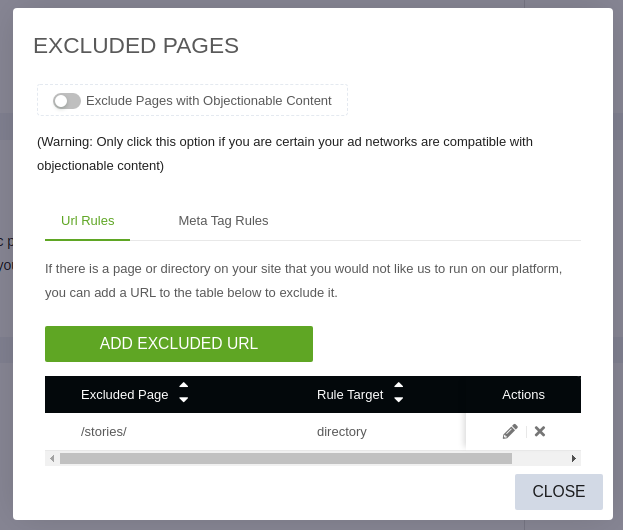
My AMP web story validated in Google Search Console. :+1:
itsmikechu
on 31 Jul 2020
@itsmikechu great tip for those using the Ezoic service in the meantime!
@JenTow if you have access to the above settings, this might help in your case.
ernee
on 31 Jul 2020
I received notification from Ezoic support that they've pushed an update for their AMP integration. I'm removing the exclusion rule from earlier and testing...
itsmikechu
on 4 Aug 2020
Hi there,
The developers have resolved this issue by rendering everything in the /stories folder as static content - removing our own analytics from the affected pages.
Your Ezoic Team,
itsmikechu
on 6 Aug 2020
@itsmikechu really appreciate the updates. Has the validation error resolved on your story? Feel free to share a URL if you like.
ernee
on 6 Aug 2020
It still has not fixed the issue for my story. I retested this morning and
I’m still getting the error message
On Thu, Aug 6, 2020 at 9:20 AM Renee Johnson notifications@github.com
wrote:
@itsmikechu https://github.com/itsmikechu really appreciate the
updates. Has the validation error resolved on your story? Feel free to
share a URL if you like.—
You are receiving this because you were mentioned.
Reply to this email directly, view it on GitHub
https://github.com/google/web-stories-wp/issues/3448#issuecomment-670030972,
or unsubscribe
https://github.com/notifications/unsubscribe-auth/AQMT5UD3MUSJH6VNAMXGJK3R7LJ6VANCNFSM4PHHIGAQ
.
JenTow
on 6 Aug 2020
@ernee, Yes. My validation errors are gone and the DOM looks good on my WP web story https://dataoverhaulers.com/stories/safest-social-networks/
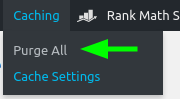
@JenTow, I see that yours still has the invalid
- clearing your WP cache
- clearing your Ezoic cache
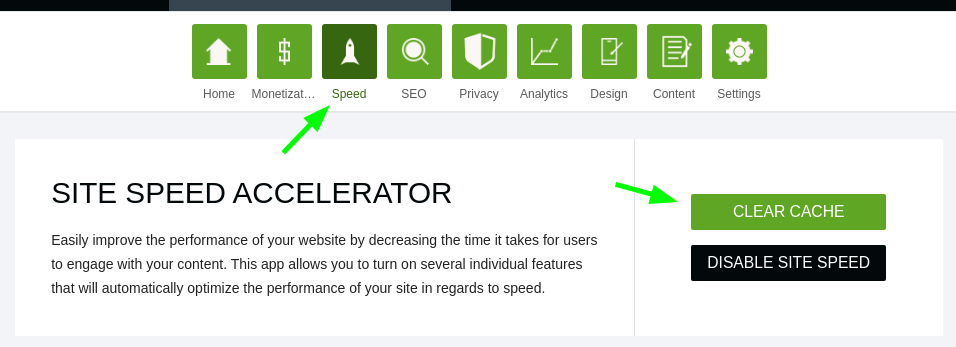
itsmikechu
on 6 Aug 2020
I cleared both and haven’t seen a change. Any other ideas? Thanks so much for your help. I am trying everything you offer.
On Aug 6, 2020, at 11:55 AM, Mike Chu notifications@github.com wrote:
@ernee https://github.com/ernee, Yes. My validation errors are gone and the DOM looks good on my WP web story https://dataoverhaulers.com/stories/safest-social-networks/ https://dataoverhaulers.com/stories/safest-social-networks/
@JenTow https://github.com/JenTow, I see that yours still has the invalid tags. Have you tried:clearing your WP cache
https://user-images.githubusercontent.com/2320216/89570818-ff314f80-d826-11ea-8be9-efe589fc134e.png
clearing your Ezoic cachehttps://user-images.githubusercontent.com/2320216/89570871-11ab8900-d827-11ea-9a8b-97409750f697.png
—
You are receiving this because you were mentioned.
Reply to this email directly, view it on GitHub https://github.com/google/web-stories-wp/issues/3448#issuecomment-670134166, or unsubscribe https://github.com/notifications/unsubscribe-auth/AQMT5UFB6L72WIKXK2KL2FLR7L4BTANCNFSM4PHHIGAQ.
JenTow
on 6 Aug 2020
You might reach out to Ezoic support. They've been responsive and quite helpful. Point them to this thread for sure.
itsmikechu
on 6 Aug 2020
@itsmikechu @JenTow thanks for the update and this additional information. I've also reached out to Ezoic to see how we can resolve this since the changes don't appear to be immediately applied in some cases. I'll update this issue with more info when I know more.
ernee
on 6 Aug 2020
@itsmikechu @JenTow just quick update that the Ezoic team is still looking at applying these changes on their platform. They'll keep us updated on the progress and I'll also update you here. Have a great weekend!
ernee
on 8 Aug 2020
Hi @JenTow ! Just following up on this issue. The Ezoic team has informed us of a fix on their platform. I'm currently not experiencing the issue any longer. When checking your story, the service does not look like it is activated- have you made changes?
It would be great to get your confirmation whether you're still experiencing the issue with Ezoic.
ernee
on 12 Sep 2020
@JenTow we just released the stable version of the plugin 1.0.0 and the issue is resolved for me using Ezoic. I'll close your issue now since we're moving support to the WordPress.org forums, so please don't hesitate to reach out to us there for any further questions or concerns.
ernee
on 23 Sep 2020
Related issues
 netnaps
·
3Comments
netnaps
·
3Comments
 csossi
·
3Comments
ernee
·
4Comments
csossi
·
3Comments
ernee
·
4Comments
 injainja
·
4Comments
injainja
·
4Comments
 wassgha
·
3Comments
wassgha
·
3Comments
Most helpful comment
@ernee
I'm seeing the same errors above with my Ezoic integration.
I did a quick attempt to solve this by setting Ezoic to exclude my site's route to web /stories/ and purge both WordPress and Ezoic caches. Unfortunately, this didn't help and I'm seeing sibling
<amp-analytics>blocks added above and below<amp-story>(with duplicateidattrs...oooo).I'll open a support ticket with Ezoic to find out if they have an open issues around this.