Web-stories-wp: Settings Field For Telemetry Opt-In in the Dashboard Settings page
Feature Description
For enabling product usage data in the product we need a way for users to opt in to (and out of) product usage tracking.
The most suitable place for this is the global settings page which is currently in the works.
Product Brief -- includes an opt-in in the settings page, and a message to new users in the other dashboard pages (my stories, explore templates) where the user can opt-in or dismiss.
Alternatives Considered
Additional Context
Mock:

_Do not alter or remove anything below. The following sections will be managed by moderators only._
Acceptance Criteria
- New opt-in checkbox on the settings page that works per-user.
- There is a link to https://policies.google.com/privacy, and the URL is translatable (e.g. uses
__( 'https://policies.google.com/privacy', 'web-stories' ) - Field should be hidden behind
enableInProgressViewsflag.
Implementation Brief
- The
apilist inget_dashboard_settings()inDashboard.phpis extended to include/wp/v2/users/me - A
GETrequest to/wp/v2/users/meis made to retrieve the current user's opt-in status frommeta.web_stories_tracking_optin - Whenever the checkbox is toggled, a
POSTrequest to/wp/v2/users/meis made to update the value ofmeta.web_stories_tracking_optintotrue/false
See API reference for that endpoint.
 swissspidy
All 13 comments
@swissspidy For now, moving into Product brief/UX needed? Looking through quickly, I don't think this has been designed, but let me know if I missed something.
 o-fernandez
on 13 Jul 2020
o-fernandez
on 13 Jul 2020
@BrittanyIRL @carlos-kelly @pbakaus @samitron7 @swissspidy @dvoytenko would love your reviews on the product brief, tried to keep it simple, but with an opt in throughout so that users have a chance to quickly discover the opt-in bit and opt in.
o-fernandez
on 24 Aug 2020
@o-fernandez - My initial feedback: adding this to the settings view is straight forward and can easily be done!
The "new user considerations" where
We prompt new users to share their data by showing them the opt-in message at the top of the dashboard pages (My Stories and Explore Templates) and giving users the option to Opt-in or Dismiss the message.
would be outside of the settings view and should be its own thing. It will also need some design love. Could we separate these two things into their own stories so that it's more manageable?
Right now, the settings page is set up to be available to users who are admin only - with the canManageSettings config being true. This brief suggests that settings should be readable to everyone, but only updatable by admin. Either one is doable, but I wanted to bring it up so that we can get it right. The settings page has had a lot of iterations and I just don't want anything to get lost.
Before we implement opt in I think it's important that the existing settings view gets QA'd and UAT'd since it hasn't gotten a chance to go through that yet. (#4132 )
 BrittanyIRL
on 24 Aug 2020
BrittanyIRL
on 24 Aug 2020
Got it, let me file a quick ticket for the banner. FYI @pbakaus @samitron7
Update: See #4226 for the banner.
@BrittanyIRL to your other points:
- In this case, the settings page would be available to all users, but non-Admins should only be able to manage this setting (for now). The rest of the settings should only be visible to Admin users. I will update on the brief.
- I see that QA has been done for #4132 so hopefully we're all good there!
o-fernandez
on 25 Aug 2020
UX for telemetry opt-in on settings and dashboard are here
 samitron7
on 31 Aug 2020
samitron7
on 31 Aug 2020
Some notes/thoughts:
- The wording needs to be changed for the final implementation, e.g. not using he word "anonymous".
- How can the opt-in banner on the dashboard be dismissed? I don't think it should be permanent, so maybe add an
Xicon in the top right corner? - For the opt-in banner on the dashboard, can we add the checkbox right there? It's cumbersome having to got to the Settings page just to opt-in. We might lose lots of valuable opt-ins with this additional step
It could work like this:
- Display checkbox in the banner
- When checked, a toast/snackbar message appears, saying that the selection has been updated
- Banner is closed (with some delay, in case the user undoes their selection)
This opt-in checkbox could also be displayed in the plugin activation message, so that we get as many users as possible to opt-in
Here's how Site Kit does it, for context: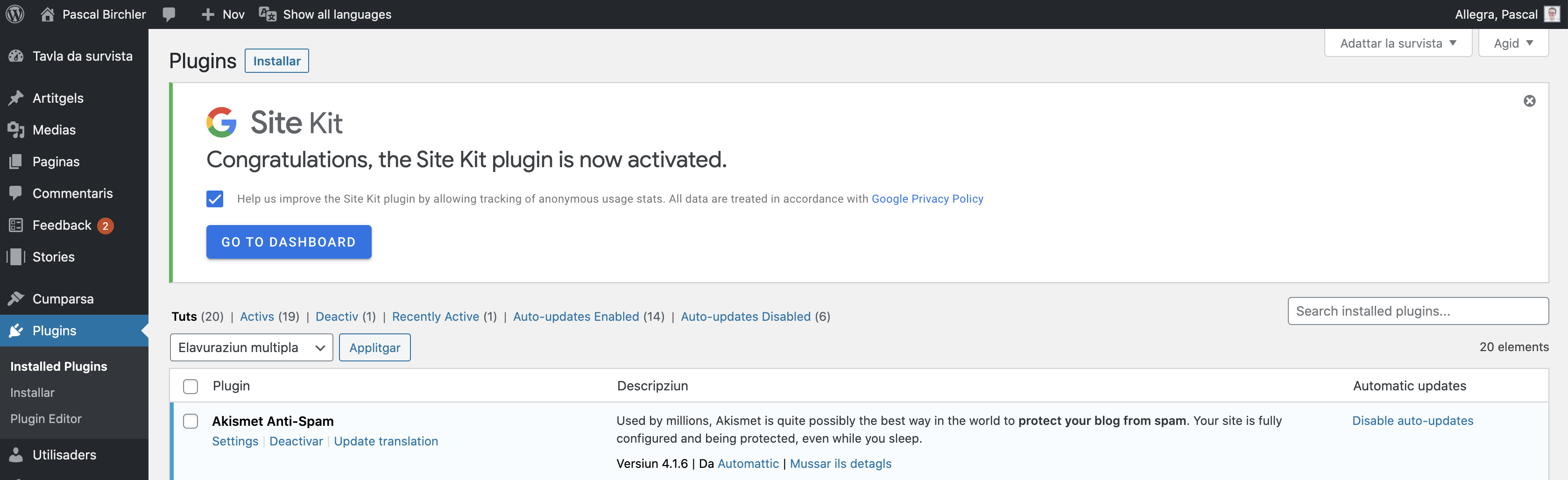
@samitron7 WDYT?
swissspidy
on 1 Sep 2020
@swissspidy - all sound feedback. I updated the banner in the dashboard to reflect the checkbox but instead of using the toast let's inline the feedback.
@oef to assist with messaging (ie use of word anonymous and do we need a ticket for a congrats banner after plugin activation?
samitron7
on 1 Sep 2020
@swissspidy - all sound feedback. I updated the banner in the dashboard to reflect the checkbox but instead of using the toast let's inline the feedback.
@OEF to assist with messaging (ie use of word anonymous and do we need a ticket for a congrats banner after plugin activation?
Connected with @samitron7 on this yesterday, she's updating.
o-fernandez
on 2 Sep 2020
There are about 7 of us on the assignees but I will take the development on this one.
 carlos-kelly
on 2 Sep 2020
carlos-kelly
on 2 Sep 2020
Updates has already be completed. Let me know if you all catch anything else.
samitron7
on 2 Sep 2020
Verified in QA
 csossi
on 7 Sep 2020
csossi
on 7 Sep 2020
On the settings screen, how do I know my selection has been saved when toggling the "Data Sharing Opt-in" checkbox? @samitron7 This is not defined in Figma.
swissspidy
on 8 Sep 2020
Will close out, can do follow-up ticket for UI indicator of "saved" as needed, but I think this pattern is OK if 90%+ of the time settings successfully save without the user having to redo it. SiteKit seems to use the same pattern, though the checkbox doesn't change until the setting is fully saved, it seems.
o-fernandez
on 9 Sep 2020
Related issues
 injainja
·
4Comments
injainja
·
4Comments
 dvoytenko
·
3Comments
swissspidy
·
3Comments
csossi
·
3Comments
dvoytenko
·
3Comments
swissspidy
·
3Comments
csossi
·
3Comments
 netnaps
·
3Comments
netnaps
·
3Comments