Web-stories-wp: Settings Data: Google Analytics
Feature Description
_Referring to https://github.com/google/web-stories-wp/issues/2747_

We need an endpoint to read and write google analytics tracking IDs
Alternatives Considered
- I did a little discovery and verified with Pascal that this is not something that exists yet that we can access in the Dashboard.
- SiteKit was mentioned as a possible aid in setting this up
Additional Context
_Do not alter or remove anything below. The following sections will be managed by moderators only._
Acceptance Criteria
- CRUD functionality for Google Analytics tracking ID:
- We need to know if the account logged into has a tracking ID set up through an API call
- We need to be able to update an existing ID from an API in the dashboard
- Ideally as a response we get some error handling returned to us specifying if an update didn't work and why and if it was successful return the new ID back to us with a success message.
- Availability:
- ~We need to be able to tell when the account does not have google analytics enabled so that we can disable this form area or provide directions to them to go set it up. ~
Implementation Brief
- Create a new
Settingsclass and initialize it inPluginlike the other classes - Within that class, register a new
web_stories_ga_tracking_idoption that can then be exposed by theSettings_Controller - Create new
Settings_Controllerclass insideincludes/REST_APIthat exposes a newweb-stories/v1/settingsendpoint. - This controller would be very similar to
WP_REST_Settings_Controller, and thus can extend the class, but override\WP_REST_Settings_Controller::get_registered_optionsto only return Web Stories options from theSettingsclass - Add information about new endpoint to
\Google\Web_Stories\Dashboard::get_dashboard_settings - Add new
siteKitSettingsUrlfield to\Google\Web_Stories\Dashboard::get_dashboard_settingsif Site Kit is installed (defaults tonullif not installed).
 BrittanyIRL
All 12 comments
Thanks for creating this issue @BrittanyIRL!
This one AC does not seem clear to me:
We need to be able to tell when the account does not have google analytics enabled so that we can disable this form area or provide directions to them to go set it up.
Looking at Figma, the GA tracking ID field is a simple text field that you need to be able to read and update (GET and POST/PUT basically).
The only twist is that you need to know whether Site Kit is installed or not, and display a note & link if it is. That information I think we can provide easily via the existing config provider / window.webStoriesDashboardSettings.
 swissspidy
on 7 Jul 2020
swissspidy
on 7 Jul 2020
Ah, re
We need to be able to tell when the account does not have google analytics enabled so that we can disable this form area or provide directions to them to go set it up.
My thought was it does no good to allow them to "set" a google analytics ID if they don't have code set up with sitekit to utilize said ID? I admittedly am no expert in this though, so if you say we can access if the user has sitekit installed and that'll give us the info we need then I'm all aboard. I could have also misunderstood the designs - there just was something there that feels odd about allowing a user to set an ID here without laying the groundwork for actually using google analytics?
If that makes no sense though feel free to update the criteria - just wanted a starting point.
BrittanyIRL
on 7 Jul 2020
Site Kit integration is fully automated: if they have Site Kit, they don't need to enter any tracking ID. They don't need to worry about that stuff.
If they don't have Site Kit, users need to sign up with Google Analytics themselves and copy the property ID from there.
there just was something there that feels odd about allowing a user to set an ID here without laying the groundwork for actually using google analytics?
That groundwork will be done on the PHP side. If the user enters a tracking ID (which they obtained from Google Analtycis), we will print the tracking code on the frontend.
swissspidy
on 7 Jul 2020
Sorry this admittedly feels a little bit like that old "who's on first" sketch.
So just making sure I am on the same page as you for this, let's say the following:
I'm a user. I don't have GA set up yet. I go to my settings page here that we're making now and I see this empty form. I think to myself, 'oh ga is a good idea, let me go get my ID and enter it here'. Then I enter my ID and then the rest of the code necessary to track stories is implemented behind the scenes? They don't have to do anything? I feel like there should be a handful of things you can personalize and config for what and how you're tracking beyond the ID (at least last time I set up analytics!).
Separately, if they have site kit - should we disable the input for this altogether?
BrittanyIRL
on 7 Jul 2020
When I enter my ID and then the rest of the code necessary to track stories is implemented behind the scenes? They don't have to do anything?
Correct :-)
I feel like there should be a handful of things you can personalize and config for what and how you're tracking beyond the ID (at least last time I set up analytics!)
_At least for the first version of this feature_ we're gonna take care of all this, doing things like tracking page views and the various events supported by Web Stories. See #2731 and https://github.com/ampproject/amphtml/blob/master/extensions/amp-story/amp-story-analytics.md for some examples. There aren't really many thangs that could be customized, but _for now_ this would be left to other WordPress plugins to take care of.
Separately, if they have site kit - should we disable the input for this altogether?
According to the yellow sticky note on Figma there should just be a warning message about Site Kit, and the field should be "grayed out", but still allow input.
We can ask Sam for clarification on that in #2747, but I think that is fine for now. Personally I'd probably not even gray it out, but I suppose it doesn't make much of a difference.
swissspidy
on 7 Jul 2020
Aces! thanks for walking through that with me :D I feel much better about this.
BrittanyIRL
on 7 Jul 2020
Review the above, it seems a little overkill.
There is a core function called register_setting, that allows for settings ( options ) to registered and to appear in the existing settings endpoint. It even has validation and typing. I have created a POC - https://github.com/google/web-stories-wp/pull/3098
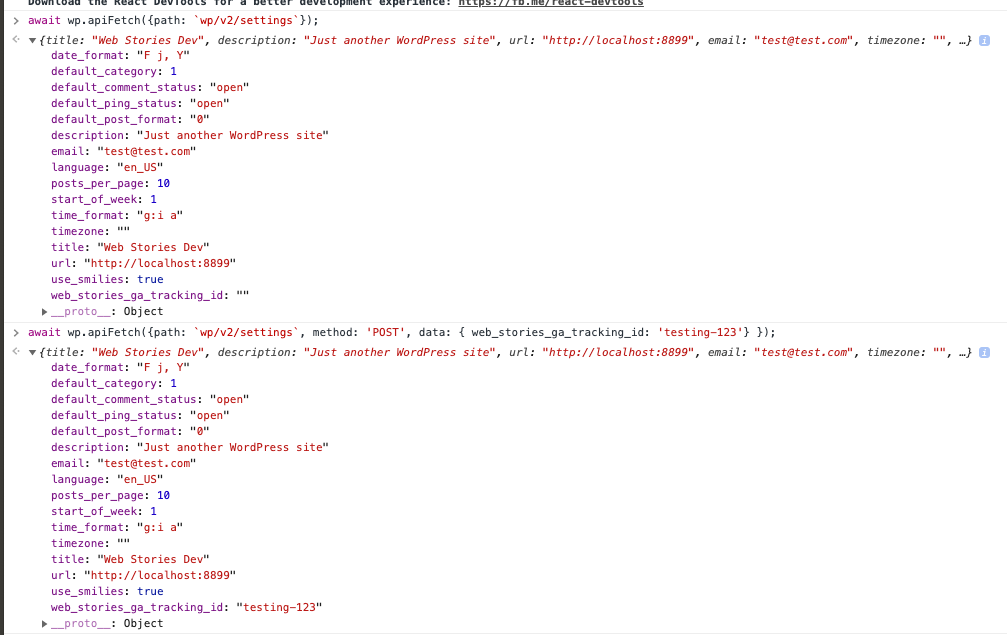
Can you review my PR and see if works?
Two option things to note here.
- We should preload the settings on page load, like we did with web-stories, for improved performance.
- There shoud a
current_user_can( 'manage_options' )check on saving this value or even displaying it value. Only site admins should be able to change this.
 spacedmonkey
on 9 Jul 2020
spacedmonkey
on 9 Jul 2020
I wrote the implementation brief, not Brittany :-)
swissspidy
on 9 Jul 2020
@BrittanyIRL to review and provide feedback
 bmattb
on 13 Jul 2020
bmattb
on 13 Jul 2020
@BrittanyIRL to review and provide feedback
@spacedmonkey 's proof of concept PR is absolutely usable. Once that PR is ready I'll be able to hook up the rest of the google analytics set up of the settings view (which is half the total view).
BrittanyIRL
on 13 Jul 2020
@swissspidy @BrittanyIRL @bmattb @spacedmonkey I'm a user and I'm trying to activate the plugin in WordPress but no analytics. I use the Site Kit but without the insertion of GA code, since it is done via Google Tag Manager (through Site Kit). How do I get GA enabled in Web Stories? Here is an example: https://dilmarames.com/stories/menos-conteudo-mais-conversao/
 amesdigital
on 17 Jul 2020
amesdigital
on 17 Jul 2020
@amesdigital Hey there, no need to mention all the people :-) At the moment, we only support GA via Site Kit, but are soon going to allow you to enter your GA tracking ID in the plugin's settings. Follow our release announcements to stay in the loop.
swissspidy
on 17 Jul 2020
Related issues
 o-fernandez
·
3Comments
o-fernandez
·
3Comments
 obetomuniz
·
3Comments
obetomuniz
·
3Comments
 injainja
·
4Comments
injainja
·
4Comments
 jauyong
·
4Comments
jauyong
·
4Comments
 netnaps
·
3Comments
netnaps
·
3Comments
Most helpful comment
@amesdigital Hey there, no need to mention all the people :-) At the moment, we only support GA via Site Kit, but are soon going to allow you to enter your GA tracking ID in the plugin's settings. Follow our release announcements to stay in the loop.