Web-stories-wp: Custom Calendar Styling
Feature Description
This is a followup to #789 which is a short term solution for the Beta Release.
Once a calendar is implemented we will need to style it according to the designs
_Do not alter or remove anything below. The following sections will be managed by moderators only._
Acceptance Criteria
- The calendar should match the designs in Figma
QA Instructions
 jauyong
All 11 comments
Note: It would be good to confirm if we're going to reuse the WordPress calendar style again (as it is in Figma currently), or use something custom -- since we're going to use a custom calendar anyway now and not a copy of WP implementation.
 miina
on 7 May 2020
miina
on 7 May 2020
Pinging @samitron7 to confirm, but I don't think it makes sense to use WordPress styling anywhere in the editor.
 swissspidy
on 7 May 2020
swissspidy
on 7 May 2020
Yeah, no WP styling but this is probably a low priority thing. Adding to visual design request.
 samitron7
on 2 Jul 2020
samitron7
on 2 Jul 2020
Figma file is attached in description and here as well
samitron7
on 7 Nov 2020
@samitron7 after review the eng team requests that the other views to also be included:
- Year view
- Month view
- Century view
 bmattb
on 18 Nov 2020
bmattb
on 18 Nov 2020
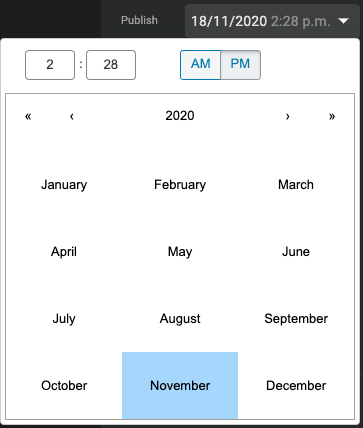
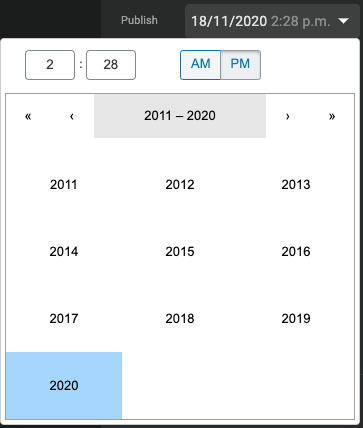
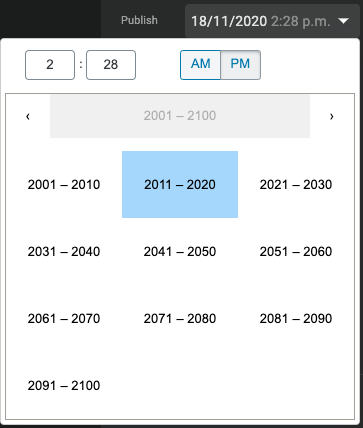
Here are the 4 views of the current calendar component, that all need a design. Note that the first is designed at the three latter are very similar:
| | Month | Year | Decade | Century |
|-|-|-|-|-|
| Current design | 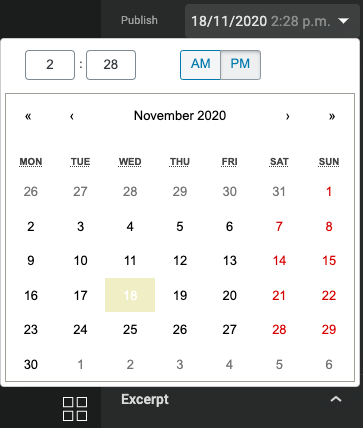 |
|  |
|  |
|  |
|
| New design | 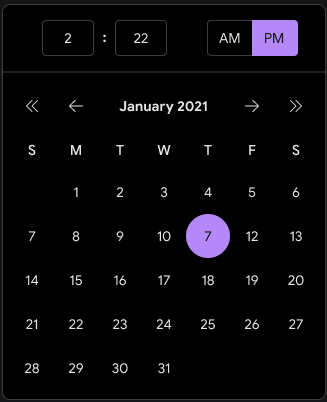 | _missing_ | _missing_ | _missing_ |
 barklund
on 18 Nov 2020
barklund
on 18 Nov 2020
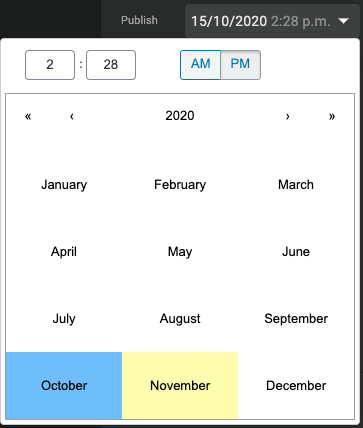
Also, what do the highlights for _today_ and _current selection_ look like? In the current editor, _current selection_ is the blue background, where _today_ is the yellow background. This is present in all views:
Monthly view with current selection as 19th where today is 18th:
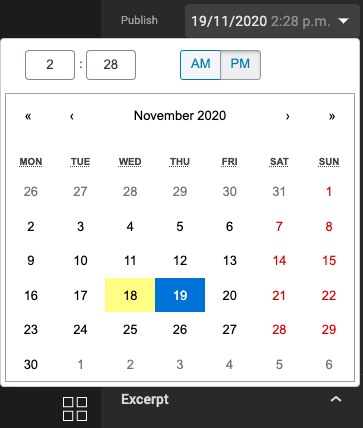
Yearly view with current selection as October where today is November:
The above design only has a single color for highlight - is that supposed to represent _current selection_ only and no highlight for _today_?
barklund
on 18 Nov 2020
OMG...not trying to defend myself here, but I had NO idea to click on the month to get to the other view. Do we know if users actually use the other views? UI is not too friendly plus you can use the inner arrow to navigate month and outer arrow to navigate year. I prefer to hide that functionality and avoid additional work. @o-fernandez thoughts and for context, this is a pure visual restyle of the WP calendar?
I added the current selection state to Figma (also fixed the active color. FYI @BrittanyIRL is implementing the design language so the normal, hover, focus and active state should apply to the calendar. Only button state that is special to the calendar design is the outline circle. This pattern does not exist elsewhere. Please ping her for details on button states.)
samitron7
on 19 Nov 2020
OMG...not trying to defend myself here, but I had NO idea to click on the month to get to the other view.
It is a bit secret, yes.
Do we know if users actually use the other views?
I have no idea. I don't think we log that.
UI is not too friendly plus you can use the inner arrow to navigate month and outer arrow to navigate year. I prefer to hide that functionality and avoid additional work. @o-fernandez thoughts and for context, this is a pure visual restyle of the WP calendar?
We can definitely disable the year, the decade, and the century view, if desired. I don't think people often schedule posts for next decade, so we're probably in the clear for this one. As long as we don't use it for birthdates or similar, month-only view is probably fine.
barklund
on 19 Nov 2020
I'm totally fine disabling year/decade/etc. Seems like an edge case.
 o-fernandez
on 19 Nov 2020
o-fernandez
on 19 Nov 2020
@barklund Let's just start with the view that I provided (ie month). We can disable year, decade and century. If request comes in for year we can react to that later.
samitron7
on 25 Nov 2020
Related issues
 obetomuniz
·
3Comments
obetomuniz
·
3Comments
 injainja
·
4Comments
o-fernandez
·
3Comments
injainja
·
4Comments
o-fernandez
·
3Comments
 LuckynaSan
·
3Comments
LuckynaSan
·
3Comments
 ernee
·
4Comments
ernee
·
4Comments
Most helpful comment
OMG...not trying to defend myself here, but I had NO idea to click on the month to get to the other view. Do we know if users actually use the other views? UI is not too friendly plus you can use the inner arrow to navigate month and outer arrow to navigate year. I prefer to hide that functionality and avoid additional work. @o-fernandez thoughts and for context, this is a pure visual restyle of the WP calendar?
I added the current selection state to Figma (also fixed the active color. FYI @BrittanyIRL is implementing the design language so the normal, hover, focus and active state should apply to the calendar. Only button state that is special to the calendar design is the outline circle. This pattern does not exist elsewhere. Please ping her for details on button states.)