Web-stories-wp: Element border panel
Feature Description
As an editor, I want to be able to make a border around a text, image, video, or shape element.
- New section in design panel according to design in Figma
- All elements (image, video, text, and shape) can have a border
a. However, only the default rectangular shape can have a border. All other shapes cannot. - If an image(video is dropped into another shape/image/video drop target, the current border of the drop target persists, regardless of the dropped element border.
- The border can be either outer border (outside of the moveable lines), inner border (inside the moveable lines, covering the content), or center border (50% out, 50% in, 50% covering the element content).
QA/implementation instructions
- Add an image at (50,50) coordinate with a size of 300x300.
- Add a 10px 50% transparent black solid border
- Observe that the element is in the same position and has the same size
- Observe that the actual image inside the element is still 300x300
- Observe that 10px inside the image will cover the image with a 50% black border
- Observe that in all aspects, the element is still located at (50,50) and is sized 300x300. This goes for snapping while dragging, alignment buttons, etc
_Do not alter or remove anything below. The following sections will be managed by moderators only._
Acceptance Criteria
- I should be able to show or hide a border around an element
- I should be able to choose the color of the border with a color picker
QA Instructions
 jauyong
All 16 comments
@samitron7 I think UX is complete for the borders, but I'm looking at this Figma where you have the expanded sections next to Text.
Is that design final and ready to go to eng? Or should we be looking somewhere else?
 o-fernandez
on 8 Oct 2020
o-fernandez
on 8 Oct 2020
Design is there, just realized it's linked at the top.
@barklund can you add here any open questions that you'd want addressed (in a product brief or otherwise) that are unclear from the design? I can answer here and/or add to a brief, just want to focus on what's needed.
o-fernandez
on 8 Oct 2020
I just confirmed with @barklund that the designed is locked for this and I try to add designs to the top so folks don't have to scroll to look for them.
 samitron7
on 9 Oct 2020
samitron7
on 9 Oct 2020
@o-fernandez FYI
Can images and videos have a border?
Yes. I would also extend this to bg images/video
If so, what happens when an image with a border is dropped into another image/shape with a border - which border takes precedence?
The image acting as the mask takes precedence
If not, what happens when an image is dropped into a shape with a border? Do we just remove it?
Retain the border
Is the border located inside, outside, or centered on an element edge? E.g. if a 2px border is added to an image does the image element size grow by 2px all around (so the full image is still visible), is the border covering 1px of the image all around while the element grows 1 px, or does the border cover 2px of the image all around and the element stays the same size?
Centered and I don't think we need to expose options for the other
How do bordered elements snap to guidelines? By the outside edge of the border or by the center of the border?
Outside of the edge of border
samitron7
on 10 Oct 2020
@samitron7, can you please check the above description of the desired implementation under QA/Implementation instructions? Do you agree with this definition of behavior?
@miina, please ask any follow-up questions that you may have.
 barklund
on 11 Oct 2020
barklund
on 11 Oct 2020
@barklund I had not accounted for the opacity. Let's go with 'inside' instead of center. This will solve the split border effect when opacity is applied. If we see complaints we can change this later. Right now, I really want to keep this UI basic and simple.
samitron7
on 12 Oct 2020
@samitron7 Some more details to confirm:
- The lock for the border: does this just lock the ratio (as with width/height) or does it lock all the border widths to be the same value (as with padding)?
- Where in the design panel is the Border panel positioned for each element?
- If an image has a border and then it's dropped into a shape that's non-rectangular -- will the border panel be just hidden and the border removed (as opposed to showing disabled fields)?
- Are there max values for the fields?
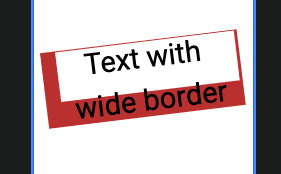
- If the border is 'inside' the element, does it mean that it covers the content? E.g. if there is a text element with width 100, height 50 and the user assigned 25px border from each side, then this would basically cover all the content of the text, is that correct?
Edit: Or should the inner border be below the text in this case, e.g.:
 miina
on 14 Oct 2020
miina
on 14 Oct 2020
@miina, great questions!
I can give my input on two of those:
- If an image has a border and then it's dropped into a shape that's non-rectangular -- will the border panel be just hidden and the border removed (as opposed to showing disabled fields)?
According to the above definition, when dropping a media element into any other, the drop target border takes precedence. If the drop target cannot have a border, no border is always the result.
- If the border is 'inside' the element, does it mean that it covers the content? E.g. if there is a text element with width 100, height 50 and the user assigned 25px border from each side, then this would basically cover all the content of the text, is that correct?
Hm, for text fields, border should work as padding, and be added to the text element - so on text fields, border is on the "outside", except that the text field background also extends to cover the entire border. I think. @samitron7 to confirm.
@miina, I have just updated the ticket regarding the information that the border is on the inside. However, when you have all these questions clarified, please add them to ticket definition.
barklund
on 14 Oct 2020
- The lock for the border: does this just lock the ratio (as with width/height) or does it lock all the border widths to be the same value (as with padding)?
Similar to padding, it locks all value
- Where in the design panel is the Border panel positioned for each element?
It should be below corner radius (Figma) if that option is available to the element otherwise, below Style
- If an image has a border and then it's dropped into a shape that's non-rectangular -- will the border panel be just hidden and the border removed (as opposed to showing disabled fields)?
Yes, remove it to remove clutter in the design panel
- Are there max values for the fields?
In most design tool, a setting a value of 100 on all corners gives you a circle. I do notice that when you scale, the border requires you to manually increase pass 100 if you want to maintain the perfect circle edges. Not sure how this would work on our system.
- If the border is 'inside' the element, does it mean that it covers the content? E.g. if there is a text element with width 100, height 50 and the user assigned 25px border from each side, then this would basically cover all the content of the text, is that correct?
Chatted with Miina offline, but let's add options for inside, center and out. These options aren't exposed till you make an intent to add borders anyways so might as well give users the full option. Then we don't have to deal with some of these weird behavior
samitron7
on 16 Oct 2020
In most design tool, a setting a value of 100 on all corners gives you a circle. I do notice that when you scale, the border requires you to manually increase pass 100 if you want to maintain the perfect circle edges. Not sure how this would work on our system.
What about the border-width, dash and gap -- do these have set max values?
miina
on 19 Oct 2020
Running into some issues when implementing the border panel, adding together all the features is getting quite complex.
We need to support the following features:
- Different border radius on each side
- Different border width on each side
- Dash length and gap length
- Border responsiveness (border width is less on smaller screens and wider on larger screens -- the width related to the element is kept the same -- e.g. 5% of the element width)
There are different ways how to add the border to element but no one option supports all the features. Here is an overview of what the different approaches support:
Feature | Using the default CSS border | Using SVG | Using background-image |
|-|-|-|-|
| Supports dashes and gaps | NO, only the default dashed border | YES | YES |
| Support different border-width on each side | YES | NO | YES |
| Responsiveness | NO, the border would be in pixels | YES | YES |
| Border-radius | YES | YES | NO |
Here is an example of how a dashed and rounded border could look like using SVG. However, it's not possible to assign different border width in this case and it's not clear how it could look like either since a dash can be on two sides at the same time:

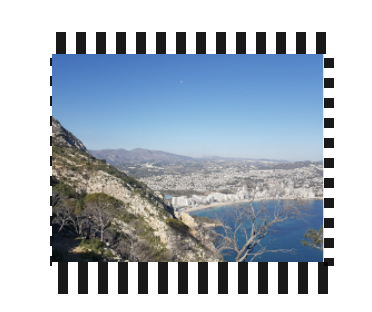
An example of how a dashed border looks like with all border widths differing on each side, using background-image (does not work together with border-radius):
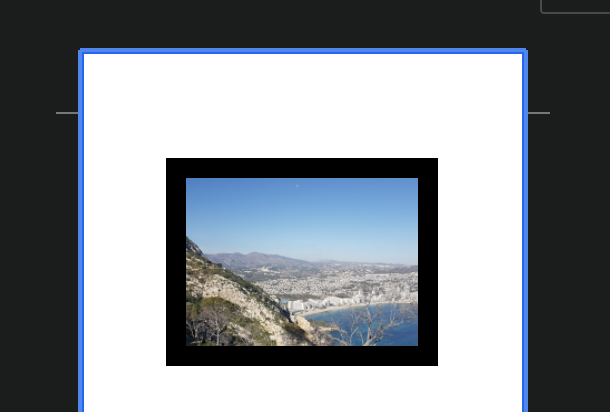
An example of using just the default border which is not responsive:
Editor (the border is 10px):
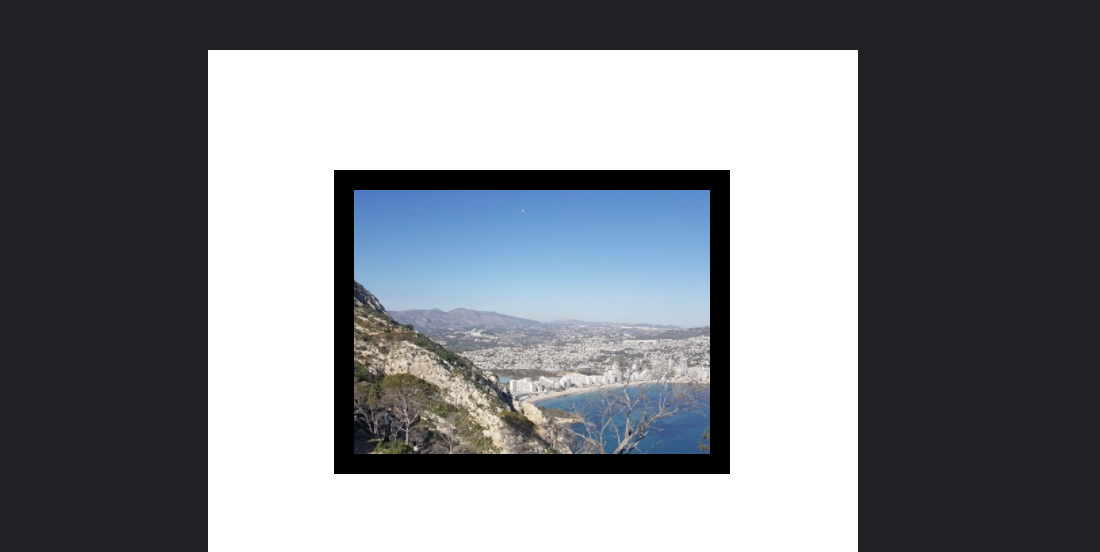
Front-end (the border is still 10px but since the image is larger, the border seems thinner):
- Default dashed border (without the user being able to assign the dash/gap size):
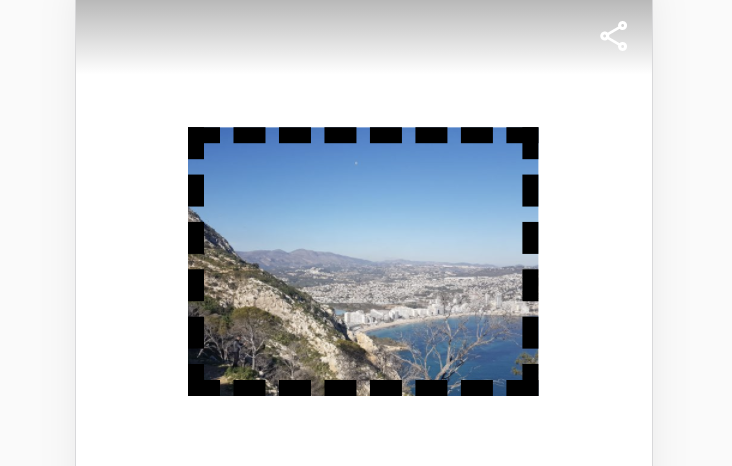
@samitron7 / @o-fernandez Is there a way how to make this a bit simpler or restricting using features together that aren't supported together by any of the approaches.
Thoughts?
miina
on 21 Oct 2020
@samitron7 to me, I'd prioritize as P0 the following and ship that when ready:
- P0: simple border with same width on all sides
- P0: border radius support (on non-bg elements)
The rest, I can live without (e.g., multiple border widths, dashes and gaps, etc.)
Thoughts?
o-fernandez
on 21 Oct 2020
Good call out Miina. +1 to just using CSS borders.
We could set border-width in em but I don't think responsiveness is actually desirable in terms of actual design intent.
 choumx
on 21 Oct 2020
choumx
on 21 Oct 2020
Thanks for the input, sounds good, reworked the PR to use CSS border only, we can follow up separately for further improvements.
miina
on 22 Oct 2020
+1 to css border and no intent for responsiveness.
samitron7
on 22 Oct 2020
Verified in QA
Tested according to 4895
 csossi
on 4 Nov 2020
csossi
on 4 Nov 2020
Related issues
csossi
·
3Comments
 injainja
·
4Comments
o-fernandez
·
3Comments
injainja
·
4Comments
o-fernandez
·
3Comments
 ernee
·
4Comments
ernee
·
4Comments
 netnaps
·
3Comments
netnaps
·
3Comments
Most helpful comment
Good call out Miina. +1 to just using CSS borders.
We could set
border-widthinembut I don't think responsiveness is actually desirable in terms of actual design intent.