Web-bugs: www.paypal.com - “Contacts” section page design is broken
URL: https://www.paypal.com/myaccount/home
Browser / Version: Firefox Nightly 66.0a1 (2019-01-21)
Operating System: Google Pixel (Android 9) - 1080 x 1920 pixels (~441 ppi pixel density)
Tested Another Browser: Yes
Problem type: Design is broken
Description: “Contacts” section page design is broken
Prerequisites:
1. PayPal account created and signed in.
Steps to Reproduce:
1. Navigate to https://www.paypal.com/myaccount/home
2. Tap “Menu” button.
3. Tap “Send & Request”.
4. Tap “Contacts” tab.
5. Observe page design.
Expected Behavior:
Design is correctly displayed.
Actual Behavior:
Design is broken (Large image, overlapping elements).
Note
1. Reproducible for the accounts [email protected] and [email protected].
2. Not reproducible on Chrome 71.0.3578.99.
3. Screenshot attached.
Watchers:
@softvision-oana-arbuzov
@softvision-sergiulogigan
@cipriansv
sv;
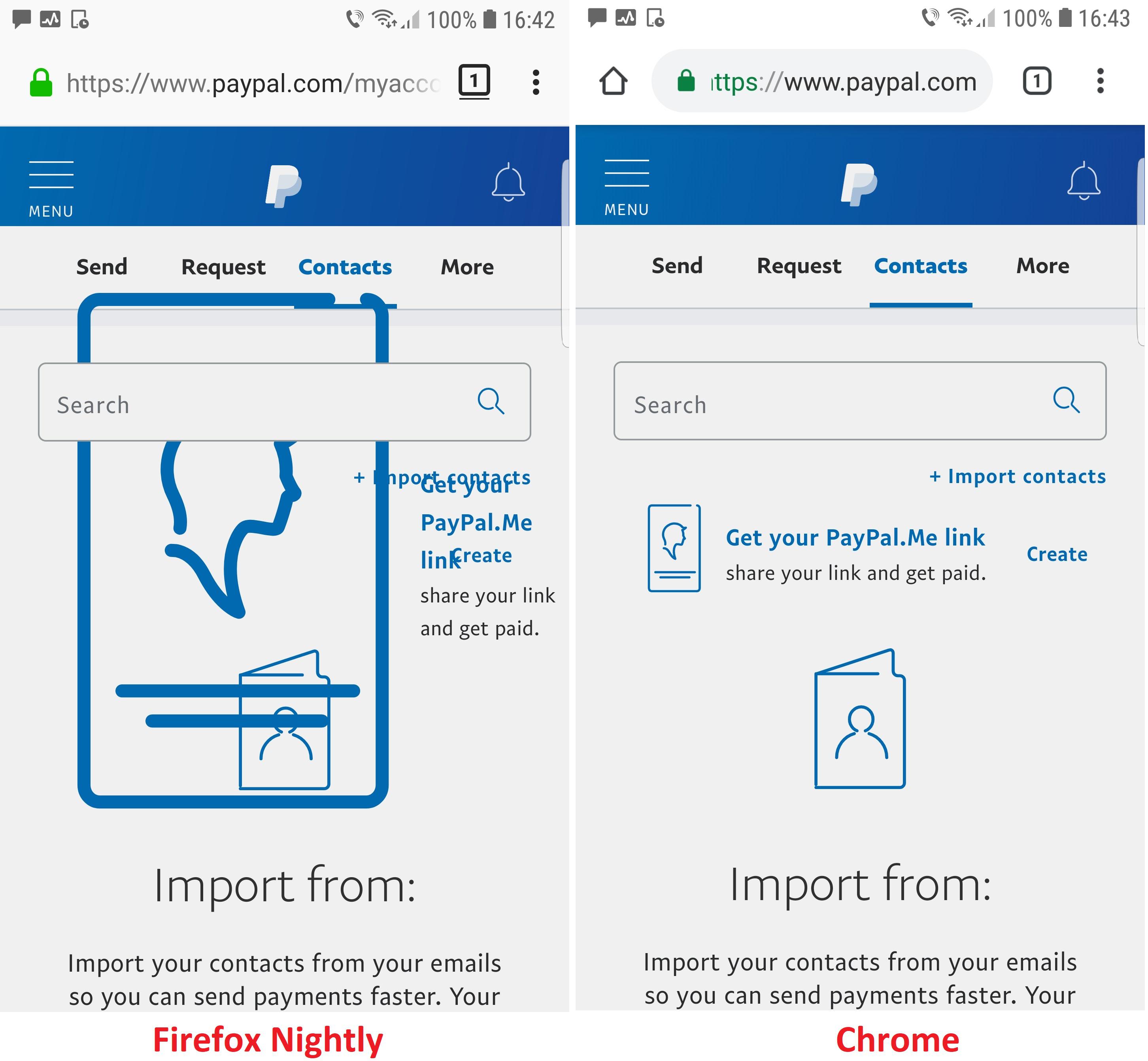
Browser Configuration
- None
_From webcompat.com with ❤️_
 softvision-oana-arbuzov
All 7 comments
Also reproduces for me with RDM. The huge icon is an SVG image, wrapped like this in a flexbox item (the outer div):
<div class="css-1ti2vgl">
  <div class="css-vq90og">
    <i class="icon-svg css-1478sek" aria-hidden="true">
      <svg viewBox="0 0 34 55" version="1.1" xmlns="http://www.w3.org/2000/svg" xmlns:xlink="http://www.w3.org/1999/xlink"><!-- snip --></svg>
    </i>
  </div>
</div>
But it appears that since no definite width or height is specified on the SVG itself, it ends up getting assigned a different width by Chrome and Firefox. Firefox just sizes it as wide as the screen, and Chrome uses the size of the other items in its flexbox. I'm not sure if this is a known flexbox interop issue, so I've filed bz1521882 to investigate.
In the meantime, PayPal can work around this by setting a definite width or height on the SVG. Perhaps height: 35px would be good, given that one of its parent elements has max-height:35px specified?
 wisniewskit
on 22 Jan 2019
wisniewskit
on 22 Jan 2019
Reaching out via partner mailing list.
 adamopenweb
on 23 Jan 2019
adamopenweb
on 23 Jan 2019
The report has been forwarded to the right team at Paypal.
adamopenweb
on 23 Jan 2019
We have fix for this and are deploying asap.
 gdomorski
on 24 Jan 2019
gdomorski
on 24 Jan 2019
This fix is live. Please confirm and close the issue. :)
gdomorski
on 29 Jan 2019
Thanks @gdomorski, the issue is fixed now .
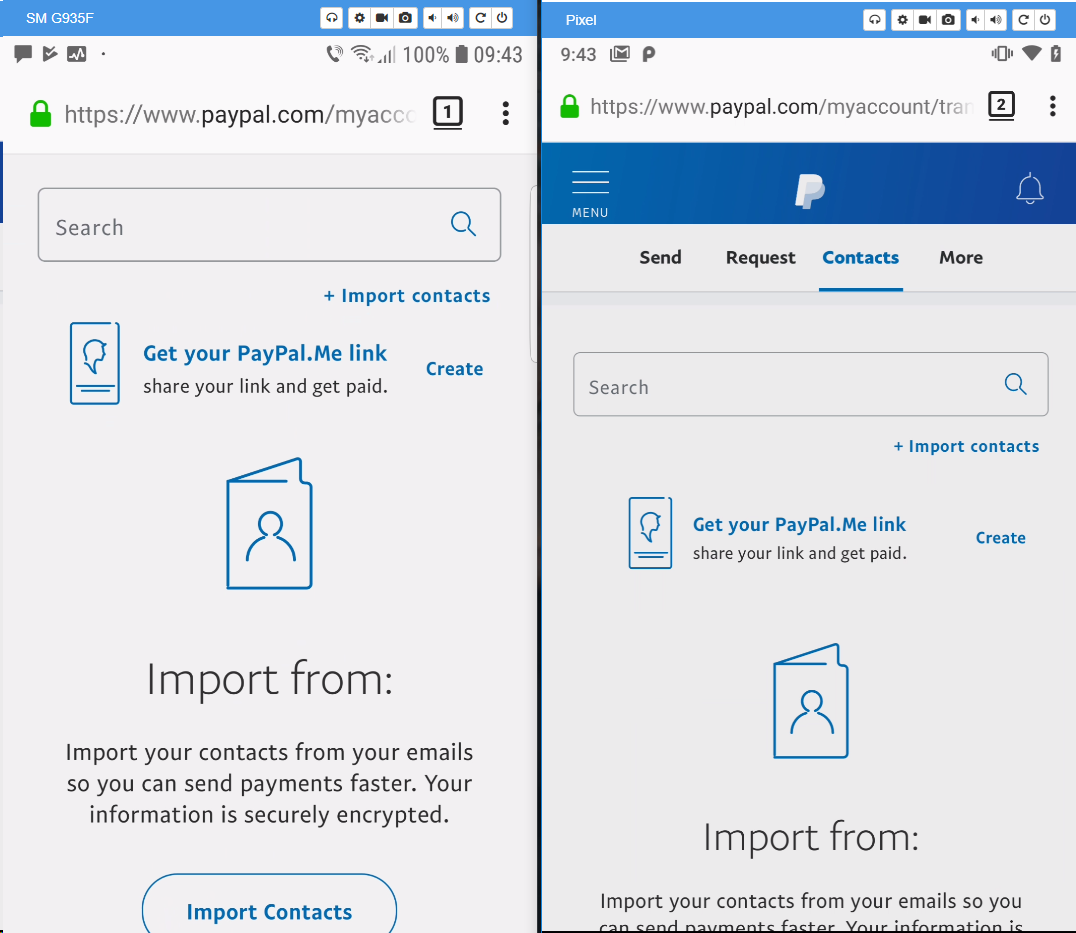
Tested with:
Browser / Version: Firefox Nightly 66.0a1 (2019-01-29)
Operating System: Google Pixel (Android 9) - 1080 x 1920 pixels (~441 ppi pixel density), Samsung Galaxy S7 Edge (Android 8.0.0) - Resolution 1440 x 2560 pixels (~534 ppi pixel density)
softvision-oana-arbuzov
on 30 Jan 2019
This issue has been automatically locked since there has not been any recent activity after it was closed. Please open a new issue at https://webcompat.com/issues/new if you are experiencing a similar problem.
![lock[bot] picture](https://avatars1.githubusercontent.com/in/6672?v=4&s=40) lock[bot]
on 13 Feb 2019
lock[bot]
on 13 Feb 2019
Related issues
 vickychin
·
4Comments
vickychin
·
4Comments
 webcompat-bot
·
4Comments
webcompat-bot
·
4Comments
 christantoan
·
4Comments
christantoan
·
4Comments
 IngrownMink4
·
3Comments
IngrownMink4
·
3Comments
 Gravydigger
·
4Comments
Gravydigger
·
4Comments
Most helpful comment
We have fix for this and are deploying asap.