Web-bugs: sport.woot.com - layout is messed up
URL: https://sport.woot.com/offers/twisted-root-big-mozzi-hammock-3-colors-1?ref=w_cnt_zl_55
Browser / Version: Firefox Mobile 51.0
Operating System: Android 6.0.1
Problem type: Layout is messed up
Steps to Reproduce
- Navigate to: https://sport.woot.com/offers/twisted-root-big-mozzi-hammock-3-colors-1?ref=w_cnt_zl_55 on an Android phone
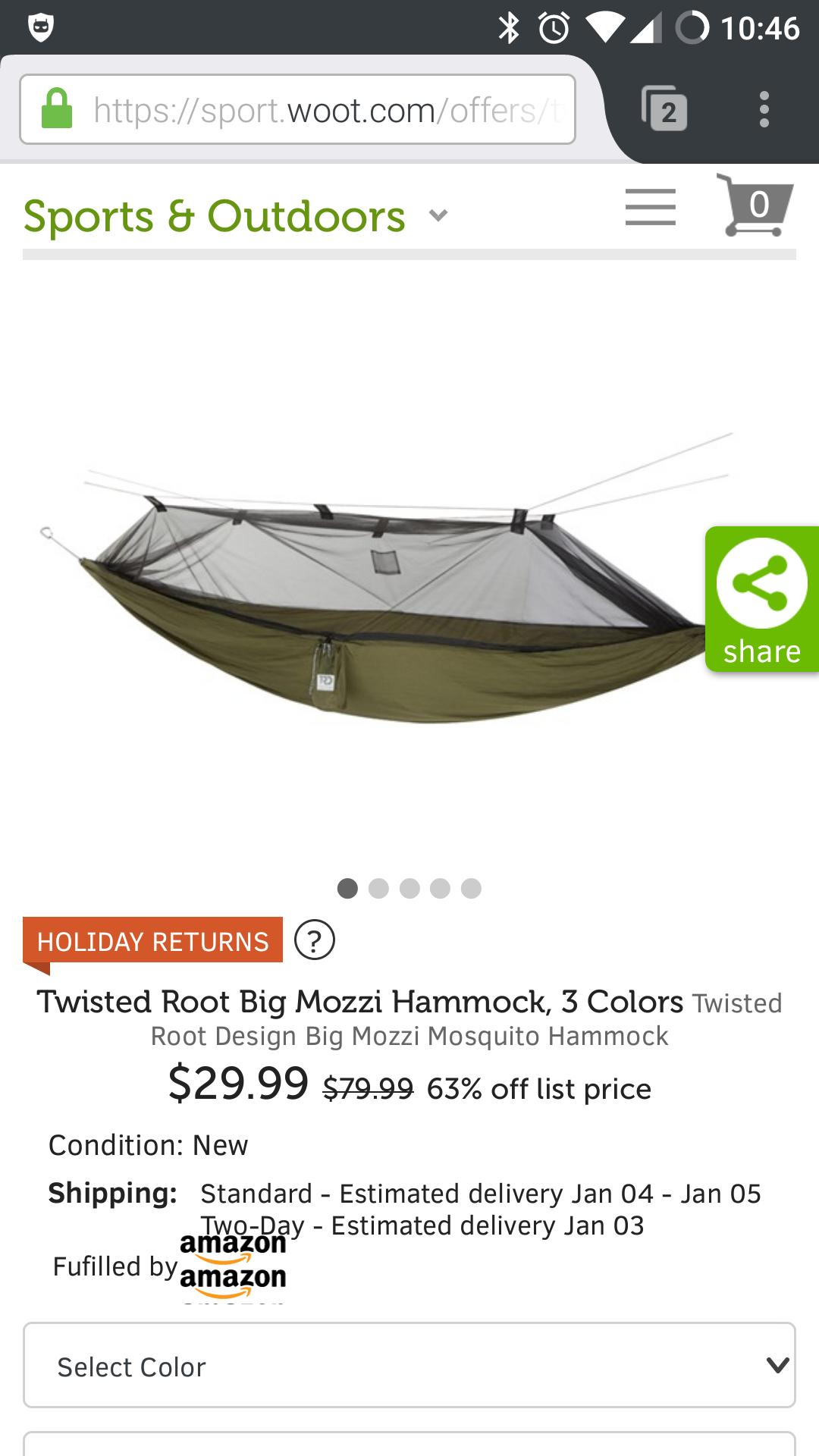
- Look at the "Fulfilled by [amazon]" line
Expected Behavior:
The "amazon" image appears twice (tiled)
Actual Behavior:
"amazon" image should just appear once.
_From webcompat.com with ❤️_
 dholbert
All 14 comments
I'm using a OnePlus One phone. Chrome on the same device gives EXPECTED RESULTS.
dholbert
on 26 Dec 2016
Wow. Very interesting issue.
@media only screen and (-webkit-min-device-pixel-ratio:2),only screen and (min-resolution:192dpi) {
    .fba-container .fba-logo {
        background-image:url(/lib/images/shared/fba-sprite.2x.png);
    }
}
@media only screen and (-webkit-min-device-pixel-ratio:3),only screen and (min-resolution:288dpi) {
    .fba-container .fba-logo {
        background-image:url(/lib/images/shared/fba-sprite.3x.png)
    }
}
.fba-container .fba-question-icon {
    background-size:64px 15px;
    background-image:url(/lib/images/shared/fba-sprite.1x.png);
    background-position:0px 0px;
    width:0px;
    height:0px;
    padding:14px 14px 0 0;
    cursor:pointer
}
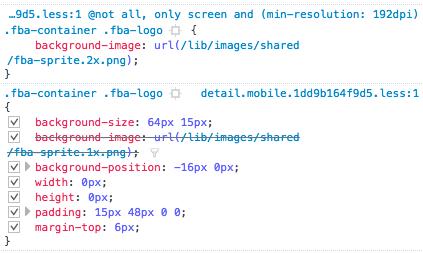
To note that unticking one or the other doesn't change the issue. There are two being displayed, while the image being linked is just one logo. It's like there was a background repeat of some sort.
if I force the no-repeat it is working. kind of. The position is a bit off.
.fba-container .fba-logo {
    background-image: url(/lib/images/shared/fba-sprite.2x.png);
    background-repeat: no-repeat;
}
but why this is happening in the first place. Let's check the computed value with browser styles
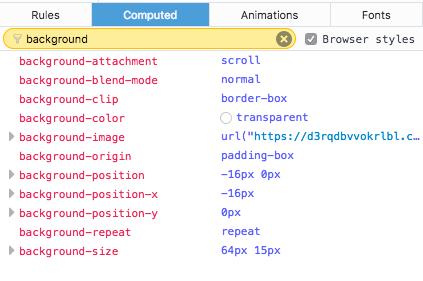
hmmm background-repeat: repeat;
Same in Safari.
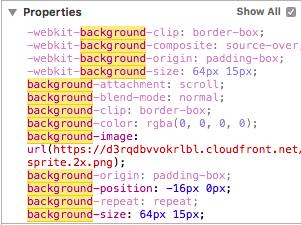
ah… ?! just noticed that the width and height were set to 0.
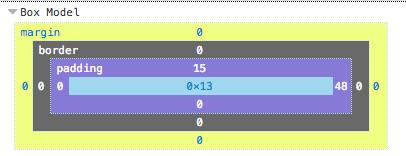
I wonder if there is an interaction between background-size and the size of the box.
 karlcow
on 26 Dec 2016
karlcow
on 26 Dec 2016
Ah in Safari we get
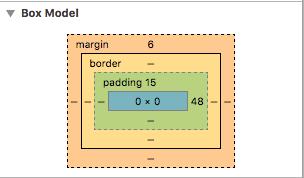
karlcow
on 26 Dec 2016
Same box dimension in Chrome.
karlcow
on 26 Dec 2016
I think this is just due to the box being sized via padding and Firefox being inconsistent with other browsers (but consistent with the spec) about whether or not there's anything besides the padding that grants us height here.
Reduced testcase # 1: https://jsfiddle.net/k58c0j86/
This testcase just has<img style="padding: 100px 100px 0 0; background: blue", which my Firefox build renders as 119px tall, whereas Chrome & Edge render it as 100px tall (the height of the padding-top, the only obvious source of height).
The extra height (19px in my case) comes from the fact that we render no-src <img> elements as empty inline elements, i.e. we render them like an empty <span>, which does have a nonzero height -- it's the height of the line, basically.
So this is kind of a form of bug 851048 (or related at least).
dholbert
on 27 Dec 2016
In this Woot page, the issue described above means the image ends up being extra-tall.
Woot is trying to zero out the content height via width: 0px;height: 0px (shown in karl's screenshot above) BUT, this width/height CSS has no effect, because it's being applied to an empty inline element. (This is exactly what bug 851048 describes.)
They can work around this and actually zero out the content height if they simply style this <img> as display:inline-block (instead of the default display:inline). Then it'll honor the height property, and its only visual height will come from the specified padding (as Woot wants/expects).
So, I think our suggested fix should be to add display: inline-block to their .fba-container .fba-logo {...} CSS rule.
dholbert
on 27 Dec 2016
Here's a screenshot in Firefox after I apply my above inline-block suggested fix:

dholbert
on 27 Dec 2016
Switching to needscontact. Thanks @dholbert
karlcow
on 27 Dec 2016
Woot.com is operated by Woot Services LLC.
Where are you guys located? In the hearts of gadget-loving skinflints everywhere, which happens to be just outside Dallas, Texas. A statistically insignificant few of us are based in Seattle, Washington.
Woot is an independent subsidiary of Amazon.
Their feedback form covers technical issues.
https://www.woot.com/feedback?ref=w_ft_wt_fdbk
I wonder if @imphasing could help us find the developers working on the CSS front-end of woot website.
karlcow
on 27 Dec 2016
I've alerted the dev team about this issue, thanks for reporting it.
 imphasing
on 27 Dec 2016
imphasing
on 27 Dec 2016
We are working on it now. You rock guys :) thanks!
 JulienDollon
on 27 Dec 2016
JulienDollon
on 27 Dec 2016
Thanks a lot! Appreciated!
karlcow
on 27 Dec 2016
@karlcow, this seems to be working on my phone now (but the color and other select drop-downs under the "fulfilled" line aren't working :S ).
 wisniewskit
on 22 Aug 2017
wisniewskit
on 22 Aug 2017
Both issues (the original one and the one reported by Tom) have been fixed.
Tested with:
Browser / Version: Firefox Nightly 68.1a1 (2019-08-19)
Operating System: OnePlus 6 (Android 9) - 1080 x 2280 pixels, 19:9 ratio (~402 ppi pixel density)
https://sellout.woot.com/offers/biooil-4-2oz-multiuse-skincare-oil?ref=w_cnt_odet_bs_1
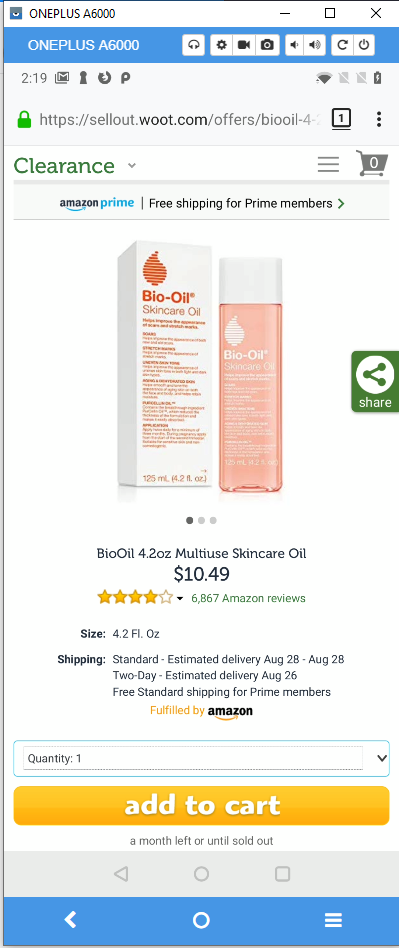
 softvision-sergiulogigan
on 20 Aug 2019
softvision-sergiulogigan
on 20 Aug 2019
Related issues
 christantoan
·
4Comments
christantoan
·
4Comments
 vickychin
·
4Comments
karlcow
·
5Comments
vickychin
·
4Comments
karlcow
·
5Comments
 bvanrijn
·
4Comments
bvanrijn
·
4Comments
 IngrownMink4
·
3Comments
IngrownMink4
·
3Comments