Weasyprint: Table style "width" property ignored in latest version
I use for "table" tag this CSS properties:
  width:-moz-fit-content;
  width:-webkit-fit-content;
  width:-ms-fit-content;
  width:fit-content;
All was working fine till I changed to Debian Stretch and upgraded to latest WeasyPrint. Now, tables doesn't adapt its width to the page+margin width, overflowing and being cropped at right margin.
Edit: In the terminal, weasyprint shows:
WARNING: Ignored `width:unset` at 268:3, invalid value.
WARNING: Ignored `width:-moz-fit-content` at 273:3, invalid value.
WARNING: Ignored `width:-webkit-fit-content` at 274:3, invalid value.
WARNING: Ignored `width:-ms-fit-content` at 275:3, invalid value.
Please, could you fix it??

In the image you can see in the left how it should be displayed / printed (in fact, is printed right directly from the browser) and in the right, the output from WeasyPrint nowadays.
 RafaelLinux
All 27 comments
Hello, thanks for this bug report!
I use for "table" tag this CSS properties […]
width: fit-content;
fit-content has never been supported by WeasyPrint, the rule is just discarded. It's just defined in some drafts and is being replaced by other values (it's a draft too, don't use them for real!).
Now, tables doesn't adapt its width to the page+margin width, overflowing and being cropped at right margin.
I see. I think that it's a duplicate of #582, but it's supposed to be fixed in 0.42.3. Which version do you have?
 liZe
on 8 Aug 2018
liZe
on 8 Aug 2018
Thank you liZe. I'm using version 0.42.3. I could send you HTML code if you require it. Or an URL.
RafaelLinux
on 8 Aug 2018
Thank you liZe. I'm using version 0.42.3. I could send you HTML code if you require it. Or an URL.
That would be perfect.
liZe
on 8 Aug 2018
This is the public URL http://www.dip-badajoz.es/bop/ventana_anuncio.php?id_anuncio=111865&FechaSolicitada=2018-01-22 (the actual changes to CSS are not public still).
As you can see in code, I'm trying now using with too (but still didn't process it with weasyprint)
width: -moz-available;
width: -webkit-fill-available;
width: fill-available;
I just now will process with those properties.
Edit: Just the same, they are discarded. :(
RafaelLinux
on 8 Aug 2018
This is the public URL
External files (including CSS) return 403 (Forbidden).
liZe
on 8 Aug 2018
Did you mean WeasyPrint give that error? Cause you can check that all files linked are downloadable (CSS and three or four common images). If that's the case, is not a page related issue, cause any browser can download the entire page. If fact, first time I tried WeasyPrint I needed to use "wget" to download all content of the page and use WeasyPrint on the page locally :(
RafaelLinux
on 9 Aug 2018
If fact, first time I tried WeasyPrint I needed to use "wget" to download all content of the page and use WeasyPrint on the page locally
Yes, I get
ERROR: Failed to load stylesheet at http://www.dip-badajoz.es/bop/maquetacion.css : HTTPError: HTTP Error 403: Forbidden
ERROR: Failed to load stylesheet at http://www.dip-badajoz.es/bop/certificaciones_W3C.css : HTTPError: HTTP Error 403: Forbidden
ERROR: Failed to load image at "http://www.dip-badajoz.es/img/logos_2016/diputacion_color_horizontal.svg" (HTTPError: HTTP Error 403: Forbidden)
ERROR: Failed to load image at "http://www.dip-badajoz.es/bop/img/W3C-HTML5.png" (HTTPError: HTTP Error 403: Forbidden)
ERROR: Failed to load image at "http://www.dip-badajoz.es/bop/img/W3C-CSS3.png" (HTTPError: HTTP Error 403: Forbidden)
ERROR: Failed to load image at "http://www.dip-badajoz.es/bop/img/W3C-RWD.png" (HTTPError: HTTP Error 403: Forbidden)
but downloading these files with wget or a web browser work, I suppose that there are user-agent-based rules on this server for static files.
liZe
on 9 Aug 2018
No, liZe, there are not user-agent specific rules. It's something related with WeasyPrint, but I don't know what. You can open any of those files without problem in any browser. I could think that is mod_security module related .... but I'm not sure just now, cause wget can download it without problems but not WeasyPrint .... so I think (maybe I'm wrong) that is an issue of WeasyPrint.
Anyway, that could be something to investigate further, if I can help any way.
RafaelLinux
on 9 Aug 2018
but I'm not sure just now, cause wget can download it without problems but not WeasyPrint .... so I think (maybe I'm wrong) that is an issue of WeasyPrint.
OK, I'll check that too (it's strange). I've already downloaded the files and I'm trying to understand what's going on with these tables…
liZe
on 9 Aug 2018
It's a complex problem with many different things to say :smile:.
The table problem
Short answers to your problem:
- The minimum width of the table (as calculated by WeasyPrint) is too large, that's why it doesn't fit in the page.
- There's something "wrong" in the way WeasyPrint calculates the table width, probably because of the strange
colspanvalues. - This "wrong" calculation is probably not wrong according to the W3C spec, just wrong according to what users expect.
I'll dig deeper, but I'm afraid that it's less a real problem in WeasyPrint than a nice enhancement we'd like to have (and thus with a lower priority :cry:). Table layout is not exactly specified and browsers can do almost what they want, nobody knows how it works except some prophets.
I'll change the issue title if I didn't miss anything else about this problem.
403 error
There's actually a filter on the 'Accept' header, that's why WeasyPrint get 403s.
>>> from urllib.request import Request, urlopen
>>> urlopen(Request('http://www.dip-badajoz.es/bop/certificaciones_W3C.css', headers={'Accept': '*/*'}))
<http.client.HTTPResponse object at 0x7f06c962e588>
>>> urlopen(Request('http://www.dip-badajoz.es/bop/certificaciones_W3C.css', headers={}))
Traceback (most recent call last):
  File "<stdin>", line 1, in <module>
  File "/usr/lib64/python3.6/urllib/request.py", line 223, in urlopen
    return opener.open(url, data, timeout)
  File "/usr/lib64/python3.6/urllib/request.py", line 532, in open
    response = meth(req, response)
  File "/usr/lib64/python3.6/urllib/request.py", line 642, in http_response
    'http', request, response, code, msg, hdrs)
  File "/usr/lib64/python3.6/urllib/request.py", line 570, in error
    return self._call_chain(*args)
  File "/usr/lib64/python3.6/urllib/request.py", line 504, in _call_chain
    result = func(*args)
  File "/usr/lib64/python3.6/urllib/request.py", line 650, in http_error_default
    raise HTTPError(req.full_url, code, msg, hdrs, fp)
urllib.error.HTTPError: HTTP Error 403: Forbidden
Media queries
The maquetacion.css file has a @media only print rule. As media queries are not handled yet (see #494), it doesn't work. Removing only gives quite a pretty good result!
Presentational hints
Your tables have a lot of presentational hints that are ignored by WeasyPrint by default, including border and widthon table and col tags. You can make WeasyPrint follow these hints by using the -p command-line attribute. These hints are deprecated, you should use style attributes (that's probably not the point of this issue, but it can explain differences between browsers and WeasyPrint).
liZe
on 9 Aug 2018
I realized the problem with the "only print" just along this morning. Thanks anyway. However, despite I changed loading fonts from google fonts online repo, now I have other errors from WesayPrint with "@font-face", but I will open other thread about that.
Presentational hints ignored by WeasyPrint are not a problem at first sight, cause result difference is not appreciable. Curiosly, I saw all those hints without using "-p" parameter, don't know why. About using "style" attributes, we have a "must change", cause we are using "XStandard" for editing XHTML but is discontinued, so this plugin creates automatically some deprecated options like "col" etc.
The priority for me is to be able to show large width tables like browsers does, adjusted to fit the page width. If that doesn't work, I'm in trouble cause I bet for WeasyPrint and finally my idea of use it instead mpdf libraries will be our only option to continue :( despite WeasyPrint is really a fantastic app.
Sorry, I just read your reply (I don't know how to subscribe to this thread).
RafaelLinux
on 9 Aug 2018
I realized the problem with the "only print" just along this morning. Thanks anyway. However, despite I changed loading fonts from google fonts online repo, now I have other errors from WesayPrint with "@font-face", but I will open other thread about that.
Google @font-face rules try different resources for fonts, and the first one is to check whether the font is already installed on the system instead of downloading it. That's why you get warnings like this one:
WARNING: Failed to load local font "Open Sans Regular"
That's just a warning, but if you only have warnings about local fonts, it means that online fonts provided by Google Fonts work well.
Presentational hints ignored by WeasyPrint are not a problem at first sight, cause result difference is not appreciable. Curiosly, I saw all those hints without using "-p" parameter, don't know why. About using "style" attributes, we have a "must change", cause we are using "XStandard" for editing XHTML but is discontinued, so this plugin creates automatically some deprecated options like "col" etc.
Good to know.
The priority for me is to be able to show large width tables like browsers does, adjusted to fit the page width. If that doesn't work, I'm in trouble cause I bet for WeasyPrint and finally my idea of use it instead mpdf libraries will be our only option to continue :( despite WeasyPrint is really a fantastic app.
I understand, it's really annoying… Give me a week, I'll spend a few hours trying to find an quick fix, but if there's nothing obvious I'm afraid mpdf is the way to go.
Sorry, I just read your reply (I don't know how to subscribe to this thread).
There's a "subscribe" button at the right of your first message in this page :wink:.
liZe
on 9 Aug 2018
Good news: the issue is obvious:
<style>
  td { border: 1px solid }
</style>
<table>
  <td colspan="10">test</td>
</table>
I hope that the fix is obvious too.
liZe
on 9 Aug 2018
Google @font-face rules try different resources for fonts, and the first one is to check whether the font is already installed on the system instead of downloading it. That's why you get warnings like this one:
WARNING: Failed to load local font "Open Sans Regular"
That's just a warning, but if you only have warnings about local fonts, it means that online fonts provided by Google Fonts work well.
I'm still on it, cause I downloaded the fonts, renamed it and it's working fine on browsers, but seems weasyprint is not loading .... let me check it on monday.
I understand, it's really annoying… Give me a week, I'll spend a few hours trying to find an quick fix, but if there's nothing obvious I'm afraid mpdf is the way to go.
I wish you find a solution, cause really weasyprint is more flexible and versatile than mpdf (that is not perfect, at all).
There's a "subscribe" button at the right of your first message in this page wink.
You have reason. In fact, I was subscribed!!! However, I'm not receiving any e-mail from the forum .... nor in the spam folder :(
<style>
  td { border: 1px solid }
</style>
<table>
  <td colspan="10">test</td>
</table>
But, I presume that's a particular fix for the table I send you? If that's the case, it won't work on each table we publish daily .... correct me if I'm wrong.
RafaelLinux
on 10 Aug 2018
I wish you find a solution, cause really weasyprint is more flexible and versatile than mpdf (that is not perfect, at all).
I think I have, I get much better results with your tables now.


Please tell me if it's better for you with the current master branch!
(And good to know that WeasyPrint may be useful for you.)
But, I presume that's a particular fix for the table I send you?
No, it's a simple example that was totally broken with WeasyPrint.
liZe
on 10 Aug 2018
You have reason. In fact, I was subscribed!!! However, I'm not receiving any e-mail from the forum .... nor in the spam folder :(
You can check your notifications page.
liZe
on 10 Aug 2018
You can check your notifications page.
Fantastic, that seems to be the solution for the notifications not working. Other forums only need to check the subscription and all is done.
RafaelLinux
on 13 Aug 2018
Please tell me if it's better for you with the current master branch!
I have a doubt about it. I'm not acquainted with Python and its way of update installed applications. Should I then make something like "pip3 update weasyprint"?
Thank you
RafaelLinux
on 13 Aug 2018
Just for a test (don't do this in production!), you can try "pip3 install --upgrade git+https://github.com/Kozea/WeasyPrint" and see if it works. This command gives you the possibility to test the latest development version.
liZe
on 13 Aug 2018
Well, while this problem is not solved, all is in "beta" stage, don't worry. I did what you said, but this time I tried with a larger (usually we work with this kind of tables) like the one in this:
http://www.dip-badajoz.es/bop/boletin_completo.php?FechaSolicitada=2007-05-23
And first, weasyprint give a lot of warnings like ...
WARNING: Anchor defined twice: Anuncio_03864
WARNING: Anchor defined twice: Anuncio_03860
WARNING: Anchor defined twice: Anuncio_04272
WARNING: Anchor defined twice: Anuncio_03931
WARNING: Anchor defined twice: Anuncio_03972
WARNING: Anchor defined twice: Anuncio_03682
WARNING: Anchor defined twice: Anuncio_04248
WARNING: Anchor defined twice: Anuncio_04053
And then stays doing something .... forever (I let it working and will tell you in 2 days)
RafaelLinux
on 14 Aug 2018
WARNING: Anchor defined twice: Anuncio_03864
The warnings are right: you have different tags with the same id, and it's forbidden. But it's just a warning.
And then stays doing something .... forever
It's slow for me, but it works in about 1 minute. Here's my command:
weasyprint.py -v "http://www.dip-badajoz.es/bop/boletin_completo.php?FechaSolicitada=2007-05-23" /tmp/test.pdf
Please tell me if it's forever or if it's just really long!
liZe
on 14 Aug 2018
It seemed to stay forever, but IT'S NOT!!! However, I can't tell if it's working cause weasyprint is ignoring my local downloaded fonts (but the HTML page is showing correctly), so the result could be correct but it's imposible to fit if not using the condensed version of the OpenSans font :(
I include the first warning messages:
/usr/local/lib/python3.5/dist-packages/weasyprint/document.py:33: UserWarning: There are known rendering problems with cairo < 1.15.4. WeasyPrint may work with older versions, but please read the note about the needed cairo version on the "Install" page of the documentation before reporting bugs.
'There are known rendering problems with cairo < 1.15.4. '
ERROR: Failed to load stylesheet at https://fonts.googleapis.com/css?family=PT+Sans&subset=latin,latin-ext : URLError:
WARNING: Ignored unicode-range: U+0-FF, U+131, U+152-153, U+2BB-2BC, U+2C6, U+2DA, U+2DC, U+2000-206F, U+2074, U+20AC, U+2122, U+2191, U+2193, U+2212, U+2215, U+FEFF, U+FFFD at 11:2, descriptor not supported.
WARNING: Failed to load local font "Open Sans Regular"
WARNING: Failed to load local font "OpenSans-Regular"
WARNING: Ignored unicode-range: U+100-24F, U+259, U+1E00-1EFF, U+2020, U+20A0-20AB, U+20AD-20CF, U+2113, U+2C60-2C7F, U+A720-A7FF at 20:2, descriptor not supported.
WARNING: Failed to load local font "Open Sans Regular"
WARNING: Failed to load local font "OpenSans-Regular"
WARNING: Ignored unicode-range: U+0-FF, U+131, U+152-153, U+2BB-2BC, U+2C6, U+2DA, U+2DC, U+2000-206F, U+2074, U+20AC, U+2122, U+2191, U+2193, U+2212, U+2215, U+FEFF, U+FFFD at 29:2, descriptor not supported.
WARNING: Failed to load local font "Open Sans Condensed Light"
WARNING: Failed to load local font "OpenSansCondensed-Light"
WARNING: Ignored unicode-range: U+100-24F, U+259, U+1E00-1EFF, U+2020, U+20A0-20AB, U+20AD-20CF, U+2113, U+2C60-2C7F, U+A720-A7FF at 38:2, descriptor not supported.
WARNING: Failed to load local font "Open Sans Condensed Light"
WARNING: Failed to load local font "OpenSansCondensed-Light"
RafaelLinux
on 16 Aug 2018
I can't tell if it's working cause weasyprint is ignoring my local downloaded fonts
You don't have to locally install Open Sans if you're using the @import rule from Google Fonts.
Google fonts provide CSS files like this one:
@font-face {
  font-family: 'Open Sans Condensed';
  font-style: normal;
  font-weight: 300;
  src: local('Open Sans Condensed Light'), local('OpenSansCondensed-Light'), url(https://fonts.gstatic.com/s/opensanscondensed/v12/z7NFdQDnbTkabZAIOl9il_O6KJj73e7Ff1GhDuXMQg.ttf) format('truetype');
}
As you can see, the first items of the src property are local(xxx) rules. It means that if the font is installed on your system, it will use this font, and thus users with the font installed don't have to download it.
That's why you get
WARNING: Failed to load local font "Open Sans Condensed Light"
WARNING: Failed to load local font "OpenSansCondensed-Light"
and there's nothing wrong with that.
WeasyPrint then tries to download the font using the third url(xxx) rule. As there's no warning about this rule, it means that the font has been download and is ready to be used.
So, according to these warnings, I think that Google Fonts work for you.
Maybe the font-family: Open Sans Condensed rule does not apply to your table for some reason?
liZe
on 16 Aug 2018
I took my time to revise my CSS code about fonts, taking into account your clear explanation about the @font-face rule. However, apparently all is fine. The page is showing correctly all fonts (Condensed subtype too) as you'll see in attached screenshot. Actually, in fact, we try to have all resources in our server, to avoid client browser to search outside out server, so our CSS code to load required fonts is:
@font-face {
    font-family: 'Open Sans';
    font-style: normal;
    font-weight: 400;
    src: local('Open Sans Regular'), local('OpenSans-Regular'), url(./fonts/opensans_regular_latin.woff2) format('woff2');
    unicode-range: U+0000-00FF, U+0131, U+0152-0153, U+02BB-02BC, U+02C6, U+02DA, U+02DC, U+2000-206F, U+2074, U+20AC, U+2122, U+2191, U+2193, U+2212, U+2215, U+FEFF, U+FFFD;
}

/* latin-ext */
@font-face {
    font-family: 'Open Sans';
    font-style: normal;
    font-weight: 400;
    src: local('Open Sans Regular'), local('OpenSans-Regular'), url(./fonts/opensans_regular_latin_ext.woff2) format('woff2');
    unicode-range: U+0100-024F, U+0259, U+1E00-1EFF, U+2020, U+20A0-20AB, U+20AD-20CF, U+2113, U+2C60-2C7F, U+A720-A7FF;
}

/* latin */
@font-face {
    font-family: 'Open Sans Condensed';
    font-style: normal;
    font-weight: 300;
    src: local('Open Sans Condensed Light'), local('OpenSansCondensed-Light'), url(./fonts/opensans_condensed_latin.woff2) format('woff2');
    unicode-range: U+0000-00FF, U+0131, U+0152-0153, U+02BB-02BC, U+02C6, U+02DA, U+02DC, U+2000-206F, U+2074, U+20AC, U+2122, U+2191, U+2193, U+2212, U+2215, U+FEFF, U+FFFD;
}

/* latin-ext */
@font-face {
    font-family: 'Open Sans Condensed';
    font-style: normal;
    font-weight: 300;
    src: local('Open Sans Condensed Light'), local('OpenSansCondensed-Light'), url(./fonts/opensans_condensed_latin_ext.woff2) format('woff2');
    unicode-range: U+0100-024F, U+0259, U+1E00-1EFF, U+2020, U+20A0-20AB, U+20AD-20CF, U+2113, U+2C60-2C7F, U+A720-A7FF;
}
And, as I wrote you, apparently is working, as you can see in the first and second screenshots attached (both from FF, the first one on real view on browser and the second printing from FF to PDF). However, it seems weasyprint is ignoring the fonts, but don't know why (see the third screenshot). Maybe is ignoring the real folder where they are stored in the server.

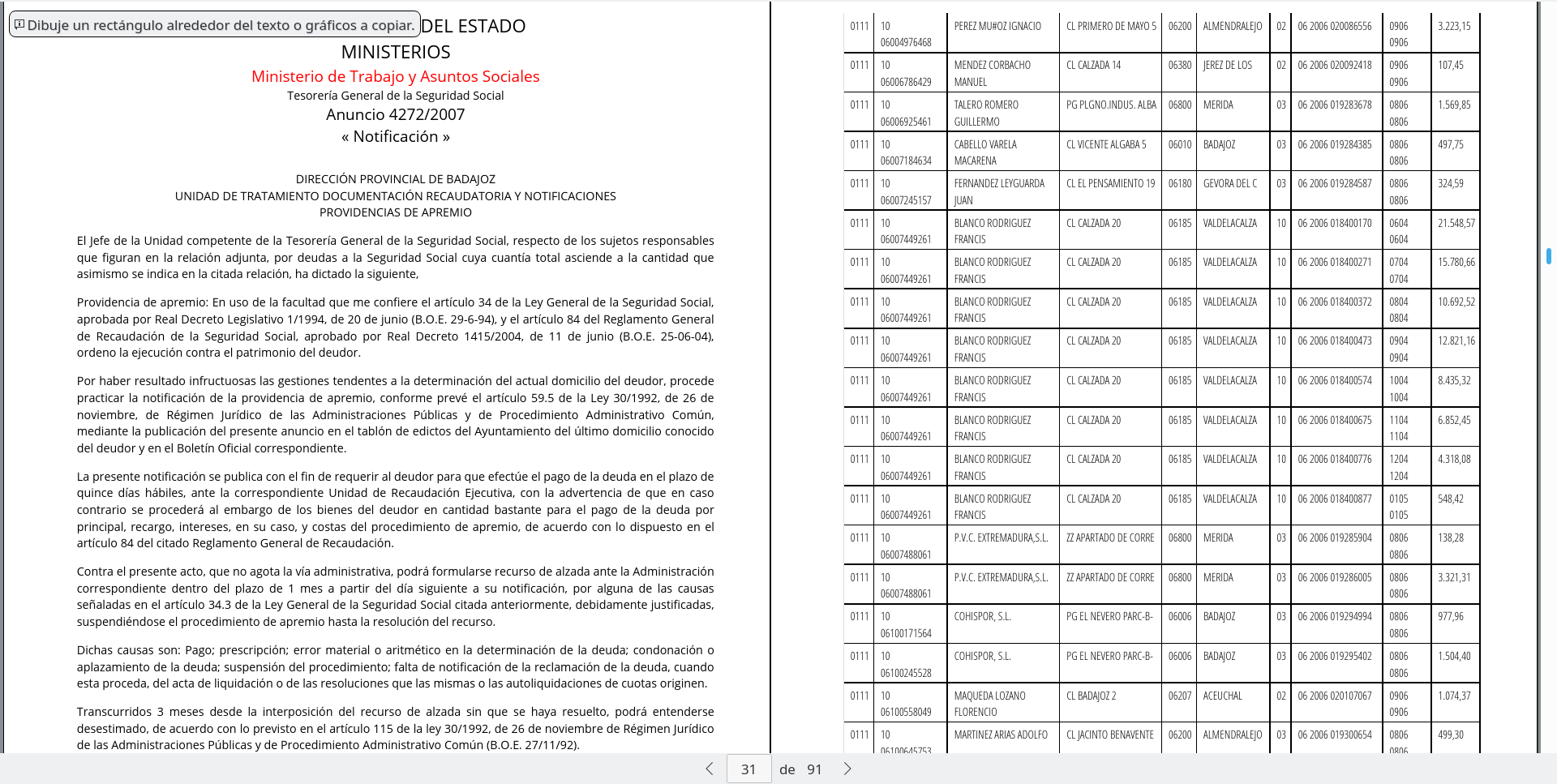

As you can see in CSS above, URL of each font is relative to the CSS file from they are loaded. So, maybe, weasyprint is trying to locate that fonts in the wrong folder. I'm going to change relative location to complete location, to try to solve this mystery.
Best regards
RafaelLinux
on 17 Aug 2018
However, it seems weasyprint is ignoring the fonts, but don't know why
I finally know why: WeasyPrint doesn't support woff2 fonts, because it relies on fontconfig that doesn't support woff2. Using another format will work.
liZe
on 17 Aug 2018
Ups, I didn't imagine that. It's time then to search and download the ttf equivalent. Thank you.
RafaelLinux
on 17 Aug 2018
YOU DID IT!!! I didn't believe it (cause I'm sure it was not easy for you as you told me), so I created the PDF file at least three times, and it works perfectly!!!!
Now I need to find out what where is my mistake in CSS fonts code, cause curiously now I have not condensed font in the browser!!!! But for sure is something I'm doing wrong, so I'm going to find what is just now.
Then I'll test with similar (even larger) and a little more complex tables, but I'm sure all will work like a charm with weasyprint!! I'll report you next news!
RafaelLinux
on 17 Aug 2018
Related issues
 thejasechen
·
3Comments
thejasechen
·
3Comments
 assuntaw
·
3Comments
assuntaw
·
3Comments
 muzzamilkhan
·
3Comments
muzzamilkhan
·
3Comments
 whitelynx
·
5Comments
whitelynx
·
5Comments
 SimonSapin
·
4Comments
SimonSapin
·
4Comments