Weasyprint: w10 error - inflateReset2(libpng16-16.dll)
After install weasyprint on my computer (followin the instructions http://weasyprint.readthedocs.io/en/stable/install.html) i try to execute the test
python -m weasyprint http://weasyprint.org weasyprint.pdf
and i received the next error:
cannot find entrypoint in procedure inflateReset2 in dll file C:\Program Files\GTK-Runtime Win64\bin\libpng16-16.dll
This .dll is in this path.
My machine is a 64-bits architecture, and i have installed all 64bits versions
Where is the problem?
Thanks a lot.
Kind regards
 ZabeJM
All 13 comments
Strange… Did you use GTK's .exe installer, or did you try to clone the repository?
 liZe
on 16 Jan 2018
liZe
on 16 Jan 2018
I used a GTK's .exe installer
LiZe, thanks for your support
ZabeJM
on 16 Jan 2018
According to some sources, you may have another (older) version of zlib installed somewhere else in a folder listed in your PATH.
There's unfortunately nothing I can do more than looking for similar issues on the internet, as I don't easily have access to a Windows installation :cry:.
liZe
on 16 Jan 2018
I'm looking my environment variables and i don't find any reference to zlib.
Yesterday I forget to send my traceback log.
When i close the libpng16-16.dll error (on a message box) the traceback writes this:
python -m weasyprint http://weasyprint.org weasyprint.pdf
Traceback (most recent call last):
  File "C:\Python27\lib\runpy.py", line 163, in _run_module_as_main
    mod_name, _Error)
  File "C:\Python27\lib\runpy.py", line 111, in _get_module_details
    __import__(mod_name)  # Do not catch exceptions initializing package
  File "C:\Python27\lib\site-packages\weasyprint\__init__.py", line 375, in <module>
    from .css import preprocess_stylesheet  # noqa
  File "C:\Python27\lib\site-packages\weasyprint\css\__init__.py", line 29, in <module>
    from . import computed_values
  File "C:\Python27\lib\site-packages\weasyprint\css\computed_values.py", line 16, in <module>
    from .. import text
  File "C:\Python27\lib\site-packages\weasyprint\text.py", line 18, in <module>
    import cairocffi as cairo
  File "C:\Python27\lib\site-packages\cairocffi\__init__.py", line 41, in <module>
    cairo = dlopen(ffi, 'cairo', 'cairo-2')
  File "C:\Python27\lib\site-packages\cairocffi\__init__.py", line 38, in dlopen
    raise OSError("dlopen() failed to load a library: %s" % ' / '.join(names))
OSError: dlopen() failed to load a library: cairo / cairo-2
Thx
ZabeJM
on 17 Jan 2018
OK, the real original error is probably OSError: dlopen() failed to load a library: cairo / cairo-2, meaning that cairo in not available in PATH.
I don't know how you can get C:\Python27 if you carefully followed the install instructions asking to install Python 3.6 :wink:. Quoting the install page:
Dear Windows user, please follow these steps carefully. Really carefully. Don’t cheat.
There's nothing more I can say.
liZe
on 17 Jan 2018
@ZabeJM Did you try anything new?
liZe
on 29 Jan 2018
Hello,
Your mileage may vary but I was fighting with this particular issue all day yesterday. Was pulling my hair out. Ran across this article (https://github.com/syncthing/syncthing-gtk/issues/273) and with a nothing left to lose kind of vibe finally fixed it by moving the GTK/bin files out of the default directory (that had spaces in it) to a directory with no spaces and that fixed my issue. Good Luck.
 Rarefy-Dev
on 7 Feb 2018
Rarefy-Dev
on 7 Feb 2018
@ZabeJM I'm closing this issue, I hope that you've found a solution or that @Rarefy-Dev's comment will help you.
liZe
on 13 Feb 2018
Just letting you know that this error is still occurring and that @Rarefy-Dev's comment did not fix it for me. Still trying to find a solution.
 kummerer94
on 13 Nov 2018
kummerer94
on 13 Nov 2018
Okay, I fixed it already.
There were two copies of zlib1.dll in my path (check with `where zlib1.dll´). I had to remove the other one and it worked.
I found this solution here: https://github.com/Alexpux/MINGW-packages/issues/813
kummerer94
on 13 Nov 2018
So which copy of zlib1.dll did you remove?
 theHopeCollective
on 11 Jul 2019
theHopeCollective
on 11 Jul 2019
I removed the one that was not located in the GTK3-Runtime Win64\bin\ directory. I thought the version of zlib included here might work best with the other dlls of GTK3. As it turns out, it does. I currently have no problems running weasyprint.
kummerer94
on 11 Jul 2019
Thanks @kummerer94 !
It helped me too. (_for google users I'll describe my steps_)
In my case, the output of command: _where zlib1.dll_
was:
C:\PostgreSQL\pg10\bin\zlib1.dll
C:\Program FilesGTK3-Runtime Win64\bin\zlib1.dll
Only I didn't removed the PostgreSQL folder from PATH, I moved the GTK3 folder at the beginning of my PATH list using Move Up button
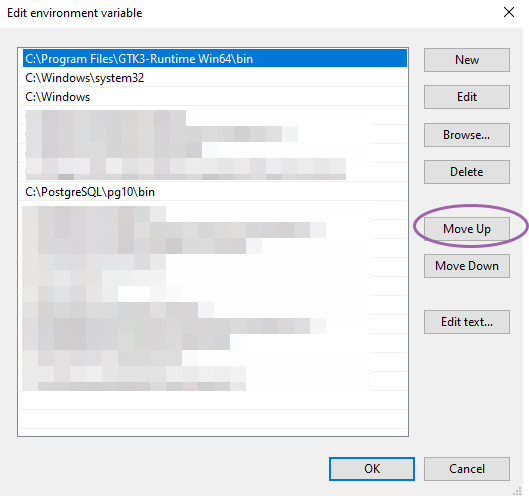
Remember! You need restart your PC to apply the changes. _(Without it, the magic of the Windows doesn't work :)_
After that the command:
python -m weasyprint http://weasyprint.org weasyprint.pdf
saved PDF file for me. I was happy!
 hotenov
on 13 Oct 2019
hotenov
on 13 Oct 2019
Related issues
 antuaneacion
·
3Comments
antuaneacion
·
3Comments
 jeffgabhart
·
3Comments
jeffgabhart
·
3Comments
 elcolie
·
4Comments
elcolie
·
4Comments
 whitelynx
·
5Comments
whitelynx
·
5Comments
 Tontyna
·
4Comments
Tontyna
·
4Comments
Most helpful comment
Okay, I fixed it already.
There were two copies of zlib1.dll in my path (check with `where zlib1.dll´). I had to remove the other one and it worked.
I found this solution here: https://github.com/Alexpux/MINGW-packages/issues/813