Wcf: Unable to add connected services in 2.1 Preview (Error: Version for package dotnet-svcutil could not be resolved)
Create New Web Application using Core 2.1 Preview. (Angular Application)
Attempt to add connected services.
Error: Version for package
dotnet-svcutilcould not be resolved.
Switch version to Core 2.0 attempt to add service (Completes successfully)
 sliceofbytes
All 30 comments
Hi @sliceofbytes
Thank you for reporting this issue. We made several improvements to the tool to support versions of the framework not yet known to the tool (so the tool doesn't need to be recompiled to add support for the newer framework version) and these improvements will be available with the release of Visual Studio 2017 v15.7 Preview 3 scheduled to be released on the first week of April (4/4). Stay tuned ...
 mlacouture
on 29 Mar 2018
mlacouture
on 29 Mar 2018
Visual Studio v15.7 v15.7 Preview 4 is now available.
mlacouture
on 20 Apr 2018
This issue still persists in VS 15.7 preview 4. The project is using .NET Core version 2.1.300-preview2-008533

 rvanmaanen
on 24 Apr 2018
rvanmaanen
on 24 Apr 2018
Hi @sliceofbytes
Thank you again for reporting this problem; it is very unfortunate that this was not fixed; I'm sorry about it.
I can offer a workaround while the fix for this issue is released in case you absolutely need to run this for NET Core v2.1:
Locate the temporary folder created by the WCF Web Service Reference connected service after the failure, and fix up the nuget.config file generated on this folder, the folder path should look like the following:
%USERPROFILE%\AppData\Local\Temp\WCFConnectedService\2018_Apr_24_16_00_36\svcutil_starter
Edit the nuget.config to fix the location (directory) of the svcutil nuget package, it should look like the following after the fix:
<configuration>
  <packageSources>
    <add key="SvcUtilLocalFeed" value="<VSINSTALLDIR>\Common7\IDE\EXTENSIONS\MICROSOFT\WCF Connected Service\svcutil" />
  </packageSources>
</configuration>
Now from this directory restore the dotnet-svcutil NuGet package by running the following command:
>dotnet restore
Once you complete all these steps you should be able to run the WCF Web Service Reference wizard successfully.
Observe that this workaround is not a supported scenario so it should not be treated as a permanent solution.
I hope this helps,
mlacouture
on 25 Apr 2018
I can conform that the workaround works, thanks! Do you have any idea when this will be fixed with a permanent solution?
rvanmaanen
on 25 Apr 2018
It worked for me.
 Wonovan
on 3 May 2018
Wonovan
on 3 May 2018
We are planning to provide a fix for this with the release of Visual Studio 2017 v15.8 Preview 2 which is currently scheduled for 05/30.
mlacouture
on 15 May 2018
@mlacouture we are experiencing the same issue. I can't use the fix above because the subdirectories "WCF Connected Servicesvcutil" don't seem to exist within my "Program Files (x86)" path..
I installed the 64-bit version of .NET Core SDK 2.1.300 RC1. Do I need to install the 32-bit version instead?
 ygeelen-tb
on 15 May 2018
ygeelen-tb
on 15 May 2018
Hi @ygeelen-tb
If you can't locate the svcutil directory then something is wrong with your installation. What version of Visual Studio 2017 are you running? it must be 15.5 and over (you may be running an older version of VS with the deprecated version of the tool from the VS Marketplace).
hope this helps,
mlacouture
on 15 May 2018
Hi, I have the latest version installed being 15.7.1 and I don't see the extension installed and can't install it. I believe it's no longer an extension and baked into VS?
ygeelen-tb
on 15 May 2018
@ygeelen-tb, I'm a bit confused, are you able to run the WCF connected service at all? it sounds like you aren't, in which case you may not have the workloads that install this tool (.NET desktop development, ASP.NET and web development, or .NET Core cross-platform development). This doesn't seem to be a problem with .NET Core 2.1. Can you confirm?
thanks,
mlacouture
on 15 May 2018
I have the same error screen as rvanmaanen in the comment above and have all those workloads installed. I'm using the Connected Services template for WCF on a .NET Core 2.1 RC1 ASP.NET Web API project.
ygeelen-tb
on 15 May 2018
thanks @ygeelen-tb for clarifying. Since you are using the connected service it must be installed under the %VSINSTALLDIR%\Common7\IDE\Extensions... folder, where is your VSINSTALLDIR?
mlacouture
on 15 May 2018
@mlacouture Thanks a lot, I looked up the installation folder by looking at the file properties of Visual Studio shortcut and it seems to be installed in another folder than I expected: C:\Program Files\Microsoft Visual Studio\2017\Professional\Common7\IDE\Extensions\Microsoft\WCF Connected Servicesvcutil\
I confirm now that the workaround works! So we also await Visual Studio 2017 v15.8 Preview 2.
ygeelen-tb
on 16 May 2018
great, thanks @ygeelen-tb
mlacouture
on 16 May 2018
My folder for preview release was in a folder preview
C:\Program Files (x86)\Microsoft Visual Studio\Preview\Community\Common7\IDE\Extensions\Microsoft\WCF Connected Service
As @ygeelen-tb says - if in doubt get the file properties of the shortcut.
So for me the file NuGet.config looked like this:
<?xml version="1.0" encoding="utf-8"?>
<configuration>
  <packageSources>
    <add key="SvcUtilLocalFeed" value="C:\Program Files (x86)\Microsoft Visual Studio\Preview\Community\Common7\IDE\Extensions\Microsoft\WCF Connected Service\svcutil" />
  </packageSources>
</configuration>
<?xml version="1.0" encoding="utf-8"?>
<configuration>
  <packageSources>
    <add key="SvcUtilLocalFeed" value="C:\Program Files (x86)\Microsoft Visual Studio\Preview\Community\Common7\IDE\Extensions\Microsoft\WCF Connected Service\svcutil" />
  </packageSources>
</configuration>
and I ran dotnet restore from within C:\Users\Simon\AppData\Local\Temp\WCFConnectedService\2018_May_16_13_30_57\svcutil_starter
 simeyla
on 16 May 2018
simeyla
on 16 May 2018
Hi all!
Visual Studio 2017 v15.8 Preview 2 was released today, please try it out! thank you!
mlacouture
on 31 May 2018
@mlacouture - In version 15.8 Preview 3, I get the following warnings when adding the connected service to https://webservices.netsuite.com/wsdl/v2014_2_0/netsuite.wsdl from within a netcoreapp2.1 project.
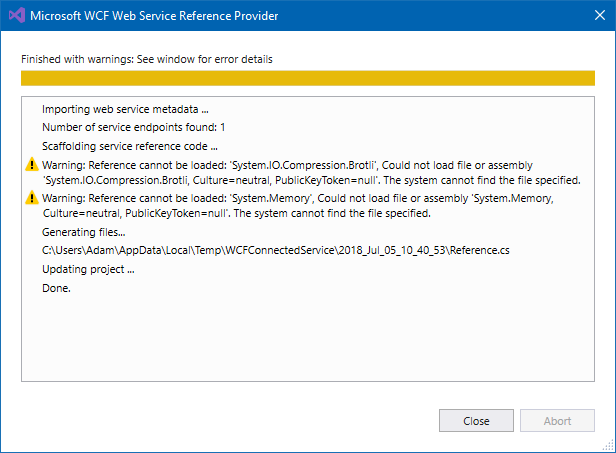
It seemed to have generated the code, but is there anything to be concerned about?
This warning does _not_ occur when the project is netstandard2.0, however.
Thanks for working on this!
 AdamDotNet
on 5 Jul 2018
AdamDotNet
on 5 Jul 2018
Hi @AdamDotNet!
No, this is not to be concerned about. Basically, the tool is letting you know that it won't be able to include types from these assemblies as candidates for using them for type reuse when generating the proxy code. By default all assembly references are selected so you don't have to pick individual assemblies. It is very unlikely these assemblies define types that can be used for representing your web service contract types.
BTW: In the future it would be great if you open a separate issue when asking about something that is not related to the current issue, this way other people can find the issue more easily and benefit from the discussion in it. Thank you!
mlacouture
on 5 Jul 2018
Hey @mlacouture ,
Just want to personally thank you for the temporary solution you offered here, and also just wanted to let you know that with the most recent version of vs 2017 and the most recent .net core this problem still persists and i had to use the your suggested workaround.
Thanks!
 Bodokh
on 7 Aug 2018
Bodokh
on 7 Aug 2018
Hi @Bodokh!
I'm glad the workaround helped you but I'm surprised you are still hitting this problem with the latest version of VS 2017, can you confirm you have Visual Studio 2017 v15.8 P2+ installed?
mlacouture
on 7 Aug 2018
Hey @mlacouture,
I'm using VS Professional version 15.7.6, I don't see any pending updates in the Notifications window.
Bodokh
on 8 Aug 2018
@Bodokh, thank you for checking the VS version, not sure why you don't see notifications, but you need at least Visual Studio 2017 v15.8 Preview 2 to get the fix.
thanks,
mlacouture
on 8 Aug 2018
@mlacouture Strange, my VS is up to date. Could it be that the update is only available for the community edition?
Bodokh
on 9 Aug 2018
Hi, I also have the latest version of VS Professional which is stated as 15.7.6 and I am having the exact same issue. Thanks
 jmcelreavey
on 13 Aug 2018
jmcelreavey
on 13 Aug 2018
I have this issue too. It worth noting, I am trying to consume non-WCF but SOAP web-service. I have not tried workaround from above messages. Is it actual at this moment?
Microsoft Visual Studio Community 2017
Version 15.8.1
VisualStudio.15.Release/15.8.1+28010.2003
Microsoft .NET Framework
Version 4.7.02558
 grsmvmsk
on 24 Aug 2018
grsmvmsk
on 24 Aug 2018
As mentioned before, you need Visual Studio 2017 v15.8 Preview 2 at least, v15.8 RTM is already out.
mlacouture
on 24 Aug 2018

I've been unable to get it to work. I have the latest version installed as done an update already. Currently using Visual Studio 2017 v15.8 Preview 2. Any idea on how I would be able to add this service reference?
 gingjonesy
on 6 Sep 2018
gingjonesy
on 6 Sep 2018
Having this issue using the dotnet cli on MacOS.
 avesse
on 24 Oct 2018
avesse
on 24 Oct 2018
Hi @avesse
Based on the error message it seems you are adding the tool as a _PackageReference_ to the project instead of a _DotNetCliToolReference,_. See the Getting Started page for details on how to setup the tool. If that's not the case, can you run the tool with the debug verbosity and provide the log file? you may want to restore nuget packages for the project first. thanks,
mlacouture
on 25 Oct 2018
Related issues
 weitzhandler
·
6Comments
weitzhandler
·
6Comments
 IGx89
·
6Comments
IGx89
·
6Comments
 Petermarcu
·
4Comments
Petermarcu
·
4Comments
 cristicatalan
·
4Comments
cristicatalan
·
4Comments
 martinspasovski
·
3Comments
martinspasovski
·
3Comments
Most helpful comment
Hi @sliceofbytes
Thank you again for reporting this problem; it is very unfortunate that this was not fixed; I'm sorry about it.
I can offer a workaround while the fix for this issue is released in case you absolutely need to run this for NET Core v2.1:
Locate the temporary folder created by the
WCF Web Service Reference connected serviceafter the failure, and fix up thenuget.configfile generated on this folder, the folder path should look like the following:%USERPROFILE%\AppData\Local\Temp\WCFConnectedService\2018_Apr_24_16_00_36\svcutil_starterEdit the nuget.config to fix the location (directory) of the svcutil nuget package, it should look like the following after the fix:
Now from this directory restore the dotnet-svcutil NuGet package by running the following command:
>dotnet restoreOnce you complete all these steps you should be able to run the WCF Web Service Reference wizard successfully.
Observe that this workaround is not a supported scenario so it should not be treated as a permanent solution.
I hope this helps,