Wcf: Calling any WCF service Task-based Async methods from Xamarin fails
I have hit the same issue noted here https://bugzilla.xamarin.com/show_bug.cgi?id=51959
To reproduce
1) Using VS 2017 15.5.2
2) Create a Xamarin cross platform app and select '.NET standard option' and 'Android'
3) Since it's not possible to add a web service reference to the shared assembly (will open separate bug) add a .NET standard 2.0 class library project to host the web service reference.
4) Create a reference to a WCF service from the class library. Using basicHttpBinding will do.
5) All methods in the service are async, which is fine, except calling one (called GetVersion in this case) results in:
Error in deserializing body of request message for operation 'GetVersion'. OperationFormatter encountered an invalid Message body. Expected to find node type 'Element' with name 'GetVersion' and namespace 'hexcel.com'. Found node type 'Element' with name 'GetVersionAsync' and namespace 'hexcel.com'
 PhilPJL
All 75 comments
I've created a sample project showing the issue.
You'll need to publish WcfService - which is pretty much the default WCF service project created by VS - to IIS and then recreate the web reference in the XamarinTestServices project.
PhilPJL
on 30 Dec 2017
Hi @PhilPJL
I'll take a look at this problem and report back as soon as I have the chance to. Thank you for reporting this issue.
Miguel Lacouture
 mlacouture
on 8 Jan 2018
mlacouture
on 8 Jan 2018
WCF Connected Service generates the modern task-based asynchronous (TBA) client proxy code. The code can be compiled fine in a .NET Standard library. When this library is used at the runtime, it requires the WCF implementation of the actual runtime framework supports TBA. TBA is supported by WCF on .NET Core and .NET Framework. After discussing with @mconnew, we believe the root-cause of the issue is that the WCF implementation in Xamarin/mono does not support TBA. Xamarin/mono implementation supports the old style async programming model (APM Begin/End) only.
To solve this issue, the WCF implementation in Xamarin/mono needs to be updated to catch up what .NET Framework has for many years. Add @marek-safar and @akoeplinger from Xamarin team. Is this something you can plan for Xamarin/mono? There are quite a few reports of this issue recently. In the latest VS2017 update, Xamarin project offers to create .NET Standard library by default template, so more customers may run into this issue in the future.
 zhenlan
on 10 Jan 2018
zhenlan
on 10 Jan 2018
Updating Xamarin implementation of WCF is something we'd certainly like to do but it's not a simple task. Due to its complexity and amount of work needed we have been postponing the work for some time.
 marek-safar
on 10 Jan 2018
marek-safar
on 10 Jan 2018
@marek-safar Maybe time to stop postponing it? You love a challenge though?
@zhenlan Is there anything you can do in the WCF Connected Service tool to work around this limitation until Xamarin implements TBA?
PhilPJL
on 11 Jan 2018
Friends, greetings.
I need this support too. The WCF Web Service tool could generate the methods with begin / end, this would solve the problem.
It does not make any sense to use Net Standard with Xamarin Forms if we can not use a web service building with WCF.
 rspulini
on 12 Jan 2018
rspulini
on 12 Jan 2018
@marek-safar, is Xamarin using a stale version of WCF from mono? Having a quick look at the mono source code, it looks like mono already has all of the pieces required. There's already an implementation of TaskCreator that's needed by ServiceChannelProxy. There's code to strip the "Async" suffix off the method name to get the operation name here so it looks like mono shouldn't be having this problem. In fact, looking at the commit history of ServiceReflector.cs it was you who pulled in the implementation from Microsoft in 2014.
Edit: I just realized those files are copied from referencesource and aren't actually used by mono
 mconnew
on 12 Jan 2018
mconnew
on 12 Jan 2018
@marek-safar, we got more and more reports that Xamarin customers are running into this issue. Is this something you can prioritize?
zhenlan
on 15 Feb 2018
Greetings!
How is this question?! Is there a solution? Thanks!
rspulini
on 16 Mar 2018
Anyone have a Workaround for this issue ? Based on what I logged, this implementation use the method's name instead of the correct object :
<s:Envelope xmlns:s="http://schemas.xmlsoap.org/soap/envelope/">
<s:Body>
<GetUserAsync xmlns="http://tempuri.org/">
<UserName>JOHN_DOE</UserName>
</GetUserAsync>
</s:Body>
</s:Envelope>
instead of:
<s:Envelope xmlns:s="http://schemas.xmlsoap.org/soap/envelope/">
<s:Body>
<GetUser xmlns="http://tempuri.org/">
<UserName>JOHN_DOE</UserName>
</GetUser>
</s:Body>
</s:Envelope>
If you rewrite in your Reference.cs the method, the call is correct but the same problem occur with the response, he's not able to unserialize the response:
System.Runtime.Serialization.SerializationException: Error in line 1 position 135. Expecting state 'Element'.. Encountered 'Text' with name '', namespace ''.
 watcheur
on 12 Apr 2018
watcheur
on 12 Apr 2018
@watcheur there is a workaround described in the linked Xamarin Bugzilla
Another option is to create a Portable Class Library project (as per Comment 3), use the old "Project > Add Service Reference..." menu command (rather than the new "Project > Add Connected Service" menu command), and then copy the generated Reference.cs proxy from the PCL into the .NET Standard project. Generating the proxy this way automatically avoids the
IExtensibleDataObjectandExtensionDataObjecttypes.
Still this issue needs fixing. @marek-safar any updates from your side?
 Weishaupt
on 13 Apr 2018
Weishaupt
on 13 Apr 2018
@Weishaupt I did try the workaround (Bug #51959) that included creating the Reference.cs file by command line using SvcUtil.exe /async /tcv:Version35 http://127.0.0.1/Service1.svc /out:Reference.cs. I could create the Reference.cs file but after I included it in my Xamarin Forms project I still got the following error when I called the service. The deserialization is still not working correctly on the client. I am running Visual Studio 2017 15.7.0 Preview - Error Message Below
Error in deserializing body of request message for operation 'GetData'. OperationFormatter encountered an invalid Message body. Expected to find node type 'Element' with name 'GetData' and namespace 'http://tempuri.org/'. Found node type 'Element' with name 'GetDataAsync' and namespace 'http://tempuri.org/'
 shelly2016
on 24 Apr 2018
shelly2016
on 24 Apr 2018
@shelly2016 I didn't try that workaround, but the one quoted in my previous post.
- Create a new PCL Project with the _legacy_ code sharing strategy template
Class Library (Legacy Portable) - Use the old _Project > Add Service Reference..._ command
- Copy over the generated sources and rename as neccesary.
This works for my right now. Still not a long term solution. I would really appreciate if the Xamarin Team would be prioritizing this issue.
Weishaupt
on 27 Apr 2018
I did finally get that to work. But you can't use async and await to handle
the threading for your webservice call. You have to do what we did
previously
and use the Complete event on your webservice client object to capture the
return values.
Its a little different when it comes to code flow but allows WCF to work
with Xamarin.
On Fri, Apr 27, 2018, 1:49 PM Marvin Dickhaus notifications@github.com
wrote:
@shelly2016 https://github.com/shelly2016 I didn't try that workaround,
but the one quoted in my previous post.
- Create a new PCL Project with the legacy code sharing strategy
template Class Library (Legacy Portable)- Use the old Project > Add Service Reference... command
- Copy over the generated sources and rename as neccesary.
This works for my right now. Still not a long term solution. I would
really appreciate if the Xamarin Team would be prioritizing this issue.—
You are receiving this because you were mentioned.
Reply to this email directly, view it on GitHub
https://github.com/dotnet/wcf/issues/2463#issuecomment-385044805, or mute
the thread
https://github.com/notifications/unsubscribe-auth/AL0e8G3yZYM5XH8RKAeBLhf0iPKcRfYWks5ts1oQgaJpZM4RPOsP
.
shelly2016
on 27 Apr 2018
shelly2016 Could you show me how you solved it?
Thanks
rspulini
on 27 Apr 2018
This was from my test code project hope it helps. See comments below in
code. I hope it helps.
namespace TestAppService
{
public partial class MainPage : ContentPage
{
public MainPage()
{
InitializeComponent();
btn.Clicked += Btn_Clicked;
}
private void Btn_Clicked(object sender, EventArgs e)
{
TestCall();
}
async
private void TestCall()
{
try
{
//>>>Set the below address for your local test environment
- This is used for Android
var address = new System.ServiceModel.EndpointAddress("
http://10.1.10.242:70/Service1.svc");
BasicHttpBinding bind = new BasicHttpBinding();
var svc = new ServiceReference1.Service1Client(bind,
address);
//>>>>Set the GetDataCompleted event to call method
Svc_GetDataCompleted
svc.GetDataCompleted += Svc_GetDataCompleted;
//>>>Make call to service - See below method
Svc_GetDataCompleted() gets called when webservice returns results
svc.GetDataAsync(5);
}
catch(System.Exception ex)
{
string msg = ex.Message;
}
}
private void Svc_GetDataCompleted(object sender,
ServiceReference1.GetDataCompletedEventArgs e)
{
// Result is returned down here.
var result = e.Result;
}
}
}
On Fri, Apr 27, 2018 at 4:04 PM, rspulini notifications@github.com wrote:
shelly2016 Could you show me how you solved it?
Thanks
—
You are receiving this because you were mentioned.
Reply to this email directly, view it on GitHub
https://github.com/dotnet/wcf/issues/2463#issuecomment-385079484, or mute
the thread
https://github.com/notifications/unsubscribe-auth/AL0e8FIHsowtUixf8ILSKraEqWmBjM3rks5ts3m2gaJpZM4RPOsP
.
shelly2016
on 27 Apr 2018
@rspulini
Step 1 - Generate a References.cs from the command line. (Point it to your service)
SvcUtil.exe /async /tcv:Version35 http://127.0.0.1/Service1.svc /out:Reference.cs.
Step 2 - Replace Reference.cs in your Xamarin project with the newly created one.
Step 3 - Follow the code I posted above. You may have to configure it differently to test IOS on a local webservice. ( I also deployed my webservice to my local installation IIS. )
Step 4 - follow the above posted code.
shelly2016
on 27 Apr 2018
I'm just another guy that having this issue. Hope to see a solution soon!
My workaround is to manually edit the generated Reference.cs by adding the non task-based operation. Hope this help someone.
 noctis0430
on 6 May 2018
noctis0430
on 6 May 2018
We are also experiencing this issue after trying to convert from Web Reference to the Connected Services method.
The really troubling part of this whole ordeal is that Microsoft has updated the documentation regarding WCF services here: https://docs.microsoft.com/en-us/xamarin/cross-platform/data-cloud/web-services/walkthrough-working-with-wcf
In this documentation the Connected Services automatically create task based async methods, which are then used in an Android activity of a Xamarin.Android project. The troubling part is that is does not work in reality due to the bug being tracked here. How did this even happen?
Does Microsoft create the documentation for how things should work and then not test that it actually works in practice?
With the new defaults for Xamarin.Projects in VS2017 15.5 and higher using these connected services through a .Net Standard 2.0 library, and the official help documentation outlining how it works with examples, I really hope this issue is resolved, otherwise we have brand new documentation that is based on a fantasy, not implemented features.
 dnixonCES
on 9 May 2018
dnixonCES
on 9 May 2018
i am experiencing same runtime exception but only with .Android build, .UWP works fine: i am able to call the service in async manner without issues from it.
solution is made of:
Xamarin Forms v.2.5.0.280555 project targeting net standard 1.4 library (not going up due to lack of support on windows phones)
UWP project configured with target 16299 and min version 15063.
Android project configured with: min api version 22, target api 22, compiled using latest (oreo 8.1)
any ideeas?
 andreisbarnea
on 22 May 2018
andreisbarnea
on 22 May 2018
you can use application => "Service Reference Generator For .net Standard & Xamarin.Forms" from : https://files.fm/u/mduffseg
first read help in application
 erfankh67
on 1 Jun 2018
erfankh67
on 1 Jun 2018
i already try this tool, doing the 3 steps in the help, but i got a new error:
"Unhandled Exception:
System.InvalidOperationException: A Binding must be configured for this channel factory"
Any ideas?
 darklink000
on 8 Jun 2018
darklink000
on 8 Jun 2018
I am also experiencing this. Essentially WCF connected Service is useless for Xamarin.
I've had to use this workaround for iOS already.
But now async also doesnt work
 JKennedy24
on 27 Jun 2018
JKennedy24
on 27 Jun 2018
Do your services have specific settings?
From: Octavio Rivera Arellano notifications@github.com
Sent: Friday, June 8, 2018 9:32:38 PM
To: dotnet/wcf
Cc: erfankh67; Comment
Subject: Re: [dotnet/wcf] Calling any WCF service Task-based Async methods from Xamarin fails (#2463)
i already try this tool, doing the 3 steps in the help, but i got a new error:
"Unhandled Exception:
System.InvalidOperationException: A Binding must be configured for this channel factory"
Any ideas?
—
You are receiving this because you commented.
Reply to this email directly, view it on GitHubhttps://github.com/dotnet/wcf/issues/2463#issuecomment-395823832, or mute the threadhttps://github.com/notifications/unsubscribe-auth/Aly5xTRxznp3ZxD51-3_pyDg5inWMfxoks5t6q4ugaJpZM4RPOsP.
erfankh67
on 29 Jun 2018
Is anyone having any luck with this issue? Feel like I'm running in circles trying the above workarounds.
I'm trying to set up a .net standard 2.0 class library that will be used by my Xamarin.Forms setup to consume my WCF services, but just keep getting the "strongly typed parameters" error.
 marcodafonseca
on 2 Jul 2018
marcodafonseca
on 2 Jul 2018
Same problem here...
 acaliaro
on 3 Jul 2018
acaliaro
on 3 Jul 2018
Our "solution" currently has been to use Web References for the time being, force the server to use the XMLSerializer (to eliminate the Specified boolean issue), and wrap everything on the client side with:
await
Task.Run(() => { //Call your service here });
Basically giving up on the new documentation completely and using Service References at all, in favor of the old style Web References until these issues are ever resolved.
I'll note that this also solves the issue of IIS dynamic compression not working (likely another bug in the implementation).
dnixonCES
on 3 Jul 2018
I solved it but I don't use task and await with my solution. I use async
calls and I generate the reference.cs file using the command line to
generate an older version of the WCF compatible cs file. I posted a step
by step directions how to do this 2 months ago on this forum. see above. If
I have time I may create a video to help others.
On Tue, Jul 3, 2018, 2:10 PM Alessandro Caliaro notifications@github.com
wrote:
Same problem here...
—
You are receiving this because you were mentioned.
Reply to this email directly, view it on GitHub
https://github.com/dotnet/wcf/issues/2463#issuecomment-402246297, or mute
the thread
https://github.com/notifications/unsubscribe-auth/AL0e8LTrapS0Pf9vWNefzukPck0Av0K-ks5uC7OSgaJpZM4RPOsP
.
shelly2016
on 3 Jul 2018
My program does the same to your solution
From: shelly2016 notifications@github.com
Sent: Tuesday, July 3, 2018 2:12 PM
To: dotnet/wcf
Cc: erfankh67; Comment
Subject: Re: [dotnet/wcf] Calling any WCF service Task-based Async methods from Xamarin fails (#2463)
I solved it but I don't use task and await with my solution. I use async
calls and I generate the reference.cs file using the command line to
generate an older version of the WCF compatible cs file. I posted a step
by step directions how to do this 2 months ago on this forum. see above. If
I have time I may create a video to help others.
On Tue, Jul 3, 2018, 2:10 PM Alessandro Caliaro notifications@github.com
wrote:
Same problem here...
—
You are receiving this because you were mentioned.
Reply to this email directly, view it on GitHub
https://github.com/dotnet/wcf/issues/2463#issuecomment-402246297, or mute
the thread
https://github.com/notifications/unsubscribe-auth/AL0e8LTrapS0Pf9vWNefzukPck0Av0K-ks5uC7OSgaJpZM4RPOsP
.
—
You are receiving this because you commented.
Reply to this email directly, view it on GitHubhttps://github.com/dotnet/wcf/issues/2463#issuecomment-402293328, or mute the threadhttps://github.com/notifications/unsubscribe-auth/Aly5xadF5CEkqgwWwpDAbeMed93Wm7Mbks5uC95PgaJpZM4RPOsP.
erfankh67
on 6 Jul 2018
You can create your web reference using the SvcUtil file
From: Alessandro Caliaro notifications@github.com
Sent: Tuesday, July 3, 2018 11:10 AM
To: dotnet/wcf
Cc: erfankh67; Comment
Subject: Re: [dotnet/wcf] Calling any WCF service Task-based Async methods from Xamarin fails (#2463)
Same problem here...
—
You are receiving this because you commented.
Reply to this email directly, view it on GitHubhttps://github.com/dotnet/wcf/issues/2463#issuecomment-402246297, or mute the threadhttps://github.com/notifications/unsubscribe-auth/Aly5xYWgqEVJnR7sL_7TOdOWRRx-3MWiks5uC7OSgaJpZM4RPOsP.
erfankh67
on 6 Jul 2018
You can create your web reference using the SvcUtil file
From: Marco da Fonseca notifications@github.com
Sent: Sunday, July 1, 2018 8:51 PM
To: dotnet/wcf
Cc: erfankh67; Comment
Subject: Re: [dotnet/wcf] Calling any WCF service Task-based Async methods from Xamarin fails (#2463)
Is anyone having any luck with this issue? Feel like I'm running in circles trying the above workarounds.
I'm trying to set up a .net standard 2.0 class library that will be used by my Xamarin.Forms setup to consume my WCF services, but just keep getting the "strongly typed parameters" error.
—
You are receiving this because you commented.
Reply to this email directly, view it on GitHubhttps://github.com/dotnet/wcf/issues/2463#issuecomment-401665108, or mute the threadhttps://github.com/notifications/unsubscribe-auth/Aly5xcD5_DCzxsy42072Kb0jsNM4O74Sks5uCZjTgaJpZM4RPOsP.
erfankh67
on 6 Jul 2018
You can create your web reference using the SvcUtil file
From: JKennedy24 notifications@github.com
Sent: Wednesday, June 27, 2018 7:31 AM
To: dotnet/wcf
Cc: erfankh67; Comment
Subject: Re: [dotnet/wcf] Calling any WCF service Task-based Async methods from Xamarin fails (#2463)
I am also experiencing this. Essentially WCF connected Service is useless for Xamarin.
I've had to use this workaroundhttps://stackoverflow.com/questions/10054581/monotouch-wcf-how-to-consume-the-wcf-service-without-svcutil for iOS already.
But now async also doesnt work
—
You are receiving this because you commented.
Reply to this email directly, view it on GitHubhttps://github.com/dotnet/wcf/issues/2463#issuecomment-400693644, or mute the threadhttps://github.com/notifications/unsubscribe-auth/Aly5xX6TDEHPW9Jit0yUGG9aDyZ1qWwqks5uA5cygaJpZM4RPOsP.
erfankh67
on 6 Jul 2018
The ONLY working solution for me was using :
SvcUtil.exe /syncOnly
This removes the Async methods and the "strongly typed" error on Android disappeared for me. Somehow the error still appeared to me even if I used the sync methods exposed by client with both async and sync methods.
Client with ONLY sync methods works instead, and you need the /syncOnly option.
Please fix this, it's ridiculous to spend DAYS figuring out how to integrate soap services in 2018.
 amoscatelli
on 17 Jul 2018
amoscatelli
on 17 Jul 2018
I did the same. Nothing else works.
marcodafonseca
on 17 Jul 2018
I also confirm that await Task.Run(() => { /* API CALLING */ }) is also required, or something strange happens when accessing the response.
amoscatelli
on 20 Jul 2018
Any news from xamarin team? or WCF Team?
 jupagose
on 14 Aug 2018
jupagose
on 14 Aug 2018
Hello, Any news from xamarin team? or WCF Team?
rspulini
on 21 Aug 2018
@mlacouture It's 9 months since I raised this. Is anything happening with Xamarin support for async await?
I just tried creating a cross platform solution with VS 15.8.2.
Attempting to use 'Microsoft WCF Web service reference provider' from the .net standard project fails
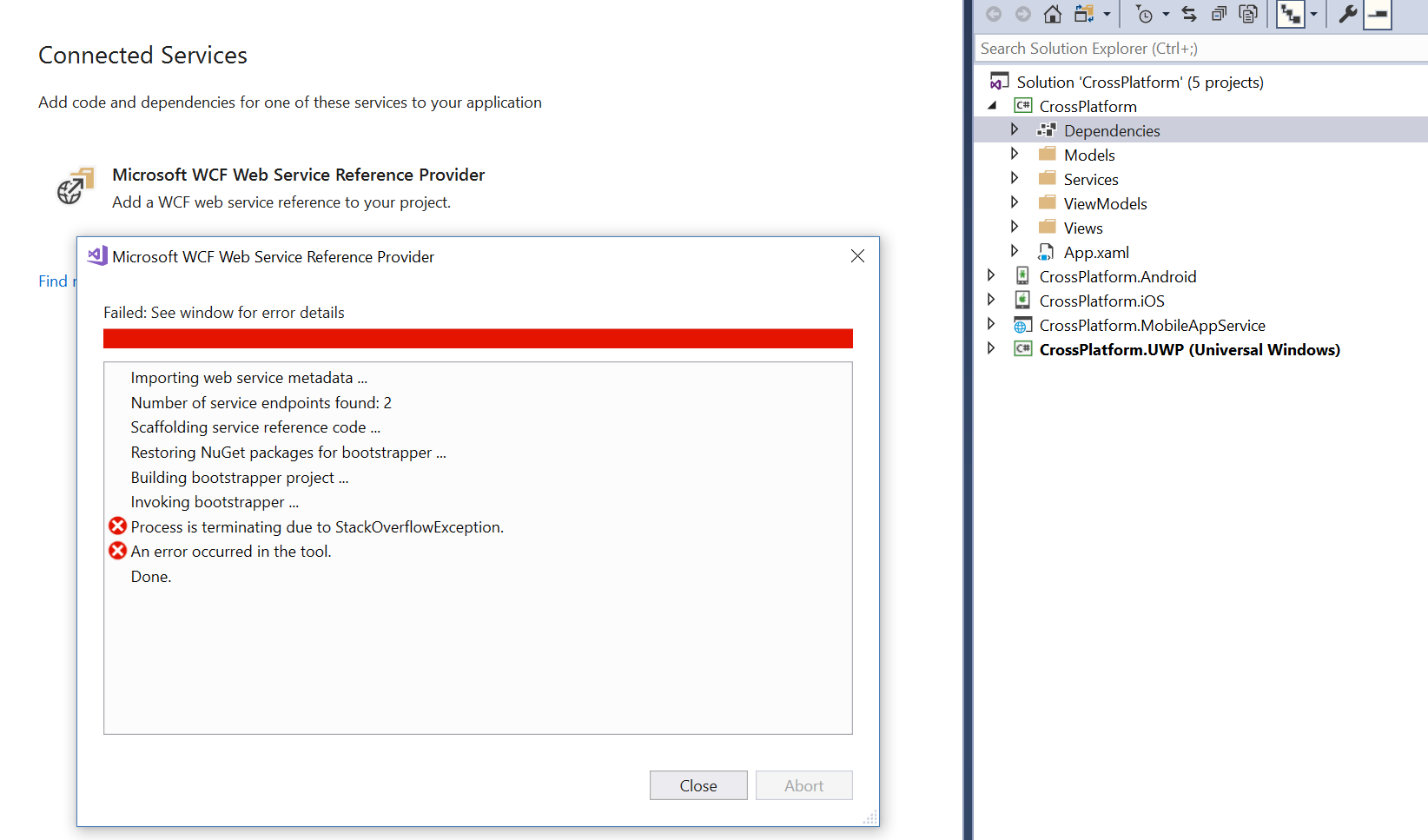
The output window shows exactly the same messages.
I can successfully use 'add web reference' on the Android, IOS or UWP projects but they all result in old event based async.
Is anything happening, going to happen?
PhilPJL
on 30 Aug 2018
There is someone working on this issue?
jupagose
on 30 Aug 2018
@marek-safar?
mlacouture
on 1 Sep 2018
@jupagose no, not at this moment
marek-safar
on 6 Sep 2018
@marek-safar That means xamarin wcf relationship die here?
jupagose
on 6 Sep 2018
This post will start as a bit of a rant, then go on to show you how to fix the problem.
This is something that should be very easy for developers to use, and probably used by most apps as calling home to a server is a VERY common requirement.... Unfortunately it's currently a bit of a nightmare where a new developer has to go way too far down the rabbit hole of code that should be abstracted away in 2018. Taking a year to fix it is NOT acceptable.
Finding how to fix it is also a bit of a mess as the details are NOT included in the official documentation, and there are forum posts all over the place of people asking how to do this. Can we PLEASE get this fixed by the visual studio/xamarin team? The wizard to import a service should produce working code with no networking or internal implementation knowledge required.
These files show most of the alterations needed to the auto-generated code to get it working for both android and ios. (Ignore the ios on the filename. The code involved should be added to all projects)
https://github.com/sami1971/SimplyMobile/blob/master/Core/Plugins/Stocks/SimplyMobile.Plugins.WcfStockService/StockQuoteServiceClient.cs
https://github.com/sami1971/SimplyMobile/blob/master/Core/Plugins/Stocks/SimplyMobile.Plugins.WcfStockService/StockQuoteServiceClient.iOS.cs
The References.cs code the wizard produces has a class that implements ClientBase. It needs to be altered in the following ways:
1.) Setup the default EndpointAddress and BasicHttpBinding based on the url entered into the wizard, and some default sane values, (provided in linked code.)
2.) Implement functions that are named EXACTLY the same as the WCF's provided ones in addition to the async ones that it currently makes. (in example code this shows as both GetStockQuote AND GetStockQuoteAsync) (Changing the name of functions in someone else's API is a TERRIBLE policy and also breaks the code to import many android libraries.)
3.) Override the CreateChannel function and make it point to a new class that implements ChannelBase
4.) In the ChannelBase implementing class generate functions for BOTH the original function name AND the Async version.
5.) The linked code uses Invoke that does not exist anymore. Use the following code as a guide instead:
public returnType getThingFromServer(string paramNameGoesHere, string param2, int param3)
{
    IAsyncResult result = BeginInvoke("getThingFromServer", new object[] { paramNameGoesHere, param2, param3}, null, null);
    result.AsyncWaitHandle.WaitOne();
    return (returnType )EndInvoke("getThingFromServer", new object[] { paramNameGoesHere, param2, param3}, result);
}
With these fixed, users can call use the wizard to connect to a service as if it was a local class without needing to know implementation details or using command line parameters. (Presuming they turn off the broken "reuse types in referenced assemblies" option.)
 moginheden
on 17 Oct 2018
moginheden
on 17 Oct 2018
I have had the same problem after upgrading an MVVMCross PCL to .net Standard, but as I was previously using a proxy generated by SLSVCUTIL that had the older style async (APM) based async callbacks, I found using the /a /tcv:325 arguments in SVSUTIL produced similar proxy classes.
Reinstalling Silverlight and its sdks and using SLSVCUTIL again was another work around.
With this in mind, @marek-safar, will this be fixed in the future, even if there is a long lead time on it, otherwise am I stuck with the old style async (APM) callbacks?
Kind Regards
Steven
 SSELLIOTTHOME
on 1 Dec 2018
SSELLIOTTHOME
on 1 Dec 2018
How is this still a thing?
Can we not just;
- look to see if adding reference to .net standard project
- if yes - only implement synchronous methods
- also generate ios workaround code.
JKennedy24
on 11 Jan 2019
What is worse is that their documentation is just plain wrong.
 SSElliott
on 12 Jan 2019
SSElliott
on 12 Jan 2019
Time to celebrate "One year with important bug that stops the project"!
There shouldn't be this kind of bugs in Xamarin, it's slowly killing Xamarin.
 Ulf-Ason
on 17 Jan 2019
Ulf-Ason
on 17 Jan 2019
Happy birthday !!!!
or worst birthday ?
jupagose
on 17 Jan 2019
Its time to face reality. This technology as great as it is, no longer is
being supported. Maybe it could be handled in opensource. Anyway this I
think has been abandoned
On Thu, Jan 17, 2019, 4:48 PM jupagose <[email protected] wrote:
Happy birthday !!!!
or worst birthday ?—
You are receiving this because you were mentioned.
Reply to this email directly, view it on GitHub
https://github.com/dotnet/wcf/issues/2463#issuecomment-455344285, or mute
the thread
https://github.com/notifications/unsubscribe-auth/AL0e8FaVRM5OxlO97FI3ggQzuk27xHmmks5vEO-XgaJpZM4RPOsP
.
shelly2016
on 24 Jan 2019
@shelly2016 Whilst this may well be true, it does not excuse a complete lack of comment by Microsoft, faulty and incorrect Xamarin documentation and a lack of upgrade path suggestions. The plain fact is that they broke existing functionality. SLSVCUTIL used to work perfectly well. By removing it they created additional work for Dev. teams. If we did this to our customers, we would not have a business. I think this thread is becoming a sounding box unfortunately. I tweeted this thread but only got a 'like' from Microsoft. I think that says it all.
SSElliott
on 24 Jan 2019
For those with similar issue, you need to manually edit the Reference.cs file manually and add the synchronous methods manually. Start by defining your method in the interface, then in the serviceclient class
 kilonzo4
on 24 Jan 2019
kilonzo4
on 24 Jan 2019
why does no one use svcutil?
SvcUtil.exe /tcv:Version35 https://mywebservice /out:"C:\mydirectory\Reference.cs" /syncOnly /namespace:*,MyNameSpace
JKennedy24
on 24 Jan 2019
@JKennedy24 We are still left with the problem that iOS does not allow dynamic code compilation and it will not work on that platform. Not an issue with SLSVCUtil.
SSElliott
on 24 Jan 2019
@SSElliott use the workaround highlighted here:
https://stackoverflow.com/a/10056431/2987066
I have extra partial classes called "ServiceFix" that look something like this:
using System;
using System.Collections.Generic;
using System.Text;
using System.Threading;
using Xamarin.Forms;
using System.ServiceModel;
using PresenterService;
//https://github.com/dotnet/wcf/issues/2463
public partial class PresenterFileServiceClient
{
protected override IPresenterFileService CreateChannel()
{
if (Device.RuntimePlatform == Device.iOS)
{
return new PresenferFileServiceClientChannel(this);
}
else
{
return base.CreateChannel();
    }
}
private class PresenferFileServiceClientChannel : ChannelBase<IPresenterFileService>, IPresenterFileService
{
public Dictionary<string, string> RequestLiveContainerDownloads(int blah, string userName, string Password, string[] blah2)
{
object[] _args = new object[4];
_args[0] = blah;
_args[1] = userName;
_args[2] = Password;
_args[3] = blah2;
ManualResetEvent mre = new ManualResetEvent(false);
Thing returnedObject= null;
base.BeginInvoke("ServiceMethodName", _args,
new AsyncCallback(ar =>
{
try
{
returnedObject= (Thing)base.EndInvoke("ServiceMethodName", new object[0], ar);
}
catch (Exception)
{
}
mre.Set();
}), null);
mre.WaitOne();
return downloads;
}
}
}
Thats why i think this workaround would be really simple for the team to implement
JKennedy24
on 24 Jan 2019
@JKennedy24, although this doesn't address the root problem, I'd like to suggest an improvement to your code. I suspect you have edited some code out as the variable downloads that you return isn't defined anywhere. So I'm going to give a generic example which you should easily be able to apply.
        public Task<Foo> GetFooAsync(int blah, string[] blah2)
        {
            object[] _args = new object[2];
            _args[0] = blah;
            _args[1] = blah2;
            var tcs = new TaskCompletionSource<Foo>();
            base.BeginInvoke("ServiceMethodName", _args,
                new AsyncCallback(ar =>
                {
                    var thisTcs = ar.AsyncState as TaskCompletionSource<Foo>;
                    try
                    {
                        var returnedObject = (Foo)base.EndInvoke("ServiceMethodName", new object[0], ar);
                        thisTcs.TrySetResult(returnedObject);
                    }
                    catch (Exception e)
                    {
                        thisTcs.TrySetexception(e);
                    }
                }), tcs);
            return tcs.Task;
        }
Then you can simple await your method call.
mconnew
on 24 Jan 2019
@mconnew Thanks for the advice. I'll give your code a try. My workaround seems to get around the problem (iOS cannot dynamically generate code). Although I dont fully understand the extent of the root of the problem
JKennedy24
on 25 Jan 2019
I thought I'd give some technical details of some of the problems that there are with the Xamarin stack and the code generated by the Connect Services tool.
- Mono (which Xamarin is based on) doesn't support Task based async operation contracts. Back in 2012 when .NET 4.5 was released, WCF added support for Task based contracts. This requires a few changes in the implementation to accomodate. First, the name of the method needs to be mapped to remove the Async suffix. So a contract interface
IServicewith an operation method called DoWorkAsync needs to use the action namehttp://tempuri.org/ISimpleService/DoWork. As the Mono implementation doesn't support Tasks, this doesn't happen and the request action gets generated ashttp://tempuri.org/ISimpleService/DoWorkAsync. When the service receives this, the action name doesn't match. The second thing which needs to be changed is the return type needs to be unwrapped from theTask. So for example, if the return type of the method isTask<int>, it needs to be unwrapped to justint. A return type ofTaskwill becomevoid. The third (and related) change is that aTaskCompletionSource<TResult>needs to be created after the request is sent and theTask<TResult>returned back to the called. On receiving the response, instead of returning to the caller the deserialized response object, the response object needs to be set as the result to theTaskCompletionSource<TResult>to complete the return Task. Any exception which would be thrown needs to be set instead. None of this has been implemented in Mono which is why Xamarin doesn't support Task base interfaces. - WCF needs to generate the client proxy which implements the service contract at runtime. On .NET Framework we use the .NET remoting transparent proxy feature to achieve this. But .NET remoting doesn't exist on .NET Core so we switched to using a Ref.Emit solution (basically we pulled in the silverlight implementation) which generates a class at runtime which implements the interface. iOS doesn't support running JIT so a Xamarin app on iOS needs to be compiled ahead of time (AOT). This causes a problem for WCF as Ref.Emit requires JIT. We also had the same problem on UWP as that's also AOT compiled. The solution was the creation of the class
DispatchProxy. This provides a clean API surface to generate a proxy and calls an abstract method with the MethodInfo and arguments of the interface method that was called. We then use that to generate our request. On UWP there's a piece of the AOT compilation toolchain which looks for usages ofDispatchProxyand pre-generates a C# code based implementation which supports the interfaces that it was used with and merges that into the application. But our implementation (the code in this repo) isn't used by Xamarin on iOS, it's still the implementation from Mono. This means a special version of the generated WCF client (that we normally generate with the Connected Services tool) which doesn't depend on the dynamic proxy generation is used. Which is why base.BeginInvoke/base.EndInvoke are being called, to bypass this functionality.
The Connected Services tool is only used for applications/libraries targeting .NET Core/.NET Standard. Ultimately it comes down to the problem being that the Xamarin implementation of WCF doesn't fully support the features of WCF.
@marek-safar, is there a bug tracking this issue for Xamarin/Mono? Is it linkable from here?
mconnew
on 28 Jan 2019
@mconnew it's probably better to create a new one and link it from there. The closest one we have is https://github.com/mono/mono/issues/6938
marek-safar
on 30 Jan 2019
what time can fixed the problem .
 wwfm
on 21 May 2019
wwfm
on 21 May 2019
Has there been any progress made on this?
Thanks
 Shazib
on 29 Nov 2019
Shazib
on 29 Nov 2019
Has there been any progress made on this?
Thanks
Just forget about it, I recommend you migrate to AutoRest, just build your api rest generate swagger and Autorest build a C# client for you.
jupagose
on 29 Nov 2019
Inclined to agree, I rewrote my service as Web API (a wrapper around the existing methods) and put in some OAuth. Microsoft have clearly forgotten all about this and there is no commercial imperative to fix what they broke. It cost a couple of months with testing, but I am better off for it.
SSELLIOTTHOME
on 29 Nov 2019
What about connecting to legacy WCF services?
JKennedy24
on 2 Dec 2019
I Find a solution
 qgcqw
on 5 Dec 2019
qgcqw
on 5 Dec 2019
I Find a solution
what ?
 VisiontechGitHub
on 5 Dec 2019
VisiontechGitHub
on 5 Dec 2019
Xamarin.Forms:
public interface IWCF
{
System.Threading.Tasks.Task
}
public IWCF client= DependencyService.Get
string result= await client.GetDataAsync(1);
xxxxx.Android:
[assembly: Dependency(typeof(xxxxx.Droid.ImpWCF))]
namespace xxxxx.Droid
{
public class ImpWCF:IWCF
{
public string strResult;
    WS.Service1 Service= new WS.Service1();

    TaskCompletionSource<bool> getRequestComplete = null;
    public ImpWCF()
    {
        WebSer.GetDataCompleted += GetDataCompleted;
   }
   public async Task<string> GetDataAsync(int value)
    {
        getRequestComplete = new TaskCompletionSource<bool>();
        Service.GetDataAsync(value, true);
        await getRequestComplete.Task;
        return strResult;
    }
    private void GetDataCompleted(object sender, WS.GetDataCompletedEventArgs e)
    {
        try
        {
            getRequestComplete = getRequestComplete ?? new TaskCompletionSource<bool>();
            if (e.Error == null)
            {
                strResult;= e.Result;
            }
            getRequestComplete?.TrySetResult(true);
        }
        catch (Exception ex)
        {
        }
    }
}
}
qgcqw
on 5 Dec 2019
This does not deal with the underlying problem - you do not mention at all how the proxy was generated, other than how to you call it.
SSELLIOTTHOME
on 5 Dec 2019
As far as i could tell there is no solution other than wrapping up the service client synchronous calls into your own async ones
I ended up moving my WS to ASP.NET Core Web API (REST) and using NSwag to generate client code
Shazib
on 5 Dec 2019
anyway,you can call await GetDataAsync and return a right result. It works really well.
qgcqw
on 6 Dec 2019
Still no solution for this problem, is really a thing to use a PCL after 2 years?
Is WCF no more a solution?
If I need to use legacy service I have to use PCL or rewrite ALL services in a REST way?
Seriously???
 amellini
on 28 Dec 2019
amellini
on 28 Dec 2019
Still no solution for this problem, is really a thing to use a PCL after 2 years?
Is WCF no more a solution?
If I need to use legacy service I have to use PCL or rewrite ALL services in a REST way?
Seriously???
YESSSS SERIOUSLY
Don't wait any longer. You can use the same WCF methods with few modifications into asp.net project. Then you can create a client for "c#" and other languages using swagger and Autorest. It's really simple.
jupagose
on 28 Dec 2019
Of course, i obviously can rewrite 3rd party WCF without source, simple right?
amellini
on 29 Dec 2019
I also ran into this problem.
- My newly generated WCF client for .Net Standard did not work.
- Fortunately I could reuse my old WCF client generated for .Net Framework. But in the current context I cannot regenerate it and have to maintain it by hand.
- Meanwhile I have also implemented a Web API client as a learning path. That works.
- I have kept both varieties running, experimenting with dependency injection of the service clients.
Now being this far, I can imagine to drop WCF. Both for me as the Mono team.
But there could be reasons not to drop it. In that case I think it is necessary for Mono to catch up technically. It is no valid option to make people limping, not able to easily generate or update a WCF client.
Otherwise, that whole path should be dropped, which would of course be a BREAKING change (which it is already).
At least CLARITY is needed about the current state and the roadmap ahead.
 a-einstein
on 6 Mar 2020
a-einstein
on 6 Mar 2020
Just run into this issue, is there any solution ?
Error in deserializing body of request message for operation 'LoginUser'.
 Kalyxt
on 13 Jan 2021
Kalyxt
on 13 Jan 2021
Should we abandon wcf for our developments?
Why still no correction?
 TheNicor
on 29 Apr 2021
TheNicor
on 29 Apr 2021
Related issues
 nicoclau
·
6Comments
nicoclau
·
6Comments
 apdirexyon
·
5Comments
mconnew
·
4Comments
apdirexyon
·
5Comments
mconnew
·
4Comments
 Petermarcu
·
4Comments
mconnew
·
6Comments
Petermarcu
·
4Comments
mconnew
·
6Comments
Most helpful comment
This post will start as a bit of a rant, then go on to show you how to fix the problem.
This is something that should be very easy for developers to use, and probably used by most apps as calling home to a server is a VERY common requirement.... Unfortunately it's currently a bit of a nightmare where a new developer has to go way too far down the rabbit hole of code that should be abstracted away in 2018. Taking a year to fix it is NOT acceptable.
Finding how to fix it is also a bit of a mess as the details are NOT included in the official documentation, and there are forum posts all over the place of people asking how to do this. Can we PLEASE get this fixed by the visual studio/xamarin team? The wizard to import a service should produce working code with no networking or internal implementation knowledge required.
These files show most of the alterations needed to the auto-generated code to get it working for both android and ios. (Ignore the ios on the filename. The code involved should be added to all projects)
https://github.com/sami1971/SimplyMobile/blob/master/Core/Plugins/Stocks/SimplyMobile.Plugins.WcfStockService/StockQuoteServiceClient.cs
https://github.com/sami1971/SimplyMobile/blob/master/Core/Plugins/Stocks/SimplyMobile.Plugins.WcfStockService/StockQuoteServiceClient.iOS.cs
The References.cs code the wizard produces has a class that implements ClientBase. It needs to be altered in the following ways:
1.) Setup the default EndpointAddress and BasicHttpBinding based on the url entered into the wizard, and some default sane values, (provided in linked code.)
2.) Implement functions that are named EXACTLY the same as the WCF's provided ones in addition to the async ones that it currently makes. (in example code this shows as both GetStockQuote AND GetStockQuoteAsync) (Changing the name of functions in someone else's API is a TERRIBLE policy and also breaks the code to import many android libraries.)
3.) Override the CreateChannel function and make it point to a new class that implements ChannelBase
4.) In the ChannelBase implementing class generate functions for BOTH the original function name AND the Async version.
5.) The linked code uses Invoke that does not exist anymore. Use the following code as a guide instead:
With these fixed, users can call use the wizard to connect to a service as if it was a local class without needing to know implementation details or using command line parameters. (Presuming they turn off the broken "reuse types in referenced assemblies" option.)