Wcf: Unable to use a WSDL file to generate proxy: "The service at the following URI does not have any valid endpoints" (when wsdl contains Fault descriptions)
Hi,
I'm trying to generate a proxy using the extension _"Microsoft WCF Web Service Reference Provider"_ for VisualStudio 2017 to be used in dotnet core/standard projects.
The wsdl I'm using works without problems on VS2015 (both using the extension and manually using dotnet-svcutil), but I'm always getting the same error on VS2017:

I also checked the log files, but no additional information in shown:

Here you can find the WSDL used
Thank you
 s00ther
All 33 comments
@s00ther Sorry to hear that you are running into an issue! We will try to repro it locally and investigate the root cause.
Thanks,
Hong Dai
 hongdai
on 5 Sep 2017
hongdai
on 5 Sep 2017
@s00ther This is because the WSDL files do not have an endpoint defined as the error message indicates. The code generated in VS2015 is not usable. Hence we stopped generating them.
Thanks,
Hong Dai
hongdai
on 8 Sep 2017
@hongdai
The endpoint seams to be set in vimService.wsdl file:
...
<service name="VimService">
<port binding="interface:VimBinding" name="VimPort">
<soap:address location="https://172.17.165.100/sdk/vimService" />
</port>
</service>
...
In VS 2015 we were actually using it without problems...
Thanks
s00ther
on 15 Sep 2017
i have same issue and reported at https://github.com/dotnet/wcf/issues/2294 just now
 smartmaster
on 19 Sep 2017
smartmaster
on 19 Sep 2017
@s00ther Thanks for providing more information. I'm able to generate usable proxy code in VS2015 now.
There is an issue with the VS2017 tool, we will evaluate the fix.
To workaround it, you can use dotnet-svcutil.dll directly:
1) find the location of dotnet-svcutil.dll
2) In a console, go to the directory contains wsdl files type
dotnet <full path to dotnet-svcutil.dll> /tf:netcoreapp1.0 * /n:"*,ServiceReference1"
Thanks,
Hong Dai
hongdai
on 21 Sep 2017
I have the same problem with this file.
And your workaround has not been working for me.
i've tried with VS 2017 15.5 preview And the 15.4 release.
 PawOrmstrupMadsen
on 2 Nov 2017
PawOrmstrupMadsen
on 2 Nov 2017
Have the same error. The error was in wsdl file.
Use command: svcutil *.wsdl /language:C#
It show correct error and helped me to correct file.
 sergei66666
on 2 Nov 2017
sergei66666
on 2 Nov 2017
@PawOrmstrupMadsen line 745 in your file
Replace X with correct URI. It should help
sergei66666
on 2 Nov 2017
But it works for for .NET and not .NET Core
which makes me believe the new core version of svcutil is not complete yet.
PawOrmstrupMadsen
on 2 Nov 2017
dotnet "C:\Program Files (x86)\Microsoft Visual Studio\Preview\Professional\Common7\ID
E\Extensions\Microsoft\WCF Connected Service\svcutil\netcoreapp2.0\dotnet-svcutil.dll" *.wsdl
Microsoft (R) WCF Service Model Proxy Generation Tool for .Net Core platform
[svcutil, Version 1.0.0.0]
Copyright (c) Microsoft Corporation. All rights reserved.
Error: Argument 'targetFramework' is mandatory.
If you would like more help, type "svcutil /?"
dotnet "C:\Program Files (x86)\Microsoft Visual Studio\Preview\Professional\Common7\ID
E\Extensions\Microsoft\WCF Connected Service\svcutil\netcoreapp2.0\dotnet-svcutil.dll" /?
Microsoft (R) WCF Service Model Proxy Generation Tool for .Net Core platform
[svcutil, Version 1.0.0.0]
Copyright (c) Microsoft Corporation. All rights reserved.
USES:
- Generate web service proxy code from running services or static metadata documents.
An error occurred in the tool. Index was outside the bounds of the array.
PawOrmstrupMadsen
on 2 Nov 2017
Actual error from svcutil
dotnet "C:\Program Files (x86)\Microsoft Visual Studio\Preview\Professional\Commo
n7\IDE\Extensions\Microsoft\WCF Connected Service\svcutil\netcoreapp2.0\dotnet-svcutil.dll" /tf:netcoreapp2.0 * /n:"*,Se
rviceReference1"
Microsoft (R) WCF Service Model Proxy Generation Tool for .Net Core platform
[svcutil, Version 1.0.0.0]
Copyright (c) Microsoft Corporation. All rights reserved.
Warning: Cannot import wsdl:port
Detail: An exception was thrown while running a WSDL import extension: System.ServiceModel.Channels.TransportBindingElementImporter
Error: Invalid URI: The format of the URI could not be determined.
XPath to Error Source: //wsdl:definitions[@targetNamespace='http://cprservice.rsd.dk']/wsdl:service[@name='CPRService']/wsdl:port[@name='CPR']
Error: No endpoints compatible with .Net Core apps were found.
PawOrmstrupMadsen
on 2 Nov 2017
@PawOrmstrupMadsen Yes, I was talking about this error.
If you insert correct URI - you get generated code.
sergei66666
on 2 Nov 2017
Sweet, thank you :)
PawOrmstrupMadsen
on 2 Nov 2017
I stumbled on this problem and discovered it is related to file permissions. I got the can't find endpoints, but when I clicked the GO button again, I got another error message saying it couldn't find part of the path to a file. This error message is utterly useless! It didn't tell me what file it was looking for as the wsdl file had @imports referenced.
Oddly enough, when I moved my folder outside visual studio, it worked. Not sure why as I just moved on. I suspect it has something to do with permissions or some lock. Very strange. I would investigate further, but I am not being paid by Microsoft to debug their software.
 Joebeazelman
on 15 Nov 2017
Joebeazelman
on 15 Nov 2017
Thanks @Joebeazelman for your input. This issue is on our queue for investigation, if you have any additional input that helps us expedite the investigation that is always welcome.
 mlacouture
on 15 Nov 2017
mlacouture
on 15 Nov 2017
OK. I spent part of my day tracking down the source of the problem instead of working on my own project which already past the delivery date. Please realize how much of a nice guy I am.
It turns out that my suspicion was incorrect. It isn't related to a permission issue, but related to Microsoft programmers trying to rewrite code that was already in production and served its customers for years,. Who was the Albert Einstein wannabe who made this decision?
To find the source of the problem, I created another directory at the root of my development drive E: and gave it the name "wsdl test" and tested it again. It didn't work! I checked the folder against the working the one and couldn't find any differences in permission. I downloaded Process Monitor and set it to watch activity on the "wsdl test" folder and I got this:
1:42:15.1235867 PM devenv.exe 16340 CreateFile E:\wsdl%20test\FreightRate.wsdl PATH NOT FOUND Desired Access: Generic Read, Disposition: Open, Options: Synchronous IO Non-Alert, Non-Directory File, Open No Recall, Attributes: n/a, ShareMode: Read, AllocationSize: n/a DESKTOP-QDJUTN0\mbarr
I removed the space from the directory and got this message instead:
1:45:34.9274772 PM devenv.exe 16340 QueryOpen E:\wsdltest\FreightRate.wsdl SUCCESS CreationTime: 11/14/2017 5:06:14 PM, LastAccessTime: 11/14/2017 5:06:14 PM, LastWriteTime: 6/16/2017 3:12:14 PM, ChangeTime: 11/14/2017 5:06:27 PM, AllocationSize: 4,096, EndOfFile: 3,475, FileAttributes: A DESKTOP-QDJUTN0\mbarr
Obviously, the code is treating the file path chosen by the user the same way as a regular URL and passing it to the file system!
WHAT IS GOING ON AT MICROSOFT!!!! Are you guys serious? How did this get past testing? Simple automated testing, or even a drug testing policy would have prevented this!
Joebeazelman
on 15 Nov 2017
Created issue #2410 to track the wsdl file path issue, closing this one as it seems the original issue has been resolved.
BTW: we have made several improvements to the was the tool resolve metadata documents, like resolving references (remote or local), these fixes will be available with the release of Visual Studio 2017 15.6 Preview 1.
mlacouture
on 21 Nov 2017
@mlacouture Hi, thanks for the assistance on this one. I'm trying to generate a service proxy using this tool for a .wsdl file that has no endpoints. (These files are generated by the government, we get what we're given.)
If you have time, could you please confirm that a) these fixes will permit me to import my .wsdl file without modifications (just like Add Service Reference does) and b) when you say:
these fixes will be available with the release of Visual Studio 2017 15.6 Preview 1.
You mean we're two releases away from these improvements? 15.5 is in preview now, so that needs to be released first (release 1), then 15.6 goes into preview, then release (release 2)?
If that's the case I'd ask you to please consider updating the extension on the Visual Studio Marketplace if it would be quicker than waiting for 15.6.
 taspeotis
on 28 Nov 2017
taspeotis
on 28 Nov 2017
Hi @taspeotis! Yes, this tool provides the same functionality as the Add Service Reference tool for classic .net framework projects, see the WCF Web Service Reference usage for more details.
Visual Studio 2017 15.6 Preview 1 is scheduled to be released the first or second week of December along with the Visual Studio 2017 15.5 RTM version. Check the Visual Studio 2017 release rhythm doc for details.
mlacouture
on 28 Nov 2017
I have tried this again with the preview and it still does not provide the same functionality.
VS2017 15.5.0 Add Service Reference

VS2017 15.6.0 Preview 1 Microsoft WCF Web Service Reference Provider

Like I said, can you please considering updating the extension on the Visual Studio Marketplace to permit me to import my .wsdl file without modifications (just like Add Service Reference does)?
taspeotis
on 8 Dec 2017
I have nothing else to offer here other than the original wsdl files I sent
you. In particular, UPS and Fedex WSDLs don't work. Although they do work
with SVCUTIL.
On Tue, Nov 14, 2017 at 8:41 PM, Miguel Lacouture notifications@github.com
wrote:
Thanks @Joebeazelman https://github.com/joebeazelman for your input.
This issue is on our queue for investigation, if you have any additional
input that helps us expedite the investigation that is always welcome.—
You are receiving this because you were mentioned.
Reply to this email directly, view it on GitHub
https://github.com/dotnet/wcf/issues/2269#issuecomment-344458665, or mute
the thread
https://github.com/notifications/unsubscribe-auth/ABxvjgo9WEv3p-oJnqXj_xJctumroE_kks5s2kFggaJpZM4PMkj5
.
Joebeazelman
on 8 Dec 2017
@taspeotis, are you able to try the tool in VS 2017 15.6 Preview 1? the issue about failing to generate proxy code for metadata that doesn't define endpoints is fixed in this release. See the release notes for more info.
mlacouture
on 11 Dec 2017
@mlacouture Like I said in https://github.com/dotnet/wcf/issues/2269#issuecomment-350197712: I have tried this again with the preview ... VS2017 15.6.0 Preview 1.
The first screenshot is from Add Service Reference from the non-preview version. It works. The second screenshot is from Microsoft WCF Web Service Reference Provider from the preview version. It does not work.
Anyway, here are screenshots from the preview version (again) and the Visual Studio Installer:


taspeotis
on 12 Dec 2017
I'll take a second look ...
mlacouture
on 15 Dec 2017
@taspeotis, are you able to share the wsdl file you are using? thank you!
mlacouture
on 16 Dec 2017
Not publicly. My email is in my profile, send me an email and I'll reply back with the .wsdl file.
Thanks for the time you've spent on this.
taspeotis
on 16 Dec 2017
@taspeotis, thank you for providing further information. I was able to reproduce this problem and will be investigating as soon as possible.
mlacouture
on 18 Dec 2017
Hi, I have the same issue
In my wsdl file, when I have fault element inside operation element of portType, I cannot add the service reference.
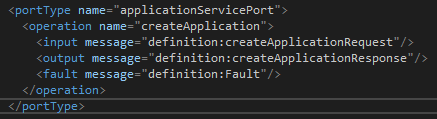

If I remove fault, I can add as a service reference. I'm using Visual Studio 2017 15.5.3.
Also with fault element, I can add service reference with Visual Studio 2015.
I cannot understand why I get the errors.
 futurify-phuongnd
on 15 Jan 2018
futurify-phuongnd
on 15 Jan 2018
@futurify-phuongnd, are you able to share the wsdl file(s) with us? thank you!
mlacouture
on 15 Jan 2018
@mlacouture, I have fixed my issue.
My WSDL is invalid.
The first screenshot is the incorrect wsdl, and I fix them by add fault element in operation binding (second screenshot)


Currently, I can add service reference with VS 2017 15.5.3.
VS 2015 can add the first screenshot version.
Thank you
futurify-phuongnd
on 16 Jan 2018
it is a dotnet core tooling issue. my workaround is
- use dotnet framework project to generate .cs by .wsdl
- copy the generated .cs to dotnet core project
smartmaster
on 16 Jan 2018
@taspeotis, we are planning to release a fix for this issue with VS 2017 v15.6 Preview 4 scheduled for 02/07/2018, stay tuned.
mlacouture
on 19 Jan 2018
VS 2017 v15.6 Preview 4 is now available, hope you can all try it.
thanks,
Miguel Lacouture
mlacouture
on 8 Feb 2018
Related issues
 IGx89
·
6Comments
IGx89
·
6Comments
 mconnew
·
5Comments
mconnew
·
5Comments
 weitzhandler
·
6Comments
weitzhandler
·
6Comments
 scottmchargue
·
3Comments
scottmchargue
·
3Comments
 Adam-Tg
·
5Comments
Adam-Tg
·
5Comments