Wcf: WCF Add connected service: The solution cannot be built, please try to rebuild the solution and fix any build problems.
Hello,
I tried to add a 4.6.1 WCF service as a connected service to asp.net 2.0 project, but I get the error:
Importing web service metadata ...
Number of services found: 1
Restoring NuGet packages ...
Building solution ...
Error:The solution cannot be built, please try to rebuild the solution and fix any build problems.
WCF Service is configured under IIS, but the error appears also when try to add using Discover option. The solution is building normally, without errors.
In VS15.2 with .netCore1.1 it succeded.
Any ideas?
 IonRobu
All 39 comments
@IonRobu Sorry to hear you are running a issue! We will investigate it.
Thanks,
Hong Dai
 hongdai
on 29 Aug 2017
hongdai
on 29 Aug 2017
@IonRobu I was not able to repro the issue locally according to the provided steps.
Could you provide a repro app?
Thanks,
Hong Dai
hongdai
on 29 Aug 2017
I got this error too. You can reproduce it on this service - https://api.gorzdrav.spb.ru/Service/HubService.svc.
VS2017, .net core 2.0, tool version 0.5.10808.800
 meancrazy
on 30 Aug 2017
meancrazy
on 30 Aug 2017
@meancrazy Thanks for providing the repro service. We will try to repro it locally.
Thanks,
Hong Dai
hongdai
on 30 Aug 2017
@meancrazy The root cause for the repro service is there are some schema validation errors in the service and that's why we stop generating the code.
Ideally the service should fix those schema validation errors. However, many customers do not own the services and might not be feasible to fix them. Moreover, many of the schema validation errors can be successfully ignored. Thus we decide to treat all schema validation errors as warnings to unblock customers. The change will be in the next release.
Note that this is not the same issue as @IonRobu. I will keep the issue open.
hongdai
on 30 Aug 2017
@hongdai Sure, this service wouldn't fix errors. Thanks for answer and fix.
meancrazy
on 30 Aug 2017
Getting similar issue. Do we know if this has been solved?
 curiousmindthinking
on 6 Nov 2017
curiousmindthinking
on 6 Nov 2017
Getting the same error. Has this been released? is there a pre-release of the tool I can upgrade to?
 JKennedy24
on 14 Nov 2017
JKennedy24
on 14 Nov 2017
The particular issue of "schema validation error" was fixed in VS 2017 v15.5 preview. Please let us know if this solves your issue.
 zhenlan
on 15 Nov 2017
zhenlan
on 15 Nov 2017
@zhenlan Thanks for letting me know.
I haven't got VS preview installed but I will wait for that version to go stable and let you know if it solves it
JKennedy24
on 15 Nov 2017
Hi all @IonRobu @meancrazy @JKennedy24 @curiousmindthinking
We took a second look at this issue and we want to make sure it has been addressed correctly as there seems to be some confusion.
The initial problem reported by @IonRobu is about an error when building the solution: Error:The solution cannot be built, please try to rebuild the solution and fix any build problems.
The issue reported by @meancrazy (schema validation error) does not seem to be the same: There was an error verifying some XML Schemas generated during export:
Multiple definition of element 'http://schemas.datacontract.org/2004/07/HubService2:ErrorList causes the content model to become ambiguous'.
@meancrazy, can you confirm what issue you are seeing? is it both?
as @zhenlan mentioned previously, a fix for the schema issue is available in the VS 2017 v15.5 Preview.
@IonRobu , are you still seeing the build error? if so, we would like to get more details so we can investigate, maybe if you can attach a debugger right before clicking the WCF Web Service Reference wizard's Finish button and get a callstack that would be awesome, let me know if you need help with this.
Finally, @JKennedy24 and @curiousmindthinking can you also confirm what issue you are seeing and whether you can provide more information?
thank you all!
Miguel Lacouture
 mlacouture
on 15 Nov 2017
mlacouture
on 15 Nov 2017
@mlacouture
I am seeing the
"Error:The solution cannot be built, please try to rebuild the solution and fix any build problems"
When adding a WCF Service to a .Net Standard 1.4 project using the WCF Extension.
Initially I thought this problem was to do with the solution I was adding the WCF service to, so spent a lot of time trying to work out what the error was.
But then found this bug saying that this actually means there are errors in the xml schema of the service you are trying to add
JKennedy24
on 16 Nov 2017
thank you @JKennedy24! are you able to share the service URI or to provide wsdl files so we can try to reproduce and investigate your build issue?
mlacouture
on 20 Nov 2017
@mlacouture if you let me know an email to send the endpoint to I will happily email you one to test
JKennedy24
on 21 Nov 2017
@JKennedy24 , please use this email address: [email protected] - thanks,
mlacouture
on 21 Nov 2017
Update: Thank you @JKennedy24 for providing the requested information, this problem does not reproduce using Visual Studio 2017 15.5 Preview 3.
mlacouture
on 27 Nov 2017
I'm going to resolve this issue as it seems we have provided solutions for the schema problem and the build problem, please try Visual Studio 15.5 Preview or get ready for the official release soon to be available. If you still see these problem in the recent releases then please reactivate.
Thank you all for helping us make Visual Studio better.
Miguel Lacouture
mlacouture
on 27 Nov 2017
@mlacouture I just installed VS 2017 Preview 4 and tried to add the service to my .Net Standard 1.4 library but got the same error.
Got the MIcrosoft WCF Web Service Reference Provider - Preview (0.5.10808.800) installed
and still getting the same "Cannot build solution" error. No doubt this is something wrong with my setup this end.
Have you got any ideas?
JKennedy24
on 28 Nov 2017
@JKennedy24, the WCF Web Service Reference connected service provider is part of Visual Studio starting from the VS 2017 v15.5 Preview 1 release. It sounds like you are still using an old version of the tool. See the WCF Web Service Reference release notes for more details.
mlacouture
on 28 Nov 2017
@mlacouture I have uninstalled any Extensions of the WCF Web Service Reference Provider. So I am just left with the one that comes with VS Preview and I am still getting the Cannot Build error.
I have VS 2017 Preview 2 insalled -Version 15.5.0 Preview 4.
Could this be a regression bug from Preview 1 to preview 2? or is something in my setup screwed.
Although - My actual solution I'm adding it to doesn't build anyway so it could just be that, (i dont know what solution its talking about when it says Cannot build)
JKennedy24
on 29 Nov 2017
@JKennedy24 if the project you are adding the service reference to doesn't build then that's the problem. The recommendation is to fix the build problem of course, but you can work around this and add the service reference by disabling the Reuse types in referenced assemblies option in the second page of the wizard, this will cause the tool not to build the project.
mlacouture
on 29 Nov 2017
reopening until we have resolved @JKennedy24 issue ...
mlacouture
on 29 Nov 2017
@mlacouture That worked. Thanks for your help. (The build error was a third party error so unfortunately I couldnt fix it).
JKennedy24
on 30 Nov 2017
@JKennedy24 I'm glad you found a solution, thank you for taking the time to help us make a better Visual Studio. closing now.
mlacouture
on 30 Nov 2017
I was starting a .NETStandard Xamarin project from scratch in Visual Studio 2017 and I was still having issues with adding a web service in the latest release build (15.5), so in case it helps anyone I will relate what was wrong in my scenario.
I was simply trying to add a ASMX web service, not a full blown WCF service. So I was looking for "Add Web Reference..." but there is only "Add Connected Service..." which I wasn't sure was what I wanted. This brings up a screen with "Connected Services" and "Publish" tabs. "Connected Services" has a tool called "Microsoft WCF Web Service Reference Provider". I click that and type in the http URL for the web service I am using (click Go). Even though I was able to build the solution ok previously, I still got the error "The solution cannot be built, please try to rebuild the solution and fix any build problems...". I saw mention of this "WCF Web Service Reference Provider" and wasn't sure if I needed an extension to make it work right, and whether that was why it was failing. So I inadvertantly installed it from Tools -> Extensions and Updates, not knowing that it would actually install a second version of the tool, but the "Preview" one.

So now when I click "Add Connected Service", on the "Connected Services" tab I get two options, a "Microsoft WCF Web Service Reference Provider" and a "Microsoft WCF Web Service Reference Provider - Preview".
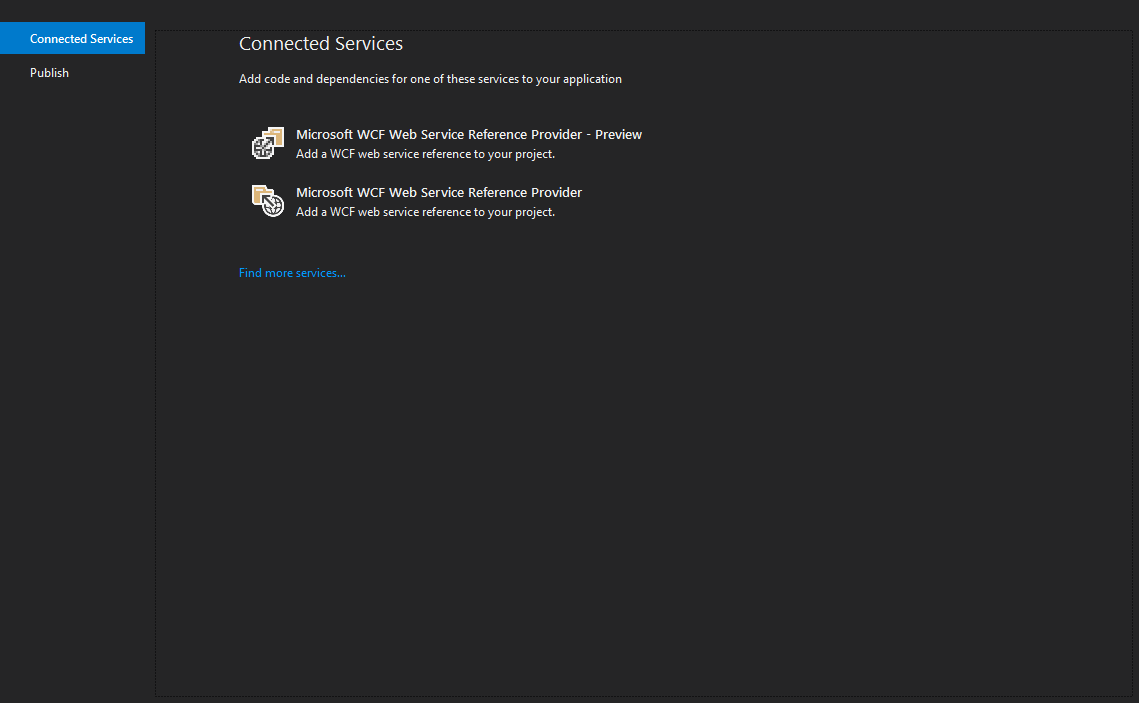
I try to build again and still fails, although the error keeps coming from just the " - Preview" tool. I look up that I should uncheck "Reuse types in referenced assemblies" and do that, but still no luck. I decide to uninstall the Preview one and restart VS, so that I now only have the original "Microsoft WCF Web Service Reference Provider" to pick. Now when I uncheck "Reuse types in referenced assemblies" it works. So my web service wsdl must have been getting snagged on some validation or something in the Preview tool version, which I really shouldn't have installed in the first place. Needless to say, it was kinda confusing to make sense of why it was failing out like this without a place to look.
 jamin1001
on 3 Jan 2018
jamin1001
on 3 Jan 2018
thanks @jamin1001 for the details.
mlacouture
on 5 Jan 2018
Sure. But now, even though compiles ok, seems like I get a runtime exception due to some binding issue, from this code when Foo() is called from a button:
async void Foo()
{
    MyService.MyServiceSoapClient client = new MyService.MyServiceSoapClient(
        new BasicHttpBinding(BasicHttpSecurityMode.Transport),
        new EndpointAddress("https://<myapi>.net/myservice.asmx"));

        string result = await client.callSomeFunctionFromMyServiceAsync("Fred Flintstone");

        theEditor.Text = result;
}
Result:
System.InvalidOperationException: Operation 'getIDQuestionsAsync' contains a message with parameters. Strongly-typed or untyped message can be paired only with strongly-typed, untyped or void message.
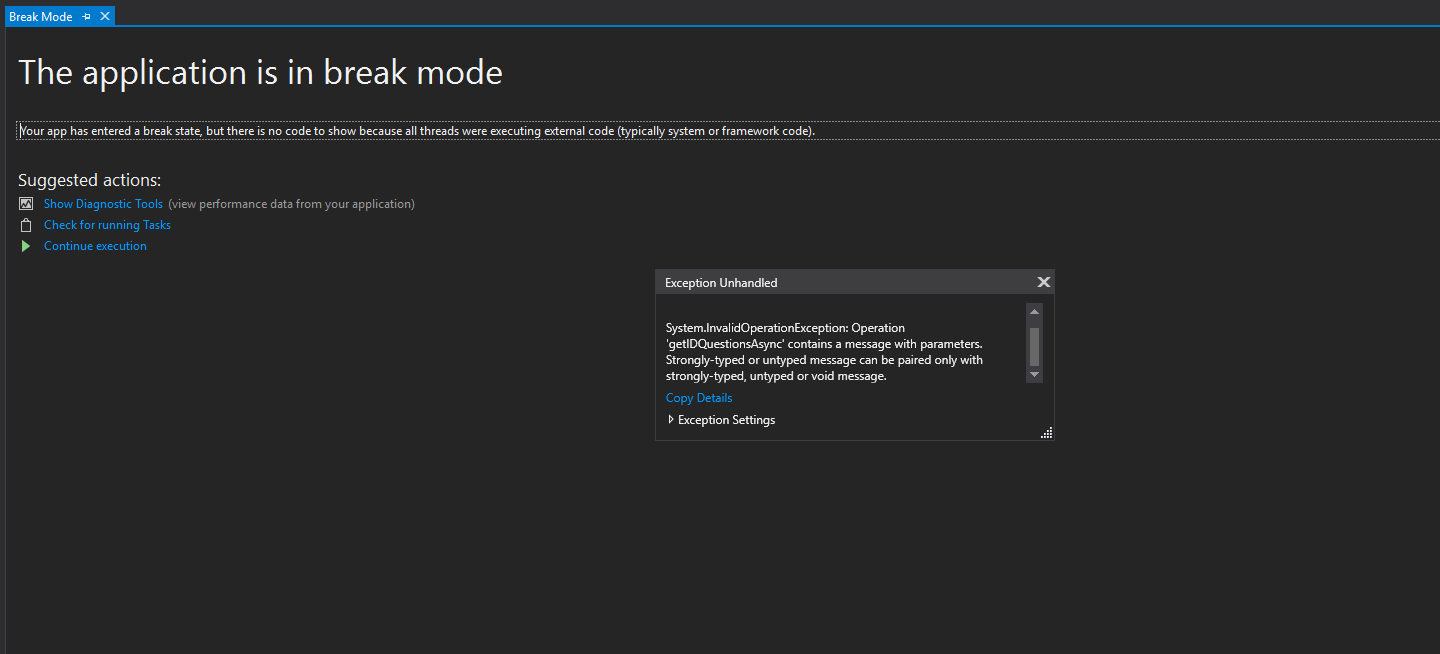
So I deleted this Connected Service, and started from scratch and tried to import a Reference.cs web service binding file from a old previous project, but seems like that file won't compile, which made use of namespace System.Web.Services, which maybe is not supported in my .NETStandard 2.0 / .NETCore.Platforms 2.0.0 project. The file looks like this:
// Reference.cs
//
// This source code was auto-generated by Microsoft.VSDesigner, Version 4.0.30319.42000.
//
#pragma warning disable 1591

namespace MyApiService.<myapi>.net {
    using System;
    using System.Web.Services;
    using System.Diagnostics;
    using System.Web.Services.Protocols;
    using System.Xml.Serialization;
    using System.ComponentModel;


    /// <remarks/>
    [System.CodeDom.Compiler.GeneratedCodeAttribute("System.Web.Services", "4.7.2046.0")]
    [System.Diagnostics.DebuggerStepThroughAttribute()]
    [System.ComponentModel.DesignerCategoryAttribute("code")]
    [System.Web.Services.WebServiceBindingAttribute(Name="MyServiceSoap", Namespace="http://<myapi>.net/")]
    public partial class MyService : System.Web.Services.Protocols.SoapHttpClientProtocol {

...
My third apporach was to use command line SLSvcUtil.exe, apparently the latest Silverlight (latest is 5.x) WCF proxy generation tool which is located in "C:\Program Files (x86)\Microsoft SDKs\Silverlight\v5.0\Tools". I ran the following command:
SlSvcUtil.exe https://<myapi>.net/myservice.asmx /d:C:\Dev\Test\MyServiceClient
And copied the Reference.cs file into my project and it compiled ok, but peculiarly seemed like return values of the API calls are of void type rather than strings, so it seems the generation didn't work right, and I am going to have to look at why that is the case.
I read online that this Silverlight command line tool is preferred over the older legacy wsdl.exe and did not pursue this older command line tool yet, but I may have to try that next.
All I am trying to do here is generate a client proxy for the web service for a fresh Xamarin .NETStandard project, so I can call into it. I hope I don't have to resort to rolling my own SOAP XML and just call from an Http client!
jamin1001
on 5 Jan 2018
Looking at https://developer.xamarin.com/guides/xamarin-forms/cloud-services/consuming/asmx/, and the Xamarin Forms example TodoASMX, it appears maybe what I am trying to do is not currently supported. In other words, generating a proxy client via the WCF tool for accessing a web service in a cross platform (.NETStandard) library, rather than individually within each platform project, with a concrete class implementation of an interface (as is done in TodoASMX). I do see that "Add Web Reference..." is available in the platform specific Xamarin.Android and Xamarin.iOS projects, but not the base Xamarin.Forms .NETStandard library project. I will try this approach to see if it works for me. Can you confirm whether what I was trying to do was even possible with the current tooling? Thanks.
jamin1001
on 5 Jan 2018
@jamin1001, you are correct, what you are trying to do is not supported as every platform may contain a different set of APIs. For .Netcore/.NetStandard platforms, the WCF Web Service Reference connected service provider is what you need to use.
mlacouture
on 6 Jan 2018
@mlacouture I have this error again:
"The solution cannot be built, please try to rebuild the solution and fix any build problems."
same endpoint as before, I can send you the endpoint if you let me know an email address
Using VS 15.5.5.
If I untick "Reuse Types in referenced assemblies" as I did previously to get it working I get the following error:
Scaffolding service reference code ...
Error: \
Error: - Alternatively, install the framework version '1.0.4'.
Error:It was not possible to find any compatible framework version
Error:The specified framework 'Microsoft.NETCore.App', version '1.0.4' was not found.
Error: - Check application dependencies and target a framework version installed at:
Error:An unknown error occurred while invoking the service metadata component.
Failed to generate service reference.
Using .Net Standard 1.4
Even after installing .Net core from here: https://www.microsoft.com/net/learn/get-started/windows?utm_expid=.-Fmi9Q05Ry2oXQgdtPElHw.0&utm_referrer=https%3A%2F%2Fwww.google.co.uk%2F
It still didn't work
JKennedy24
on 31 Jan 2018
Hi there!
Same thing here. If I uncheck the "Reuse Types in referenced assemblies" it works but not if I leave it checked.
Thanks in advanced.
 ignacioinnovo
on 31 Jan 2018
ignacioinnovo
on 31 Jan 2018
Hi @JKennedy24, it seems your project targets a .NET Core version which is not installed, the missing framework can be installed from the VS installer by choosing the .NET Core 1.0-1.1 development tools option.
Hope this helps,
mlacouture
on 31 Jan 2018
Hi @ignacioinnovo and others!
A solution for the original problem 'The solution cannot be built ...' is now available with the release of Visual Studio 2017 v15.6 Preview 3. Please give it a try!
thanks,
mlacouture
on 31 Jan 2018
Dear @mlacouture,
First of all, thank you for the quick response.
Do you know when that preview version will be released as a final version? Perhaps is better to wait for that moment.
Thank you very much in advanced,
Ignacio.
ignacioinnovo
on 31 Jan 2018
@ignacioinnovo, you can have a good idea as to when the official release is going to be by reading the Visual Studio 2017 Release Rhythm and Release Notes. With this, the final v15.6 version should be out the first week of March (v15.6 Preview 4 to be released sometime next week).
mlacouture
on 31 Jan 2018
Thank you very much @mlacouture !
ignacioinnovo
on 1 Feb 2018
@mlacouture Installing .Net Core tools worked. It was under the "Optional" installs on the first page of the Visual Studio Installer after ticking .Net Core.
JKennedy24
on 1 Feb 2018
@JKennedy24 I'm glad it worked!
mlacouture
on 1 Feb 2018
you can use application => "Service Reference Generator For .net Standard & Xamarin.Forms" from : https://files.fm/u/mduffseg
first read help in application
 erfankh67
on 1 Jun 2018
erfankh67
on 1 Jun 2018
Related issues
 gicat
·
4Comments
gicat
·
4Comments
 IGx89
·
6Comments
IGx89
·
6Comments
 apdirexyon
·
5Comments
hongdai
·
5Comments
apdirexyon
·
5Comments
hongdai
·
5Comments
 mconnew
·
5Comments
mconnew
·
5Comments