Wcf: System.PlatformNotSupportedException: Compiling JScript/CSharp scripts is not supported
Hi,
I am using a WSDL file (wsdl.zip) provided by Salesforce.com. When trying to logon to the service using the below code, it threw a System.PlatformNotSupportedException saying "Compiling JScript/CSharp scripts is not supported"
var salesforceClient = new SoapClient();
salesforceClient.loginAsync(null, username, password).Wait();
Here is the stack trace.
InnerException  {System.PlatformNotSupportedException: Compiling JScript/CSharp scripts is not supported
   at System.Xml.Serialization.TempAssembly..ctor(XmlMapping[] xmlMappings, Type[] types, String defaultNamespace, String location)
   at System.Xml.Serialization.XmlSerializer.GetSerializersFromCache(XmlMapping[] mappings, Type type)
   at System.Xml.Serialization.XmlSerializer.FromMappings(XmlMapping[] mappings, Type type)
   at System.ServiceModel.Description.XmlSerializerOperationBehavior.Reflector.SerializerGenerationContext.GenerateSerializers()
   at System.ServiceModel.Description.XmlSerializerOperationBehavior.Reflector.SerializerGenerationContext.GetSerializer(Int32 handle)
   at System.ServiceModel.Dispatcher.XmlSerializerOperationFormatter.AddHeadersToMessage(Message message, MessageDescription messageDescription, Object[] parameters, Boolean isRequest)
   at System.ServiceModel.Dispatcher.OperationFormatter.SerializeRequest(MessageVersion messageVersion, Object[] parameters)
   at System.ServiceModel.Dispatcher.ProxyOperationRuntime.BeforeRequest(ProxyRpc& rpc)
   at System.ServiceModel.Channels.ServiceChannel.PrepareCall(ProxyOperationRuntime operation, Boolean oneway, ProxyRpc& rpc)
   at System.ServiceModel.Channels.ServiceChannel.SendAsyncResult.Begin()
   at System.ServiceModel.Channels.ServiceChannel.BeginCall(String action, Boolean oneway, ProxyOperationRuntime operation, Object[] ins, TimeSpan timeout, AsyncCallback callback, Object asyncState)
   at System.ServiceModel.Channels.ServiceChannelProxy.TaskCreator.CreateGenericTask(ServiceChannel channel, ProxyOperationRuntime operation, Object[] inputParameters)}    System.Exception {System.PlatformNotSupportedException}
Is this really something that is not supported by the tool yet?
Thanks,
Son
 nosson
All 10 comments
Hi Son, I tried the repro and could repro the issue on my machine. For now it seems to be a bug with the XmlSerializer generation using RefEmit. I need to investigate the issue further to understand the root cause.
XmlSerializer has a special mode in which the serializer would use reflection instead of RefEmit to do serialization. I wondered if the app would work in that mode. If you are willing to give it a try, you can enable the mode by using the code below at the app's startup,
```c#
static void Main(string[] args)
{
MethodInfo method = typeof(XmlSerializer).GetMethod("set_Mode", BindingFlags.Public | BindingFlags.NonPublic | BindingFlags.Static);
method.Invoke(null, new object[] { 1 });
// Your code goes here
}
```
Note that, using reflection to enable the mode is subject to future changes.
 shmao
on 22 Aug 2017
shmao
on 22 Aug 2017
That workaround works, shmao (just found out that the method name was "set_Mode"). Thank you very much.
nosson
on 23 Aug 2017
@nosson Thanks for the confirmation. Glad you figured out the method name (I meant to change the name to the actual value, but I forgot).
shmao
on 23 Aug 2017
I understood the root cause of the issue. One of the types generated by WCF Connected Service was wrong, see below.
C#
        /// <remarks/>
        [System.Xml.Serialization.XmlArrayAttribute(Order=5)]
        [System.Xml.Serialization.XmlArrayItemAttribute("columns", typeof(ListViewRecordColumn), IsNullable=false)]
        public ListViewRecordColumn[][] records
        {
            get
            {
                return this.recordsField;
            }
            set
            {
                this.recordsField = value;
            }
        }
The property is a 2-dimensional array, but the XmlArrayItemAttribute speicifed the item type as typeof(ListViewRecordColumn). To work around the issue, we can change the item type to typeof(ListViewRecordColumn[]).
The issue is a duplicate of https://github.com/dotnet/wcf/issues/1274. Resolved the issue as duplicate.
shmao
on 12 Sep 2017
I am also experiencing this issue.
WSDL (not valid, cant add xml to this comment): Reference.cs [System.Xml.Serialization.XmlArrayAttribute(Order=24)] regards
[System.Xml.Serialization.XmlArrayItemAttribute("DriverInformation", typeof(string), IsNullable=false)]
public string[][] DrivInfID
{
get
{
return this.drivInfIDField;
}
set
{
this.drivInfIDField = value;
}
}
Peter
 petervestergaard
on 10 Nov 2017
petervestergaard
on 10 Nov 2017
It is unfortunate that this issue is marked as closed (as well as https://github.com/dotnet/wcf/issues/1274 and https://github.com/dotnet/wcf/issues/2743 and https://github.com/dotnet/wcf/issues/2219 referred to as duplicate), as I encountered this problem today; but a Big Thank You to @shmao for the workaround, (above).
In my case, this Service Reference code that was generated from Vendor WSDL:
public System.Threading.Tasks.Task<bool> pingAsync(ServiceReferenceCompany.VendorLogin VendorLogin)
{
return base.Channel.pingAsync(VendorLogin);
}
being called like this:
VendorSoapV1Client a = new VendorSoapV1Client(VendorSoapV1Client.EndpointConfiguration.VendorSoapV1SOAP, "https://vendor.contoso.com/Vendor/SoapV1/Service");
VendorLogin myLogin = new VendorLogin();
myLogin.Login = "username";
myLogin.Password = "password";
bool ok = await a.pingAsync(myLogin);
resulted in the Compiling JScript/CSharp scripts is not supported error on that bool ok line.
As described above, adding these lines using System.Reflection appears to have fixed the error for me:
MethodInfo method = typeof(XmlSerializer).GetMethod("set_Mode", BindingFlags.Public | BindingFlags.NonPublic | BindingFlags.Static);
method.Invoke(null, new object[] { 1 });
*Edit: using Visual Studio 2019 Version 16.1.6
.NET Core 2.2 Console Application
 gojimmypi
on 13 Sep 2019
gojimmypi
on 13 Sep 2019
This issue was closed as it is a duplicate of issue #1274 as mentioned in this comment. That's the issue to post any follow-ups to. That issue was closed as we are prioritizing fixing regressions (it works on .NET Framework but not on .NET Core) and the issue existed on .NET Framework and has a workaround. I haven't read through details of either issue or your problem closely, just providing you some info as to why these issues were closed. Although a quick read through does seem like your issue might be different than this one and #1274 based on how you worked around it.
 mconnew
on 17 Sep 2019
mconnew
on 17 Sep 2019
Hi @shmao I am using Asp.net core 3.1 and try to consume web-service, I tried with bellow code
svcutil.exe /t:code /d:C:\Users\XXXX\Desktop\SOAP\WebApplication1\WebApplication1 http://ws.jobdiva.com/axis2/services/BIData?wsdl
And its generate the code file (BIData.zip) and required methods when when I call a method bellow error occurred
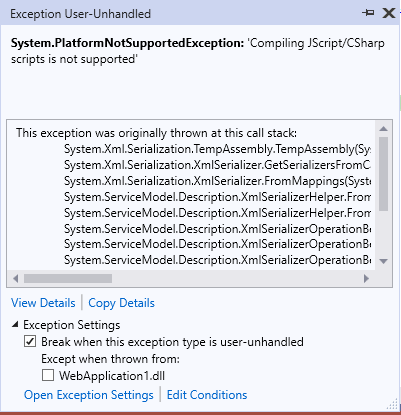
Can you please help me?whats going wrong
 kuntalbose
on 10 May 2020
kuntalbose
on 10 May 2020
The property is a 2-dimensional array, but the
XmlArrayItemAttributespeicifed the item type astypeof(ListViewRecordColumn). To work around the issue, we can change the item type totypeof(ListViewRecordColumn[]).The issue is a duplicate of #1274. Resolved the issue as duplicate.
I searched the XSD file I had for Type[][] and fixed the corresponding XmlArrayItemAttribute from typeof(Type) to typeof(Type[]) and also got it working! Thanks so much @shmao
 vuchl
on 4 Jun 2020
vuchl
on 4 Jun 2020
Hi Son, I tried the repro and could repro the issue on my machine. For now it seems to be a bug with the XmlSerializer generation using RefEmit. I need to investigate the issue further to understand the root cause.
XmlSerializer has a special mode in which the serializer would use reflection instead of RefEmit to do serialization. I wondered if the app would work in that mode. If you are willing to give it a try, you can enable the mode by using the code below at the app's startup,
static void Main(string[] args) { MethodInfo method = typeof(XmlSerializer).GetMethod("set_Mode", BindingFlags.Public | BindingFlags.NonPublic | BindingFlags.Static); method.Invoke(null, new object[] { 1 }); // Your code goes here }Note that, using reflection to enable the mode is subject to future changes.
For anyone who is reading this - the Reflection code does indeed work as a workaround. However, be very careful. I put this into our code which fixed the issue with the .cs files being generated from the svcutil utility. However, we had other code in our application where the Reflection changes caused harm to the XML serialization being done there. In our case, code to make payments. Therefore, make sure you do a thorough regression test on the application you are working in.
 Catchops
on 26 Jan 2021
Catchops
on 26 Jan 2021
Related issues
 kevinoid
·
6Comments
kevinoid
·
6Comments
 martinspasovski
·
3Comments
martinspasovski
·
3Comments
 cristicatalan
·
4Comments
cristicatalan
·
4Comments
 IGx89
·
6Comments
IGx89
·
6Comments
 scottmchargue
·
3Comments
scottmchargue
·
3Comments
Most helpful comment
I understood the root cause of the issue. One of the types generated by WCF Connected Service was wrong, see below.
C#
        /// <remarks/>
        [System.Xml.Serialization.XmlArrayAttribute(Order=5)]
        [System.Xml.Serialization.XmlArrayItemAttribute("columns", typeof(ListViewRecordColumn), IsNullable=false)]
        public ListViewRecordColumn[][] records
        {
            get
            {
                return this.recordsField;
            }
            set
            {
                this.recordsField = value;
            }
        }
The property is a 2-dimensional array, but the
XmlArrayItemAttributespeicifed the item type astypeof(ListViewRecordColumn). To work around the issue, we can change the item type totypeof(ListViewRecordColumn[]).The issue is a duplicate of https://github.com/dotnet/wcf/issues/1274. Resolved the issue as duplicate.