Wcag: Contrast Ratio Math and Related Visual Issues
The W3C's specification for determining sRGB contrast as discussed in "Understanding WCAG 2.0 and 2.1, Minimum Contrast 1.4.3" is not perceptually uniform and as a result creates "contrast ratios" that are not meaningful. The end result is incorrect contrast choices for some web colors. Compounding the problem are the number of "contrast tools" based on this math all over the web, and all of which are returning invalid data.
The end result are websites that _may comply with the W3C's math for contrast, but are otherwise difficult to read._ The bad math coupled with contrast tools have provided designers with color schemes of poor accessibility. This needs to be addressed!
PROBLEM SUMMARY
_Edit May 2019: after first-round research, we've found that the issue is not so much using "simple contrast" as it is the manner (or lack of) considering ambient lighting, the nature of illuminated1 displays, and/or a lack of math that better models human non-linear perception._
(L1 + 0.05)/(L2 + 0.05)_(aka "simple contrast")_ is only really useful to determine monitor max on/off (#FFF / #000) _Edit 6/19 I'll restate this as "does not accurately model an illuminated1 display in real world ambient conditions"_: . It fails badly in the midrange colors as it does not adjust for human nonlinear perception. As such it should not be used to programmatically determine legibility of colors, esp. in the middle and darker ranges.
Weber contrast, Michelson Contrast, Bartleson-Breneman Perceptual Contrast Length (PCL), or other possible candidates are better choices for programatic legibility assessment. I am currently conducting studies on a "best" programatic contrast assessment algorithm for UI/Web design and will update this issue as I do. I am presently leaning toward a variation of PCL as it prevents the near-black contrast expansion. Using this and applying an exponent to the luminance data looks promising.
_Edit June 2019: results of research/experiments below show that a "standard" Weber contrast does not provide better performance by itself — it requires a modification for a more accurate model of a computer display)._
Note1: By "illuminated" I mean both emissive (led), and transmissive backlit (LCD) display types.
Web Links to some of the pages of the document:
https://www.w3.org/TR/WCAG21/#dfn-contrast-ratio
https://www.w3.org/TR/UNDERSTANDING-WCAG20/visual-audio-contrast-contrast
https://www.w3.org/TR/2008/REC-WCAG20-20081211/#relativeluminancedef
PROBLEM EXAMPLE:
I prepared a webpage that demonstrates the problem here:
http://myndex.com/WEB/W3Contrastissue
_(Edit: the full set of experiments is at https://www.myndex.com/WEB/Perception )_
Here is a reduced resolution screenshot of part of that test page.
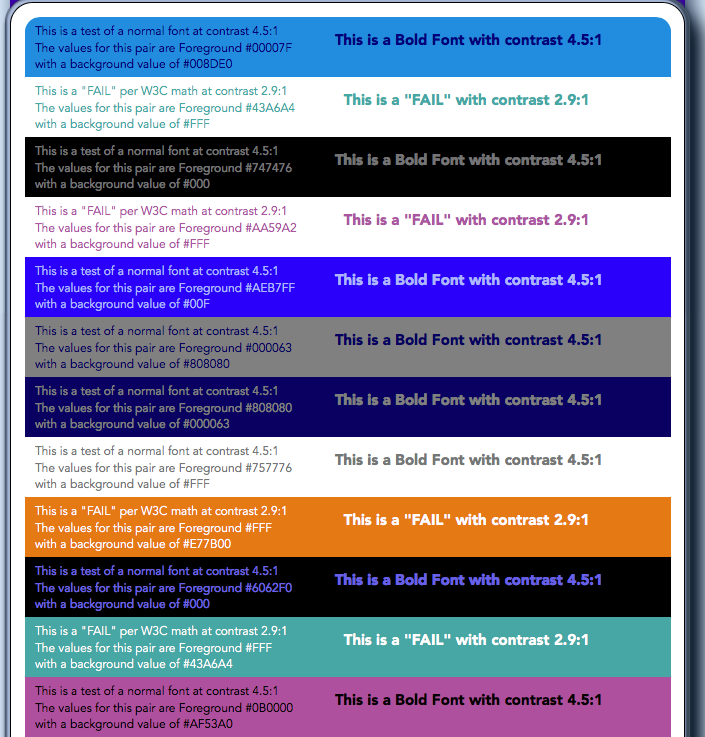
In the above experiment, we set a number of panels to color-pairs with a contrast ratio of 4.5:1, this counts as a "PASS" for the W3C spec of minimum contrast for small text. Interspersed among these panels are color-pairs that the W3C criteria counts as a "FAIL" even for large text, with a contrast of 2.9:1
As you can see, many of the "PASS" color pairs are actually hard to read and of low contrast, while all of the "FAIL" pairs are substantially easier to read and of higher perceptual contrast.
The point here is that the "contrast ratios" created by the equations listed in the WCAG documents are not useful or meaningful for determining perceptual luminance contrast.
Part of the reason this is happening is using simple contrast (L1/L2) Simple Contrast fails to account for non linear human perception in values between #000 and #FFF. Also troubling is the use of outdated standards documents or drafts. I list these issues on the webpage:
http://myndex.com/WEB/W3Contrastissue
The upshot of all this is that if "contrast ratios" are going to be promoted as a means to define color for accessible design, then there needs to be a clear path to assess contrast based on human perception.
Looking for a Solution _(EDIT 4/25/19: Better solutions in later posts)_
One idea is to process the luminance with an exponent (^1.6) then take 1/3rd the contrast result, using either weber contrast or perceptual contrast length.
The purpose of the exponent is to shift contrast for black/dark text vs white/light text, this adjusts for our perception that light text on a medium or darker background has a higher perceived contrast than dark text on a medium background. The purpose for taking 1/3rd of the result is to bring the output numbers into line with the W3C standard indicating a 4.5:1 contrast.
A more ideal solution would be to commission a study with human subjects of various visual impairments to fine tune a model for programatic contrast assessment.
-Andrew Somers
_Title Supervisor
General Titles & Visual Effects
Hollywood, Ca._
 Myndex
All 122 comments
xref https://github.com/w3c/wcag/issues/360#issuecomment-482918892
 patrickhlauke
on 14 Apr 2019
patrickhlauke
on 14 Apr 2019
xref #360 (comment)
Thank you Patrick but as you can see I already posted in that thread. That is a separate and somewhat minor issue. The issue I discuss in THIS thread is specifically about the minimum contrast 1.4.3, and is _not_ minor as it has far-reaching consequences such as a ton of apps that now incorrectly present colors as "accessible" when in fact they are not. And this issue has led to a great deal of misunderstanding regarding color choices and contrast.
The thread you linked to deals with a minor error in the relative luminance equation, and while the W3C picked the wrong equation that is not what is causing the much more serious problem that I outline in this separate issue.
The issue HERE is using a simple contrast (L1/L2) on linear luminance to define color & luminance contrast. But this does not provide any meaningful value for perceived contrast.
I posted this as an issue for discussion while I continue my research (search for an accurate programatic contrast assessment) and pull request separately.
Myndex
on 14 Apr 2019
Some additional thoughts regarding 1.4.3
FWIW MY BACKGROUND: I work in the film and television industry in Hollywood as an editor/colorist/VFX & Title Supervisor. I work with color and visual perception issues every day.
I am going to continue to post in this thread while I delve further into this before generating a pull request. It is a concern for me because this W3C document is considered authoritative, and has made its way into government regulations. It is important that it be correct, and it is not at present. PLEASE COMMENT if you have thoughts or insights as to why some of these choices were made. Thank you.
On Terms:
Simple contrast _"is not useful for real-world luminances, because of their much higher dynamic range and the logarithmic response characteristics of the human eye."_[1]
and using simple contrast seems to have led to the higher (4.5:1) contrast specifications:
What is the cite and specific justification for the claimed need for a 4.5:1 contrast ratio? Studies by Legge, Rubin, Bangor etc. found that "Contrast _by itself_ had no significance for either vision group." [unimpaired or impaired] [2]
However font size and polarity are very important, and contrast does interact with very small font sizes to a degree, especially in negative polarity. The Bangor study indicated that font sizes below 18 px resulted in a need for increased contrast, but these study participants were ether legally blind (20/200) or very impaired (20/100).
It is NOT about contrast as much as size and possibly polarity. While it is true that increasing contrast can _help_ legibility for small fonts for visually impaired, increasing the font size offers a better improvement.
As I mentioned in my first post Weber of Michaelson are possibly better here, and one of those are what is used in nearly all the research & standards. However, I am working with Bartleson-Breneman perceptual contrast at the moment.
To make this point more clear: The "simple" ratio of #FFF to #808080 is 4.6:1 (3.95:1 if you add in the W3C's 5% bonus luminance). But #808080 to #040404 is a ratio of 178.88:1 (5:19:1 using the 5% extra).
FFF is luminance 100, mid-grey #808080 is 21.59, and #040404 is 0.12
So ignoring the oddly-applied/misapplied "flare" value, white to mid grey is a ratio of 100:21.6 and mid grey to black is a ratio of 21.7:0.12
BUT because the first much smaller ratio is also associated with _high luminance_ it is much easier to read and has much better _PERCEPTUAL_ contrast:
4.6:1 (3.95:1)

And the black one with 179:1 contrast (LOL, 5.19:1 with the cheat)

I find no justification for the 4.5:1 contrast ratio for 20/40 vision as indicated in the W3's standard. Is it set that way (along with the excessive flare luminance add) to attempt make up for the other deficiencies?
See also reference [3] below, a EU paper on this subject.
Contrast Sensitivity is a separate measurement from visual acuity. From the referenced Arditi paper: "visual acuity measurements alone are insufficient to characterize basic spatial visual function..." But I don't see where you get multiplying the ISO well established 3:1 standard by 1.5 ?? Looking at acuity vs contrast graphs is see a difference in CS as low as 5% for a 20/40 person. And as I recall the common 3:1 luminance contrast ratio included near normal vision (20/40 is near normal).
Here's a graph, (for reference logMAR 0.3 is approximately 20/40.)

In short, it appears to me the 4.5:1 contrast standard is somewhat arbitrary, and there are other more important means to improve accessibility, namely font size, appropriate polarity, and total luminance.
LUMINANCE:
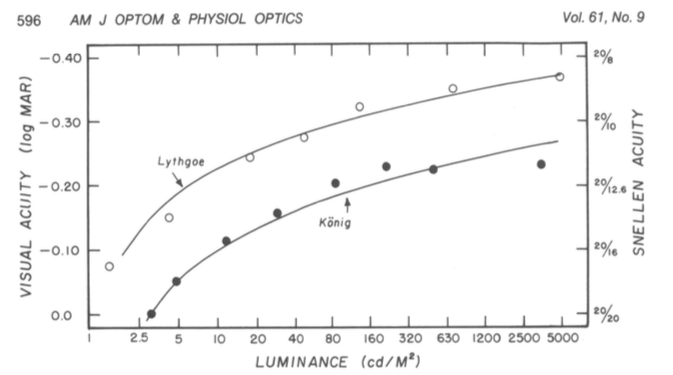
NITS TO THE RESCUE! (by nits I mean cd/m^2, 1 cd/m^2 is 1 nit ... but maybe I also mean ME, nit-picking on this issue, LOL).
The sRGB spec states an _80 nit monitor_, however people commonly adjust them to 120 nit to 160 nit, even more (300+ is common. Some phones do 1200). If the monitor is brighter, and the material is black text on white, the light from the monitor results in pupil contraction which improves perceived sharpness.
I'll opine that it is more important to have a monitor that is adjusted bright enough for its environment. In fact it would be a good idea to lobby the ISO for an amendment to the sRGB spec to adjust away from 80 cd/m2 to a specific luminance based on the environment. 1996 was a long time ago, and display technology has changed substantially — we shouldn't have to adjust the ROOM lighting to match the monitor, it's easier to adjust the monitor. A standard stating the max display luminance for a given ambient light would go a long way toward real accessibility/accommodation.
SUMMARY:
The main thing I am lobbying for here is a revised programatic contrast assessment that is perceptually correct. But as I research this, I see there are other concerns that should be considered.
- New contrast assessment method, with a revision of the standard to accurately model perceptual needs. I.e. no simple ratios, etc.
- Among the contrast revisions, provide guidance on excessive contrast — too high of a contrast causes reading problems and eye strain as well.
- Add guidance on display polarization (light on dark vs dark on light) to the standard.
- Along with polarization, guidance for local adaptation which is part of the issue with current contrast assessments. (Local adaptation is one reason that white on a darker background looks more contrasty than grey on a dark background even if the luminance ratio is the same).
- Emphasize font size for accessibility, with guidance to avoid ever overriding the user agent's root font size.
- Lobby ISO to amend sRGB to provide a standard for adjusting a display _to the room._ 80 nits is really a bit dim in a lot of environments.
Thank you for reading. I hope to have a solid contrast assessment model this week.
Andy
Refs:
[1] https://www.schorsch.com/en/kbase/glossary/contrast.html
[2] https://pdfs.semanticscholar.org/4f9f/f4bcbc0eb8d1040228e5d84cd0c0e75962c7.pdf
[3] https://www.anec.eu/images/Publications/technical-studies/ANEC-final-report-1503-1700-Lenoir-et-al.pdf
Edited May 22 for typos and some clarity.
Myndex
on 15 Apr 2019
Hi @Myndex
- I agree that there are some combinations that pass that should fail and that there are some situations that fail that should pass. However, in general the algorithm works well and has made a big difference to ensure that text has better contrast.
- While I agree that lower acuity doesn't necessarily mean less contrast sensitivity -- once you get into the 2070 20200 levels folks tend to have eye conditions with multiple factors and there is a larger correlation between the two
- 20/40 may not be visually impaired at least by most US standards. 20/70 is generally considered visually impaired by many and I believe the criteria were written to help many of us who use vision in the range of 20/70 - 20/400. For someone with 20/200 contrast very much tends to be an important issue and these guidelines were written for folks in this range. 4.5 is very much a tipping for point for many of us and I do not agree that 4.5 is too high for someone who is visually impaired or legally blind. Many legally blind people use their vision and require this type of minimum contrast. So if the understanding text is not clear around this area then we need to update it.
 mraccess77
on 15 Apr 2019
mraccess77
on 15 Apr 2019
Hi @mraccess77
Thank you for commenting, it helps me to see when I am not explaining or describing completely. But perhaps more important it leads to some new discoveries. In answering your post I did some experiments that add insight. More below.
First, just to provide a little more background, I want to mention that I have personal experience with 20/200 vision. Several years ago (in my late 40s) I developed early onset cataracts which brought my vision to worse than 20/200 in one eye, the other diminished a bit less. I now have IOL implants, but those surgeries caused vitreal detachments and retinal detachments, requiring a vitrectomy in one eye, and in the other, continuing issues due to large vitreal floaters that still can interfere with reading. Also, I still need glasses (i.e. it is trivial for me to remove them to introduce poor vision).
As such WCAG is a topic I have a close personal interest in.
As I mentioned in an above post, I am an imaging professional in Hollywood with a career that spans decades and a background that includes broadcast engineering, colorist, VFX Supervisor, and perhaps most relevant, title designer.
I came across this WCAG issue while developing a CSS framework. For the color module I am trying to create a simple color subset that is both easy to read and aesthetically pleasing. This led me down the color and vision theory rabbit hole, where I stumbled on a contrast calculator and saw an odd comment by the coder who mentioned that his "calculate" button did not pass the WCAG standard. The button is completely readable with more than adequate contrast, thus started my present research journey.
I have since been doing nothing but research this issue in depth. My posts here are based on that research and my extensive experience in digital imaging.
- mraccess77 said: I agree that there are some combinations that pass that should fail and that there are some situations that fail that should pass. However, in general the algorithm works well and has made a big difference to ensure that text has better contrast.
I cannot agree here. Estimating roughly, 40% of the color pairs the WCAG math calls "PASS" are poor in quality and should fail. And somewhere in the area of 51% of colors they fail could conceivably pass.
Wrong nearly half the time is one huge fail. I believe it is the result of incorrect assumptions and cherry picking various bits of standards and cobbling them together into something that is truly inaccurate and unsuitable for the purpose.
I'm going to quote Whittle from his paper [1] (emphasis added)
With regard to the mathematical description, an important distinction is between ratios and contrast expressions that also involve differences. This concerns what is meant by ‘contrast’. Weber contrast and Michelson contrast are the commonest expressions for it, not the simple ratio L/Lb. Weber contrast = (L- Lb)/Lb, usually written ÆL/Lb. When the backgrounds are weak a ‘dark light’ constant must be included: ÆL/(Lb+L0). Michelson contrast = |ÆL|/(L+Lb). When people talk of contrast coding in the early stages of the visual pathway, they usually mean that the firing rate of sensory neurons is a function of, perhaps proportional to, Weber contrast or Michelson contrast. Such a code combines differencing (calculating L-Lb) with normalisation (attenuating by some function of the absolute stimulus level).
And then from Pelli's paper [2] (emphasis added)
The contrast of the target quantifies its relative difference in luminance from the background, and may be specified as Weber contrast Lmax−LminLbackground, Michelson contrast Lmax−LminLmax+Lmin, or RMS contrast LσLμ, where Lmax, Lmin, Lbackground, Lμ, and Lσ are luminance maximum, minimum, background, mean, and standard deviation, respectively. Weber contrast is preferred for letter stimuli, Michelson contrast is preferred for gratings, and RMS contrast is preferred for natural stimuli and efficiency calculations (Bex & Makous, 2002; Pelli & Farell, 1999). Threshold contrast is the contrast required to see the target reliably. The reciprocal of threshold is called sensitivity.
The WCAG ignores this wholesale, despite it being prominent in most research and even noted in the ISO and ANSI standards. WCAG is using simple contrast (Lw/Lk) and that is one of the errors.
Among my findings, some of the sites I have the most difficultly reading are "compliant" with the WCAG. There are countless contrast checkers and other automated or semi automated accessibility checkers that use the algorithm as written, and they all fail to detect poor perceptual contrast.
And there are a LOT of combinations that pass but are hard to read. An accessibility site has this on one of their pages indicating the problem:

The contrast checkers are all using this flawed model which ignores many important aspects of perception. The results are all over the place and inconsistent. I can see why designers are ignoring the contrast recommendations: they are ambiguous and inconsistent at best. At the moment, visual judgement does a better job than the contrast calculators.
I have a page where I am conducting live experiments in this regard, aloing with some commentary on my findings as I go along. This link is:
https://www.myndex.com/WEB/W3Contrastissue
Here are some examples from today's experiments:

Today, I've been looking into luminance — it is well known and researched that increasing luminance improves readability (within a range). One thing the WCAG lacks is a specification on minimum lightness for the lightest element in a color pair.

I have more on this on the page, but as you can see, setting a minimum lightness of the lightest element to #AAA results in a consistent, readable, block of text. On the page you'll see examples where pages with 3:1 contrast and minimum #AAA on the brightest of the pair is more readable than 4.5:1 contrast on darker pairs.
- mraccess77 said: While I agree that lower acuity doesn't necessarily mean less contrast sensitivity -- once you get into the 2070 20200 levels folks tend to have eye conditions with multiple factors and there is a larger correlation between the two.
Yes, I am aware, there is definitely correlation to contrast sensitivity due to a number of vision impairments. Indeed, one can have good visual acuity and bad contrast sensitivity. The WCAG does not discuss CS though, and only lists some Snellen numbers like 20/40.
I was talking mainly of 20/40, which is what the WCAG talks about regarding AA. For the portion of the standard that relates to profoundly impaired, still the math they provide does not create useful numbers for guidance.
And that is the point I am getting at. The math is essentially _wrong_. Lw/Lk is not well suited for determining contrast in this context. The vast majority of research on contrast sensitivity uses WEBER or MICHELSON or both. Rarely simple contrast. But there are other math mistakes in WCAG related to sRGB and computer displays that also need to be addressed.
_(EDIT by Andy: May 2019: My recent experiments and research indicates that a "classical, unmodified Weber contrast" is really not "substantially" better than the WCAG math, though there is a _modified Weber_ from Hwang/Peli that is much better than the WCAG math, and other more modern contrast equations such as PCL)._
- mraccess77 said: 20/40 may not be visually impaired at least by most US standards. 20/70 is generally considered visually impaired by many and I believe the criteria were written to help many of us who use vision in the range of 20/70 - 20/400. For someone with 20/200 contrast very much tends to be an important issue and these guidelines were written for folks in this range. 4.5 is very much a tipping for point for many of us and I do not agree that 4.5 is too high for someone who is visually impaired or legally blind. Many legally blind people use their vision and require this type of minimum contrast. So if the understanding text is not clear around this area then we need to update it.
I never said that 4.5:1 is too high, particularly in regards to profound impairment, 4.5:1 is TOO LOW when using the WCAG math. WCAG indicates 7:1 for the more visually impaired (AAA). And yes, the "understanding" text is all over the place and not clear.
To be clear, I am not "condemning" the 4.5:1 ratio per se, but I am questioning where it was derived from and the basis of the equations when those equations are not supported by standards nor research. I am also pointing out that luminance is a much bigger factor than contrast yet it is not mentioned, nor is local adaptation unless I missed seeing that. My statements here are from published research as well as my own research.
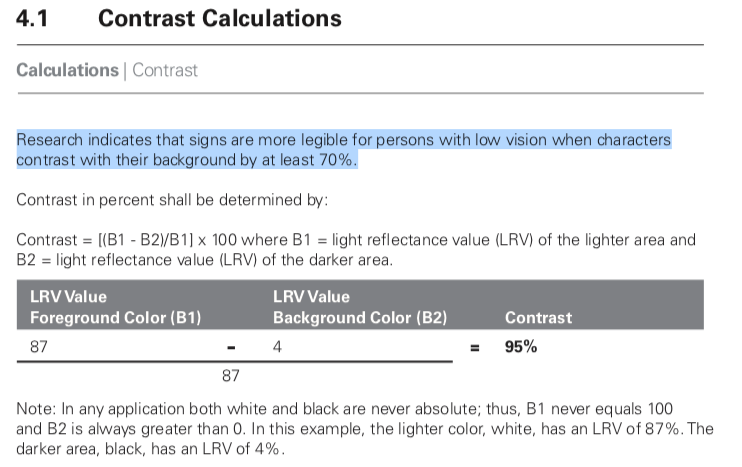
The California Council of the Blind (Lozano, 2009) states, and Federal ADA guidelines also state, that contrast for signs be 70% (note it is a percent not a ratio). The math used for the Federal standard is (B1-B2)/B1 (B1 is the lighter LRV, and B2 is the darker).[3] Now, if I use the WCAG math, 70% equals a ratio somewhere around 2.3:1 to 3.2:1. WCAG math is all over the place and does not relate to Weber's law nor anything else useful.
Nevertheless, California Council of the Blind (Lozano, 2009)[4] is on record stating that the Federal equation is flawed when B1 is less than 45. I just came across this a minute ago — I'm slightly amused as it is closely mirroring what I have been saying about the WCAG.
I describe this in more detail on the experiments page, and there are more examples.
In closing I just want to say that simply switching the equation to Weber is not the complete answer. I think we can do better, and that is the focus of my research.
Thank you again for the comments.
Andy
REFS:
[1]http://aardvark.ucsd.edu/color/whittle.pdf
[2]https://www.ncbi.nlm.nih.gov/pmc/articles/PMC3744596/
[3]https://segd.org/sites/default/files/SEGD_2012_ADA_White_Paper_Update.pdf
[4]https://www.documents.dgs.ca.gov/dsa/access/Pt2_Final-SOR.pdfHi @mraccess77
Edited May 2019 for some minor clarity fixes.
Myndex
on 16 Apr 2019
Hi @Myndex I appreciate your efforts in addressing the shortcomings of the current algorithm. In your examples, I personally found some of the first 4.5 items easier to read than the ones with values greater than #AAA -- thus I know there will always be differences in interpretation by different people as we all see differently. Along those lines with the adaption you were discussing, halos may technically be used to meet the requirement but when you take into account the width of the stroke and surrounding colors haloed text can actually be harder for me to read. I agree that we want more people to use contrasting colors that meet users needs and if we can change the algorithm to meet those needs without lessening it get more adoption that would be a good thing. Personally, I see these changes as something that can't be changed with the current standard as the method is too normative to change with an errata but would be a great opportunity to address for the next version of the accessibility guidelines (silver). It would be good to socialize this with some other folks such as Jared Smith from WebAIM who also would like to change the future direction of the contrast calculations and the Low Vision Accessibility Task Force which is part of the Accessibility Guidelines Working group. Adding @WayneEDick and @allanj-uaag.
mraccess77
on 16 Apr 2019
Thanks @Myndex for writing this up so thoroughly!
 bruce-usab
on 16 Apr 2019
bruce-usab
on 16 Apr 2019
Hi @mraccess77
Hi @Myndex I appreciate your efforts in addressing the shortcomings of the current algorithm. In your examples, I personally found some of the first 4.5 items easier to read than the ones with values greater than #AAA.
If that is based on the images in my post above, I should mention that the SIZE of the first set is 30% larger, and therefore easier to read (I just realized the scaling error due to how this site handles images as I looked at the post, post edited to correct).BUT ALSO, three of the first 5 have the brightest color well above #AAA. For an apples to apples comparison, please see the live experiment on the website: https://www.myndex.com/WEB/W3Contrastissue
Text scaling on the site for the samples is equal in each group (the first group is general contrast assessments, and the second is body text).
thus I know there will always be differences in interpretation by different people as we all see differently. Along those lines with the adaption you were discussing, halos may technically be used to meet the requirement but when you take into account the width of the stroke and surrounding colors haloed text can actually be harder for me to read.
Indeed, for instance, research shows that most people do better with dark text on a light background (Positive Display) but with my vision, I much prefer light/colored text on a black background (Negative Display). Right now I am having difficulty with THIS site due to the bright background (L* 98 in the text area) yet for most people this is the ideal presentation.
I agree that we want more people to use contrasting colors that meet users needs and if we can change the algorithm to meet those needs without lessening it get more adoption that would be a good thing. Personally, I see these changes as something that can't be changed with the current standard as the method is too normative to change with an errata but would be a great opportunity to address for the next version of the accessibility guidelines (silver).
Yes I see it was just tagged as WCAG 2.2 which I was somewhat expecting. Correcting the algorithm also means changing the standard, as far as I can tell the current standard(s) seem to be compensating for the math issues — I don't know the complete history, but that is how it appears based on the reverse engineering/analysis.
For an errata, it might be useful to place a note to the effect of: "Current contrast algorithms may overvalue contrasts with pairs of darker colors. Designers should be cautioned not to rely on contrast numbers in these cases/"
I should note that problems and controversy on this very subject are visibly present in the research and some standards. It is partly why I am being so proactive here. I hope to cut through the clutter to bring some clarity (puns more or less intended).
It would be good to socialize this with some other folks such as Jared Smith from WebAIM who also would like to change the future direction of the contrast calculations and the Low Vision Accessibility Task Force which is part of the Accessibility Guidelines Working group. Adding @WayneEDick and @allanj-uaag.
Excellent. What are the deadlines for 2.2? As I mentioned in one of my posts while there is much research on simple monitor displays (i.e. black on white, white on black), there is not much in the way of research on complex, graphically rich content (that I've found anyway). I'm thinking some empirical studies would be illustrative.
ON ALGORITHMS:
Weber has been the "gold standard" for text contrast. But I am presently leaning toward a modified version of Perceptual Contrast Length (PCL) which "essentially" uses a modified L* type curve (perceptual lightness) in calculating contrast. I believe I have a way to adapt it so the contrast results are similar to what people are used to using (i.e. 3:1 etc).
Another idea is using the difference between a brighter/darker L* values (as in CIE L* a* b*).
Those are all fairly simple models for contrast determination. A more advanced approach is a true color or image model like CIECAM02 or ICAM. ICAM is the work of Mark Fairchild at Rochester Inst. of Technology. A model like that could (I believe) analyze an overall page, as opposed to a pair of colors in isolation.
On the experiments page there is an example of local adaptation issues do to surrounding colors. But here's a quick example:
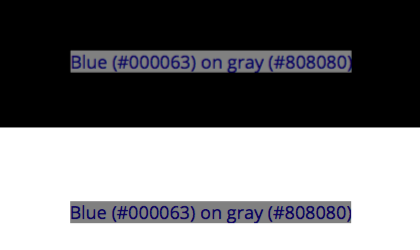
The blue text on grey is WCAG 4.5:1 contrast, and both bits of text are identical. But the one centered on black is more readable because the black allows local adaptation to the darker colors. So among other things, minimum padding for elements against a high contrasting color are important.
(I'll mention in passing that pair of blue on grey is a fail in my modified PCL algorithm).
And this is where things are more complicated than a simple contrast — web content is graphically rich. Text on a background may be a pass, but if it is far different than the overall page, adaptation will affect perceived legibility.
Thank you again,
Andy
Myndex
on 16 Apr 2019
Thanks @Myndex for writing this up so thoroughly!
Thank you @bruce-usab — I consider this a particularly important issue, partly because W3C standards are used not just for web but for app design and other applications as well. Because it is a freely distributed standard, it has a very wide reach. Myself I spend 12 hours a day in front of monitors, while that may be more than average displays are certainly integral to the lives of so many — we are inseparable from our technology — standards like this have a very real affect on people's lives. This standard in particular has become part of government regulations, for instance.
What is the timeline/deadlines for 2.2? I'm hoping to have some candidate contrast models soon, but also thinking there is one giant rabbit hole to crawl down considering how page complexity affects perception (adaptation) etc.
Thank you!
Andy
Myndex
on 16 Apr 2019
There is a mathematical problem with this discussion line. L1 and L2 are
computed using weightings that take color receptivity into account.
R, G, and B have distinct weights in the relative luminance formula.
On Tue, Apr 16, 2019 at 12:32 PM Myndex notifications@github.com wrote:
Thanks @Myndex https://github.com/Myndex for writing this up so
thoroughly!Thank you @bruce-usab https://github.com/bruce-usab — I consider this a
particularly important issue, partly because W3C standards are used not
just for web but for app design and other applications as well. Because it
is a freely distributed standard, it has a very wide reach. Myself I spend
12 hours a day in front of monitors, while that may be more than average
displays are certainly integral to the lives of so many — we are
inseparable from our technology — standards like this have a very real
affect on people's lives. This standard in particular has become part of
government regulations, for instance.What is the timeline/deadlines for 2.2? I'm hoping to have some candidate
contrast models soon, but also thinking there is one giant rabbit hole to
crawl down considering how page complexity affects perception (adaptation)
etc.Thank you!
Andy
—
You are receiving this because you were mentioned.
Reply to this email directly, view it on GitHub
https://github.com/w3c/wcag/issues/695#issuecomment-483812380, or mute
the thread
https://github.com/notifications/unsubscribe-auth/AH0OF8FugSGRVmc2nIyMdaxNKnTND_7dks5vhiUzgaJpZM4cui9x
.
 WayneEDick
on 17 Apr 2019
WayneEDick
on 17 Apr 2019
There is a mathematical problem with this discussion line. L1 and L2 are computed using weightings that take color receptivity into account. R, G, and B have distinct weights in the relative luminance formula.
Hi @WayneEDick , thank you for commenting. I’m away from the studio, on location, so I can’t comment in depth, but:
Yes, luminance is spectrally weighted. However luminance is a linear measure of light.
Light is linear (additive) but human vision is NOT linear (essentially a power curve). So while the sRGB coefficients adjust for spectral sensitivity, luminance is NOT relative to PERCEPTION of lightness. L* is perceptual (CIELAB), and gamma encoded transfer curves are somewhat perceptual (such as luma, the Y‘ of Y‘IQ) but not luminance (Y).
But that’s not even the most relevant part. L1/L2 is called “simple contrast” and it is wrong in this context. The “standard” for contrast for TEXT is Weber, which is based on ∆L/L typically as
(LMax-Lmin)/Lbackground or (LMax-Lmin)/LMax
And is in fact still using linear luminance. But there are some better more modern implementations now such as Perceptual Contrast Length (PCL) which essentially converts to a modified L* (perceptual lightness).
This issue came to my attention when I saw the contrast equation was wrong (as is the sRGB threshold WCAG lists), as I have outlined in my posts above. But now that this is being discussed, we can do better. I am currently investigating PCL and other methods.
For further details, I suggest Charles Poynton’s GAMMA FAQ and COLOR FAQ. Here’s a link: https://poynton.ca/GammaFAQ.html
but please feel free to ask me any other questions.
-Andy
Myndex
on 17 Apr 2019
@Myndex, you asked:
What is the timeline/deadlines for 2.2?
The formal/approved Project Plan has a goal of this time next year for the first public working draft.
I'm hoping to have some candidate contrast models soon, but also thinking there is one giant rabbit hole to crawl down considering how page complexity affects perception (adaptation) etc.
I am not optimistic about the chances for wholesale replacement formulas for 2.2. That is possible for 3.0.
This standard in particular has become part of government regulations, for instance.
Yes. I am one of the actors in helping that happen.
There was some user testing associated with the validation of the 2.0 formula. I could not quickly find a cite for that. My recollection is that the hard data pointed to a ratio of 4.65:1 as a defensible break point. The working group was close to rounding that up to 5:1, just to have round numbers. I successfully lobbied for 4.5:1 mostly because (1) the empirical data was not overwhelmingly compelling, and (2) 4.5:1 allowed the option for white and black (simultaneously) on a middle gray.
I am sorry to say that I will offline for the next ten days or so, but I will be circling back to this!
bruce-usab
on 17 Apr 2019
@Myndex, this one assertion leapt at me:
The California Council of the Blind (Lozano, 2009) states, and Federal ADA guidelines also state, that contrast for signs be 70% (note it is a percent not a ratio). The math used for the Federal standard is (B1-B2)/B1 (B1 is the lighter LRV, and B2 is the darker).[3]
That formula was only ever intended for reflective light, not luminescence. It was promulgated in the 1991 ADAAG and was sufficiently problematic that is was dropped in the 2004/2010 ADAAG/ADAAS.
Your citation [3] clearly states (more than once) that 70% “is no longer a requirement”.
bruce-usab
on 17 Apr 2019
Hi @Myndex,
Just upfront - I strongly suggest we come to a resolution on this issue before you spend time creating a PR.
estimating roughly, 40% of the color pairs the WCAG math calls "PASS" are poor in quality and should fail. And somewhere in the area of 51% of colors they fail could conceivably pass.
This doesn't match my testing with people over the years. Not a large scientific study, but 100s of tests (since the early 2000s) with people with low-vision. Whenever there was a color combination that people struggled with it virtually always failed on the contrast level checks.
I've also found there are huge differences between people and the particular colors that were an issue for them. E.g. Some participants couldn't see a strong pink on white, which others couldn't ignore as it was so intense.
Broadly I think the context that you need to account for is what the guidelines are for, and how they are used. A method to measure contrast for the _web_ content accessibility guidelines needs to:
- Work across many types of visual impairment. Low vision is a general category, various forms impact color perception in different ways.
- Work across many devices. As a web designer your work will be viewed on cheap & expensive phones, expensive Macs (or Chomebooks), cheap Chromebooks (or Windows laptops), TVs, projectors etc. Therefore it cannot account for the brightness of the display, let alone the surroundings. It has to be a measure from the way the web page is setup.
- Be simple to test. I.e. a web designer needs to be able to test their own work easily.
A lot of the factors you added in the summary above cannot be accounted for in a web standard (e.g. display polarization, nits).
Also, at least some of the examples you created have the same 'background bias' effect I mentioned here, perhaps you know the name for that effect? I.e. having a different general background behind the area of interest affects the perceived readability. Reading on, I guess this is the 'local adaptation' issues?
In short, I don't think there is such as a thing as a "revised programatic contrast assessment that is perceptually correct", but I'd love to be wrong. A change would need a lot of real-world testing to ensure it provides better results.
What is the timeline/deadlines for 2.2?
Given the scale of change this would require (including the research), I suspect it would be a 3.0/Silver type of thing to do.
 alastc
on 18 Apr 2019
alastc
on 18 Apr 2019
@Myndex, this one assertion leapt at me:
The California Council of the Blind (Lozano, 2009) states, and Federal ADA guidelines also state, that contrast for signs be 70% (note it is a percent not a ratio). The math used for the Federal standard is (B1-B2)/B1 (B1 is the lighter LRV, and B2 is the darker).[3]
That formula was only ever intended for reflective light, not luminescence. It was promulgated in the 1991 ADAAG and was sufficiently problematic that is was dropped in the 2004/2010 ADAAG/ADAAS.
Your citation [3] clearly states (more than once) that 70% “is no longer a requirement”.
This is the section in reference [3] I was referring to (I did not read the entire document, I was mainly pointing out the continued controversy and unsettled nature of the issue):
Historical and current studies of contrast sensitivity it is typically about 1% to 1.6% over a wide range from 7 or 8 cd/m2 to over 500 cd/m2. NASA also found that under 8 cd/m2, contrast sensitivity fails increasingly.
But on the subject of reflected light vs emitted light: both can be measured in luminance. Luminance is proportional to both illuminance and reflectance.
And this is one of the HUGE ENORMOUS PROBLEMS facing us in the present conversation, I have seen two COMPLETELY DIFFERENT definitions of LRV. The correct definition of LRV is based on luminance (Y or L) which is linear light, yet some sources state it is based on lightness (L* as in CIELAB, L* a* b*) which is perceptual lightness NOT linear light.
YIKES. It appears this stems for the error in the 1991 ADAAG, which from what I have been reading was using Weber on L* and not Luminance?
Myndex
on 19 Apr 2019
Hi @Myndex,
Just upfront - I strongly suggest we come to a resolution on this issue before you spend time creating a PR.
Hi @alastc I agree and said as much in one of my posts, it is why I am posting an issue instead of a pull request first.
estimating roughly, 40% of the color pairs the WCAG math calls "PASS" are poor in quality and should fail. And somewhere in the area of 51% of colors they fail could conceivably pass.
This doesn't match my testing with people over the years. Not a large scientific study, but 100s of tests (since the early 2000s) with people with low-vision. Whenever there was a color combination that people struggled with it virtually always failed on the contrast level checks.
That's good to know, though I am concerned about the large number of sites I encounter that pass the test yet I find very hard to read. I am less concerned with false fails and more concerned about the false passes in other words.
I've also found there are huge differences between people and the particular colors that were an issue for them. E.g. Some participants couldn't see a strong pink on white, which others couldn't ignore as it was so intense.
A "strong" pink on white should have a fairly low luminance contrast, and should fail with proper math though the WCAG math might pass it when it should fail in some cases. The problem with hue is how people with color deficient vision rely on luminance contrast. But also, a light background changes perception of text & contrast vs a dark background. I'm wondering how those who had a hard time with pink on white would have seen the white on pink.
Broadly I think the context that you need to account for is what the guidelines are for, and how they are used. A method to measure contrast for the _web_ content accessibility guidelines needs to:
- Work across many types of visual impairment. Low vision is a general category, various forms impact color perception in different ways.
Yes the main issue is adequate luminance contrast. A useful tool for designers might be a tool that captured a website and converted it to greyscale based on luminance so the designer could see the luminance contrast without being influenced by hue.
- Work across many devices. As a web designer your work will be viewed on cheap & expensive phones, expensive Macs (or Chomebooks), cheap Chromebooks (or Windows laptops), TVs, projectors etc. Therefore it cannot account for the brightness of the display, let alone the surroundings. It has to be a measure from the way the web page is setup.
Cheap or expensive, displays are built to sRGB standards, and often with better brightness. But not the point, as the eye adapts to various conditions of light. What is important is to consider how adaptation affects readability (more on that below).
- Be simple to test. I.e. a web designer needs to be able to test their own work easily.
Most that I am discussing is simple to implement. (It's not harder to use correct math, for instance).
A lot of the factors you added in the summary above cannot be accounted for in a web standard (e.g. display polarization, nits).
It can — when I talk of polarization, I talk specifically of web DESIGN. light text on a dark background is "negative polarization" _(or confusingly, positive contrast)_ and vice versa.
As for nits (cd/m^2) I'm not saying the web standard should specify any particular "absolute" luminance output, but the standard IS already trying to take environment into consideration
Also, at least some of the examples you created have the same 'background bias' effect I mentioned here, perhaps you know the name for that effect? I.e. having a different general background behind the area of interest affects the perceived readability. Reading on, I guess this is the 'local adaptation' issues?
Local adaptation, and adaptation in general, need to be part of the design considerations. Dark text on on a grey background may pass via the math, but if the grey background is a div with no padding on a white background, they eye adapts to the white making the dark text on grey hard to read. There is a demonstration of this on the experiments site.
In short, I don't think there is such as a thing as a "revised programatic contrast assessment that is perceptually correct", but I'd love to be wrong. A change would need a lot of real-world testing to ensure it provides better results.
There are definitely better choices than using incorrect math, which is the current state. And while vision and perception are complicated, it is also mostly academic in terms of things like contrast. There is a wealth of research on vision perception and contrast over the last several hundred years that can and should be used to guide this standard. In other words, yes there is such a thing as "programatic contrast assessment that is perceptually correct." It's just a matter of implementing it.
There may be added challenges in modern webpages due to the graphically rich content AND the variety of environments due to mobile devices. But the W3C provides the standards and guidelines not just for web design but for browser software.
_(edited for spelling and some clarity issues)_
Myndex
on 19 Apr 2019
False fails/passes & ‘incorrect math’: Yes there is lots of research, but any model using Mathematics is a mapping of how light is measured to how it is perceived.
There are individual differences in perception, so there cannot be a perfect model (that’s what I meant by ‘no such thing’). Otherwise the pink example wouldn’t vary by person.
A different model may improve the fit across a range of visual impairments, but it is not an absolute right/wrong. One model will not fit everyone perfectly, and we should be optimising for people with visual impairments rather than the general population.
If there is a better industry standard model to use for measuring contrast, great, let’s test it across a range of people.
Secondary notes
There are already tools for greyscaling a screenshot, but we need to be able to assess text (and certain graphics) and show a pass/fail individually.
Web content can be defined to use color spaces other than sRGB, but we are planning to standardise testing of contrast to sRGB as a lowest common denominator.
alastc
on 19 Apr 2019
I am not optimistic about the chances for wholesale replacement formulas for 2.2. That is possible for 3.0.
That makes sense, there are probably some incremental changes that might be helpful as well as "leading a path" to a larger change.
This standard in particular has become part of government regulations, for instance.
Yes. I am one of the actors in helping that happen.
Ah excellent! However, that also means that the standard needs to be solid and unimpeachable. I'd like to help to get to that point.
There was some user testing associated with the validation of the 2.0 formula. I could not quickly find a cite for that. My recollection is that the hard data pointed to a ratio of 4.65:1 as a defensible break point.
Hmmm. I'd love to see this data. I believe you that the ratio from the data is higher that other standards as the equation being used overstates the contrast ratio in addition to being perceptually incorrect.
The working group was close to rounding that up to 5:1, just to have round numbers. I successfully lobbied for 4.5:1 mostly because (1) the empirical data was not overwhelmingly compelling, and (2) 4.5:1 allowed the option for white and black (simultaneously) on a middle gray.
I'm not sure it does, as written the equation is overstating contrast for darker colors. It appears the equation does not take system gamma gain into account, nor the floor of 8 cd/m2 in terms of minimum luminance for contrast (NASA). More discussion to come on these issues.
QUESTION: it would be helpful to get online access to certain ISO standards, as well as papers used in the current specification — is that possible?
Thank you!
Myndex
on 19 Apr 2019
Ah excellent! However, that also means that the standard needs to be solid and unimpeachable. I'd like to help to get to that point.
Just for context though, the formula was already in WCAG 2.0, and that's been out since 2008 https://www.w3.org/TR/WCAG20/ ... so just a word of warning that it's something deeply enshrined and not something that can be changed quickly or easily. It would take a few years at least...
patrickhlauke
on 19 Apr 2019
Just for context though, the formula was already in WCAG 2.0, and that's been out since 2008 https://www.w3.org/TR/WCAG20/ ... so just a word of warning that it's something deeply enshrined and not something that can be changed quickly or easily. It would take a few years at least...
HI @patrickhlauke, Yes, I do realize this and recognize the issue. I'm certainly not expecting any overnight major change! As I mentioned in one of my posts, I am looking at potential incremental changes that can lead to a more solid solution.
At the same time there are a lot of other related standards that use different models and compliance parameters. Nearly all of them are using Weber, but there are newer more useful models emerging.
I mentioned some of the reasons I'm motivated for some positive changes here — and to be clear, my intent is to assist in finding easy and workable solutions to the issues I've outlined, and perhaps others.
As CSS, Java, HTML develop into greater feature sets, I've noticed a disturbing trend toward sites that are "fancy but less useable." So much so that many browsers now have the reader view to turn off all the crap!!!
Myndex
on 20 Apr 2019
Here are my questions.
When you use the term spectral in the sense of functional analysis?
While gamma is not a linear function it is differentiable and can be
represented piecewise by line segments without? Are you saying the W3C
representation does not use enough line segments in it's approximations? Or
are you saying that gamma does not come into the equation?
Finally what is your formula precisely including visual factors.
I would like to analyze this. I am a mathematician.
Sincerely, Wayne Dick PhD.
On Fri, Apr 19, 2019 at 3:41 PM Myndex notifications@github.com wrote:
Just for context though, the formula was already in WCAG 2.0, and that's
been out since 2008 https://www.w3.org/TR/WCAG20/ ... so just a word of
warning that it's something deeply enshrined and not something that can be
changed quickly or easily. It would take a few years at least...HI @patrickhlauke https://github.com/patrickhlauke, Yes, I do realize
this and recognize the issue. I'm certainly not expecting any overnight
major change! As I mentioned in one of my posts, I am looking at potential
incremental changes that can lead to a more solid solution.At the same time there are a lot of other related standards that use
different models and compliance parameters. Nearly all of them are using
Weber, but there are newer more useful models emerging.I mentioned some of the reasons I'm motivated for some positive changes
here — and to be clear, my intent is to assist in finding easy and workable
solutions to the issues I've outlined, and perhaps others.As CSS, Java, HTML develop into greater feature sets, I've noticed a
disturbing trend toward sites that are "fancy but less useable." So much so
that many browsers now have the reader view to turn off all the crap!!!—
You are receiving this because you were mentioned.
Reply to this email directly, view it on GitHub
https://github.com/w3c/wcag/issues/695#issuecomment-485030931, or mute
the thread
https://github.com/notifications/unsubscribe-auth/AB6Q4F4R2KE2T7DNR7IJLFLPRJDDJANCNFSM4HF2F5YQ
.
WayneEDick
on 20 Apr 2019
There are individual differences in perception, so there cannot be a perfect model (that’s what I meant by ‘no such thing’). Otherwise the pink example wouldn’t vary by person.
Pink/white relates to hue contrasts. The more perfect accepted model is luminance contrast as it's connected to contrast sensitivity. CS threshold is 1%-1.6% over the wide range of 8 cd/m2 to over 500 cd/m2, as shown in study after study, including many visual impairments. There are of course some impairments that directly affect CS/CSF, but contrast sensitivity is separate from visual acuity.
Visual acuity is helped more by size than contrast. perceived contrast is more complex than a ratio between two colors as it is substantially affected by adaptation, local adaptation, chromatic aberation, and other issues.
CHROMATIC ABERRATION: So this relates to an optical issue with any lens system, including human eyes. Light at different wavelengths are "bent" differently through a prism, which is why a prism creates a "rainbow". Lenses are a form of prism, and blue light through a lens lands in a different spot than red light as a result. (It is theorized that this is why our eye evolved to have red cones in the center and blue cones on the periphery). But this is a reason that red (#F00) and blue (#00F) look wacky together - the shared red/blue edge focus to different places on the retina. The hot pink you mention is #FF00FF - so red and blue with no green, the red portion of the text edge focusing differently than the blue edge. So for instance, working with colors that have a high blue content needs care, as NASA discusses:
https://colorusage.arc.nasa.gov/blue_2.php
That NASA site covers a lot of related material, and it is all about user interface design considering adverse viewing circumstances.
If there is a better industry standard model to use for measuring contrast, great, let’s test it across a range of people.
The "standard' has been Weber the 1800s. There are better models now, and particularly as web pages are a "unique environment" in that they are displayed using certain standards, there are definitely better ways to assess perceptual contrast.
Secondary notes
There are already tools for greyscaling a screenshot, but we need to be able to assess text (and certain graphics) and show a pass/fail individually.
Okay, but as I have demonstrated and discussed, the ratio of two colors by themselves in isolation will not give you a complete answer.
Web content can be defined to use color spaces other than sRGB, but we are planning to standardise _testing_ of contrast to sRGB as a lowest common denominator.
Hmmm, no you can't. The standard is still sRGB. the CSS 4 _working draft_ does list additional working color spaces as something desired for future implementation, but that's a pretty horrible idea at today's level of technology. sRGB is ideal for 8 bit. Any larger colorspace and you start needing at least 10 bit pretty quick. I see talk of linear_sRGB or linear_Rec2020 - then you need at least 16bit_HALF(FLOAT). Double bit depth and you double data size, and pages are ALREADY overbloated and slow. And you'll NEVER see the benefits under typical ambient conditions and cheap devices.
To wit: bigger color spaces do absolutely ZERO to assist impaired vision, There is ZERO luminance contrast difference _(and it's worse if you stay in 8 bit: A super-big space like ProPhoto is GARBAGE on 8 bit, and will provide WORSE contrast gradation (i.e. causes banding) due to the ginormous delta E errors. NOT TO MENTION the fact that ProPhoto uses IMAGINARY primaries, meaning that values like #00FFFF DO NOT EXIST in ProPhoto as something you can see._
Most mobile browsers and many desktop browsers still do not support any form of color management. sRGB is the standard, and is expected remain that way for the foreseeable future. The CSS tag for alternate colorspaces is not.
_FOR ACCESSIBLE:_ 8 bit and sRGB (and Rec709) is the ideal standard at present technology.
Yes, there are some emerging color spaces like Rec2020 that are bound to make a difference someday but all these alternate color spaces have different transfer curves and different primary coordinates. Converting between spaces is computationally expensive, which is why most mobile browsers are NOT color managed and instead are sRGB "compliant".
I have high end $$$ wide gamut monitors (which are probably what caused my early cataracts), but those are rare — sRGB/Rec709 define nearly all distributed content be it Web or Broadcast worldwide, and in a non-color managed way. If you use monitors OTHER THAN sRGB/Rec709, then you MUST have color management to transform colorspaces, and that is computationally expensive. I discuss some of this in some articles I've written over the years reprinted here: https://www.generaltitles.com/helpfiles/13-q-a-blog/colorspaces-and-file-types
but still, Poynton's Gamma and Color FAQ are a good and easy read first: https://poynton.ca/GammaFAQ.html
Thank you for the comments!
Andy
Myndex
on 20 Apr 2019
Here are my questions. When you use the term spectral in the sense of functional analysis?
Hi @WayneEDick !
This is part of the CIE 1931 standard on luminance, the Y in CIEXYZ. The standard is spectrally weighted relative to the LMS cones (red green blue cones) that make up human trichromatic vision.
The coefficients 0.2126, 0.7152, and 0.0722 are part of the Rec709 standard for HDTV, and sRGB is derived from that standard. Both Rec709 and sRGB use the same color primaries and white point — the only practical difference is the transfer curve (effective gamma) is a little different between sRGB and Rec709, the reason being that Rec709 gamma is relative to a dark living room and sRGB is relative to a brighter office type setting.
Charles Poynton's Gamma FAQ is really the best crash course on this.[1]
While gamma is not a linear function it is differentiable and can be represented piecewise by line segments without?
Gamma is one form of a "transfer curve" to transform a particular color value from one colorspace to another. It is often represented "piecewise by line segments" as what we call a LUT (look up table). LUTs are very common in the film/television industry because the color represented in negative film is sufficiently complicated that it can't be accurately represented with a simple equation or matrix. 3D LUTs are used to create accurate transforms through various color spaces in the post production process.
Some color spaces like Adobe98, use a pure exponential transfer curve.
BUT ALSO: the sRGB and Rec709 transfer curves in their "correct" implementation use a combination of an exponential curve attaches the a linear region near black. The linear region has a number of purposes and motivations, including reducing camera noise near black and math issues with pure exponential curves near black.
Are you saying the W3C representation does not use enough line segments in it's approximations?
It uses "none" because luminance is linear, as in a straight line. Luminance has no gamma (or technically, the gamma is 1.0). Luminance is proportional to light, and light in the real world is linear.
The human eye is NOT linear, photopic vision has a gamma of around 2.4 to 2.5 (though vision is more complicated due to adaptation, scoptic (rod/dark night) vision, etc.)
This is the CIE L* curve
L* is based on human perception. Luminance (not shown) would just be a straight diagonal line from 0,0 to 100,100.

Or are you saying that gamma does not come into the equation?
Right now human perceptual contrast is not represented in the WCAG "Understanding 1.4.3."
Luminance is derived by first applying the reverse transfer curve to each of the R´G´B´components, then multiplying them by the coefficients, and then summing them for the total luminance (Y but sometimes shown as L but NOT to be confused with L*).
THEN they use a simple contrast ratio Yhi/Ylo or as they print it L1/L2. They also add 0.05 flare to each term. ((L1 + 0.05)/(L2 + 0.05)).
So here is the point I was getting at: the use of L1/L2 is only useful for very absolute black & white values, because it ignores a lot of what happens with perception of in-between values.
The "standard" math for contrast of TEXT is WEBER CONTRAST which uses the Weber fraction, which is ΔL/L — Weber has been around for a very long time, and most contrast standards and research are based on Weber or Michelson, not simple contrast. Simple contrast is used for example for the contrast of a monitor from maximum black to maximum white, but not for the in between values.
EDIT: Weber contrast is often stated as (Ybg-Ystim)/Ybg, but this can result in odd results. For monitors/displays, try (Ylightest- Ydarkest) / Ylightest
I am NOT saying that Weber is the ultimate solution, but it is what jumped out at me when I was investigating why web contrast calculators were presenting "weird" numbers relative to legibility. This led me on this path of "how did we end up here" which has now morphed into "what is the most useful modern perceptual contrast calculation."
Other notes on WCAG math: The sRGB conversion to luminance is using some incorrect values. The problem is minor and likely has little effect on the contrast issue, but I will show to the correct sRGB formula below.
Also, just FYI the coefficients must be applied only _after_ the gamma is removed, but there is an interesting wrinkle here: even the "correct" luminance math does not account for system gamma gain. There is an additional 1.1 or 1.2 exponent applied to the signal by the monitor/display. This is common even in older systems like NTSC, which used a 1/2.2 exponent at the camera, but the CRT display was actually ~ 2.5 resulting in a system gamma gain at final display. Final display gamma can in fact be adjusted by the user with the monitor controls (that adds the uncertainty aspect to all of this). But I did notice that when I added a 1.2 exponent to the resultant luminance, it improved the perceptual uniformity of the resultant reported contrast (at least it seemed to, I have not run a real controlled study yet).
Finally what is your formula precisely including visual factors.
I suggest looking at Weber contrast, Michelson contrast (aka modulation), but also two modern methods that I am investigating and experimenting with, Bartleson-Breneman Perceptual Contrast Length[2], and one I just recently found that apparently is the basis for the Australian accessibility standards, the Bowman-Sapolinski Equation [3], though I;m not certain it can be used on CIE Y (Luminance). And then there are methods using L* (perceptual lightness from CIE L* a* b) instead of luminance, in that case, it's not usually a ratio, but a difference (L1background - L2 foreground) as L is perceptually uniform.
So for normalized values of 0 is min and 100 is max:
Y (luminance) 0 = L* 0 = sRGB 0 and Y 100 = L* 100 = sRGB 100
_BUT_
Y 18.4 = L* 50 = sRGB 46.7
This is because the perceptual halfway point between black and white is not a luminance of 50, but a luminance of 18.4 but on the perceptually uniform L* curve, the halfway point is 50. On sRGB its about 46.7 because as I mentioned earlier, sRGB has additional system gamma gain. Adding an expoinent of 1.102 to Y will put Y 18.4 at sRGB 50 for example (and I'm not saying that necessarily "should" be done, just that's how the math is for comparison).
I would like to analyze this. I am a mathematician. Sincerely, Wayne Dick PhD.
That is REALLY awesome to hear, I was hoping a mathematician would get involved. I have some planned experiments this weekend, I'll post more as I progress.
Note: the correct luminance calculation for sRGB -> D65 Y is:
From 8 bit R´G´B´, divide each channel R´G´B´/ 255 to get them 0-1, then
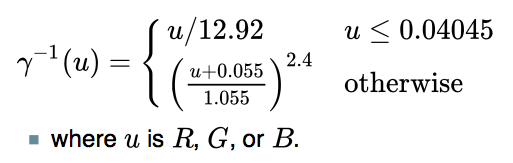
This reverses the gamma resulting in linear RGB, then
R * 0.2126 + G * 0.7152 + B * 0.0722 = Y (D65 luminance)
For your cut and paste convenience, here is the gamma-to-linear portion from my OO spreadsheet:
=IF( R1 <= 0.04045 ; R1/12.92 ; POWER(((R1 + 0.055)/1.055) ; 2.4) )
ALSO if you are looking at other color transforms, we are only concerned with D65. Some CIEXYZ and L* a* b* transforms use a D50 whitepoint, which should not be a part of anything we are doing with monitor contrast, it's D65 only.
[1]https://poynton.ca/Poynton-color.html
[2]https://icdm-sid.org/downloads/idms1.html
[3] https://bcdg.hoop.la/fileSendAction/fcType/0/fcOid/330620847500650652/filePointer/330902322495002398/fodoid/330902322495002396/Color_Contrast_Scientific_Report.pdf
[4]http://www.brucelindbloom.com/index.html?Math.html
Myndex
on 20 Apr 2019
MORE USEFUL CONTRAST MATH
So today I came across this recent research at NIH (just a couple years ago) that directly states what I have been attempting to explain in the above posts. While they don't mention the WCAG, they do use the WCAG simple contrast ratio (CR) equation as a comparison to their modified Weber equation, including the WCAG's 5% ambient component.
The paper states specifically (emphasis added):
_The contrast ratio (CR) based visibility predictions fail because it does not consider the function of the observer’s visual system. Human vision achieves high dynamic range through luminance (retinal) adaptation. As the overall scene luminance increases or decreases, the viewer’s adaptation level normalizes the target to background luminance difference, and perceives the same contrast (contrast constancy). For example, a large absolute luminance difference displayed under high overall luminance condition is perceived to have the same contrast as a lower absolute luminance difference displayed under low overall luminance condition. This characteristic is embedded in the Weber contrast definition._
NIH PAPER: https://www.ncbi.nlm.nih.gov/pmc/articles/PMC5489230/
They do modify Weber a little differently than I have, and their results are interesting and provide a further demonstration of the problems with "simple contrast" (CR). There are a couple small caveats I'll discuss after the summary. The paper is a short read, but here's a synopsis:
The WCAG contrast ratio (CR) is (L_light_ + 0.05)/(L_dark_ + 0.05)
The modified Weber is: (L_light_ - L_dark_ ) / (L_light_ + 0.05)
Hwang-Peli Modified Weber for Realistic Contrast for Monitors
CS Log plots of contrast versus ambient light:
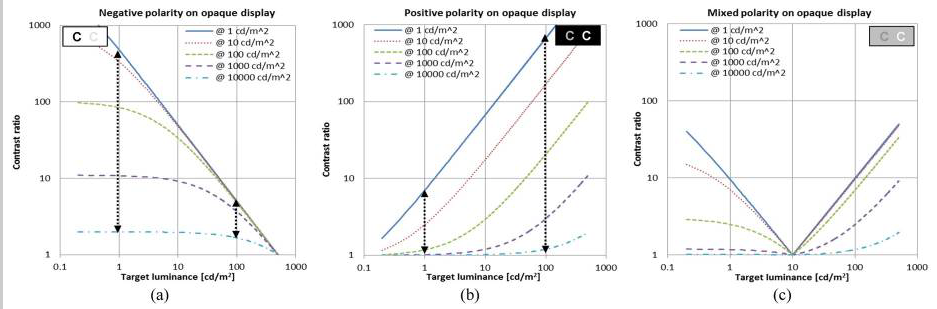
CR Plots suggest that when the display viewed indoor is moved outdoors under bright sunlight condition, the visibility reduction of the high contrast letter is much larger than the low contrast letter (the opposite of what happens in the real world).
CR Plots show patterns of contrast ratio change under the same changes in ambient luminance condition are different for the two contrast polarity cases, again opposite the real wolrd case.
Modified Weber log plots of contrast versus ambient light. _Note that Weber is not a ratio, but a value ov 0 to 1 (which can be *100 and described as a percentage, like Michelson)_:

The Weber contrast of target decreases rapidly to zero (0), as the target luminance approaches near to the background luminance level, while it converges slowly to contrast of 1.0 as the target luminance depart from the background luminance level at all ambient light conditions.
the impact of ambient light variation is much stronger for positive contrast polarity than negative polarity contrast. (Note: this report uses _contrast polarity_, so positive contrast polarity is light text dark BG, this is opposite from "screen polarity" where positive means dark on light BG, which I used in another post above).
The contrast threshold can be drawn on the plots as a black horizontal line. Any target with contrast (including the impact of ambient light) below the threshold line will not be visible to the viewer.
An image composed of both contrast polarities letters (Fig. C), it is expected that even for letters of the same contrast, _those darkTX-on-lightBG letters disappear first_ (becomes lower than contrast threshold), as ambient light increases. These results on the mixed polarity are particularly important as it suggests an effective way to compensate for the ambient light.
Some thoughts:
1) TERMS: I have seen in the research two different polarity types. Contrast polarity, where black text on a white BG is called NEGATIVE, and screen polarity where black text on a white BG is called POSITIVE. Gee can we be more confusing?
For the purposes OF THIS DISCUSSION THREAD, I want to offer these (hopefully more clear) terms based on acronyms:
WOB: for white on black, any light text on any darker background.
BOW: for black on white, any dark text on any lighter background.
And _maybe_:
WOG and BOG, where the _background_ is near a middle grey value.
2) The cited report describes what I have found regarding the perception difference of WOB vs BOW page designs. The implication as I have stated earlier is that there need to be a separate accounting or specification depending on design polarity.
3) The report also shows that BOW is the most stable under ALL ambient conditions, while WOB is more susceptible to brighter ambient conditions, and the middle-grey-background version (C) emphasizes this even more. This directly supports my earlier suggestions that the _minimum value for the BRIGHTEST_ element be around #AAA (or somewhere between #999 and #AAA, TBD).
Next Post: Path Forward.
Myndex
on 22 Apr 2019
PATH FORWARD
Based on all the research and discussion THUS FAR, I see the following general path forward as far as changes and pull requests for the WCAG:
WCAG 2.2 (and possible errata for 2.1/2.0)
- Clearly, correcting the algorithm is too great a change for an incremental version as an algorithm change will necessitate a change in the pass/fail specification.
- There are still incremental changes that can be added to 2.2 that will be helpful, such as: a minimum luminance for the lightest element, and maximum for the darkest element (essentially, depending on the A/AA/AAA level performance level, the brightest element be no darker than luminance 35% which is sRGB 63% which is #A0A0A0 and the darkest element as _no lighter_ than 25% luminance which is 53% sRGB which is #888888. All while still maintaining the contrast as currently specified).
- Another incremental change to address shortcomings of the current algorithm is to make WOB require a higher contrast than BOW, and similarly:
- Address local adaptation, which can be helped by a minimum-padding spec, which is related to 1.4.8 and 1.4.12 for visual presentation and line spacing. (Essentially saying that if a containing div background and the text therein is substantially darker than the overall BG of the larger container, than padding equal or greater than the leading needs to be incorporated in the darker div element).
- On visual presentation, emphasize user-adjustible size, which I have identified as being more important than contrast. Make it a FAIL if a webpage does not allow zooming in, and a fail if a webpage overrides user agent default font size or zoom level.
5b. RELATED: Users should be able to set the default screen height of 1 REM. If page designers design _around that base unit._ it would allow users to set a larger base font (say 20 instead of 16) and have the rest of the page design maintain relative proportions. However, as a mandate there are issues due to responsive design concerns. The more important issue is disallowing zoom lock on pages!! Personally I find nothing more irritating than a page on my phone that has text too small and won't allow me to zoom in. That's a HUGE problem. - One final incremental change would be to use the correct values in the relative luminance equation so it is in line with the sRGB standard (which it current is not).
WCAG 3.0
- At the very least, change the contrast algorithm to a modified Weber contrast, if not another perceptually based contrast assessment.
- Modify the standard for contrast minimum & enhanced to use the values created by the new algorithm.
- To help prevent confusion, the new algorithm should create contrast values as a _percentage_ so the values are clearly different than those of the WCAG 2.0 standard which uses a ratio.
- As a new algorithm/method may reduce or eliminate the need for some of the incremental changes listed above for 2.2, make sure those are altered as needed. For instance, a correct algorithm/method may take positive/negative polarity in design into account.
- EVALUATION: If funding can be obtained, ideally a laboratory controlled study would be ideal as part of an evaluation. But also, a wide and public study using a web page based perception test should be included. While such a study would have less under "controlled" conditions, it would provide more under real world conditions, _including how users have their browsers and devices setup_. This wide study would be cheap and also create a huge dataset. I'd hope to see 50,000 or more responses, which should cancel out the far outliers and provide a real world basis for standards.
THREADS: Should we create a new thread for 3.0, and then set the discussion here just to the incremental changes I've proposed for 2.2?
Thank you all again for all comments and thoughts.
Andy
Myndex
on 22 Apr 2019
Hey @bruce-usab for when you get back, there are a couple interesting things to mention.
JUSTIFICATION for #A0A0A0
_as an interim "minimum value" for the lightest element, pending further study._
On a thread at hoop.la: https://bcdg.hoop.la/topic/cbc-1115b-6-3-compliant
Sharon Toji says:
It is not (45 LRV) in the code, due to the fact that, as I said in my post, designers stopped it. We had passed it in ANSI, for instance, and they showed up at the next meeting in force, suits and briefcases, and defeated it with a tie vote broken by the Chair against what had been a fairly good margin in favor. They used every dirty trick in the book to do this, including out and out lies.
Then, we had voted to include it in California, unanimously, in the Access Committee, and the DSA, without telling us, did not include it in the code changes on the grounds that it had been voted down in ANSI! I was never even asked for the background! We had a scientific committee working on this for a full year, vision and color experts. The Access Board had a study on contrast that specifically stated that you had to include a minimum for the lighter of the two LRVs in order for the formula to work. Such is the power of designers who want to continue with signs that have little or no dark/light contrast.
The 45 LRV was VERY conservative. It allowed literally thousands and thousands of color combinations. However, they mindlessly shot it down, even though they all acknowledge that the formula is flawed without it.
I find this interesting, along with the Cal Blind Inst. assertion regarding 45 LRV, and how it correlates to my suggestions regarding making #A0A0A0 (Luminance 35%) or #AAAAAA (Luminance 40%) as the darkest value for the lighter of two elements. 45 LRV is sort of similar to #B3B3B3, but an important difference is that at 45 LRV, there is the implication that the eye is adapted to an illumination that's 55% brighter (I.e. if 45 LRV measured as luminance 225 cdm2, then we can assume an illumination that creates 450 cdm2 on an LRV of 90.)
On a monitor in an office, with an ambient Lux of 64, and a monitor white of 100cd/m2 (at #FFFFFF), #AAAAAA would end up as 36 to 40cd/m2, and #A0A0A0 as 31 to 35 cd/m2, depending on monitor adjustment.
Here are some examples:

Two things to notice in the above example: One is that the text is becoming difficult to read, and also notice the WCAG contrast ratios - the top is 4.5:1 and the bottom is 8:1, yet the apparent contrast difference between the two is hardly noticeable.
And the same two grey elements but now on black instead of white:

Both are now easier to read, and ALSO the contrast difference between the 4.5:1 and the 8:1 is a little more obvious. Nevertheless allowing the brightest element to go much below #A0A0A0 starts to really impact legibility, regardless of the reported contrast.
This has led me to consider something that I think could be part of WCAG 3.0, and that is looking at three colors, instead of just pairs: That is, the overall luminance of a webpage is what the eye will tend to adapt to, and then the smaller elements are thus affected. The context of the contrast a specific pair of colors is thus enhanced or degraded by the overall page luminance.
BUT GETTING BACK TO MINIMUM LUMINANCE
Nevertheless, in the interim, I am suggesting that #A0A0A0 (35% luminance) be the darkest level for the lightest element. At the moment, the WCAG math allows for #747476 (17.5% luminance) to be the lightest element if the darkest element os #000. IMO that's barely readable in typical ambient light:

Setting a minimum luminance of 35% instead of the current minimum for 4.5:1 at 17.5% reduces "available colors" 21% (65/82.5 = 79% of the colors), but many of those 21% are hard to read pairs (depending on a number of other considerations as mentioned). With WCAG 4.5:1 contrast, 35% as a minimum for the lightest element gives easy to read color pairs, here are some examples using colors other than grey:

If we split the difference, linearly, between 35 and 17.5 it.s 26.25 or #8C8C8C, I think it's getting challenging, again of course this is conditional on ambient lighting, but these darker samples do much worse as ambient light increases.

Interestingly, 30% luminance (#959594) is naturally the darkest value of the lightest element at the WCAG 7:1 ratio for AAA/Enhanced Contrast. So the comparison of the darkest 7:1 pairs against the brightest 7:1 pairs:

All these are at WCAG 7:1. As expected the first two darker pairs have lower perceived contrast than the next two brightest pairs. The last example is #A0A0A0 as the minimum luminance for the lightest color, and it still has good contrast. While this isn't an exhaustive study, it does provide some justification for setting #A0A0A0 as a minimum value for the lightest color, when relating to text elements.
Myndex
on 24 Apr 2019
Just discovered this thread and working through it.
I agree with the general observation that a simple, flare-corrected luminance ratio is not perceptually uniform and will thus give both false positives and false negatives. It also fails to take into account chromatic contrast (background/foreground pairs which are complementary colors will have higher perceived contrast than gray pairs of the exact same luminances).
On the other hand, WCAG is probably not the place to put a full-on color appearance model with tightly defined area, surround and viewing condition requirements.
I think this is an interesting topic and it would be great if a future version of WCAG could use a better contrast metric.
BTW reading through, one statement jumped out at me as being clearly incorrect:
Part of the reason this is happening is using simple contrast (L1/L2) on linear luminance which ignores the non-linear nature of human perception, as well as ignoring the monitor gamma.
The part about monitor gamma is false. The equation for computing luminance (from sRGB, although the same steps are used for other RGB spaces) takes these steps:
- Convert from a bit-depth specific number (e.g. 0 to 255) to a float 0 to 1
- Undo the gamma correction, to get linear light
- Do the matrix math to convert from linear-light RGB to CIE XYZ, using the primary chromaticities and white point.
@Myndex given your background I am sure you know this, so I am very puzzled by that part of your comment. Unless you intended to indicate that monitor gamma is in some ways similar to the non-linear curve used in, for example , luminance to lightness conversion?
Y is the luminance term (currently described somewhat loosely as "rightness" etc in WCAG, but it is clearly luminance that is used).
_edited to add:_
It appears the equation does not take system gamma gain into account,
Aha, I suspect you were thinking of overall, end-to-end system gamma, not monitor gamma specifically. If so, that makes more sense to me.
 svgeesus
on 24 Apr 2019
svgeesus
on 24 Apr 2019
excessive flare luminance
I don't think it is excessive. In comparison with all cinema and much TV, which is viewed in a very dim to near black viewing environment, the Web is used in what the original sRGB proposal called "standard office" environment and the contribution of viewing flare to an RGB black are significant (even worse on most projectors used for slide presentations and the like, where "black" is clearly a mid grey at best).
Of course this depends greatly on the actual ambient illumination, and the reflectivity of the display surface which does vary a lot (matt screens, glossy screens, etc).
So a 5% viewing flare (as a standard one-size-fits-all value, as opposed to making each tester actually measure the environment) seems perfectly reasonable and if anything, something of an under estimate.
svgeesus
on 24 Apr 2019
The sRGB spec states an 80 nit monitor, however people commonly adjust them to 120 nit, 160 nit, even more.
Yes, this is a known issue; I also raised it for CSS Color 4.
80 cd/m^2 is clearly very incorrect, and attempts to use this value (when compositing SDR Web content on HDR mage or movie content, for example) give wildly incorrect results.
svgeesus
on 24 Apr 2019
Estimating roughly, 40% of the color pairs the WCAG math calls "PASS" are poor in quality and should fail. And somewhere in the area of 51% of colors they fail could conceivably pass.
Wrong nearly half the time is one huge fail.
I agree completely with this assessment.
svgeesus
on 24 Apr 2019
But I am presently leaning toward a modified version of Perceptual Contrast Length (PCL) which "essentially" uses a modified L* type curve (perceptual lightness) in calculating contrast.
Could you elaborate a bit more on why it is necessary to modify the L* equation? I'm aware of the more recent (than 1976) color difference formulae which start from pairs of Lab values and then modify the color difference (e.g the delta E 2000 formula or the CMC formula) but from memory (I'm away from my library right now) this is primarily to deal with deviations from perceptual uniformity in Lab in different areas of the chromatic space.
svgeesus
on 24 Apr 2019
@Myndex I'm really liking the changes you propose, specifically the ones that make the overall system less sensitive to changes in ambient level. With the rise of mobile, Web content is now consumed in a huge variety of viewing environments from fairly dim (browser on a TV in a domestic, evening setting) to normal office environment to cloudy outside to sunny outside.
Any advice that could be given to content developers to maintain adequate contrast in a wide range of viewing conditions (such as the wider padding on dark backgrounds, to help local adaptation of the eye) is very valuable.
svgeesus
on 24 Apr 2019
The TL;DR summary of my views on the proposal: strong agree, both for the fairly modest changes for 2.2 and the more important and meaningful changes for 3.0. I have minor quibbles with occasional points of detail, but the proposal is well argued, well-referenced, coherent, and deserves to be very seriously considered. Bravo!
svgeesus
on 24 Apr 2019
@Myndex asked about the ratios settled for with 2.0, and I have dug some of that up, but I am still looking for more. The 03-Nov-08 Proposed Recommendation had 5:1 ratio in 1.4.3, so the change to 4.5:1 was quite late in the process. All the Issue Disposition Report says is:
Note that based on implementation feedback, we have changed the ratio for SC 1.4.3 from 5:1 to 4.5:1.
Also, here is a list email noting At risk SC - 1.4.3 Contrast from 1/1/2008.
bruce-usab
on 24 Apr 2019
Hi @svgeesus !
I am so happy you joined this thread, I'm a big fan of your posts elsewhere — I find we are normally in agreement, and you always bring an additional perspective to complex and difficult or abstract issues.
The TL;DR summary of my views on the proposal: strong agree, both for the fairly modest changes for 2.2 and the more important and meaningful changes for 3.0. I have minor quibbles with occasional points of detail, but the proposal is well argued, well-referenced, coherent, and deserves to be very seriously considered. Bravo!
Thank you very much. this contrast issue became a central focus that I came across while working on a larger project relating to color (namely, a CSS framework, and a planned series of articles). Since I came across this contrast issue, I have dived deeper down the color perception rabbit hole than I can remember (hint: it's a really deep hole, LOL)
And it sounds like I need to review some of my early posts if I am not making complete sense. Not only that but some of my initial opinions and hypotheses have shifted, others strengthened, and new ones have emerged.
I do want to address any confusions of course. Just briefly my background is film/TV in Hollywood, VFX, Editing, Colorist, etc. (I'm normally listed as Andrew Somers in credits). We do nearly all of our work in a 32bit float linear workspace, meaning gamma 1.0 (flat diagonal line from 0 to sun, no curve) as is common today.
BACKGROUND ON TERMS THAT HAVE CAUSED CONFUSION:
In the early days of digital filmmaking, Kodak developed Cineon and the 10bit per channel .cin file which became DPX. The data in the file of a scan of a film negative, and was referred to as being "log". Because the "opposite" of log in linear, this led many in the industry to calling video "linear" and DPX "log", despite the fact that video has a gamma curve. You can probably imagine the amount of confusion and frustration this caused, including an ugly shouting match between me and a certain well known colorist over issues caused by the resulting miscommunication.
I have always used the term linear to mean what it is: a straight line that represents the additive quality of light as it exists in the real world. This is in part thanks to my friend Stu Maschwitz (formerly with ILM and his company The Orphanage) who has been evangelical regarding linear, see his blog https://prolost.com/blog/2005/5/15/log-is-the-new-lin.html
The authority I always point to most of course is Charles Poynton who has been instrumental in setting hte record straight on these issues.
So my point is _it's more than a little oops on my part_ if something I said regarding linear/gamma/perception wasn't clear, I'll review that soon/this weekend. I've also been working up a glossary and list of references to add some clarity to this thread, thank you for pointing those out.
But I was not trying to imply that monitor gamma was not dealt with or ignored — What I was trying to say was that luminance is linear and therefore is far from perceptually uniform, and simple contrast fails to accommodate perception.
On some of your other questions:
But just to address what I was saying briefly to perhaps clarify: Simple Contrast (SC) does not take human perception into account. The SC math is (L1/L2) and is really only useful for the ratio between 0 or min, and max. It should be noted that between 0 and max, a variant of Weber is the same: (Lmax - Lmin)/Lmin so if Lmin is close to zero (0.04) and max is 100, then you have 99.6/0.04 which is not significantly different than L1/L2 and because it is at the extremes, the gamma curve doesn't play into it. L1/L2 is how manufacturers define the "total contrast" of their monitors, and it's a fine metric for that (though the newest monitor standards (SID IDMS, that are replacing VESA) are using Perceptual Contrast Length (PCL) I pasted a screen shot below).
SC (simple contrast L1/L2) uses luminance as input values, and so does Weber and Michaelson contrast for that matter. In fact so does PCL before it converts luminance to more or less an L* curve. But L1/L2 is not suitable for describing perception of text contrast. Weber is more the standard for text. I was really talking about the contrast equation, not so much the alphabet soup of light and perception measurements.
Nevertheless as for monitor gamma, I believe I was partly referring to system gamma gain, something I found in experiments was adding in the expected sRGB system gamma gain of 1.1 improved the perceived contrast vs the reported contrast numbers. But also, I think I was stumbling through trying to relate why simple contrast failed to accommodate perception, and pointing to gamma and other perception curves. I have a much better description I'm posting later with the glossary.
Also those statements on the problem were early on and perhaps a little premature as I had not completed a series of tests, and I hope I didn't add to confusion — going back to edit some of the earlier posts now.
So I'm pretty sure we're on the same page.
On excessive flare: one of the little bones I have to pick is that some of the WCAG is based on obsolete working drafts, even when there is a claim to be using a standard — sRGB working draft vs IEC standard is one example. The sRGB working draft is not the standard, but WCAG is using (incorrect) math from it, and also a 5% flare figure. From what I've seen in the IEC standard, the flare is defined as 1 cd/m^2, although I have also seen 0.2 nit and 4.1 nit (I don't have the most current IEC at my fingertips at the moment). And that original draft, plus some of the standards like the 1988 ANSI are based on CRT monitors, not LCD. LCD screens have a very different flare characteristic. Consider that CRTs were curved making them a glossy specular fisheye reflector on top of phosphor dots that themselves where highly reflective, coupled with low output (80 cd/m^2 LOL!) there's little comparison to modern LCD and especially mobile devices.
Modern LCDs are flat, and either matte or high gloss, and substantially darker in ambient than a typical CRT. Because they are flat, they can be angled to exclude bright light source reflections, especially the high gloss ones (the persistent problem with the high gloss is the mirror effect, bad for Hawaiian shirts!)
For mobile? iPhones are over 700 cdm^2, and Samsung has phones with over 1100 cd/m^2. To couple with this, relevant research shows that flare causes problems in the _blacks_, and becomes a non-factor as screen luminance increases. (All this again showing how out-of-touch the sRGB 80 cd/m^2 spec is).
I measured several monitors around the studio here, with monitors off (so measured flare/amb reflection only) some near daylight windows but no direct daylight on the monitor face — all measured less than 1 cd/m^2 per my Sekonic Cine 558. Not exhaustive by any means, but definitely a different world from CRTs.
But my other issue with the 0.05 "flare" is that it seemed more like a way to _brute force_ the SC into something more useful, along with setting the contrast standard to 4.5 which seemed a bit of an odd number compared to existing standards (which usually specify 3:1 & 7:1).
As such, I suppose I shouldn't use the word "excessive" as you point out mobile has made ambient conditions an even more complicated issue. IN FACT: Perhaps there needs to be a different standard for mobile vs desktop.
Lstar
The current standard isn't doing anything with L, but on the subject of "why modify L ", I'm not saying "should" just that some experiments I've conducted with various contrast methods — Weber, Michaelson, PCL, Bowman, along with some of my own using additional exponents or offsets to adjust for various perceptual needs. Experiments are asking questions like, _is it possible to have a single equation that takes negative/positive design polarity into account,_ or do we need to adjust the curve near black, etc etc.
As an example the PCL equation I'm testing is from the SID IDMSv1p03b.pdf monitor standard, and it uses a bunch of weird exponents, but if you break it down it is very similar to L* in terms of curve shape but with significant changes near black. Here's the PCL math from the IDMS standard:

It looks like PCL may be derived from some of Mark Fairchild's ICAM image appearance model, but I haven't gotten too deep into iCAM, as I think "that level" is a WCAG 4.0 kind of idea.
At the moment I'm working on a web app test to test some of these ideas on a wide base of test subjects.
Again, I thank you for your comments, good to know when I stop making sense! LOL.
Andy
Myndex
on 25 Apr 2019
@Myndex asked about the ratios settled for with 2.0, and I have dug some of that up, but I am still looking for more. The 03-Nov-08 Proposed Recommendation had 5:1 ratio in 1.4.3, so the change to 4.5:1 was quite late in the process.
Thank you Bruce — does W3C have access to ISO standards docs? There are some I'd really like to study. In the meantime, I'll mention the FAA has specific human factors guidelines where they state a 3:1 contrast ratio is a minimum, and 7:1 is preferred. They call 2:1 permissible in certain high ambient conditions. 3:1 takes into consideration aging/deteriorating eyesight, though not necessarily profound impairments.
ON CONTRAST:
Research shows that without an impairment that impacts contrast sensitivity, the threshold CSF is a mere 1% to 1.6% for luminance above 8 cd/m^2, which is equivalent to a simple contrast ratio of 1.01:1 (!!!) SC 3:1 literally means the lighter element is 300% higher luminance than the darker element. With #FFF as the brightest element, 3:1 simple contrast is about Weber 67%
But of course, contrast threshold does not mean "an easy to read contrast" which of course is our focus. And then again we get into readability, and again contrast between two colors is not at the top of the list as ways to improve readability. If I were to set a pecking order of most to least important, assuming above contrast threshold and reasonable ambient light:
From most to least important (my opinion at this moment, subject to change):
- Font size
- Font weight
- Absolute luminance of the display relative to the environment
- Minimum luminance of the _brightest_ element in a text color pair.
- Other font metrics such as kerning, leading, serifs, style
- HUMAN (designer) judged contrast. A skilled designer is a better judge than math.
- Adequate div padding when needed for surround effects (aka local adaptation)
- Avoidance of strong color pairs with chromatic aberration issues (like red/blue)
- _Luminance_ contrast via math assessment model between color pairs.
- Avoidance of certain opponent colors in contrast pairs
- Avoidance of high contrasts in excess of 15:1 in "local" areas (excessive contrast can have a negative effect especially with aging eyes due to scatter and glare).
- Use of "frills" or special CSS stylings to enhance readability, as these are not always supported or may be turned off by user-agent style sheet preferences.
- _Color_ contrast is a distant last in terms of importance to accessibility: it isn't, other than that some pairs may _de-enhance_ readability due to chromatic aberration or opponentcy issues.
_Untested Theory:_
In terms of readability, increasing contrast only helps over a narrow range of font sizes, which I would hypothesize is the point where image softening due to blur, scatter, halo, and other visual acuity issues create blur wider than ½ the width of one of the font's glyph's stem or crossbar width. (put another way. the circle of confusion on the retina is equal or larger than the dot of an i.)
In that case, cranking up contrast is essentially using "brute force" to overcome the blur due impairment. But there is a point where no amount of contrast will help, and as a thought experiment, I'd guess that would be when the font was half the size where increasing contrast was especially helpful (CoC on dot of i). _end of untested theory._
Some research that HAS been done has shown that above a certain size, contrast above 3:1 makes no difference even for 20/200+ impairments (ref in one of my earlier posts).
I mentioned in another post, SC overstates contrast with the context of midrange and darker values.. Partly due to a basic math issue: with Weber two identical colors have a contrast of ZERO, but the SC, two identical colors have a contrast of 1:1 — confusion becomes compounded here as most contrast research uses Weber or Michaelson, so does the 3:1 rule trace back to a Weber based assessment ?? Or was that standard based on simple contrast experiments? Were the parameters 1980s vintage monochrome CRTs??
My point being, I wonder how much the SC overstatement of contrast influenced the resultant 4.5:1 standard.
On another front, I am finding that working directly with L* (Lstar lightness) with a modified curve near black area is producing some very exciting results, as in it's turning into a real research project with useable methods.
Going to post some illuminating examples soon maybe tonight.
A
Myndex
on 26 Apr 2019
does W3C have access to ISO standards docs?
No, the W3C is a membership organinsation, very few of the people working on the standards actually work for W3C, and it doesn't have a library as such, it would have to come through a member.
Bruce might have access, but it would be via his employer, and I doubt that sharing the docs is something he could do.
On a completely unrelated note, I see that your site has an email address.
alastc
on 26 Apr 2019
Hi @alastc
On a completely unrelated note, I see that your site has an email address.
That email address is essentially a spam catcher, and that site is just a testing non-production site. My title & VFX site is generaltitles.com but PM me if you want a direct email.
Myndex
on 26 Apr 2019
Wait, github has PMs? Where's that?!
alastc
on 26 Apr 2019
Wait, github has PMs? Where's that?!
Doh! No it doesn't, thinking of another space. Direct is Andy at generaltitles.com
Myndex
on 27 Apr 2019
I did not understand everything in this thread, and maybe this is obvious, but comparing simple contrast L/Lb to a threshold of 4.5 should be exactly the same as comparing weber contrast (L-Lb)/Lb to a threshold of 3.5. In other words: L/Lb = (L-Lb)/Lb + 1.
And just a note from an outsider's perspective: I always find it confusing when people talk about "linear" values. In my understanding, "linear" describes a relation between two scales. So is it linear to perception or is it linear to some physical quantity like cd/m^2?
 xi
on 28 Apr 2019
xi
on 28 Apr 2019
HI @xi thanks for the comment, answers below:
I did not understand everything in this thread, and maybe this is obvious, but comparing simple contrast
L/Lbto a threshold of 4.5 should be exactly the same as comparing weber contrast(L-Lb)/Lbto a threshold of 3.5. In other words:L/Lb = (L-Lb)/Lb + 1.
Yes, this is a good catch, and something I was seeing in a lot of various papers and research are "variations" on weber, some actually less useful than others. I've intended to edit my posts to clarify this more, but since you brought it up, let's discuss.
Weber contrasts are based on the Weber law or Weber fraction. The Weber fraction is ΔI/I that is, the delta intensity (such as of a JND or just noticeable difference) divided by the background intensity. It applies to all forms of perception.
Confusion arises in terms of vision and contrast in displays due to positive and negative display modes - i.e. black text on white background or white text on black background.
But I am going to CEASE using the term "background" when discussing Weber, as it has caused confusion. The equation as you wrote it above has the difference "backwards" in a way. it is:
(BG - TEXT) / BG but to be more clear: (Ylightest - Ydarkest) / Ylightest
So if the BG is white #FFF, and the text is grey #8c8c8c, then:
(100 - 26) / 100 = .70 In other words, for Weber of 70%, simple contrast is 3.3:1 for the same color pair.
I edited the post above that caused this confusion. Nevertheless, I am working PAST Weber. It has general applications in all perceptions, but monitors/displays are a specific specialized case, and Weber breaks down in darker areas. At the moment I am most interested in more modern contrast models like PCL.
This is a modified weber from a later post (695#issuecomment-485286731), that is a bit more useful:
'(L_light_ - L_dark_ ) / (L_light_ + 0.05)'
And just a note from an outsider's perspective: I always find it confusing when people talk about "linear" values. In my understanding, "linear" describes a relation between two scales. So is it linear to perception or is it linear to some physical quantity like cd/m^2?
Light is linear to the physical quantity. Perception is non-linear to light.
When talking about light, displays, and video signals, linear means that the input to output level ratio does not change depending on level. I.e. its a straight line such that for instance an input of 0.5 outputs 05, input of 1 outputs 1, input 2 outputs 2 etc.
Light in the real world is linear. If you have a light source giving off 100 photons, and add another light that is giving off 100 photons, you've doubled the light to 200 photons.
BUT human PERCEPTION is NOT linear. If you see a light that is giving off 100 photons, and another light is added to make 200 photons, it does NOT look like a doubling of light. In fact we perceive that as a small increase.
For example, if we have a Y (linear) of 18, our perception is "50%" or the mid point between white and black. If we DOUBLE the Y to 36, our perception only increases to 66%, just a little brighter than 50%.
Here is a comparison of linear values of light (the straight purple line, labeled CAMERA) and perception (the exponential blue line labeled EYES).

So when we say gamma "curve" or log curve, or perception curve, we are talking about a non-linear relationship between an input and output. When we say linear, we mean a consistent ratio between in and out for all values (or values within a specified range).
Please let me know if you still have questions on this.
Myndex
on 28 Apr 2019
EXPERIMENTAL CONTRAST EQUATION
_SAC v0.0a ALPHA TEST_
The goal is the relative perceived contrast for each chunk of text should seem the same relative to its local background. With all of the examples below, the SAC experimental math reports the same contrast value. The current WCAG simple contrast value is also listed for each block for reference purposes. Both positive and negative modes, and larger backgrounds of FFF, 777, and 000 are used:
Comments welcome. When commenting, please mention the device used for viewing and the ambient light conditions.
FFF Surround


777 Surround


000 Surround
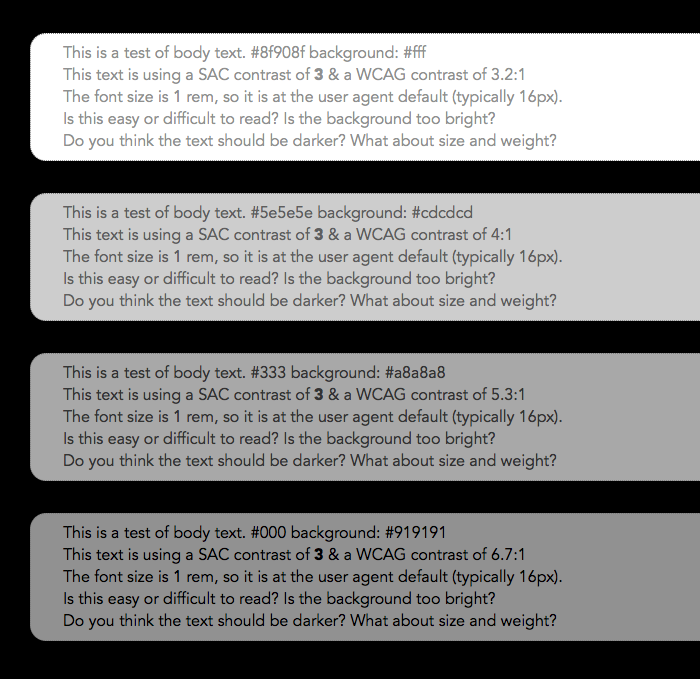

This Live Experiment page: https://www.myndex.com/WEB/W3ContrastissueTMP
Render notes: Pairs by SAC, L* estimated minimum value, f - 0.05, scale 8
Myndex
on 29 Apr 2019
Regarding surrounding background colors -- this can change for responsive and fluid sites -- so this would need to be taken into account at each zoom level 100, 1110, 120, 130, etc. and at each breakpoint variation of a page which would complicate the testing some. It's something to consider when considering to include. WCAG 2.1 has a conformance requirement that each variation of a page must pass. Contrast issues can already vary in these situations as well today but the size of the padding around the text and surrounding content is likely to change even more in responsive variations and fluid sites with zoom.
mraccess77
on 29 Apr 2019
Regarding surrounding background colors -- ...snip.... Contrast issues can already vary in these situations as well today but the size of the padding around the text and surrounding content is likely to change even more in responsive variations and fluid sites with zoom.
Hi @mraccess77
Yes, responsive design is certainly a factor. It is partly why I mentioned at one point that separating accessibility specs for mobile vs desktop might be useful.
Nevertheless, in responsive design, things like padding _can be_ relative and responsive. The test page right now is not a responsive design — and perhaps I need to make a responsive version — but the padding is set in em, so if the basefont size is relative to screen, then the design elements set as em will all follow. While I have not conducted a validation study, I'd suggest that padding relative to font size is the best practice.
In the examples in my most recent post, vertical padding is probably the tightest it should ever be at 0.5em and even so I think that's too tight when against the #FFF background. This points to the main issue, and that is where the div containing text, and the contrast of text to that containing div, is substantially different than the overall page luminance. So with a dark div and darker text against a white page, the eye adapts to the brightest white, and padding needs to increase — this is something any skilled designer knows, but it has a direct effect on accessibility too.
Myndex
on 29 Apr 2019
Hi @Myndex distinction between mobile and desktop is really not relevant for most folks today. Most low vision users zoom in and get the responsive versions of a site -- I use 800x600 on my desktop and often see the mobile version. People use laptops in the sun and outside, etc.
On a tangential note relate to adaptation -- my eyes are drawn to white -- so a white/bright bar at the top of a presentation/document will draw my eyes away from the text to the bright area by default. While this is vision related -- I'd suspect that there are similar distraction attributes that some people with print disabilities have that draw their attention away from the text as well. So it might be worth discussion other print disabilities into the contrast calculations if there is research there to guide us.
mraccess77
on 30 Apr 2019
Hi @Myndex distinction between mobile and desktop is really not relevant for most folks today. Most low vision users zoom in and get the responsive versions of a site -- I use 800x600 on my desktop and often see the mobile version. People use laptops in the sun and outside, etc.
Hi @mraccess77
Fair enough, though I don't mean just relating to contrast. For instance, some site lock or block zooming in, which I find really unacceptable.
One of the things I've been talking about in this thread, and research supports, is that zoom level/font size is the real critical factor.
No website should be able to override my defined zoom level or root font size. In fact, as a designer, I'd submit that page design should be based around root font size, so a user with an impairment can make a single change by to their root font size that will affect all pages (and apps for that matter).
And personally, for displays, I have a terrible time here on GitHub. The background is way too white and causes significant vision problems for me. Bight white background cause an adaptation to a brighter light and causes pupil contraction, which increases sharpness (good right? NOT!) The problem with increasing sharpness for me is that the vitreal floaters in my eye become more distinct and thus they block vision MORE. Too high of a contrast with a bright light background is terrible for me for instance.
On a tangential note relate to adaptation -- my eyes are drawn to white -- so a white/bright bar at the top of a presentation/document will draw my eyes away from the text to the bright area by default. While this is vision related -- I'd suspect that there are similar distraction attributes that some people with print disabilities have that draw their attention away from the text as well. So it might be worth discussion other print disabilities into the contrast calculations if there is research there to guide us.
You mean output to paper? Today LRV guides physical media, and that's actually where most things relating to perception (like Weber) began (Weber was circa 1860). As LRV and luminance are essentially synonymous, much of that work can be applied to displays, though to be sure, display perception has several unique qualities that more modern approaches can model.
Cheers
Myndex
on 1 May 2019
zoom level/font size is the real critical factor... page design should be based around root font size...
Let's keep focused on the contrast in this thread, we have other guidelines for sizing, and so long as contrast is a factor we can test for and improve we will keep it in scope.
As a sidenote about the sizing methods, I've written about that a lot, here's a summary of EMs vs Pixels & zooming.
Second sidenote on your personal experience: Have you tried browser plugins that adjust the colors for you? E.g. with Change colors you can create a standard color over-ride, or with Stylus (and some CSS know how) you can create custom over-rides per site.
alastc
on 1 May 2019
zoom level/font size is the real critical factor... page design should be based around root font size...
Let's keep focused on the contrast in this thread, we have other guidelines for sizing, and so long as contrast is a factor we can test for and improve we will keep it in scope.
Yes of course, I just want to emphasize that size and contrast are interdependent, not independent.
As a sidenote about the sizing methods, I've written about that a lot, here's a summary of EMs vs Pixels & zooming.
Thank you will read.
Second sidenote on your personal experience: Have you tried browser plugins that adjust the colors for you? E.g. with you can create custom over-rides per site.
I'm using Safari, and the Safari extension that does that (Colorum) cannot change the Github pages.
This is one of those examples where the PAGE does not allow CHANGE to help with accessibility.
I have not tried Github on Chrome with the plugin you mention, will try that shortly. But Github blocks that with Safari and the safari extension. Grrr! And this is partly what I am talking about - no site should be able to lock me out of making an appearance change that I need for accessibility reasons, yet they do, ALL THE TIME.
EDIT: It works in Chrome!!! Wow thank you, my eye's thank you. I can actually read github now! Guess I'll need to use chrome for GitHub, not sure why Safari has been unable to do it.
Myndex
on 1 May 2019
no site should be able to lock me out of making an appearance change that I need for accessibility reasons, yet they do, ALL THE TIME.
for what it's worth, that's not a failing of the sites or their authors. it's a failing of how some of the extensions/plugins inject their custom styles and the fact that browsers themselves have removed the ability to properly define user styles, which would take precedence over page styles.
patrickhlauke
on 2 May 2019
If it works on some sites but not others (like Github) it is probably prevented by the Content Security Policy, but a good browser/extension combo is not affected by that for the reasons Patrick mentioned.
alastc
on 2 May 2019
Thank you @patrickhlauke and @alastc — that makes sense... I am actually concerned about how these third party extensions are accessing page data including secure information.
It sounds like browser developers need some "standards" then — way way off topic from here — I guess that'll be the _next_ crusade.
OS X does have invert and contrast in system prefs, but that affects the entire system, and is this really cumbersome to use.
RELATED:
One of the perception problems I've discovered using multiple systems and browsers over the last week of testing is the _anti-aliasing of small text_ varies quite a bit per system (and screen pixel density), so small text often ends up much much lighter (and lower contrast) than it was specified in the CSS. This is more a browser rendering/system display problem than a design problem, though designers should be made aware in terms of a "guideline." Nevertheless, another point in how complex the issue really is.
A
Myndex
on 2 May 2019
designers should be made aware in terms of a "guideline."
but designers have no influence over this, as it comes down to individual users and how these users have set up their system (similar to how designers have no influence over other factors, like whether or not a user's monitor is properly calibrated, uses an appropriate color profile, is set too bright or too dark, etc).
the only appropriate action here seems to me an informative note somewhere (perhaps in the understanding documents) that explains that regardless of any contrast calculation (even with the updated algorithm) things may not work perfectly for every user due to variations in actual rendered output / viewing conditions.
patrickhlauke
on 2 May 2019
so small text often ends up much much lighter (and lower contrast) than it was specified in the CSS.
This looks closely related to issue #665, the discussion there is useful.
alastc
on 2 May 2019
Regarding overwriting page styles -- even with a browser extension it is very hard to overwrite page styles without throwing out author styles completely. This is because of the CSS rules that govern hierarchy with ids because highest, etc. even when !important is used.
If you throw out page styles altogether then you lose so much of the feel of the sites and other visual clues that are used for grouping elements, etc. and so it's not really fair to a low vision user to lose all of this information that they didn't have an issue with to gain contrast on another element that had less than sufficient contrast. That's why despite some people saying we don't need a contrast SC anymore because users can just overwrite the colors -- I disagree with them.
Most mobile browsers don't support extensions and so you can't get user styles in many of those situations as well.
mraccess77
on 2 May 2019
designers should be made aware in terms of a "guideline."
but designers have no influence over this,
Yes they do, they choose fonts and size. Using too thin/light of a font at too small a size is going to have anti aliasing problems which reduce apparent contrast. What I am saying is that a "guideline" on how small and light fonts render with less contrast due to antialiasing. Something like:
_"It is important to remember that even if a color pair is a PASS by the contrast checker, that small and thin fonts may be affected by antialiasing effects that will reduce perceived contrast"._
Myndex
on 3 May 2019
NEW EXPERIMENTS UP — CE10 and CE11
This examines more in detail the Modified Weber and the SAPC 3 equations. SAPC 3 has many more patches to examine as it is appearing most uniform at the moment.
There are two versions, dark text on light BG (CD10) and light text on dark BG (CD11),
NOTES:
1) THIS IS AN ALPHA LEVEL TEST — WORK IN PROGRESS! Among other things, these pages are NOT responsive, and intended for desktop only.
2) The FONT for these tests is Avenir, and the CSS sheet does have a font-face tag set. But if overridden, or the font does not look like the sample below, please let me know. I'll probably switch to something like Arial for the wide area test. I've been using this because the "normal" is fairly thin, and the "bold" is fairly bold. (The _normal_ is the font's "medium" and the _bold_ is 'black").
3) The SAPC3 percentages are scaled with the aim of making an "easy to remember" set of values:
- 100% — Similar to the 7:1 ratio for AAA Enhanced contrast.
- 80% — Similar to the 4.5:1 ratio for AA contrast.
- 70% — (Intended for large/bold text contrast.)
- 60% — Similar to the 3:1 ratio for "non-text" contrast.
- 8% — 50% are shown for analysis of thresholds in various lighting conditions. HOWEVER it is also clear that the overall DIV is very well defined at 25%.
4) Each DIV has a very large border - this is to emulate the BACKGROUND the DIV is on (i.e. consider the contrast between the DIV contents and the Border, and NOT between the border and the overall page in this case). The OVERALL BG of the page at #777 _is not part of the judgement criteria._

A CE12 sample:
_EDIT: CE12 is a more uniform test of light text on dark than CE11. CE12 also demonstrates threshold levels more effectively. Ignore CE11._
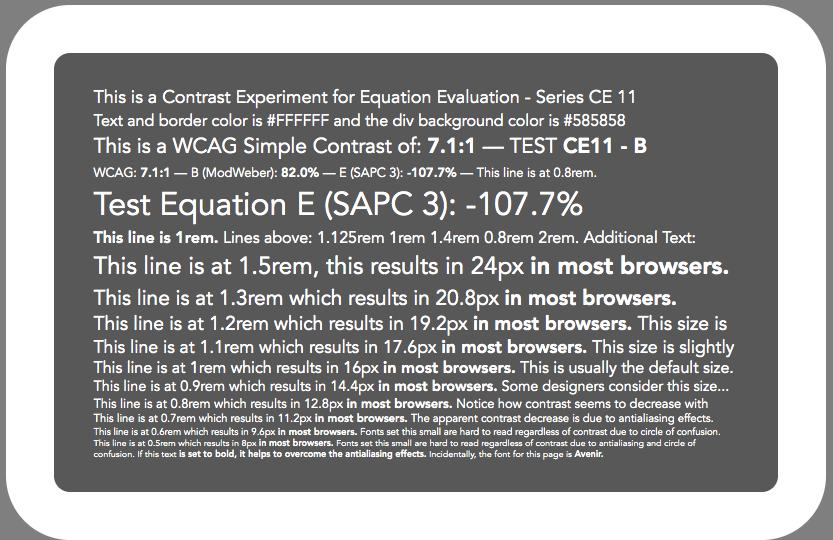
Please comment or questions!
Thank you,
Andy
Myndex
on 8 May 2019
Hi @Myndex,
Thanks, I'm having a look, just trying to work out how I should try to evaluate the results. (I'm not really target audience, but as an example.)
For example, in CE12 at 80%, the first one appears to have a bit more contrast than the second, although when I look away and look back I sometimes make a different choice! The last one at 80% appears the most contrasting to me, with the really white text. (I know the backround is lighter there, but it still stands out more to me.)
The text size within each doesn't particularly affect me, I just have to focus a little more at the sub 0.7rem lines. Actually, looking at the 60% or less examples I do struggle at under 0.8rem.
Is the idea that people rank by contrast, and we see which measure matches that best?
Or perhaps: What is the smallest line you can confortably read?
alastc
on 8 May 2019
Hi @alastc
Thanks, I'm having a look, just trying to work out how I should try to evaluate the results. (I'm not really target audience, but as an example.)
Everyone is the target audience for this, actually, This is not to evaluate any particular "standard criteria". STEP ONE in solving this issue is finding an equation that is "more perceptually uniform" across a RANGE of lightness/darkness.
That is, For a given series of dark-to-light samples at a given percentage, each one should seem "perceptually" the same contrast.
Such an equation is "impossible" because room ambient light and monitor brightness interact. This is seen most easily in the _threshold level tests._(At the bottom of the pages). On CE10 (dark text on light), go near the bottom of the page for instance to the 18.5% series (or even the 8% series) as these are close to threshold they are most "obviously" affected by room light and screen brightness. The darkest samples and the brightest samples will be more or less readable based on screen brightness and room light, and not at the same time unless the screen and room light are "exactly ideal".
For example, in CE12 at 80%, the first one appears to have a bit more contrast than the second,
Are you looking at the MODWEBER 80% or the SAPC 3 80%?
I think I just realized I need to put serial numbers on all of these so we can communicate about each! Oops (like I said this is an ALPHA test).
although when I look away and look back I sometimes make a different choice! The last one at 80% appears the most contrasting to me, with the really white text.
This is called ADAPTATION. And also points out how total screen luminance is a big part of the perception of contrast.
If you look away, you adapt to something ELSE, and then look to the screen, and it seems different due to different adaptation effects.
(I know the backround is lighter there, but it still stands out more to me.)
The "MODWEBER" light text on black at 80 will look more contrasty at the lighter value, and is a little less uniform than SAPC 3. Scrolling down to SAPC at 70%, each test patch should seem closer.
Still the darkest test patches will have the greatest variance due to a variety of conditions of light adaptation etc. The darkest patches are a big part of my focus as they are what is most wrong with the current math assessment.
THE OVERALL IDEA
The main idea here is to find a setting/equation that gives a similar, relative, perceptual contrast across an entire range of conditions of light, screen brightness, etc. By doing this, any two numbers plugged into the equation will give a reasonably predictable answer on the resultant perceived contrast.
The text size within each doesn't particularly affect me, I just have to focus a little more at the sub 0.7rem lines. Actually, looking at the 60% or less examples I do struggle at under 0.8rem. Is the idea that people rank by contrast, and we see which measure matches that best?
Using the smallest text as a "place to look" does every patch in a group of a particular contrast setting seem equally readable.
Or perhaps: What is the smallest line you can confortably read?
This is less about absolutes like that (at least right now — absolutes will be determined by experiments using a test with test subjects).
Looking at CE10 and CE12, I want to find math where each patch is equally readable (perceptually uniform) at a given target contrast.
Note that due to 8 bit resolution, the percentages will all be a little off the exact target, and that's not terribly important. mainly looking to define math that returns perceptually uniform results over a range of dark/light at a given percentage.
Myndex
on 8 May 2019
NOTE: I removed the MODWEBER tests as I'm concerned they were causing confusion.
They will be placed in a separate document.
Myndex
on 8 May 2019
On some initial perceptions:
Hi @alastc
From the other issue as it relates here:
However, whether there should be a guideline to prevent maximum contrast is a slightly different question. There is a certain amount of user control that is easier to apply to too-much contrast, compared to not-enough. If someone made a solid case for a guideline about too much contrast it would be considered.
This is certainly part of the process in the experiments for #695 — There are existing guidelines and standard though as well. FAA Human Factors specifies the following:
- 3:1 — MINIMUM contrast.
- 7:1 — PREFERRED or recommended contrast
- 15:1 — MAXIMUM contrast.
On the subject of maximum contrast, as I have different impairments in each eye I can discuss my own issues as they relate to this.
My Vision and Experiences With These Tests
My left eye, with a Symfony IOL implant has a substantial vitreous detachment and floaters., some of which tend to "hang out" right in front of the fovea. The right eye with a CrystalLens IOL has developed a membrane (soon to be removed by YAG) so at the moment that eye has both lower contrast and increased scatter similar to the cataract the IOL replaced.
YUK!!
But it is helping me evaluate these conditions of contrast (I am trying to get through a lot of this before the membrane is removed in a couple weeks, LOL).
In short, my personal experiences:
- Excessive contrast causes SCATTER, glare, and increased chromatic aberration. While counter intuitive, too much contrast will actually cause a decrease of acuity especially in older eyes where scatter is an increasing concern.
- My Symfony IOL in the left eye is of the type that higher contrast causes significant artifacts. Big giant halos around car headlights, for instance.
- The floaters in my left are are most prominent and problematic with dark text on a white background. The adaptation caused by the bright background results in the floaters becoming sharper and higher contrast, increasing the blockage effect. Light text on a dark background helps this.Dark text on a medium background is actually helpful as well.
- The right eye is exhibiting poor contrast, bad scatter, and visual acuity issues. If I remove my glasses it is equivalent of about 20/200+. I can tell you from my experiments and this is supported by other research, that higher contrast creates other problems.
- Based on current experiments CE10, the "maximum contrast" DIV (146%) is much worse in terms of acuity than the 70% series. I even found the 100% series too harsh, though those are set at essentially the AAA Enhanced standard.
- With that in mind, I will tell you that once above about 40% contrast in CE10, increasing contrast does not help in improving acuity. Without glasses, to experience the worst impairment, font size and weight are the greatest determining factors. Because those test patches have a variety of sizes and weights, I can tell you for myself based on these observations today:
_The following were with a MacBook with the screen approx 12"-14" away and high room lighting reflecting on the screen, and it the "gloss" screen, and screen brightness set to less than the halfway point._
The following contrast figures are using the output of the SAPC 3 method, measured as a percentage.
_Right Eye Only no glasses:_
- The line at 2rem becomes readable all the way down to 35%. for all patches, and the mid-grey patches for 25%. There is no improvement in readability at 50% and above. at 80% and above, chromatic aberration and scatter causes multi-colored multiple images that makes reading harder than at lower contrasts.
- The BOLD text of the line at 1.5rem becomes readable at around 45%. The thin part never becomes readable at any contrast. Similarly, CA and Scatter cause problems at 80%+
- No other lines are readable regardless of contrast.
_With BOTH eyes, glasses off:_
- The line at 2rem becomes readable all the way down to 8%. for the mid-to dark patches and is barely readable on all patches at 18%. At 25%, the 2rem line is easily readable. There is no improvement in readability at 40% and above. at 80% and above, chromatic aberration and scatter causes the letters to seem to "vibrate".
- The 1.5rem line becomes somewhat readable at 35%, and at 50% 1.5rem down to (maybe) 1.2rem get readable more or less in the darker patches. Above 70%, they vibrate or have stronger double images.
- No other lines are visible regardless of contrast.
_WITH glasses and both eyes:_
- I can read the 2rem line at all contrasts including all 8% patches.
- I can read the 1.5 to 1.1rem lines starting at the darker 8% patches.
- I can read down to 0.9rem on the few darkest of the 18% patches.
- at 45% on the darker patches I can read all lines including 0.5rem (8px)
- 50% I can read all lines on all patches at all brightnesses. No higher contrast causes any improvement, though for me I find the darker patches are generally better.
- At 80% and above, the letters gained a noticeable color halo.
As I read more existing research as well as conduct my own studies and experiments, it is clear that contrast is just one part of the overall considerations for visual accessibility.
- Visual accessibility is inseparable from font-_size_ and font _weight_.
- _Contrast_ needs to be "within a range" with a lower limit and an upper limit to support best accessibility.
- For practical purposes, the "lower limit" for contrast is most critical. The lower limit _depends_ on the subject/target size and weight values.
- As such, contrast specifications are inseparable from the font size and weight.
- Contrast is also tied to local adaptation, surround effects, (those are affected very much by the padding in an text container), and relative dark/light of the elements in question.
Myndex
on 9 May 2019
Interim thoughts based on the present research. These are "alpha" thoughts, not absolute conclusions by any means.
Along the way through experimentation, observation, existing research, and my own design experience, I find the following items are interdependent as they pertain to legibility:
Within Designer's Control
- Font Size. Size is the single most important criteria for legibility. A challenge for standards purposes is that different fonts can render at inconsistent sizes relative to "1rem", a problem made even more complicated with responsive design needs and a vast array of device sizes. For the purposes of size, it is vertical size as rendered on screen that is the critical factor.
- Font Weight. Extremely thin fonts have their contrast affected by antialiasing effects which can substantially reduce the contrast of small or thin fonts.. Very bold fonts will often appear more contrasty than normal fonts. All made more complicated as every font design has unique attributes regarding its weight. Included in weight considerations is the aspect ratio of the font.
- Luminance contrast of the font color relative to the immediate surrounding background color. Luminance contrast is more importnat than color contrast for legibility (shown below). Nevertheless, once an acceptable contrast level is reached, increasing contrast does not help acuity — in fact too much contrast can cause additional problems. Contrast is the main thrust of this issue thread, with the aim to create a method to programmatically evaluate contrast that returns an assessment that is perceptually accurate the full range of luminance.
- Padding size around the text when the text container color is significantly different from the larger page luminance, creating a secondary contrast issue. This relates to the Bartleson-Breneman effect, aka surround effects. It also addresses light adaptation to a degree (see "Relative Luminance" below). Included in padding considerations is spacing for characters, words, and lines.
- Secondary Design Elements. Things like drop shadow, borders, outlines, and other effects. These are listed last as they can be either helpful or detrimental to legibility, but are particularly hard to assess programatically.
Outside Designer's Control (User Related)
- Relative Luminance of the display and displayed content, and ambient lighting. This has the primary affect on light adaptation. It is mostly in the hands of the user, who typically has a reasonable range of adjustment.
- Visual acuity and contrast sensitivity of a given user due to visual impairments or cognitive issues. The breadth and variety of impairments, including normal vision through aging, makes this a challenging subject. Those with severe impairments may be able to use assistive technologies. This leaves the question, where is the bright line in terms of accommodation standards by design where no assistive technology is used?
So while the display luminance and environment are outside of our control, they are not a mystery either. We know that ambient light is a consideration as it lowers contrast. We know that the 80 nit specification for an sRGB monitor is far obsolete, when consumers have phones that can go well above 1200 nits, and a even the cheapest phones can display 400 to 500 nits. We also know that modern LCD displays have better contrast and lower glare/flare than the CRTs some standards were written around.
Also with visual impairments, while there are many (I have personally experienced several), most are well understood. Severe impairments require assistive technology beyond what a designer can do. But within the designer's purview are things such as not locking zoom. I've personally encountered many sites I could not access because I was unable to zoom in to enlarge the text. Such restrictions on a user adjusting the display are completely unacceptable.
Similarly, designers going for form over function, or toward trendy hard to read fonts and color combinations (which technically PASS current WCAG standards, yet are illegible) is indeed a problem. Fortunately many browsers now offer a "reader mode" that disposes of all the trendy CSS de-enhancements.
A few considerations regarding common eyesight degradation:
- Red and blue wavelengths are the farthest apart, which means they tend to create the greatest problems with chromatic aberrations (CA).
- CA and scatter are substantial problems with eyes over 40.
- Excessively high contrast increases CA and scatter.
- While a bright white webpage with black text may help readability because the bright light causes pupil contraction (which improves sharpness), the bright background causes problems for older eyes with vitreous detachments and floaters.
- Visual acuity and contrast sensitivity are only partially related. It is possible to have good acuity and poor CS and vice versa.
- Colors affect acuity. Blue light is sensed by the eye's S cones, which make up only 2% of the cone receptors in the sys, and they are all scattered far away from the fovea (center of vision). Green and Red light is sensed by the M and L cones, and they are much denser and centered in the fovea. The implication here is that colors with a lot of red or green tend to be resolved the best.
- People with color sensing deficiencies (color blindness) are most typically deficient in red cones, or sometimes green. As it happens though, red and green cones overlap substantially in terms of wavelength sensitivity. The implication is that when considering design for color vision problems, the designer cannot rely on the color contrast between red and green.

The above red and green are at the same luminance (#FF0000 and #009400) so the luminance contrast is zero (or 1:1 in WCAG math). The blue should be readable as it's much darker, despite being at the max of #0000FF. This is because blue makes up only 7% of luminance. In the above example, the blue is 2.1:1 per WCAG math, or SAPC3 28%.
_BELOW:_ The red and green are set at the same luminance as maximum blue.
(R #9E0000 G #005a00 B #0000FF).

- What this shows is that luminance contrast is more important than color contrast for readability. But it should also show that a normally sighted person may mis-interpret the lack of a luminance contrast. I the top image, the red and green are at the same luminance, but the values are FF red and 94 green. To someone not familiar with color theory, this may seem like the green is at a lower luminance than red, yet they are at the same luminance in sRGB.
There are several related issues here on GitHub
They are this (695), and also #665, #713, #360, #236, #700, and #346. The research I am discussing in this thread applies to a number of other issues including these. All are tightly intertwined in terms of how a standard (for WCAG 3.0 and beyond) should be developed, but the main focus for THIS issue (695) is developing a method for easy programatic contrast assessment that provides values that are perceptually uniform and therefore accurate relative to human perception.
Current Experiments
In the current experiments CE10 and CE12, I may have over compensated for darker color pairs slightly, but still evaluating in different ambient conditions.
Once a stable method of assessment is found, the next step is a trial with test subjects to evaluate specific range limits for accessibility criterion. At the moment I am working on a webapp with the idea that people all over can go through the assessments using the device and environment they normally use. While that lacks a clinical control, if the sample size is large enough the data should be very instructive.
Myndex
on 9 May 2019
PULL REQUEST FOR 2.2
Two weeks ago I indicated that an incremental pull request for a few ideas could/should be added for WCAG 2.2 (not a new equation, just a couple refinements). Those proposed items are:
1. Minimum and maximum luminance. Using the current WCAG math, set specific minimum luminance for the lightest element and maximum luminance for the darkest element. This should prevent some of the combinations that "pass" but are illegible.
AAA: a WCAG 7:1 contrast AND the lightest element no darker than #B0B0B0 (43.4% luminance).
AA: a WCAG 4.5:1 contrast AND the lightest element no darker than #999 (31.8% luminance).
A: a WCAG 3:1 contrast AND the lightest element no darker than #808080 (21.6% luminance).
2. Minimum padding. Using the WCAG Contrast math, if a text container (a DIV or P etc.) has a background that is a contrast ratio of more than 1.5:1 against the larger background it is on, it requires a minimum padding of 0.5em around the text. A padding of at least 1em is advised if the contrast between the DIV and the larger page background is a contrast exceeding 3:1
3. sRGB corrections @svgeesus indicated he was going to do this, namely correct the sRGB math issue and remove the reference to the sRGB working draft which is obsolete.
Before I start forming the pull requests, I thought I'd bring these up again for discussion. The justifications for 1 and 2 are the experiments shown throughout this thread. The justification for 3 is that the math is wrong, and should be correct in a standards document.
Myndex
on 9 May 2019
In order of magnitude:
(3) sRGB corrections, if @svgeesus is tackling those, best to leave that part alone.
(1) Including min/max luminance, could you point to which of the many bits posted above shows that?
I'd rather get past "should prevent" to having some evidence of preventing that (i.e. testing with people), and to understand what sort of combinations would now be ruled out (as that can cause legal changes).
The current SC text says "contrast ratio of at least 4.5:1", with no caveat on that, so it would be a large change to a current SC, which is more difficult to do.
(2) Min padding: This requires more discussion, it changes the testing criteria quite a lot and starts to dictate the design.
For example, is a measure relative to the font size necessary? Larger text has larger padding, but is that flowing from how perception works? Nievely I might assume that smaller text would need proportionally larger padding.
Also, must it be extra padding? If you don't have that sort of padding, would increasing the contrast on the inner background have a similar effect?
alastc
on 9 May 2019
Hi @alastc
In post https://github.com/w3c/wcag/issues/695#issuecomment-483805436 above
About half way down the post it shows the need for padding, from a bit that WebAim had on their site, showing how 4.5:1 does not verify legible contrast in that case. Here is the example image for convenience
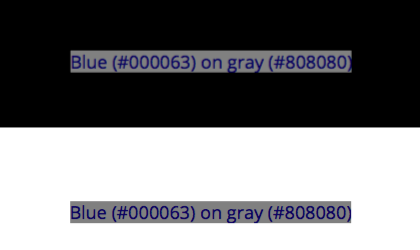
:
That was the post where I brought local adaptation and surround effects into the discussion.
The Suggested Limit Values
The figures I listed in my above post were taken from experiment CE10, as limit levels that would prevent problems such as the dark blue text problem in that clip in post 483805436.
The thinking is that it would be a good incremental change that would help "pave the way" toward an equation change in WCAG 3.0
Perhaps it should be listed as an "advisory" ? As in "As an advisory for future accessibility standards, it is recommended to limit the brightest color to be no darker than..."
2) This again is interdependent on the other 4 "designer control" factors listed in post https://github.com/w3c/wcag/issues/695#issuecomment-490838091 from late yesterday. Those being font size, weight, luminance contrast, padding & spacing, and secondary elements.
To answer your contrast question, yes all five factors all work together. So there are certainly contrast combos that don't "need" padding, which is why I mentioned relative contrast as a key to padding size. Here's the whole tidbit from WebAim:

The yellow text container has almost no contrast against the white (1.07:1) so it would not need padding per the proposed spec. The blue grey though - the grey is contrast 3.9:1, so per my suggestion it would need a 1em padding as it is over 3:1 ... However, yes, if the dark blue text was instead white like the surrounding background then padding would probably not be needed as that white text would be close to the white BG the eye is adapted to and the grey would be in essence a single contrasting element.
So here is that example piece again, but replacing the dark blue text with white, making the text 3.9:1 against the grey:

And if we make the text and container darker, here the text is at 1.5:1, and the grey is darker to maintain 4.5:1 .

So with this example it would appear that so long as either the DIV or the TEXT it contains are at a contrast less than 1.5:1 to the larger background padding isn't specifically needed, as opposed to what I originally suggested regarding just the DIV's contrast as the deciding factor.
(Just to note here as another example, the top one with white text is WCAG 3.9:1 contrast and the lower one with grey text is WCAG 4.5:1 contrast, but the grey text is a lower perceptual contrast despite being a higher reported contrast from the current math.)
As to size, I was thinking relative to body text/block text. But a big bold headline font would likely not need a full 1em around it. So perhaps em is not the right unit to use, I personally use em because it's relative and thus useful in responsive situations.
So I understand your concerns for both of these. Nevertheless I hope I have provided ample support for them through this thread. Even though they are not the prime targets, they are both part of a path toward a unified and perceptually accurate visual assessment criterion.
But if making them as a "standard" or rule is too much, perhaps there is a way to provide recommendations that are not "hard rules" with the idea that those recommendations will evolve into rules/standards at a later date. This would allow for some "easing" into larger changes, letting designers and testers know the direction something is going to change to.
Myndex
on 9 May 2019
Updated Evaluation Pages.
CE14 (Dark text on light BG) and CE15 (Light on dark) are up.
There is a serial number on each patch, which relates similar patches between CE14 and CE15 for contrasts 40% and up. The serial number should help in discussion as ther are ove 100 patches per page.
Patches are grouped by contrast, in groups for 100%, 80%, 70%, 60%, 50%, 40%, and several lower contrast groups including threshold tests.
I anticipate that 100% will relate to WCAG 7:1, 70% to 4.5:1, 50%: to 3:1, and 25% to 30% I believe will be a good target for a DIV against a background. All to be determined by a live study.
NOTE: this math (SAPC) is very _slightly_ opinionated in that the dark values are given just a little more weight as they are most affected by ambient light. Also, depending on monitor settings you may perceive a very slight increase in contrast in the middle greys, this is related to the "system gamma gain" which is not implicitly being counter-acted (as it is not encoding either). And this effect varies depending on monitor setting.
The serial number is at the end of the largest line of text,such as this #CE14-19. This should make it easier of anyone has questions or comments.

As a side note, and to emphasize the importance of surround effects, in the earlier post above, this little tidbit:
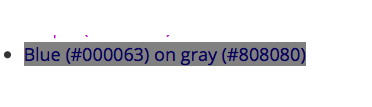
Those colors are WCAG 4.5:1 contrast yet terribly hard to read. Here are those exact same color values, but on a DIV with ample padding:

In the case of a bright white page like this one on GitHub, dark colors like this require ample padding.
I will answer any questions or comments, or further discussion, but otherwise I'm going to let these issues rest a bit to sleep on it.
Myndex
on 10 May 2019
Dear Andy,
I have read your issue and many of the papers. I am not sure how we get
from astronomical luminance to luminance in rgb, but it is done.
If you could send a bibliography or your readings I will get started.
Many issues you bring up: font size, polarity and ambient light are
significant issues I have encountered. The biggest problem we have found
with partial sight is it is just that: partial. Each individual has
something different that is missing. Thus no one configuration works for
all. That being said, the science and aesthetics need reexamination. I
doubt we can get paid to do it, but we can make a contribution if we prove
our results. The reflow criteria is the result of careful quantitative
analysis. We can do the same with this ... if it is not beyond our
scientific capabilities.
We won't know if we don't try.
Best, Wayne Dick
On Thu, Apr 25, 2019 at 7:37 AM Myndex notifications@github.com wrote:
Hi @svgeesus https://github.com/svgeesus !
I am so happy you joined this thread, I'm a big fan of your posts
elsewhere — I find we are normally in agreement, and you always bring an
additional perspective to complex and difficult or abstract issues.The TL;DR summary of my views on the proposal: strong agree, both for
the fairly modest changes for 2.2 and the more important and meaningful
changes for 3.0. I have minor quibbles with occasional points of detail,
but the proposal is well argued, well-referenced, coherent, and deserves to
be very seriously considered. Bravo!Thank you very much. this contrast issue became a central focus that I
came across while working on a larger project relating to color (namely, a
CSS framework, and a planned series of articles). Since I came across this
contrast issue, I have dived deeper down the color perception rabbit hole
than I can remember (hint: it's a really deep hole, LOL)And it sounds like I need to review some of my early posts if I am not
making complete sense. Not only that but some of my initial opinions and
hypotheses have shifted, others strengthened, and new ones have emerged.I do want to address any confusions of course. Just briefly my background
is film/TV in Hollywood, VFX, Editing, Colorist, etc. (I'm normally listed
as Andrew Somers in credits). We do nearly all of our work in a 32bit float
linear workspace, meaning gamma 1.0 (flat diagonal line from 0 to sun, no
curve) as is common today.BACKGROUND ON TERMS THAT HAVE CAUSED CONFUSION:
In the early days of digital filmmaking, Kodak developed Cineon and the
10bit per channel .cin file which became DPX. The data in the file of a
scan of a film negative, and was referred to as being "log". Because the
"opposite" of log in linear, this led many in the industry to calling video
"linear" and DPX "log", despite the fact that video has a gamma curve. You
can probably imagine the amount of confusion and frustration this caused,
including an ugly shouting match between me and a certain well known
colorist over issues caused by the resulting miscommunication.I have always used the term linear to mean what it is: a straight line
that represents the additive quality of light as it exists in the real
world. This is in part thanks to my friend Stu Maschwitz (formerly with ILM
and his company The Orphanage) who has been evangelical regarding linear,
see his blog https://prolost.com/blog/2005/5/15/log-is-the-new-lin.htmlThe authority I always point to most of course is Charles Poynton who has
been instrumental in setting hte record straight on these issues.So my point is it's more than a little oops on my part if something I
said regarding linear/gamma/perception wasn't clear, I'll review that
soon/this weekend. I've also been working up a glossary and list of
references to add some clarity to this thread, thank you for pointing those
out.But I was not trying to imply that monitor gamma was not dealt with or
ignored — What I was trying to say was that luminance is linear and
therefore is far from perceptually uniform, and simple contrast fails to
accommodate perception.On some of your other questions:
But just to address what I was saying briefly to perhaps clarify: Simple
Contrast (SC) does not take human perception into account. The SC math is
(L1/L2) and is really only useful for the ratio between 0 or min, and max.
It should be noted that between 0 and max, a variant of Weber is the same:
(Lmax - Lmin)/Lmin so if Lmin is close to zero (0.04) and max is 100, then
you have 99.6/0.04 which is not significantly different than L1/L2 and
because it is at the extremes, the gamma curve doesn't play into it. L1/L2
is how manufacturers define the "total contrast" of their monitors, and
it's a fine metric for that (though the newest monitor standards (SID IDMS,
that are replacing VESA) are using Perceptual Contrast Length (PCL) I
pasted a screen shot below).SC (simple contrast L1/L2) uses luminance as input values, and so does
Weber and Michaelson contrast for that matter. In fact so does PCL before
it converts luminance to more or less an L* curve. But L1/L2 is not
suitable for describing perception of text contrast. Weber is more the
standard for text. I was really talking about the contrast equation, not so
much the alphabet soup of light and perception measurements.Nevertheless as for monitor gamma, I believe I was partly referring to
system gamma gain, something I found in experiments was adding in the
expected sRGB system gamma gain of 1.1 improved the perceived contrast vs
the reported contrast numbers. But also, I think I was stumbling through
trying to relate why simple contrast failed to accommodate perception, and
pointing to gamma and other perception curves. I have a much better
description I'm posting later with the glossary.Also those statements on the problem were early on and perhaps a little
premature as I had not completed a series of tests, and I hope I didn't add
to confusion — going back to edit some of the earlier posts now.So I'm pretty sure we're on the same page.
On excessive flare: one of the little bones I have to pick is that some
of the WCAG is based on obsolete working drafts, even when there is a claim
to be using a standard — sRGB working draft vs IEC standard is one example.
The sRGB working draft is not the standard, but WCAG is using (incorrect)
math from it, and also a 5% flare figure. From what I've seen in the IEC
standard, the flare is defined as 1 cd/m^2, although I have also seen 0.2
nit and 4.1 nit (I don't have the most current IEC at my fingertips at the
moment). And that original draft, plus some of the standards like the 1988
ANSI are based on CRT monitors, not LCD. LCD screens have a very different
flare characteristic. Consider that CRTs were curved making them a glossy
specular fisheye reflector on top of phosphor dots that themselves where
highly reflective, coupled with low output (80 cd/m^2 LOL!) there's little
comparison to modern LCD and especially mobile devices.Modern LCDs are flat, and either matte or high gloss, and substantially
darker in ambient than a typical CRT. Because they are flat, they can be
angled to exclude bright light source reflections, especially the high
gloss ones (the persistent problem with the high gloss is the mirror
effect, bad for Hawaiian shirts!)For mobile? iPhones are over 700 cdm^2, and Samsung has phones with over
1100 cd/m^2. To couple with this, relevant research shows that flare causes
problems in the blacks, and becomes a non-factor as screen luminance
increases. (All this again showing how out-of-touch the sRGB 80 cd/m^2
spec is).I measured several monitors around the studio here, with monitors off (so
measured flare/amb reflection only) some near daylight windows but no
direct daylight on the monitor face — all measured less than 1 cd/m^2 per
my Sekonic Cine 558. Not exhaustive by any means, but definitely a
different world from CRTs.But my other issue with the 0.05 "flare" is that it seemed more like a way
to brute force the SC into something more useful, along with setting
the contrast standard to 4.5 which seemed a bit of an odd number compared
to existing standards (which usually specify 3:1 & 7:1).As such, I suppose I shouldn't use the word "excessive" as you point out
mobile has made ambient conditions an even more complicated issue. IN FACT:
Perhaps there needs to be a different standard for mobile vs desktop.Lstar
The current standard isn't doing anything with L, but on the subject of
"why modify L ", I'm not saying "should" just that some experiments I've
conducted with various contrast methods — Weber, Michaelson, PCL, Bowman,
along with some of my own using additional exponents or offsets to adjust
for various perceptual needs. Experiments are asking questions like, is
it possible to have a single equation that takes negative/positive design
polarity into account, or do we need to adjust the curve near black, etc
etc.As an example the PCL equation I'm testing is from the SID IDMSv1p03b.pdf
monitor standard, and it uses a bunch of weird exponents, but if you break
it down it is very similar to L* in terms of curve shape but with
significant changes near black. Here's the PCL math from the IDMS standard:[image: Screen Shot 2019-04-25 at 3 27 51 AM]
https://user-images.githubusercontent.com/42009457/56729676-b5dcef80-670a-11e9-8d28-259615a39710.pngIt looks like PCL may be derived from some of Mark Fairchild's ICAM image
appearance model, but I haven't gotten too deep into iCAM, as I think "that
level" is a WCAG 4.0 kind of idea.At the moment I'm working on a web app test to test some of these ideas on
a wide base of test subjects.Again, I thank you for your comments, good to know when I stop making
sense! LOL.Andy
—
You are receiving this because you were mentioned.
Reply to this email directly, view it on GitHub
https://github.com/w3c/wcag/issues/695#issuecomment-486699793, or mute
the thread
https://github.com/notifications/unsubscribe-auth/AB6Q4F2RZ34NKJI662XAEHDPSG625ANCNFSM4HF2F5YQ
.
WayneEDick
on 24 May 2019
Hi @WayneEDick
I got the email and am going to reply more in depth there, but just want to add to this thread:
I have live experiments on my Perception Research page. Experiments CE14 and CE15 are the most current ones, but I have some more pending shortly.
_https://www.myndex.com/WEB/Perception_
And I am moving a lot of the research over to my ResearchGate account here:
_https://www.researchgate.net/profile/Andrew_Somers3/projects_
I am going to avoid posting more "interim" information here, and wait until there is a more concrete path forward. I'll explain more in the email.
Andy
Myndex
on 6 Jun 2019
Sorry to have not commented in this for so long, but I only have two bits to add. @Myndex wrote:
- sRGB corrections @svgeesus indicated he was going to do this, namely correct the sRGB math issue and remove the reference to the sRGB working draft which is obsolete.
I was delighted to see @svgeesus in this thread. Is the corrected sRGB math issue public facing anywhere? This is, of course, the lowest of the low-hanging fruit, so it would be very nice to wrap that one up.
@Myndex, your (1) and (2) are larger changes, but they could crafted as new an additional Success Criteria. The queue for WCAG 2.2 is already pretty significant, but I do not think that is any reason to stop working them as new issues.
@Myndex wrote (emphasis added):
The point here is that the "contrast ratios" created by the equations listed in the WCAG documents are not useful or meaningful for determining perceptual luminance contrast.
The problem with hue is how people with color deficient vision rely on luminance contrast.
What this shows is that luminance contrast is more important than color contrast for readability. But it should also show that a normally sighted person may misinterpret the lack of a luminance contrast.
I should have added some background flavor text earlier. The WCAG maths is only about luminance contrast, and that was a deliberate choice. The working group had so much discussion about the difference between “color” and “hue”, but I must confess of that has left my mind by now!
The goal at the very beginning (back in 1999, maybe earlier) was to rule out color combinations that were problematic for people with retinitis pigmentosa and color blindness (all common types). By happy accident (or brilliant insight, probably Gregg V.), the working group realized that we could just focus on relative luminance and not worry about prescribing certain palettes (which I think was the expectation at the start). In terms of validating the formula, the focus was on testing using people with these particular impairments. The clinical evaluation was much less concerned (at least initially) about addressing low vision more generally (since those needs are so variable), and not at all concerned with perceptual contrast for people with “normal” vision (since WCAG is about disability, and not aesthetics).
Gregg V. recently posted about this background.
We have had more than a decade now with the formula, and it is working well for people with low vision generally. It is remarkable that it works as well as it does, considering that it is really pretty simple.
bruce-usab
on 6 Jun 2019
_Sorry to have not commented in this for so long, but I only have two bits to add. @Myndex wrote:_
Hi @bruce-usab ! As you may know I have joined W3C Accessibility WG & Low Vision Task Force, some things I'll be discussing more at length on the mailing list.
_1. sRGB corrections @svgeesus indicated he was going to do this, namely correct the sRGB math issue and remove the reference to the sRGB working draft which is obsolete._
_I was delighted to see @svgeesus in this thread. Is the corrected sRGB math issue public facing anywhere? This is, of course, the lowest of the low-hanging fruit, so it would be very nice to wrap that one up._
There is an issue listed here, #360, which I have made a few comments in regarding the sRGB threshold being incorrect (WCAG lists 0.03928 when it should be 0.04045 — it should be noted that the difference has _no effect for 8bit values_ but IMO it should be corrected as the publicly available WCAG documents are widely cited and should be correct/authoritative on such matters.
I believe svgeesus and I also agree on removing references to certain outdated/obsolete documents such as the original sRGB draft — that draft has a nice tutorial on the concepts but some of the math and figures are incorrect or not relevant to the actual standards.
That said, as I've determined it has no material impact on the other research I am doing on other issues (695, 665, etc) I haven't been pursuing that fix further as I believe svgeesus is doing so.
_@Myndex, your (1) and (2) are larger changes, but they could crafted as new an additional Success Criteria. The queue for WCAG 2.2 is already pretty significant, but I do not think that is any reason to stop working them as new issues._
I do intend to continue working on this — how and when is "most appropriate" to incorporate such changes is of course relevant to your normal workflow and vetting process.
In posts above: Path Forward (2.2 vs 3.0 Adoption Thoughts) AND 2.2 Pull Request
I simply was offering what I felt was a reasonable "steps toward implementation," for discussion and to form the basis of a plan.
_I should have added some background flavor text earlier. The WCAG maths is only about luminance contrast, and that was a deliberate choice. The working group had so much discussion about the difference between “color” and “hue”, but I must confess of that has left my mind by now!_
Yes, I do know that the WCAG is intended to refer to just luminance contrast, I was just reiterating that luminance contrast is a "primary importance" and color contrast is widely considered to be a distant lower priority for the reasons we all know regarding color vision deficiencies.
I possibly should review all that I wrote initially, as I may have not been clear on certain issues. What I had meant was not that the WCAG was trying for something other than luminance contrast - I do realize that was the intent, what I had meant is that perceived contrast in real world environments is not well accounted for by the current WCAG math/method, as some of the experimental results I posted above demonstrate.
_The goal at the very beginning (back in 1999, maybe earlier) was to rule out color combinations that were problematic for people with retinitis pigmentosa and color blindness (all common types). By happy accident (or brilliant insight, probably Gregg V.), the working group realized that we could just focus on relative luminance and not worry about prescribing certain palettes (which I think was the expectation at the start)._
Yes, in fact this is well known and discussed in the human factors research & guidelines of NASA and the FAA. _luminance_ contrast is a key factor far over color contrast. (references belowRefs 1,2,3,4) Though there are some color issues to be considered which I'll discuss below.
_In terms of validating the formula, the focus was on testing using people with these particular impairments. The clinical evaluation was much less concerned (at least initially) about addressing low vision more generally (since those needs are so variable), and not at all concerned with perceptual contrast for people with “normal” vision (since WCAG is about disability, and not aesthetics).
Gregg V. recently posted about this background._
Ah, yes, this is some of the information I was hoping to see, as mentioned in some posts above. I saw on the mailing list that someone at Lighthouse was involved (I assume Dr Arliti?)— good to know. Is any of the data or research from these studies available? As a matter of due diligence I'd like to review if possible.
I have read a lot of Dr Arliti's research, I never read anything that directly supported the current equation or standard however.
_We have had more than a decade now with the formula, and it is working well for people with low vision generally._
(Emphasis added) I had originally been making the analogy that "a broken clock is right twice a day." though that's not the most accurate analogy. I believe that confirmation bias may be at play here, and I include myself and my initial reactions when I came across the WCAG 1.4.3 et al., in that I certainly had my own biases based on working with colorspaces and digital imagery in the film/TV industry.
By that I mean, my initial experiments showed some very inconsistent results of the method, and my initial reaction was to blame the use of a simple contrast ratio. The actual problem is deeper, more complex, as I detail below:
_It is remarkable that it works as well as it does, considering that it is really pretty simple._
Weber is also pretty simple, and also the common standard for "complex stimuli" such as text. But Weber is also not a great fit when used on monitors without modification the equation. And as part of the results of my "first round" research that is summarized in the posts above, I can tell you that I found that the "standard" Weber contrast is in fact no better than the method the WCAG is using, particularly in a dark environment, and for _lower_ contrast comparisons.
The reasons have to do with some unique properties of emissive displays and the environment they exist in. It should be noted that luminance and relative luminance in isolation does not matter if the stimulus is emissive or reflective — 120 cd/m2 is 120 cd/m2 regardless of if emitted or reflected.
HOWEVER, the _environmental ambient lighting_ makes a very big difference. For reflective stimulus, increasing the ambient light will increase the perceived lightness of the reflective object as well — thus other things being equal, increasing ambient improves perceptions of reflected stimulus. Also, as ambient light increases, the eye's light adaptation also changes to compensate, but so long as the reflected stimulus is also affected (i.e. becomes lighter) then relative perception should remain consistent (between photopic vision ranges of 8cd/m2 to 520 cd/m2.)
_The opposite is true for monitors_, which are _negatively_ impacted by an increase of ambient light, and the ambient light competes with the emissive light both for relative contrast and for eye adaptation levels.
This is what brings us to the conclusion that something more robust and representative of perception in real world environments is needed.
COLOR REVISITED
There is something more to color though, and it can affect anyone even with color vision deficiencies, and that is chromatic aberration. Chromatic aberration describes how light through a lens (prism) is deflected differently depending on wavelength. Shorter wavelength light (blue) is literally "bent more" than longer wavelengths (red). The result is that for a given stimulus, the focal point on the retina for the blue portions is different than the focal point for the red.
In an inexpensive simple lens this is seen as a red or green "halo" around an object. Nature provided the human with some correction by placing most of the blue cones in the peripheral vision, and the red and green cones in the center (fovea).
Nevertheless, as we age, our natural lens and vision system causes greater chromatic aberration which results in lower acuity due to "glare," scatter, and defocusref 5. Chromatic aberration is made worse when contrast gets too high. But also, certain specific color combinations (especially pure red against pure blue) can cause significant problems, even if the luminance contrast is "okay."ref 6, Designing with Blue
See also my post above on CA.
_As such and to summarize my first round of resea rch:_
May Research Summary
Contrary to my initial impressions, I found the WCAG math of (Lw+0.05)/(Lb+0.05) is not substantially worse than a plain "ordinary" Weber contrast, though placing the +0.05 offset on both sides of the slash is unusual and has little effect. Rewriting it as (Lw)/(Lb+0.05) makes more sense and is similar to:
The Huang/Peli modified Weber of (Lhi - Llo)/(Lhi + 0.05) which I discuss in this post above. Though from my experiments I would leaning toward an offset of 0.1: (Lhi - Llo)/(Lhi + 0.1)
Nevertheless, I have been exploring many approaches to contrast assessment methods. The world is full of different techniques, some of which I discuss. Yet there is little research that considers the modern, graphically rich, web page or app. That has become a central focus of my research,
Any experienced/skilled designer is going to provide adequate luminance contrast as that is a function of good design practice.
- However a design that bases the contrast acceptability on the WCAG method could easily end up with a nearly illegible block of text, especially on dark color pairs as I demonstrated through experiments.
- I have seen experienced designers comment as openly critical of the current methods — and presenting a method that has inconsistent or unexpected results becomes less than useful, particularly if no one is willing to use it.
- even an experienced designer could be aided with accurate tools that provide consistent and and expected results.
It is my intent to provide the research and empirical foundations for functional tools in this regard. Tools which should allow the creation of reasonable standards and guidelines. As to the present topic (perceptual contrast), I have identified the following factors are being interrelated and essentially inseparable — more or less in order of criticality to legibility _(assuming at least above contrast threshold):_
- Font size relative to viewing distance (sometimes measured as arc-seconds or arc-minutes of visual field). Experiments discussed above show Font _Size_ as being the single most important factor in legibility. Of course this is assuming other font metrics like weight, aspect ratio, kerning are the same.
- Font weight. This is something that does not have any real standard at this time, font foundries themselves have inconsistent rankings here. (It also relates to something I am working on _outside_ of the research I am doing for the W3C). But it is important to consider for instance that very thin fonts will _not even render at the color assigned to them_ as antialiasing will result in a substantial reduction in contrast by blending the font into the background, not even mentioning the effect of low visual acuity causing a similar issue with very thin fonts.
- Local Surround Adaptation. It is not enough to have a particular contrasting color immediately under a font, it is necessary for that contrasting color to extend beyond the font a certain amount, especially if the overall background is a substantially different color/luminance contrast than the enclosing text container. Associated with this is leading and kerning.
- Luminance contrast of the stimuli vs its background(s). For normal vision, the contrast _threshold_ is about 1%. Various forms of impairment can increase the contrast threshold; indeed, contrast sensitivity tests are used to evaluate potential eye diseases. Within a range from
- Closely Related: Ambient lighting conditions are under the exclusive control of the user, and the designer can't really do "much" in that regard, though we can generally predict certain ranges, and base contrast decisions on commonly understood or expected ambient conditions. But in fact ambient and its effect relative to the reflectance of the display screen's surface, has a substantial impact on perceived contrast. In the first round experiments, a principal problem with the current WCAG math is its failure to function adequately under reasonable to brighter ambient conditions. The standard Weber _fails similarly_, in both cases due to the inverse (negative) effect of ambient light on contrast.
Thank you,
Andy
References:
Myndex
on 7 Jun 2019
@Myndex, thanks for joining the AG WG and LV taskforce!
bruce-usab
on 7 Jun 2019
RBruce, apparently it was brilliance and Gregg V...:-)
One thought about viewport size (knowing we don't really want to go into it
here)...for today and future proofing we should consider viewing/examining
this in a very broad array of viewports -- which is not limited to
mobile/desktop -- we need to include tablet, and much larger web-TV UIs,
IR/VR, and Iot/Wot devices which can include wall size displays...
On Fri, Jun 7, 2019, 4:14 PM bruce-usab notifications@github.com wrote:
@Myndex https://github.com/Myndex, I tried to send you a private email.
Please respond to that if you have it, or ping me back in this thread if
its missing.—
You are receiving this because you are subscribed to this thread.
Reply to this email directly, view it on GitHub
https://github.com/w3c/wcag/issues/695?email_source=notifications&email_token=ABL6VSRBYSOXA7CKOXWFQV3PZK6RBA5CNFSM4HF2F5Y2YY3PNVWWK3TUL52HS4DFVREXG43VMVBW63LNMVXHJKTDN5WW2ZLOORPWSZGODXG4CSI#issuecomment-500023625,
or mute the thread
https://github.com/notifications/unsubscribe-auth/ABL6VSV35HD2TL7LPFA5BHLPZK6RBANCNFSM4HF2F5YQ
.
 Ryladog
on 8 Jun 2019
Ryladog
on 8 Jun 2019

This may not be helpful as Myndex has posted several examples of text which passes the current luminosity minimums but in Real Life are difficult to read if you've got poor vision, but I wanted to paste a very recent example of passing (at 4.74:1) black text on dark-blue background, a contrast which even for me are close enough in lightness (or should I say, darkness) that I have difficulty reading them.
When they are hovered, these black links turn white, which then becomes readable to me but fails luminosity minimums (just barely, at 4.42:1). I could recommend they darken the blue background which would make the white text pass while still keeping the black text passing... but in reality that would make both states more difficult for people to read (and so of course I'm not going to recommend that).
 StommePoes
on 13 Sep 2019
StommePoes
on 13 Sep 2019
This may not be helpful as Myndex has posted several examples of text which passes the current luminosity minimums but in Real Life are difficult to read if you've got poor vision, but I wanted to paste a very recent example of passing (at 4.74:1) black text on dark-blue background,
Hi @StommePoes
Yes, blue and black are (at least in a classical design sense) regarded as a poor color combo — though with the blue here most of the luminance is coming from green.
An issue with the present method is that it overstates the perceptual contrast of darker color pairs, and this is caused by a number of factors, including light adaptation.
In your example, the L* of the blue is about 50, which equates to an 18% grey card. Perceptually, depending on light adaptation of your eye, it should seem to be about halfway between black and white.
BUT other factors, such as light adaptation, glare from ambient lights, not to mention the age and clarity of the ocular media of the eye can affect this perception. In particular blue:
- Blue cones do not exist in the fovea (central vision)
- Blue light refracts at a different angle than longer wavelengths, causing chromatic aberration, and is often associated with increased glare which reduced perceived contrast (more likely to "fill in" the dark text).
- Blue is typically considered an insignificant factor in perceived luminance, though the math used in some models gives it more weight (yet some models weight it negatively).
If you change the black text to white, your eye will be more "adapted" to the darker blue as that is more of the visual field, and so light text will be perceived to have higher contrast.
ALSO: Very recent research into the function of the new photoreceptor melanopsin indicate a connection with pupil dilation when the color blue is prominent in the visual field. To, a blue background can make the eye dilate, causing other colors (such as light text) to appear even lighter.
Somewhere is one of my posts, I indicated a suggestion that the brightest of two color be no darker that perhaps #A0A0A0 or perhaps #999 or #909090
_As a reference:_
- #A0A0A0 is a Luminance Y of about 36 - twice an 18% greycard, i.e. a stop brighter.
- #909090 is a Luminance Y of about 28 - about 2/3rd stop brighter than 18.
The current math/method does not model positive vs negative contrast accurately, nor does it model perception of darker color pairs.
These are things being examined and addressed in current research for Silver.
Cheers,
Andy
Myndex
on 17 Sep 2019
Edit 6/19 I'll restate this as "does not accurately model an emissive display in real world ambient conditions": . It fails badly in the midrange colors as it does not adjust for human nonlinear perception. As such it should not be used to programmatically determine legibility of colors, esp. in the middle and darker ranges.
Just to clarify, the problem can be observed not just on emissive displays like oled and crt, but also on transmissive displays like back lit LCD as well, which is what most people use. It impacts any display type that relies on projection of light source to convey white. I would be curious to see if similar issue can be observed on screen projected image.
To your point, the formula doesn't work well when background is in mid range, but it can easily be overcome using foreground color closer to white point. Clearly, white font 3:1 is not the same as 3:1 of other color combinations including higher as shown below. Much to my chagrin, I've observed the same behavior even on printed paper though I cannot fully vouch for reproduction accuracy.
I do think the formula, while not perfect, has served humanities well. However, with growing user-base using dark-mode, more elderly population on digital, I wonder if we need more revision. What made the current formula so effective is its simplicity, but I think the world is ready for more robust formula that takes more nuanced approach. Maybe we need more than one formula. At minimum, takes into account if foreground element is lighter or darker, and if the foreground element is closer to white point.

 incyphe
on 7 Nov 2019
incyphe
on 7 Nov 2019
Hi @incyphe and thank you for taking an interest in this.
Just to clarify, the problem can be observed not just on emissive displays like oled and crt, but also on transmissive displays like back lit LCD as well, which is what most people use.
That is a semantic argument - I am not talking about the display technology, only if the stimuli emits light. In the context I meant to encompass all displays that emit light. I clarified the post above with this note:
_Note1: By "illuminated" I mean both emissive (led), and backlit transmissive (LCD) display types._
But the CONTEXT was relevant to another post somewhere in the thread that was making the distinction from passive signage which are reflective, as opposed to emitting light. Again, it's not the display technology I am talking about, only if the device emits light regardless of if through (LCD) or direct.
I would be curious to see if similar issue can be observed on screen projected image.
Do you mean something like a front-surface projection? Or an HUD? The discussion applies to anything where the display is emitting light, even if that emitted light is filtered (vie LCD) or reflected off a wall, or a semi-transparent glass (HUD) etc. A factor that will change for all these types is the gamma curve - but the gamma curve can be adjusted for perceptual uniformity among the types (within the limits of environment).
To your point, the formula doesn't work well when background is in mid range, but it can easily be overcome using foreground color closer to white point.
Then by definition it doesn't work well. "being overcome" by a workaround is not "working well."
The formula does not model human perception, and is not supported by 100+ years of human visual perception research. However, you seem to be responding to the first post in a thread of over 70 posts, and the later posts go far beyond that initial issue.
This has been my primary research project since April, and while this thread is not obsolete, it is not up to date either. I've _mostly_ stopped posting results here, but will continue if you'd like. But first let's get you more up to date on the state of the art of this issue so we can be on the same page.
Substantial experimental results, current trials, and some discussion, are on my Perception page here:
https://www.myndex.com/WEB/Perception
There are over a dozen pages there to explore, that go far deeper than this thread which is somewhat in-depth itself. These pages are still "experimental" and should not be considered "final values" by any means. They are also "live" and subject to changes during evaluations.
I have some things on my ResearchGate account too, though I am a bit behind in updating there as well. I am presently involved in Silver which is revolutionary in many ways (far beyond contrast) and has absorbed much of my time.
A (very brief) summary of findings:
1) Spatial Frequency can have a greater effect on perceived contrast than the distance between a pair of colors. (In a practical way Spatial Frequency relates to font weight and stroke width, but also font size and letter & line spacing).
2) I took a look at your other thread, and yes the display brightness is important — but what is important is max display luminance relative To the ambient lighting environment, _and_ relative to the eye's light adaptation level.
3) Contrast, like color, is not "real"—it is a context dependant perception. The linear distance/difference between two luminance (light) values does not (in isolation) predict how a human perceives them. If you double the physical amount of light, we perceive only a small increase. The linear luminance point we perceive as halfway between full white (100%) and black (0%) is not 50%, but 18.4%. Perception is not linear to light.
4) Current standards were developed before sites like GoogleFonts, where bad font choices are easy and on-demand. 10 years ago, "WebSafe" fonts were dominant, and those fonts do not have ultra light weights like 200 or 100. Today, people are using 200 weight fonts all over the place, especially on body text, and to very bad effect. The current contrast standards fail for such thin fonts, especially when small.
5) Perhaps most important, all of these things, and several more, are all interconnected and inseparable. An arbitrary definition for a color contrast is meaningless without context of use and the many factors that affect contrast. 4.5:1 might be enough, it might be much more than is needed, and it might be far too little. It depends on the use case.
Clearly, white font 3:1 is not the same as 3:1 of other color combinations including higher as shown below. Much to my chagrin, I've observed the same behavior even on printed paper though I cannot fully vouch for reproduction accuracy.
As implied above, there is a lot more going on that just the colors, and that goes for print/reflective media as well.
I do think the formula, while not perfect, has served humanities well.
Only in the same way that a broken clock is right twice a day, and serves someone who happens to set their watch each day at the same time the clock broke.
Here's a principal problem: as mentioned above, the current standard does not take spatial frequency into account (at least not well, and definitely not for thin small fonts). But human nature being what it is, designers often seem to target 4.5:1 as the best practices target contrast, because that's "the standard" — but it is not even close to what contrast _should_ be for a column of body text.
A combination of a weak standard, and the proliferation of thin fonts has resulted in massively unreadable websites. It's a serious problem that did not exist (at least not in the same way) before 2009. A look on the wayback machine certainly finds a lot of bad design, but at least the fonts were beefy and black against light. So no, it has not served humanities well. I'm making the argument that it has caused more problems that it intended to solve.
Infographics that describe some of the issues:

And a rough chart example:

This chart is linear to perception, not linear to light.
Perceptual uniformity is important, and so is recognizing the most important aspects of perception (spatial frequency as an example) and THEN also recognizing how perception is shifted/offset for various impairments, and then determining the best practices for helping accessibility and accommodating impairments.
However, with growing user-base using dark-mode, more elderly population on digital, I wonder if we need more revision. What made the current formula so effective is its simplicity,
Simplicity isn't useful if it's wrong, and simplicity has nothing to do with "effectiveness". Effectiveness means it works and does the job and is useable.
And in this case, there is no point nor reason to be "simple". If we are talking about testing two colors, there is no real difference between
(L1 + 0.5)/(L2 + 0.5) and (L1 - L2)/(L1 + 0.1)
Both are computationally about the same, but the second one (Weber, Modified) is much more correct in terms of perception. But there are even better models, like PCL which are only marginally more complicated — and that's not relevant. People aren't doing this math on a pocket calculator, they are using web apps, and the code is trivial even for a more complicated model like SAPC, PCL, CIEMAC02, etc. They are all easily implemented in JS.
I'm not suggesting a complicated image model like HUNT, but right now an effective robust solution exists in about 12 lines of code.
but I think the world is ready for more robust formula that takes more nuanced approach. Maybe we need more than one formula. At minimum, takes into account if foreground element is lighter or darker, and if the foreground element is closer to white point.
The new algorithms are developed, tested, and functional. Some of the early results from early versions are in this thread, more recent result examples/tests on my Perception pages. I will be publishing the math and code soon. More and deeper evaluations are pending.
I will tell you that a single simple block of code will correctly predict perceptual contrast for both normal and reverse polarity (dark on light or light on dark) as well as make minimally invasive offsets to ensure that those with color vision deficiency are presented with enough contrast for readability.
In fact a breakthrough discovery this last weekend was that the math is surprisingly symmetrical in results, so that a 30% normal polarity (dark text on light or BoW) has the same perceptual contrast as -30% for reverse (WoB), though further evaluations are needed to dial in a few minor things.
Again thank you for your interest, I consider this a critically important issue and am happy to continue discussing it.
Andy
Myndex
on 7 Nov 2019
Dear @Myndex I would like to know if there is any way to use the math behind more accurate models to come up with color palettes that wold map to the range currently being accepted by WCAG 2.0 and 2.1 guidelines? A follow-up question connected to teh colors is the frequency scale and sizing. Some designers use CSS calc() function and the vw (viewport width) units, together with Rem units, and line-height to get so called fluid typography. What would be the first and most simple step to try and approach frequency scaling using similar approach applicable to CSS.
If we could get to something sound, safe and simple, we could try to propose it as an option in frameworks like Bootstrap and Foundation.
Thank you for your effort, which is truely unmatched...
 pawelurbanski
on 21 Jan 2020
pawelurbanski
on 21 Jan 2020
January 2020 Update
At long last there is a working javascriot tool as a proof of concept for some of the new directions in perceptual contrast prediction.
I have a live contrast checker tool that demonstrates the work in progress. It is preliminary, and not the standard as yet, but feel free to bash around with it — you'll see there are fewer false fails, but more importantly, fewer false _PASSES_ which is the more substantial problem we are working to solve.
Work In Progress SAPC Contrast Tool: https://www.myndex.com/SAPC/
The pages includes some sample type specimens. NOTE: these are all STATIC (only the colors are dynamic) and there is not yet an indicator if a line of text is failing or passing. On the far left, you'll see a number such as L70 — this means that line of text requires at least 70% or higher contrast, so would be potentially a fail at a lower contrast.
IMPORTANT: these values, and the values generated are PRELIMINARY
This is not a normative tool, nor a standard — it is a work in progress pre-release beta.
Along with this, I also have a CVD simulator based on the Brettel model (generally considered an accurate representation of the most common color vision deficiencies) which is here: https://www.myndex.com/CVD/
Please feel free to ask me any questions.
Regards,
Andrew Somers
Color Science Researcher
Myndex
on 22 Jan 2020
Dear @Myndex I would like to know if there is any way to use the math behind more accurate models to come up with color palettes that would map to the range currently being accepted by WCAG ...._SNIP_.... What would be the first and most simple step to try and approach frequency scaling using similar approach applicable to CSS.
Hi @pawelurbanski
I think there is a potential Venn diagram way of making a subset of colors that both takes advantage of the emerging tech, but also meets the current WCAG (by incorporating the false fails). I just posted a beta of a new tool for contrast: https://www.myndex.com/SAPC/
Your question regarding dynamic text size/weight is a little more difficult to answer, but it is something that is in the works here in my lab. On the SAPC link, you'll see some samples of text sizes and weights. I'll try and answer more completely a bit later, I have to run to a meeting right now.
Thank you for your effort, which is truely unmatched...
Thank you very much — when I started this thread almost a year ago now, I thought I'd be done in a couple months. LOL. _Now_ I expect to be busy with this project for a few more years. In case you ever wondered how deep the perception rabbit hole is, I can tell you...
_... It's really really deep (and I swear that cheshire cat is taunting me on purpose)._ What if I told you that half of what you see is made-up by your brain? 😳😎 The fact that perception is largely a function of your neurological system is one of the things that makes accurate prediction of contrast perception so incredibly difficult. But we're getting there!
Andy
Myndex
on 22 Jan 2020
Thanks for this. There is widespread confusion based on the existing WCAG recommendation. Typical authors don’t understand that it is a weak and inconsistent heuristic which mostly gives reasonable positive results (i.e. if the guideline says there is too little contrast, it is likely worth at least considering changing the color scheme) but produces many false negatives (i.e. the guideline says a color scheme is just fine, but it clearly has too little perceived contrast to be ideally legible).
A better heuristic would be very welcome.
Even an additional test as simple as “CIELAB L* difference should be at least 40” would make a big improvement I think.
 jrus
on 5 Feb 2020
jrus
on 5 Feb 2020
Hi @jrus
Thanks for this. There is widespread confusion based on the existing WCAG recommendation.
You're telling me!! There is very widespread misunderstanding of human visual perception in general. It is an abstract and very non-intuitive subject. Color is not real. Contrast is not real. They are _perceptions_ and extremely context sensitive. This makes a prediction model challenging
Typical authors don’t understand that it is a weak and inconsistent ...SNIP... produces many false negatives (i.e. the guideline says a color scheme is just fine, but it clearly has too little perceived contrast to be ideally legible).
With a random set of colors, about 50% false passes and 22% false fails compared to a perceptually uniform prediction model such as SAPC.
Even an additional test as simple as “CIELAB L* difference should be at least 40” would make a big improvement I think.
The beta tool link I posted ( https://www.myndex.com/SAPC/ ) is similar to L• difference, but more influenced by some of Fairchlld's work (RLAB), not to mention Hunt's model, and CIECAM02 etc.
Play with the tool, and please ask any questions or comments.
Thank You
Andy
Myndex
on 5 Feb 2020
I would note that some combinations (e.g., pure red text on a white background, white text on an orange background) that I have seen asserted as being false fails (by some people, _not_ Andy) are actually quite problematic for certain not-uncommon visual disabilities. SAPC also returns low % for both of those combinations.
the guideline says a color scheme is just fine, but it clearly has too little perceived contrast to be ideally legible
@jrus can you provide some examples?
bruce-usab
on 5 Feb 2020
Look up at the top of the page, Andy provided an extensive collection of examples. The essential problem is that the WCAG heuristic is based on assuming that human lightness perception is logarithmic, but this is not an accurate model. I’m not sure who picked that model or why, but they should have consulted an expert on vision or colorimetry first.
For some purposes a logarithmic model can be useful because human vision can adapt to a wide range of scene brightnesses (if you leave your eyes 30 minutes to adapt, you can see in a very dim room or out in direct sun), but at any particular level of adaptation, lightness perception is roughly similar to a square root relationship.
Then there are additional adjustments that can be made based on which of the colors is in the background, etc. As Andy says, Mark Fairchild has done some good work on color appearance modeling, building on decades of work by other researchers. I highly recommend his book, Color Appearance Models.
jrus
on 5 Feb 2020
Look up at the top of the page, Andy provided an extensive collection of examples.
I think you are talking about the color pairs with 2.9:1 luminosity ratio. I can live with them failing, as there is only one I would subjectively characterize as having good apparent contrast. Those samples still all rate < 80% with SAPC, so they are still fails.
I’m not sure who picked that model or why, but they should have consulted an expert on vision or colorimetry first.
See: http://www.w3.org/TR/WCAG20/#IEC-4WD
SAPC is better, but SME were consulted.
bruce-usab
on 5 Feb 2020
I am talking about the examples of color pairs which are listed as “passing” the WCAG test (contrast ratio 4.5), but are not particularly legible, especially at small text sizes for readers with poor vision.
Another example might be #c05500 on #000000 (for comparison, #c05500 on #ffffc2 is declared to fail, even though it is dramatically more legible).
jrus
on 5 Feb 2020
I think if I had to make a very simple rule for text contrast accessibility, I would recommend something like:
CIELAB
lightness difference ΔL* > 35 as a minimum
lightness difference ΔL* > 50 for typical body text and labels at normal size, or more where possible, especially for smaller or thinner fonts
chroma C* < 75 for any background color
chroma C* < 50 for best results
and a recommendation to try not to have both foreground and background have high chroma.
But this is just off the top of my head, and I am not an expert in text legibility per se. It would be good to do some large-scale empirical testing on as wide a range of color schemes, devices, contexts, and individual readers as possible.
jrus
on 6 Feb 2020
HI @jrus
Thank you for your comments. CIELAB is only quasi uniform and simple ΔL* is a weak predictor of contrast, as we determined last year. CIECAM02 is better but more complicated and for a different use case than we need. SAPC is a better predictor of perceived contrast if TEXT for readability, and that is its primary purpose. You can look at the javascript in the tool I linked to above, which should make it more clear. We'll have some tutorials published soon.
Also, I think you are referring to some very early posts in this thread, and we are past those now. You seem to be repeating a lot of the things I've stated here and on several other threads, so I'm going to guess we're on a similar page, however, I have yet to publish the several papers I am working on that cover this in-depth, and there are substantial developments that I am not yet public about.
Current Goodies
In the meantime, please see my Perception Experiments page(s) for more of the state-of-the-art materials, at least preliminary items. I also have some things on my ResearchGate account, and if you search my username here you'll see a lot of posts that cover all of these issues.
The current SAPC (to be called APCA in the final I believe) is not yet using many of the extensions and modules that will expand it, partly as IP protections need to be completed first. One of the modules deals very directly with color/hue related issues.
It is not as simple as "this much L* difference" or "more/less chroma" in fact chroma contrast and luminance contrast are processed by _SEPARATE_ channels in the visual cortex, and are largely independent. For accessibility, there are issues relating to CVD and Chromatic aberration, but I can not get into the details right now. Again, it is not as simple as saying "more/less that xx".
A key factor is spatial frequency. Again, the articles on my Perception page discuss this.
As for large scale empirical testing, again this is planned and the software is in development _(PerceptEx — The Web Perception Experiment)_. I hope to have that running and collecting data this spring.
Change's a Comin'
The new methods are part of 3.0, as they are a complete break from the current methods. As such, discussing the _current_ methods is somewhat moot — those are not going to change. The change is part of the new generation, which is Silver/3.0. We already have a set of recommendations/levels — look for that soon.
Cheers,
Andrew Somers
_Color Science Researcher_
Myndex
on 6 Feb 2020
Thanks @jrus, that is a good example, and SAPC rates at only 75.1%.
The false fail (SAPC 91.7) is less troubling to me because (1) it is failing against 4.5:1 (and not 3:1) and (2) it only takes a little tweaking (#ffffcd vs #ffffc2, also SAPC 91.7) to get a pass.
bruce-usab
on 6 Feb 2020
The false fail (SAPC 91.7) is less troubling to me because (1) it is failing against 4.5:1 (and not 3:1) and (2) it only takes a little tweaking (#ffffcd vs #ffffc2, also SAPC 91.7) to get a pass.
Hi @bruce-usab !
And just to add, some of these results from SAPC will be further refined with the color module, which is pending a few things before being made public, and I'll more of that below.
BUT ALSO please keep in mind that SAPC will show a DIFFERENT percentage depending on polarity! So if you reverse the background and text colors you will get a different result.
For the first example, the SAPC is actually even lower:
BG=000000 Text=C05500 is an SAPC of -71.4%
The 75% figure is of the text @ 000 and the BG @ C05500
THE COLOR MODULE
As for a quick preview of the color module trims, estimating the trims manually, the first example would probably be more around -58.6% and 62.7% depending on the polarity as above.
The second example, using the color module and if using the blue avoidance (under evaluation) was enabled along with the red offset, it would be -84.9%/77.2% and _not_ 91.7%
This has to do with blue being a negative contrast contributor for foveal imaging, and also the problems with chromatic aberration.
These are some of the "secret goodies" which I am super eager to demonstrate more fully in the near future. If you look at these colors with these revised percentages in mind you'll see how they align more closely with our perception. Moreover, they better predict several impairment issues, which of course is why we are all here.
OF NOTE: With the color module in place, we will no doubt be revisiting the actual percentage levels.
Thanks!!
Andy
Myndex
on 8 Feb 2020
Testing out the module, I plugged in #3BA545 as a background color with white and black text :
Black Text = 91.9% SAPC ( L90 )
White Text = -75.5% SAPC ( L70 )
When I compare a sample of the L90 black text to a sample of the L90 white, the white appears as much or more clearly legible than the black text, even though it gets a significantly worse SAPC score.

 mrlebay
on 17 Mar 2020
mrlebay
on 17 Mar 2020
Hi Mark @mrlebay thank you for your questions.
Beta Notice
First to mention, this is not the final release algorithm/math. This is beta, and a simplified version. The complete set of equations and additional features are still under development.
Also, the bulk of the early evaluations and tests were using greyscales. There is a set of color and spatial frequency adjustment modules for the purpose of addressing people with CVD, and for adjusting for certain other variations.
This initial version is a public beta, and please do bash at it and see what problems you may find. I am aware of some discrepancies, particularly with high spatial frequencies (small and very thin fonts). More below:
Testing out the module, I plugged in #3BA545 as a background color with white and black text :
Black Text = 91.9% SAPC ( L90 ) White Text = -75.5% SAPC ( L70 )When I compare a sample of the L90 black text to a sample of the L90 white, the white appears as much or more clearly legible than the black text, even though it gets a significantly worse SAPC score.
Among other things, for this beta version, certain constants were chosen as "middle of the road" values, but will in a future revision be more sensitive to changes in spatial frequency and hue, and other factors. Also, these interim constants were tested closer to threshold, as that is more important for accommodating impairments. The constants will be replaced by variables in the future to more accurately predict contrast based on additional input parameters.
Rasterizers & Rendering
Also, something we are investigating is how different rasterizers handle light vs dark text. As you can see from the sample below (rasterized then zoomed up 800%) the dark text is rendered thinner than the light text. This changes the spatial frequency and "thicker" (lower freq) results in higher apparent contrast. But also the black is more blended with the BG, reducing the contrast further — note the vertical stroke of the letter p for instance, not even close to black.

This is one of the frequent problems with using very thin text for web content, and part of why accurate predictions of perceived contrast and readability is a challenging task. And again, these anomalies are being addressed for future revisions.
Remember Context
And thank you for pointing this out, I'll mention in closing that hue/saturation contrast and luminance contrast is processed separately in the brain, and the combination of perceptions are not always intuitive. Our goal here is to ensure readability, but complete human perception models and prediction is shockingly complex. One of my favorite examples is this illusion:

The CSS values of the Yellow dots are identical, but they look significantly different due to context.
I hope that answers your question, and please feel free to ask more. I hope to have some updates and adjustments soon for better consistency at higher contrast levels.
Thank you,
Andrew Somers
Color Science Research
Myndex
on 18 Mar 2020
Yes, it it does. I'm playing around with a series of middle-of-the-road values for a project I'm working on. I'll test them on SAPC and share them here.
This whole thread has been a wonderful read. Thanks for all your posts @Myndex.
mrlebay
on 18 Mar 2020
Yes, it it does. I'm playing around with a series of middle-of-the-road values for a project I'm working on. I'll test them on SAPC and share them here.
This whole thread has been a wonderful read. Thanks for all your posts @Myndex.
Hi Mark @mrlebay
Thank you very much!
Some data points I am collecting, as they affect contrast perception — if it's not much trouble, including the information would help with context:
1) User agent/browser, Operating system, and color management settings.
2) Display make/model, and if calibrated and type of calibration.
3) ICC profile if calibrated and using color management.
4) Ambient lighting conditions.
I discuss a "standard observer model" in one of my repositories here on GitHub. It is very preliminary, but intended to provide guidance on a reference envirnment for evaluations.
https://github.com/Myndex/SAPC
Thank you!!
Andy
Myndex
on 19 Mar 2020
To explore the differences between the result of the current contrast calculation and the potentially future one, I've added your SAPC function repo to this little tool, to be able to play around with some color pickers: https://contrast-checker.now.sh/
I am well aware that this is in a beta stage (and tried to make this clear in the tool as well), but was curious nevertheless how this might affect brand color palettes. :) Sharing here, in case it's useful to somebody else. Can't really guarantee I did it implement it right though.
 richardbruskowski
on 20 Mar 2020
richardbruskowski
on 20 Mar 2020
Interesting to see the WCAG and SAPC results side by side, nice tool!
One nit-pick if I may, your tool uses the term luminosity while WCAG, correctly, uses luminance. These are not at all the same. Luminance is a photometric measure of the luminous intensity per unit area (and so, it takes into account that human eyes see yellow-greens much brighter than reds or blues) while luminosity is the total amount of electromagnetic energy emitted per unit of time (by a star, etc) so includes non-visible wavelengths and does not account at all for the properties of the human eye.
It isn't the first time I have seen the term luminosity used by the a11y community and I wonder where this usage comes from, since it clearly doesn't come from WCAG.
svgeesus
on 2 Apr 2020
Uh, thank you! Fixed it. I guess I've just picked a wrong translation. Wasn't aware of these differences, thanks for lighting me up! Haha, sorry.
richardbruskowski
on 2 Apr 2020
I was also unaware of the difference, I had assumed luminosity was an attribute of the thing producing light and luminance was the light produced, or something like that? Thanks for the definitions :-)
alastc
on 2 Apr 2020
Hi @richardbruskowski Richard, Interesting... and you mentioned it but just to be very clear, the current constants used (particularly the exponents) are a matter of current development and exploration, and at the moment the hue/saturation module is not implemented as it is still under development. The current exponents are place holders.
Hi @svgeesus Chris, I have noticed that "luminosity" is often incorrectly used, and I believe I 've run across at least one or two books that use it incorrectly. One I think is a fairly old edition of the NAB Engineering Handbook, although I might be thinking of the incorrect use relating to _Y‘_ but also in some other "scholarly" texts.
Hi @alastc Alastair, unfortunately colorimetery is a field with a TON of terms that sound very similar but mean fairly different things.
Today's episode of _"Let's Make Confusing Terminology"_
luminarism and luminarist — refers to painting (e.g. Rembrandt)
luminary — is a brilliant person, but also a body that gives light
luminaria — is a mexican light (candle in a paper bag)
luminaire — is a lamp
luminescence — is "low temperature" light (i.e. a glow in the dark strip, not a light bulb)
luminesce — is the verb of luminescence
luminosity — a quantity of radiation (light) per unit of time (used often in astronomy to define the brightness of a star).
luminous — emitting or reflecting light
lumens — is a unit of _luminous flux_, the quantity of spectrally weighted visible light emitted by a source per unit of time.
luminance — As Chris said, in colorimetry, the spectrally weighted light quantity, either relative (Y) or absolute in cd/m2 (L) it is linear in regards to light. _(The latter should not be confused with L* Lstar, which is perceptual lightness from CIELAB.)_
luma — a term which I think was coined by Dr. Poynton to differentiate video encoded luma Y‘ (Y prime) which has a gamma curve applied, as opposed to Y (luminance) which is linear, no curve.
And those are just the terms that _"start with LUM"_ .
_Bonus:_
Illuminance — the amount of light falling onto a surface, commonly measured in lux, which is one lumen per square meter.
If you _illuminate_ an object, the light being reflected off the object is _luminance_ in cd/m2, but _illuminance_ is the amount of light striking the object in lux.
Cheers,
Andy
Myndex
on 7 Apr 2020
It isn't the first time I have seen the term luminosity used by the a11y community and I wonder where this usage comes from, since it clearly doesn't come from WCAG.
It could be from Photoshop or other Adobe products, which are horrendously sloppy/inaccurate in their use of technical terminology.
jrus
on 10 Apr 2020
@Myndex I've asked this before but I'd like to pose this again -- will you consider not clamping the returned contrast percentage for low-contrast colors? There is a use case and purpose for needing to measure and reference colors that are below 15% SAPC.
For example, our design system generates all colors based on target contrast ratios (including subtle alternative backgrounds, which are currently 1.12:1 contrast). This gives a clear solution for providing tooling to give end-user customizability to the contrast and brightness of products (by increasing/decreasing the target ratio to generate for each color). However in the new SAPC formula, these colors would be impossible to generate as they all return 0%.

 NateBaldwinDesign
on 23 Apr 2020
NateBaldwinDesign
on 23 Apr 2020
@Myndex I've asked this before but I'd like to pose this again -- will you consider not clamping the returned contrast percentage for low-contrast colors? There is a use case and purpose for needing to measure and reference colors that are below 15% SAPC.
@NateBaldwinDesign Hi Nate!!
Sorry for the delay in response... things here in Hollywood/Los Angeles have been...uh... interesting.
I have a full range version on the development schedule. However, just FYI it will be coupled with an empirical study (which is planned anyway but delayed due to COVID). There are several other modules in development to address things like luminance skew due to color.
Here in California, our curve is not flattening for COVID... so am considering a very small sample group study that I can do here.
IN THE INTERIM
While not ideal, I could linearize the very low levels down to zero and pull out the black clamp, if that will help you... that will not be final but will be close enough in the interim... at low contrasts, the environment becomes the dominant factor, so contrast prediction does go out the window...
Thank you!
Andy
Myndex
on 12 Jun 2020
@alastc is there an update on your point here? I'm also worried about algorithm changes that could prioritise people without visual impairments, so interested how this will be tested to centre folks with visual impairments.
A different model may improve the fit across a range of visual impairments, but it is not an absolute right/wrong. One model will not fit everyone perfectly, and we should be optimising for people with visual impairments rather than the general population.
If there is a better industry standard model to use for measuring contrast, great, let’s test it across a range of people.
 nickcolley
on 13 Sep 2020
nickcolley
on 13 Sep 2020
@alastc is there an update on your point here? I'm also worried about algorithm changes that could prioritise people without visual impairments, so interested how this will be tested to centre folks with visual impairments.
HI @nickcolley !
Thank your for commenting. We are absolutely not "prioritizing people without impairment" and I have no idea how or why you would think that. IF this was something on some message board or tweet, please let me know a link so I can address it directly.
The larger empirical study is on hold due to Covid. But as it happens I have low vision with fairly different impairments in each eye, plus decades of experience in objective image evaluation prior. My deep experience in digital imaging, engineering, and design coupled with my unfortunate vision issues provides a unique perspective that has led to accessibility functions not even conceived in previous methods. And before COVID there were small pilot studies here, with more planned and the software to conduct them moving forward.
If you'd like a more complete summary of the theory and base functionality, please see: https://www.myndex.com/WEB/WCAG_CE17polarity
If you'd like to play with the beta, it's live here: https://www.myndex.com/SAPC/
There has been enormous effort and work in these areas. For instance another tool is this CVD simulator that allows designers to test screen shots and images to see how CVD "color blind" see them. https://www.myndex.com/CVD/
For an informal guide I prepared on font accessibility, there's a free download on my ResearchGate: https://www.researchgate.net/publication/338149302_Evaluating_Fonts_Font_Family_Selection_for_Accessibility_Display_Readability
ALSO: None of this is going into WCAG 2.2, but will be in the public working draft of WCAG Next (formerly silver)
The SAPC algorithm is not just better math: It is extensible and features and functions can be added, which leads to some very exciting things moving forward. The algorithm itself and the overall methodology is far more focused on readability, and clearly more consistent as a platform for setting stable accessibility guidelines and standards.
If you have any questions or comments regarding visual contrast or readability initiatives, please feel free to direct them here and i will respond as soon as practical as I am subscribed to this issue thread.
Thank you!
_Andrew Somers
W3C Invited Expert/Color Science Researcher._
Myndex
on 14 Sep 2020
@Myndex mainly was concerned as there was limited discussion of testing with people, as we know individual experience can differ greatly, glad to hear that there is plans for that but is being held back due to COVID.
nickcolley
on 14 Sep 2020
In the interest of providing a status and recap of this thread:
Modeling Light and Perception
There are two basic groups of models for light and vision:
One is how light exists in the real world, and how to model light mathematically, i.e. linear light models.
The other is human visual perception of light which is very non-linear, and moreover, visual perception is a function not only of light values, but also spatial frequency, the eye's light adaptation state, neurological development, and then various levels of impairment, etc.
Linear Models
In the real world, light values are additive. That is, if you have 100 photos of light and double it, you then have 200 photons of light. But humans do not perceive this as a doubling.
Linear image encodings (code values linear to light) are very useful for compositing (combining multiple images) as it makes math operations easy — you can use simple addition for instance, as that is how light in the real world acts.
However linear light models do not model human perception, and you cannot use linear light models and hope to predict how a given stimuli will be perceived. This is the main issue with the present WCAG 2.x contrast math: it linearizes sRGB to Y (the linear luminance from CIEXYZ) then uses this to determine a ratio.
But as is now known, the results are not consistent with the human experience of vision, regardless of impairment.
Perceptual Models
All forms of human perception are non-linear. And vision is especially non-linear, with many added nonlinearities on top for a multi-non-linear extravaganza. Predicting visual perception is extraordinarily complex as a result.
CIELAB and CIELUV are simple models that attempt to approximate human perception. The idea was that then you could use the simple euclidian distance between two colors to predict the perceived change or difference. But even these models fell short of accurately predicting color difference perceptions. They were followed by various CAMs (Color Appearance Models). Some of these models are incredibly complex, such as Hunt's model, and Fairchild's ICAM.
CAMs have been instrumental in developing image data compression, as they predict what can be discarded while maintaining image fidelity. For instance luminance (light level) is three times stronger in contrast and resolution of fine details than hue and saturation. So in many encodings, color data is reduced in resolution relative to the luminance data.
Ultimately these models are complex because human visual perception relies on more than just light values.
For readability, we can simplify, provided we understand the gestalt of visual perception, which is a combination of:
- Light focused on retina
- Spatial frequency of stimulus
- Eye global light adaptation
- Particularly photopic/mesopic
- Eye local adaptation
- Context of the stimuli
- Spectral distribution as it affects cone stimulation (retinal)
- Spectral distribution as it affects the opponent color process (post-retinal)
- Age and neurological development
- Impairments of ocular, retinal, neurological, and or cognitive that affect perception.
Predicting Readability
For readability, we can focus on the aspects that are most critical. Those things are simplified to:
Perceptual color difference as distance, as affected by expected light adaptation & predicted local adaptation from context, as affected by spatial frequency of the stimuli, with consideration for impairments, and flexibility for impairment adjustment.
SAPC _(development name. Release name will be APCA)_ does this with a combination of an extensible algorithm (new maths) which reports a contrast result as a percentage value, coupled with easy to follow guidelines for content design that have their roots in classical design and color theories.
All with a focus on readability.
Thank You All for Your Participation and Support.
Andrew Somers
_W3C Invited Expert
Myndex Color Science Researcher._
Myndex
on 15 Sep 2020
Thanks Andrew,
Apologies if I've missed it above (and with a long thread, it might be hidden), but is there an easy definition or explanation of "Spatial frequency"? I'm guessing the Wikipedia definition is correct but not entirely useful? "a characteristic of any structure that is periodic across position in space"
Maybe we need another term for use in WCAG 3? Something like Text density: A measure of how wide each stroke is and how widely spaced the letters are. (Poor grammar, but is that in the right ballpark of meaning?)
"Spectral distribution" has also been tripping me up, it has a dictionary meaning but it isn't very helpful if you don't already know what it means, most references seem to be for radiation. Is that what you translated as "Perceptual color difference as distance"?
-Alastair
alastc
on 15 Sep 2020
This is amazing, and SO welcome. As a designer who is looking to create accessible software products, I have had a range of experiences with the current generation of contrast checker tools that range from disappointing to actively bad. I'm glad that my perception of poor results wasn't based in my own biases.
How reliable is the linked SAPC tool with regard to the emerging standards in development? If I were to adopt that as my contrast checker of choice, would I be too far ahead of the curve, or can I reasonably expect the standards to move in the direction of results I get from the SAPC tool?
 tkeenoy
on 16 Sep 2020
tkeenoy
on 16 Sep 2020
Apologies if I've missed it above (and with a long thread, it might be hidden), but is there an easy definition or explanation of "Spatial frequency"?
Hi @alastc
If not in this thread, we did discuss in some others (I think 665) Spatial frequency in our application relates to FONT WEIGHT.
I have an explainer with demonstrator here: https://www.myndex.com/WEB/WCAG_CE14weight
Myndex
on 18 Sep 2020
How reliable is the linked SAPC tool with regard to the emerging standards in development? If I were to adopt that as my contrast checker of choice, would I be too far ahead of the curve, or can I reasonably expect the standards to move in the direction of results I get from the SAPC tool?
Hi @tkeenoy
The SAPC tool is a beta, but is part of the first working draft of WCAG 3. It is not the final answer, but part of a series of steps focused on bringing technologies that accurately predict perceived contrast and readability, along with guidelines that designers can use.
The reality: perceived contrast is much more than just the difference between two colors. It's multi dimensional in scope, things like font weight, size, ambient light, immediate background, larger background, line spacing, letter spacing, etc etc all have an effect.
In the first draft, the most important aspects: Font weight and size, and color pairs are what is taken into account, in part to keep the workflow simple and similar to the existing, On top of this, design guidelines are discussed in the explainer texts. At some point more will be added to the algorithm (it's extensible) but one thing: classical design theory has often been about readability. Much if it applies here as well.
Myndex
on 18 Sep 2020
"Spectral distribution" has also been tripping me up, it has a dictionary meaning but it isn't very helpful if you don't already know what it means, most references seem to be for radiation. Is that what you translated as "Perceptual color difference as distance"?
Hi @alastc
In this context, spectral distribution means the eye's response to different frequencies of light.
There is no such "thing" as color — there is only different frequencies of light. But we interpret those different frequencies with the sensation of color. In a normal eye, green is by far the most prominent, making up over 70% of total luminance. Red is a little over 20% and blue is less than 10% (in some models blue can cause a luminance reduction).
There are further interesting aspects of spectral distribution — the "blue" S Cones are not present in the fovea, only in he periphery, and there are very few - only about 2% to 7% blue cones to the red and green. It is thought that this is nature's way of dealing with "chromatic aberration" (different frequencies of light bend at different angles through a lens, so blue light bends more than red light, and ends up at a different spot on the retina.)
Some of the implications for design include considering problems of some color pairs and their affect on resolution. Blue for instance is very low in resolution due to the very few cones and lack of any blue cones in the fovea. This does not mean one cannot work with blue, just how. Pure blue can never be the brightest of two colors. You can not have #00F text on a #000 background for instance. But you can add substantial green, such as #0AF to make that a workable blue.
Something I've been working on a a way to reduce glare and chromatic aberration is to have color pairs with equal blue in both the text and background, such as BG #CA9 and text #009 — what this means is that there is literally zero detail in the blue channel, but also no "shimmering" or other glare-type artifacts.
Myndex
on 18 Sep 2020
Hi @alastc
To help illustrate what I may not be as verbally clear with:
Spatial frequency.
The colors are identical in the top and bottom lines, the only change was reducing the spatial frequency by using a larger and heavier weight font:

This has particular implications for accessibility, as various impairments affect the minimum resolvable spatial frequency.
Spectral Distribution
THe example below demonstrates some of what I was saying in the previous post.

And to add, the effect of "flattening" the blue channel to reduce or eliminate details in the blue channel as a way to improve readability:
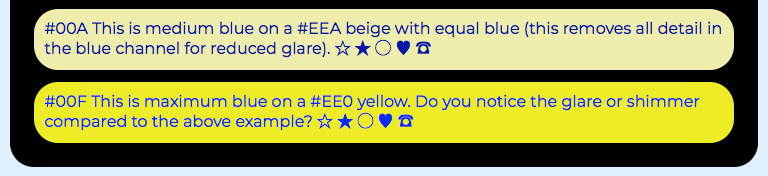
In addition to chromatic aberration, there is probably some opponent color processing that partly results in the shimmer effect on the lower sample.
Andy
_Guy Much Too Obsessed With Color_
Myndex
on 18 Sep 2020
I really appreciate the example immediately above! Hopefully we can include these kind of examples in the explainer.
bruce-usab
on 18 Sep 2020
In the last example, the blue on yellow has so much chromatic contrast that staring at it causes a (short-term, like 1m) persistent visual artifact for me, and just having it nearby still makes the darker-blue-on-pale-yellow example harder to read than it would usually be.
jrus
on 20 Sep 2020
Thanks @Myndex. Personally I find the last blue/yellow example easier than the medium-blue/beige example. but I've had that kind of shimmer/vibration effect with strong red/blue combinations.
alastc
on 21 Sep 2020
By "shimmer" are y'all talking about chromostereopsis?
StommePoes
on 21 Sep 2020
Not sure. For me with the red/blue example, if I look at it and look away it appears to wobble. Same if the text moves up & down, it appears to wobble on the background.
alastc
on 21 Sep 2020
chromostereopsis
No. The effect is “wow this is illegible and uncomfortable to look at”, not “the text/background seem to be different distances”.
jrus
on 22 Sep 2020
I really appreciate the example immediately above! Hopefully we can include these kind of examples in the explainer.
Hi @bruce-usab
In fact, those are screen shots from the explainer I wrote...
I don't want to publish the link, but if you wanted to look at the rest lemme know and I'll DM you a private link...
Andy
Myndex
on 22 Sep 2020
In the last example, the blue on yellow has so much chromatic contrast that staring at it causes a (short-term, like 1m) persistent visual artifact for me, and just having it nearby still makes the darker-blue-on-pale-yellow example harder to read than it would usually be.
Yes, interesting effect isn't it? The lower example is intentionally playing on the "opponent color process" and nearby strong opponents can have a disruptive effect on other stimuli.
Chromatic aberration is an optical phenomenon due to light of different wavelengths bending different amounts — but I believe the shimmer sensation for those that have It is in part a neurological phenomenon, either with the ganglion cells behind the retina, or somewhere in the visual cortex, particularly filtering stages v1 and v4/v8 -- and likely a combination of all.
Blue/Yellow is an interesting one because literally all three of the color opponencies are in play is some way, plus resolution and chromatic aberration.
But also, to draw your attention to it: of the "beige" and the yellow, does the beige "feel" darker? It does to me.
Yet both the beige and the yellow have the same amount of red/green. But the beige has blue in it too, and the yellow does not.
Can Adding Light Make Something Darker?
In other words, adding the blue to the yellow to make beige.........also makes it have a darker sensation for some people. Blue having a negative luminance is presented in some color models. Addressing these non-intuitive color issues will be part of the color module in development for SAPC, but that will not be part of the first working draft as more research needs to be completed.
And again it's useful to mention that "color" is not real, it is only a perception — in the real world, there is just light of different wavelengths. But our perceptions do not respond linearly to light in the real world.
This also demonstrates why contrast is _"a lot more than just the difference of two colors"_
A
Myndex
on 22 Sep 2020
Thanks @Myndex. Personally I find the last blue/yellow example easier than the medium-blue/beige example. but I've had that kind of shimmer/vibration effect with strong red/blue combinations.
I "think" you have much younger and less damaged eyes than I do — I have a very difficult time looking at the second blue/yellow — though if you spend much time on some of my sites you'll recognize the blue/beige combo.
ALSO: the device you are using (the screen technology), and how (or if) it's calibrated, and the ambient light, and are you wearing glasses or contacts with any blue blocking effect or UV filter.... these will also account for different perceptions here.
And again: "color" is not real, it is only a (nearly arbitrary) perception of light of different wavelengths that emphasizes some over others (assumed to be a result of evolutionary survival/selection). And not only do different people have different perceptions, those perceptions change over time and are also the result of early neurological development. For instance it takes 20 years for the brain to develop peak contrast perception — and if a young person has an astigmatism that is not corrected before age 12, that impairment get's "baked in" to the brain, even if glasses are later prescribed.
Red/Blue
Red/Blue is the largest difference in wavelengths, and thus the greatest chromatic aberration. It is also the most likely to cause chromostereopsis, i.e the 3-D effect of depth just due to the colors. But this is not uniform across people, and is very neurological in nature and thus one could expect it's in part due to early neurological development.
A question might be, do kids with lots of Fischer-Price toys as infants-toddlers develop a different color and depth perception than those that have a different form of early stimuli?

A
Myndex
on 22 Sep 2020
By "shimmer" are y'all talking about chromostereopsis?
Hi @StommePoes thanks for commenting
Chromostereopsis is the sensation that a an element of one color is in front (or behind) a background of another color. Red/Blue is one common example.
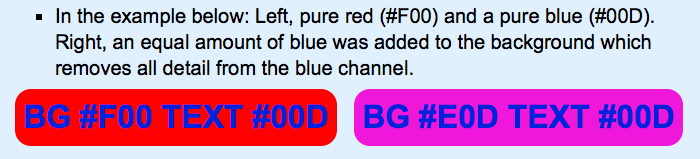
Shim Shimmery 🎶
The shimmer I was referring to in the earlier yellow/blue example is (I believe) in part a result of chromatic aberration and glare. Older eyes (like mine) with degrading ocular conditions tend to be more sensitive to glare and light scatter, and when you add in chromatic aberration effects it exacerbates the condition. Nevertheless, there are likely neurological reasons for the shimmer, and possibly related to those that cause chromostereopsis.
For me personally, the #00F blue on #EE0 yellow is uncomfortable to read. But adding blue to make the background #EEA is very helpful.In the example below, all three panels have the same background luminance and approximately equal contrast. The middle patch is a BG of #EE0 with text of #00F. The left patch adds blue to the background to wash out any detail in the blue channel, and the red and green is adjusted to keep the relative contrast. In the right patch ther is no blue at all. The text has red and green added to match the contrast for comparison.
Notice that the shimmer (if you perceive it) in the middle goes away if we either (left) add blue so that the blue channel has on detail (i.e. a zero contrast in the blue channel) or (right) don't use any blue at all.
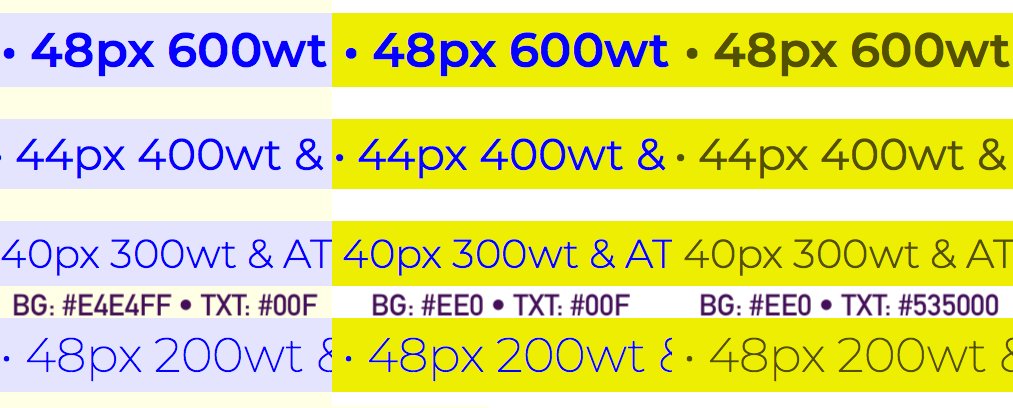
Blue's Not Bad
I want to be clear that I am NOT suggesting to not design with blue! I love blues and purples, and use them often.
But there are certain combinations that are problematic as far as reading and readability is concerned. The main thing to remember is that don't expect blue to carry important details like text on its own, and pure blues are normally going to need to be the darkest in a color pair. And glare from a brighter blue can be reduced by adding blue to the other color in a pair.
Myndex
on 22 Sep 2020
Hi Everyone,
Since Andrew mentioned a couple of times about the relation of font size and its perceived background to foreground ratio... You may find this interesting:
https://gist.github.com/xiaochengh/da1fa52648d6184fd8022d7134c168c1#use-case-reduce-layout-shifting-caused-by-web-fonts
pawelurbanski
on 9 Nov 2020
Related issues
 LaurenceRLewis
·
4Comments
LaurenceRLewis
·
4Comments
 smhigley
·
8Comments
smhigley
·
8Comments
 jake-abma
·
8Comments
jake-abma
·
8Comments
 guyhickling
·
5Comments
patrickhlauke
·
10Comments
guyhickling
·
5Comments
patrickhlauke
·
10Comments
Most helpful comment
Hi @mraccess77
Thank you for commenting, it helps me to see when I am not explaining or describing completely. But perhaps more important it leads to some new discoveries. In answering your post I did some experiments that add insight. More below.
First, just to provide a little more background, I want to mention that I have personal experience with 20/200 vision. Several years ago (in my late 40s) I developed early onset cataracts which brought my vision to worse than 20/200 in one eye, the other diminished a bit less. I now have IOL implants, but those surgeries caused vitreal detachments and retinal detachments, requiring a vitrectomy in one eye, and in the other, continuing issues due to large vitreal floaters that still can interfere with reading. Also, I still need glasses (i.e. it is trivial for me to remove them to introduce poor vision).
As such WCAG is a topic I have a close personal interest in.
As I mentioned in an above post, I am an imaging professional in Hollywood with a career that spans decades and a background that includes broadcast engineering, colorist, VFX Supervisor, and perhaps most relevant, title designer.
I came across this WCAG issue while developing a CSS framework. For the color module I am trying to create a simple color subset that is both easy to read and aesthetically pleasing. This led me down the color and vision theory rabbit hole, where I stumbled on a contrast calculator and saw an odd comment by the coder who mentioned that his "calculate" button did not pass the WCAG standard. The button is completely readable with more than adequate contrast, thus started my present research journey.
I have since been doing nothing but research this issue in depth. My posts here are based on that research and my extensive experience in digital imaging.
I cannot agree here. Estimating roughly, 40% of the color pairs the WCAG math calls "PASS" are poor in quality and should fail. And somewhere in the area of 51% of colors they fail could conceivably pass.
Wrong nearly half the time is one huge fail. I believe it is the result of incorrect assumptions and cherry picking various bits of standards and cobbling them together into something that is truly inaccurate and unsuitable for the purpose.
I'm going to quote Whittle from his paper [1] (emphasis added)
And then from Pelli's paper [2] (emphasis added)
The WCAG ignores this wholesale, despite it being prominent in most research and even noted in the ISO and ANSI standards. WCAG is using simple contrast (Lw/Lk) and that is one of the errors.
Among my findings, some of the sites I have the most difficultly reading are "compliant" with the WCAG. There are countless contrast checkers and other automated or semi automated accessibility checkers that use the algorithm as written, and they all fail to detect poor perceptual contrast.
And there are a LOT of combinations that pass but are hard to read. An accessibility site has this on one of their pages indicating the problem:
The contrast checkers are all using this flawed model which ignores many important aspects of perception. The results are all over the place and inconsistent. I can see why designers are ignoring the contrast recommendations: they are ambiguous and inconsistent at best. At the moment, visual judgement does a better job than the contrast calculators.
I have a page where I am conducting live experiments in this regard, aloing with some commentary on my findings as I go along. This link is:
https://www.myndex.com/WEB/W3Contrastissue
Here are some examples from today's experiments:
Today, I've been looking into luminance — it is well known and researched that increasing luminance improves readability (within a range). One thing the WCAG lacks is a specification on minimum lightness for the lightest element in a color pair.
I have more on this on the page, but as you can see, setting a minimum lightness of the lightest element to #AAA results in a consistent, readable, block of text. On the page you'll see examples where pages with 3:1 contrast and minimum #AAA on the brightest of the pair is more readable than 4.5:1 contrast on darker pairs.
Yes, I am aware, there is definitely correlation to contrast sensitivity due to a number of vision impairments. Indeed, one can have good visual acuity and bad contrast sensitivity. The WCAG does not discuss CS though, and only lists some Snellen numbers like 20/40.
I was talking mainly of 20/40, which is what the WCAG talks about regarding AA. For the portion of the standard that relates to profoundly impaired, still the math they provide does not create useful numbers for guidance.
And that is the point I am getting at. The math is essentially _wrong_. Lw/Lk is not well suited for determining contrast in this context. The vast majority of research on contrast sensitivity uses WEBER or MICHELSON or both. Rarely simple contrast. But there are other math mistakes in WCAG related to sRGB and computer displays that also need to be addressed.
_(EDIT by Andy: May 2019: My recent experiments and research indicates that a "classical, unmodified Weber contrast" is really not "substantially" better than the WCAG math, though there is a _modified Weber_ from Hwang/Peli that is much better than the WCAG math, and other more modern contrast equations such as PCL)._
I never said that 4.5:1 is too high, particularly in regards to profound impairment, 4.5:1 is TOO LOW when using the WCAG math. WCAG indicates 7:1 for the more visually impaired (AAA). And yes, the "understanding" text is all over the place and not clear.
To be clear, I am not "condemning" the 4.5:1 ratio per se, but I am questioning where it was derived from and the basis of the equations when those equations are not supported by standards nor research. I am also pointing out that luminance is a much bigger factor than contrast yet it is not mentioned, nor is local adaptation unless I missed seeing that. My statements here are from published research as well as my own research.
The California Council of the Blind (Lozano, 2009) states, and Federal ADA guidelines also state, that contrast for signs be 70% (note it is a percent not a ratio). The math used for the Federal standard is (B1-B2)/B1 (B1 is the lighter LRV, and B2 is the darker).[3] Now, if I use the WCAG math, 70% equals a ratio somewhere around 2.3:1 to 3.2:1. WCAG math is all over the place and does not relate to Weber's law nor anything else useful.
Nevertheless, California Council of the Blind (Lozano, 2009)[4] is on record stating that the Federal equation is flawed when B1 is less than 45. I just came across this a minute ago — I'm slightly amused as it is closely mirroring what I have been saying about the WCAG.
I describe this in more detail on the experiments page, and there are more examples.
In closing I just want to say that simply switching the equation to Weber is not the complete answer. I think we can do better, and that is the focus of my research.
Thank you again for the comments.
Andy
REFS:
[1]http://aardvark.ucsd.edu/color/whittle.pdf
[2]https://www.ncbi.nlm.nih.gov/pmc/articles/PMC3744596/
[3]https://segd.org/sites/default/files/SEGD_2012_ADA_White_Paper_Update.pdf
[4]https://www.documents.dgs.ca.gov/dsa/access/Pt2_Final-SOR.pdfHi @mraccess77
Edited May 2019 for some minor clarity fixes.