Waybar: character display ends each waybar colored block
There this strange display of character at the end of each colored block.
Default config file seems full of it.
Libreoffice character table reports:
Hexa U + 20
Decimal 1
My guess is that my system is missing something for proper display.
Any idea?
 CaptainBloodz
All 9 comments
You need to install the fontawesome-otf font :)
 Alexays
on 10 Feb 2019
Alexays
on 10 Feb 2019
media-fonts/fontawesome: The iconic font, I guess
Gentoo curenty have:
4.7.0
5.0.6
5.1.0
Any minimal version constraint there?
Additionnal guess is that it should be install whether libdbusmenu-gtk3 is installed or not?
Another depencency for the README maybe...
ThksBOQ
CaptainBloodz
on 10 Feb 2019
No version constraint for fontawesome :)
And yes libdbusmenu-gtk3 is for the tray module
Alexays
on 10 Feb 2019
For what its worth: I use a custom font for my icons, and was hit by this problem:
a wild guess was that pango was searching for the space glyph which of course I did not fill.
I solved it having my icons in <span font=\"my font\"> tags. My spaces and text out, with default font.
Bump me if needed more precision: I am not on my machine now, but only answering from memory.
 Arnaudv6
on 22 Feb 2019
Arnaudv6
on 22 Feb 2019
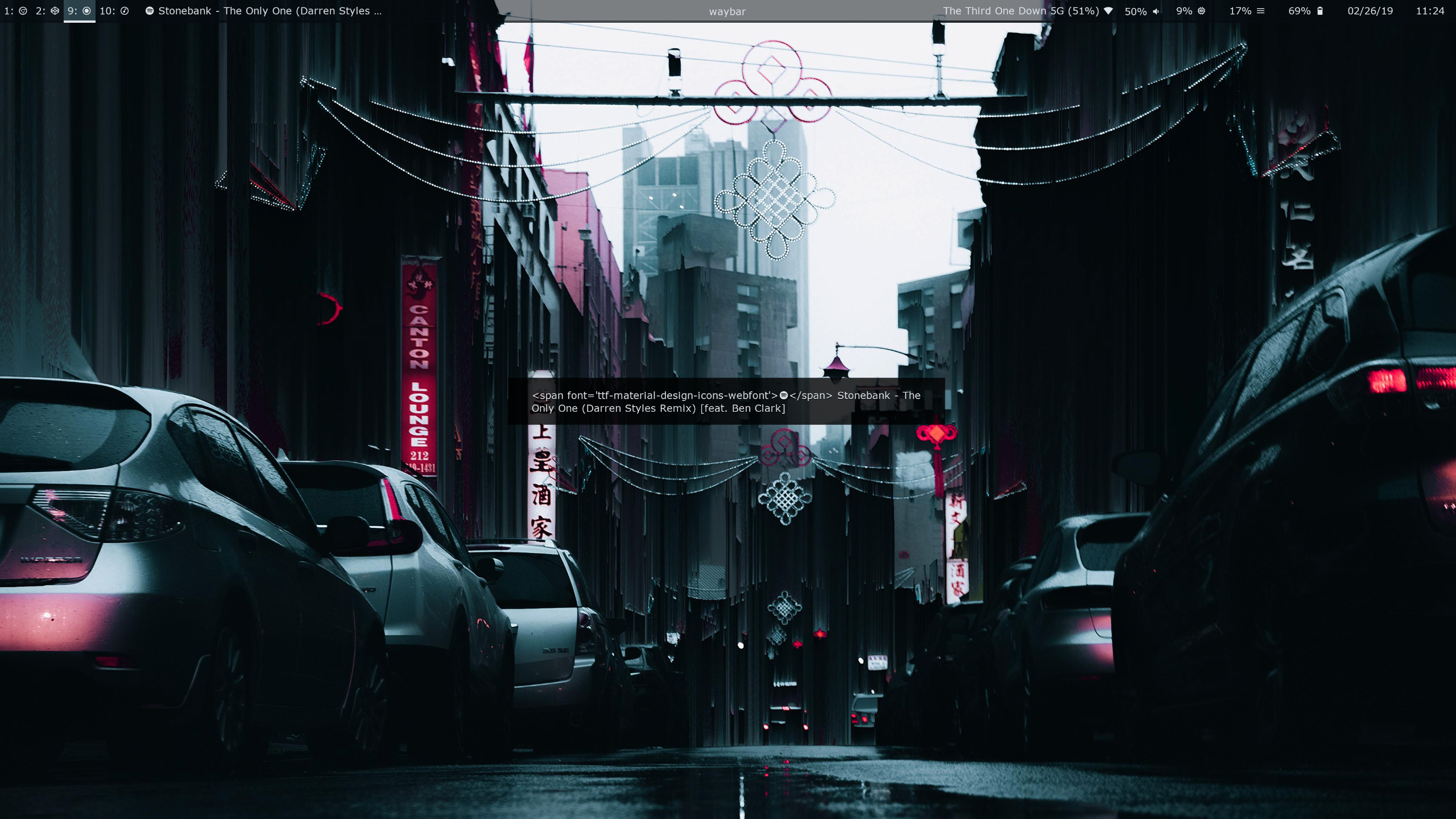
I can confirm that wrapping the custom icons in a <span font='my-font'> tag does fix this, however now when I hover over the items, the info that pops up in the middle of the screen includes the spans. This can be seen in the attached picture:
 weasnerb
on 26 Feb 2019
weasnerb
on 26 Feb 2019
Try using otf-font-awesome instead of the ttf version
 rbnis
on 26 Feb 2019
rbnis
on 26 Feb 2019
You need to install the fontawesome-otf font :)
I overlooked the "otf" part of the name. Any rationnale for why .otf is required? Are there more feature imparities to expect?
Arnaudv6
on 4 Mar 2019
Look at https://github.com/FortAwesome/Font-Awesome/issues/13067 for some informations.
Gtk try to use the font awesome space character just after the font awesome icons, but that's fail.
Alexays
on 25 Apr 2019
Arnaudv6
on 25 Apr 2019
Related issues
 Kakashiiiiy
·
4Comments
Kakashiiiiy
·
4Comments
 lovesegfault
·
3Comments
lovesegfault
·
3Comments
 atomheartother
·
3Comments
atomheartother
·
3Comments
 0xdec
·
4Comments
0xdec
·
4Comments
 xajler
·
5Comments
xajler
·
5Comments