Wavesurfer.js: Every call to wavesurferjs keeps on increasing RAM memory, without releasing it on destroy.
I have came across a issue with wavesurferjs it does not release memory previously held upon destroy.
With high duration audio file, if we open 10 times it will hang browser itself (then we need to either hard refresh or close browser itself to continue).
Steps to reproduce on linux:
1.open terminal type $htop
2.keep on opening audio with destroy on closing.
3.memory will keep on adding
Though i'm not a good programmer, but i have found a exact solution with canvas and audio api
Here is that solution: https://stackoverflow.com/questions/53241345/web-audio-api-memory-leak?noredirect=1&lq=1
i request @katspaugh , please implement it as soon as possible.
 EABangalore
All 33 comments
Hi, which backend are you using? WebAudio or MediaElementWebAudio? And this is only for OscillatorNode or all the source nodes?
 marizuccara
on 10 May 2020
marizuccara
on 10 May 2020
Hi @marizuccara , i have not provided backend option itself while initialization. that means i'm using webAudio.
EABangalore
on 11 May 2020
WebAudio is not recommended for high duration audio files, because it decodes internally your file audio to obtain the data necessary to draw the waveform. But with huge audio files this operation is too expensive, because it stores the data in memory. This can lead to browser crashes.
From the WebAudio API documentation:
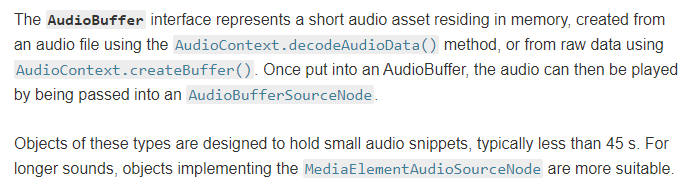
Link: https://developer.mozilla.org/en-US/docs/Web/API/AudioBuffer
Another solution is to use MediaElementWebAudio backend which does not decode internally the audio data. This is because MediaElementWebAudio use the HTML5 audio tag, which performs buffering. However with this backend you have to pass the waveform peaks manually.
marizuccara
on 11 May 2020
Though i'm not a good programmer, but i have found a exact solution with canvas and audio api
Here is that solution: https://stackoverflow.com/questions/53241345/web-audio-api-memory-leak?noredirect=1&lq=1
Have you tested it @EABangalore? if you have any fixes, please suggest them here and/or open a pull request!
 thijstriemstra
on 11 May 2020
thijstriemstra
on 11 May 2020
@thijstriemstra , i don't see closing of audioContext reference in destroy()
    destroy() {
        this.destroyAllPlugins();
        this.fireEvent('destroy');
        this.cancelAjax();
        this.clearTmpEvents();
        this.unAll();
        if (this.params.responsive !== false) {
            window.removeEventListener('resize', this._onResize, true);
            window.removeEventListener(
                'orientationchange',
                this._onResize,
                true
            );
        }
        if (this.backend) {
            this.backend.destroy();
        }
        if (this.drawer) {
            this.drawer.destroy();
        }
        this.isDestroyed = true;
        this.isReady = false;
        this.arraybuffer = null;
    }
As per this mdn reference we should be doing something like this https://developer.mozilla.org/en-US/docs/Web/API/AudioContext/close
var audioCtx = new AudioContext();
audioCtx.close().then(function() { ... });
await audioCtx.close();
The destroy of AudioContext is made in this.backend.destroy(). If you go to backend, that is webaudio.js, you can see the destroy method where are destroyed stuffs related to WebAudio
marizuccara
on 13 May 2020
@marizuccara ,
Why destroy is not called in webaudio.js when i do
wavesurfer.destroy();
wavesurfer.js destroy
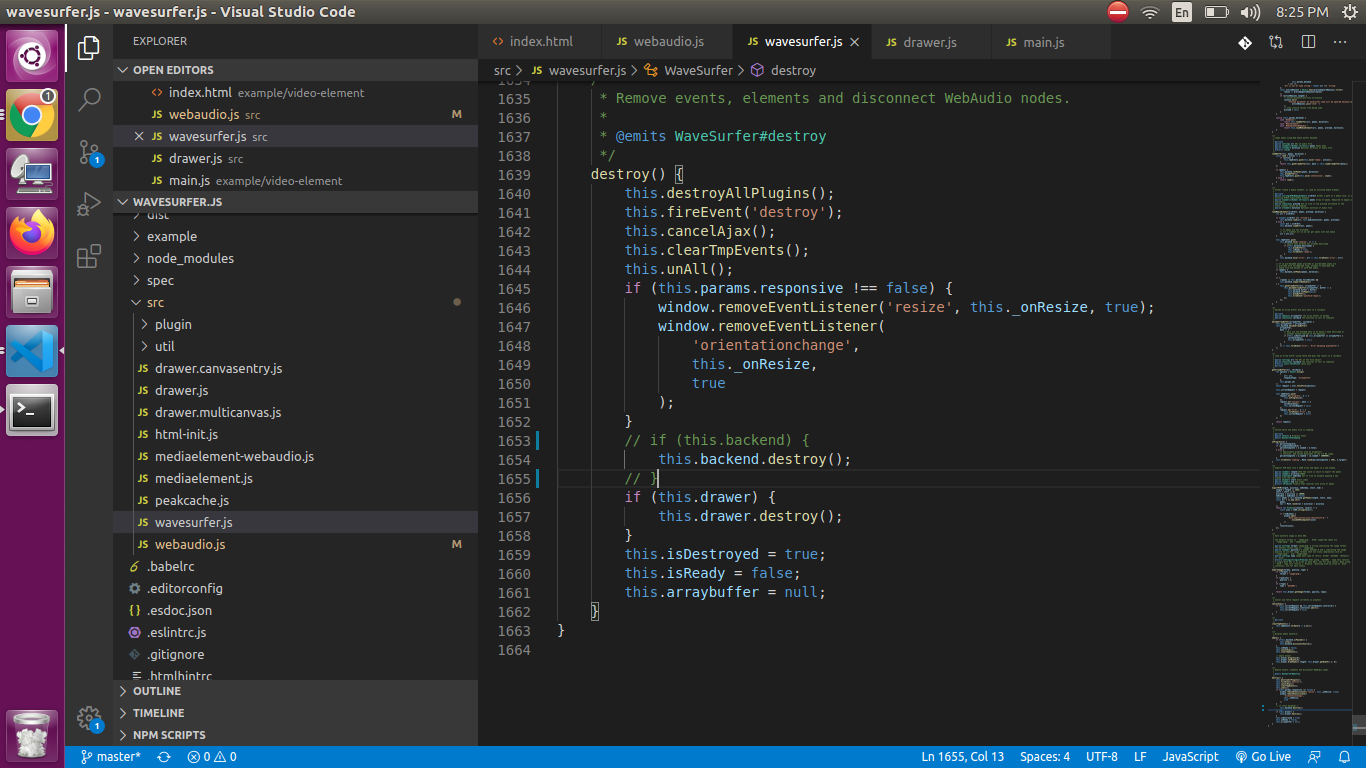
i have put some console.log in webaudio.js
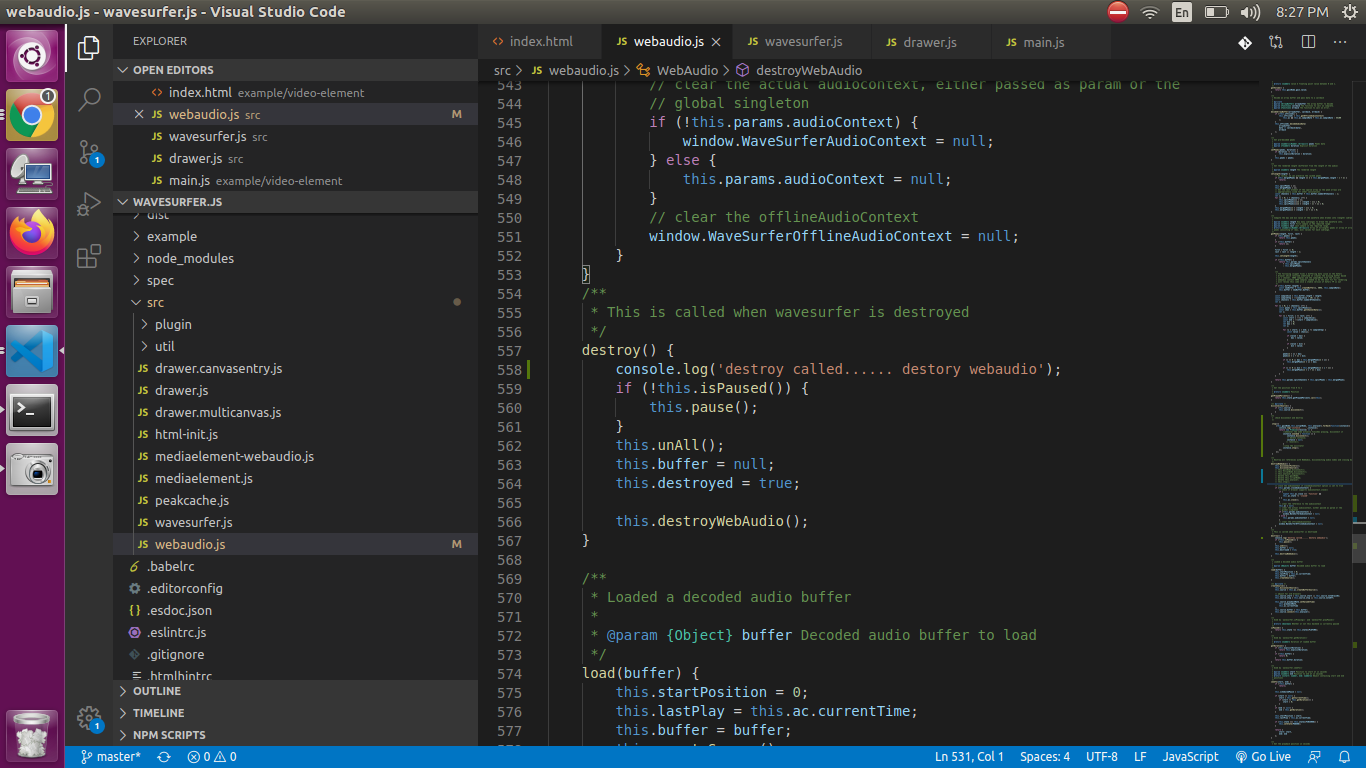
can you please check and let me know
Thanks in advance!!
My intention was to check
         [this.gainNode,this.scriptNode, this.analyser].forEach(function(instance){
            console.log('instance......',instance);
            return new Promise((resolve) => {
                //whenever the node actually finishes playing, disconnect it
                instance.onended = function () {
                    instance.disconnect();
                    // delete instance;
                    instance = null;
                   // resolve();
                }
                //stop the oscillator
                instance.stop();
            });
         });
Hi, are you sure are you using WebAudioas backend? You are calling the destroymethod somewhere?
In your piece of code you are defining the handler for the ended event, but you are doing it in a for loop, so the instance is first GainNode, then ScriptProcessorNode and finally AnalyserNode. So you are specifing the event handler for these three nodes. But the ended event is not only fired for source nodes (maybe I'm wrong)?
https://developer.mozilla.org/en-US/docs/Web/API/AudioScheduledSourceNode
Maybe you would add an event listener for the OscillatorNode for the ended event, and not for the GainNode, ScriptProcessor and AnalyserNode? Maybe you would disconnect them when the OscillatorNode is ended?
marizuccara
on 6 Jun 2020
Can you use measureMemory() in Chrome (83 and newer) to monitor the memory usage and report results here?
thijstriemstra
on 9 Jun 2020
Hello, I've been noticing this same issue on my end (Win 10, latest Chrome, latest Wavesurfer). I can confirm that Wavesurfer is erroneously not releasing the audio buffer after a call to destroy(), which results in the buffer not being garbage collected and persisting in memory even after subsequent calls to . This is most apparent when using large audio files. I know those MDN docs recommend short sound files but in practice on a decent machine Chrome handles larger audio files beautifully and I often work with tracks >1 hour in length as decoded buffers with the Web Audio API with no issues. If you set a variable holding an audio buffer to load() different sound files using the same Wavesurfer instancenull the memory is typically purged within seconds by the garbage collector. Therefore this is almost certainly not a Web Audio API/browser bug. Wavesurfer handles drawing large sounds beautifully too, but even after a call to destroy I can see that there are still retained references to the buffer in the Wavesurfer object, preventing garbage collection. Simple example, go to https://wavesurfer-js.org/ and open the console:
wavesurfer.destroy();
console.log(wavesurfer.backend.source.buffer);
//->AudioBuffer {length: 1045146, duration: 21.773875, sampleRate: 48000, numberOfChannels: 1}
//buffer is still assigned to a variable and can't be garbage collected!
wavesurfer.backend.destroy();
console.log(wavesurfer.backend.source.buffer);
//->AudioBuffer {length: 1045146, duration: 21.773875, sampleRate: 48000, numberOfChannels: 1}
//even now buffer is still referenced in the wavesurfer object!
However even if I try manually wavesurfer.backend.source.buffer = null the buffer is still not garbage collected so I suspect there remains some reference to it even elsewhere in the Wavesurfer code that I haven't figured out yet, perhaps you have an idea?
And just as a demonstration here is simple vanilla Web Audio API code that loads a large audio file and then purges it when done, easily observable in Windows Task Manager:
var audioCtx = new AudioContext();
var buffer;
var request = new XMLHttpRequest();
request.open("GET", "https://soundplant.org/fruits/Christian%20Wolff%20-%20Edges%20-%20Gentle%20Fire.mp3");
request.responseType = "arraybuffer";
request.onload = function() {
    console.log("loaded");
    let undecodedAudio = request.response;
    audioCtx.decodeAudioData(undecodedAudio, (data) => {
        console.log("decoded");
        buffer = data;
    });
};
request.send();
/* Chrome loads ~300mb audio data into memory observable in Task Manager */
buffer = null;
request = null;
/* usually within a few seconds, 300mb purged from Chrome's used memory observable in Task Manager */
 marcelblum
on 10 Jun 2020
marcelblum
on 10 Jun 2020
thanks for the details @marcelblum.
However even if I try manually wavesurfer.backend.source.buffer = null the buffer is still not garbage collected so I suspect there remains some reference to it even elsewhere in the Wavesurfer code that I haven't figured out yet, perhaps you have an idea?
Can you compare the memory size of the vanilla example with wavesurfer.js? Wavesurfer draws many Canvas instances (in some instance, e.g. when zooming) and they add up in memory as well. So theoretically sizeWavesurfer - sizeOfVanilla would be memory used by canvas. Would be useful to be able to tell how much WebAudio used and how much Canvas used.
thijstriemstra
on 10 Jun 2020
yes I have compared and they are nearly identical. Even with all of Wavesurfer's DOM/Canvas stuff the amount of RAM used by that is negligible compared to 300MB of audio (like maybe 20mb). That's at least in my own usage, with no Wavesurfer plugins or interactivity, just using Wavesurfer for visualizing. Obviously there are some browser caching and memory management quirks out of our control and it doesn't always release memory when we want it to, but it usually does. Here are 2 test pages I set up as I am trying to determine the most reliable way to purge a large audio buffer from memory in order to make room for loading another without having to refresh the page:
https://soundplant.org/wavesurfer/vanillawebaudio.html
https://soundplant.org/wavesurfer/wavesurfer.html
In the vanilla web audio test, Chrome doesn't always purge the buffer instantaneously after setting the reference to null, but it's usually within seconds, sometimes a minute or 2. In the Wavesurfer test the only way I can get Chrome to purge is if I load() a small dummy file.
Interestingly, in a quick test in Win10/Firefox, wavesurfer.backend.source.buffer = null seems to do the trick and purge instantaneously. But in Chrome it never does.
In any case, in part this is running up against browser quirks but there is definitely a Wavesurfer bug here if wavesurfer.destroy() doesn't properly release its reference to the buffer.
marcelblum
on 10 Jun 2020
BTW on further clarification I was wrong when I said
the buffer not being garbage collected and persisting in memory even after subsequent calls to load() different sound files using the same Wavesurfer instance
It's clear that load() reuses the same variable to store the buffer and therefore overwrites the previously loaded one when reusing the same Wavesurfer instance. So for my needs when I want to purge memory I load() a small dummy file. But that's rather ugly.
marcelblum
on 10 Jun 2020
Thank you Marcel, you nailed it! Let’s clear that buffer.
I think it might be also trapped in some closure (an event callback?). We should look for places where the buffer is passed as an argument or assigned to a local variable.
 katspaugh
on 10 Jun 2020
katspaugh
on 10 Jun 2020
fyi, to determine the size in bytes of the buffer space used by Audiobuffer:
function AudioBuffer_to_bytes(buffer) {
  if (!(buffer instanceof AudioBuffer)) {
    throw "not an AudioBuffer.";
  }
  const sizeoffloat32 = 4;
  return buffer.length * buffer.numberOfChannels * sizeoffloat32;
}
taken from https://padenot.github.io/web-audio-perf/#memory-profiling
thijstriemstra
on 10 Jun 2020
Thanks @thijstriemstra. Interesting to note that the Web Audio API does not do on-the-fly resampling during playback like other engines, rather it resamples the sound to the context's sampleRate and bit depth during the decoding process, which may be more efficient for latency on some level but can result in a much ballooned memory footprint. So a 10MB 16-bit/44khz 7min mp3 - 77MB of uncompressed audio data - becomes 167MB of RAM when decoded into a 32-bit/48khz audio context.
marcelblum
on 10 Jun 2020
Hi @thijstriemstra have you got a suggestion of what to fix? Check if AudioBuffer is really empty after calling the destroy method?
marizuccara
on 11 Jun 2020
AudioBuffer did not decrease in size and references to the buffers was being kept around even after all instances were destroyed after testing using multiple heap snapshots in Chrome.
On my end, I resolved this (before doing anything) by straight up deleting the buffer first.
delete this.wave.backend.buffer;
After the buffer is deleted, I run my regular destroying things like this.wave.destroy(); etc.
This solves the memory leak for me, which was upwards of 400mb every instantiation of a new object (using any of the recoemmdned backends).
 a2-rmiller
on 20 Jul 2020
a2-rmiller
on 20 Jul 2020
@a2-rmiller, thanks for your reply
I have tried your solution, but it did not help me i'm using wavesurfer.js 3.3.3
here is what i have tried
var wavesurfer = {}; // defined globally
var audioUrl = 'myaudiofile.mp3';
wavesurfer = WaveSurfer.create({
          backend: 'MediaElementWebAudio',
         container: '#waveform',
       ...
});
wavesurfer.load(audioUrl,[],'none');

getAudioPeakFromJSON(function(peakData){
            var audio = document.createElement('audio');
            audio.src = audioUrl;
            // Set crossOrigin to anonymous to avoid CORS restrictions
            audio.crossOrigin = 'anonymous';
             wavesurfer.load(audio,peakData,'auto'); // peakData is peak array []
  });

//destroying this way

delete wavesurfer.wave.backend.buffer;

wavesurfer.wave.destroy();
@a2-rmiller, what i'm doing wrong please suggest me
Thanks in advance!!
EABangalore
on 21 Jul 2020
@EABangalore I'll list the things I am doing differently than you based on that small snippet:
- I am not calling destroy as soon as I create it, but later on when I need it destroyed
- I am using version 4.0.1
- My audio files are wavs
- I am not using the extra parameters in the wavefurfer.load
- I am not using a function regarding peakdata
- I use .unAll(); before .destroy() (since I use wavesurfer events)
- My instance of wavesurfer is not defined globally (in the same way), but part of a class structure, where instantiation is called inside of a function to easily tear down and recreate everything
I hope this helps you.
a2-rmiller
on 21 Jul 2020
@a2-rmiller can you turn this potential fix into a pull request?
thijstriemstra
on 21 Jul 2020
@thijstriemstra Sorry I have not dug into the actual codebase and would not directly have the time to do so. However, destroying the instantiated AudioBuffer before destroying other things would be the route to go (wherever this may live in the source).
a2-rmiller
on 21 Jul 2020
@thijstriemstra If I had to guess though:
https://github.com/katspaugh/wavesurfer.js/blob/7af166d97009afd9e6b98726968dd0af3e1126b1/src/wavesurfer.js#L1690
Adding a check here to truly see if those items are destroyed before setting isDestroyed to true would likely reveal something more.
a2-rmiller
on 21 Jul 2020
Hi guys, gonna share my findings on this issue. I'm testing with 2 instances of wavesurfer per page.
When not using pre-loaded peaks and using WebAudio backend:
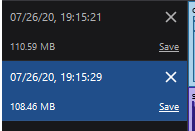
1st memory snapshot: after app loads.
2nd memory snapshot: after 2 tracks are deleted (destory method is called, DOM node is deleted)
In this case the largest memory use comes from two ArrayBuffers, 79MB which corresponds to the size of backend.buffer for track 1 + track 2
When using preloaded peaks and using WebAudioMediaElement backend:
- 28MB used after load
- 25MB used after destroy
Calling .unAll before destroy() makes no difference, and it shouldn't, since it looks like destroy() calls unAll as well.
Using delete wavesurfer.backend.buffer makes no difference. The memory is only freed after the browser tab is closed.
 sundayz
on 26 Jul 2020
sundayz
on 26 Jul 2020
Using delete wavesurfer.backend.buffer makes no difference.
Was afraid so.
thijstriemstra
on 26 Jul 2020
it turns out that Google Chrome has really good memory tools, it can tell you where things were allocated, what's holding on to the references, etc.
I'm not that good at using it though, and I'm using 3.3.3 and Vue so it's harder for me to figure out what's going on. Someone who knows how to use the chrome memory tools could probably figure this out easily.
this is the allocation stack for the backing buffer that's not being GC'd when calling destroy()

The anonymous functions lead to decodeArrayBuffer -> offlineAc.decodeAudioData(). There's a lot of callbacks here and events, maybe a hint for someone who can work this out
sundayz
on 26 Jul 2020
This is unfortunately incorrect. Chrome does in fact have very nice memory snapshotting tools. When not deleting the buffer here is the snapshots:
Heaps:

First Heap:
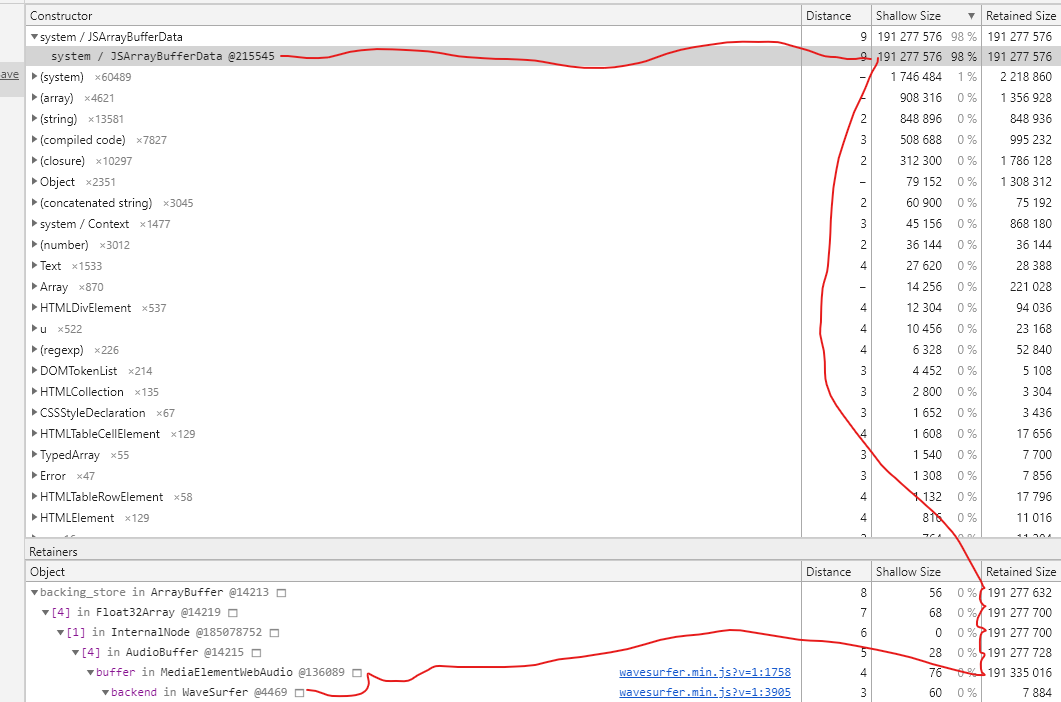
From the image above, this is the regular first time load where the buffer gets populated.
Second Time:
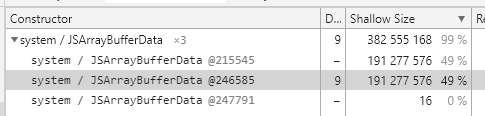
Third Time:
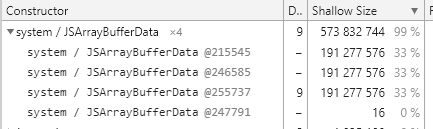
Fourth Time:
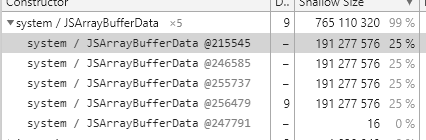
When clicking the instances of the bufferdata, it all leads back to:

The unAll before the destroy is correct, the destroy method runs it, which I later found out after briefly looking at the source for my last comment.
a2-rmiller
on 27 Jul 2020
can we pin this issue?
Also note to anyone who has issues with this, using the MediaElementWebAudio backend seems to reduce ram usage a LOT so you could use that for now
sundayz
on 4 Aug 2020
can we pin this issue?
Done.
thijstriemstra
on 5 Aug 2020
Just to add to the reports, was also seeing this issue in 4.0.1. Calling delete wavesurfer.backend.buffer does indeed release the memory for me.
 jordanfloyd
on 27 Aug 2020
jordanfloyd
on 27 Aug 2020
For anyone else having trouble diagnosing this. delete wavesurfer.backend.buffer seems to work but it's inconsistent. Running it 20 times in a row I would often get one time where it wouldn't work. (Update: Just had about 10 times in a row where this solution didn't clear the memory, very odd.)
Also it only worked on MediaElementWebAudio it didn't work on WebAudio. I was testing this without providing Peak data as that increases memory usage.
Due to the inconsistencies (and me getting frustrated debugging this) here's a few potential tips when diagnosing this:
- It can take up to 5 seconds for the memory to be released so don't come to conclusions to quickly.
- Try opening a new tab every time you test. Refreshing the tab doesn't always release the memory.
- (Unsure about this) Try closing Chrome's developer tools. This seems very odd but it seems having developer tools open sometimes caused the memory to not be released. 🤷♂️
- Due to the above don't run
delete wavesurfer.backend.bufferinside of Chrome's console put it in your own code.
I have no experience diagnosing memory leaks but found it odd that when I turned on displaying "Javascript memory" inside Chrome's Task Manager it isn't showing up as "Javascript memory" usage just as general "Memory footprint".
 SeanBannister
on 16 Nov 2020
SeanBannister
on 16 Nov 2020
I use 4.0.1, but two hours of audio will cause lag.Then, here is what i did:
- update 4.2.0
- use MediaElement
- set maxCanvasWidth 50000 (it look like very large, but it's very useful)
now, it's better than before, but it's not enough. The autocenter is true, when the timeline more than center ,there's a noticeable lag, can you give me some advice, thanks a lot.
 GodLyons
on 16 Nov 2020
GodLyons
on 16 Nov 2020
Note that this memory leak affects more than .destroy() it's also an issue with memory not being released during general usage.
For example if you use MediaElementWebAudio and don't provide peak data you can run delete wavesurfer.backend.buffer after the Peak data is generated and it frees up a heap of memory.
Please note I don't understand the inner workings of this.
SeanBannister
on 16 Nov 2020
Related issues
 CramericaIndustries
·
4Comments
CramericaIndustries
·
4Comments
 SGDAT
·
3Comments
SGDAT
·
3Comments
 itamaker
·
4Comments
itamaker
·
4Comments
 Gerlie15
·
4Comments
thijstriemstra
·
5Comments
Gerlie15
·
4Comments
thijstriemstra
·
5Comments
Most helpful comment
AudioBuffer did not decrease in size and references to the buffers was being kept around even after all instances were destroyed after testing using multiple heap snapshots in Chrome.
On my end, I resolved this (before doing anything) by straight up deleting the buffer first.
delete this.wave.backend.buffer;
After the buffer is deleted, I run my regular destroying things like this.wave.destroy(); etc.
This solves the memory leak for me, which was upwards of 400mb every instantiation of a new object (using any of the recoemmdned backends).