Wavesurfer.js: Peaks get cut off on certain widths, when loading my own peaks JSON
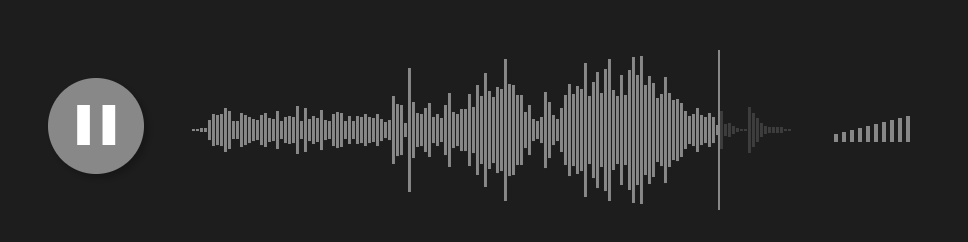
I'm loading my own pre-rendered peaks into Wavesurfer (an array of about 900 samples). On most browser widths, it looks fine:
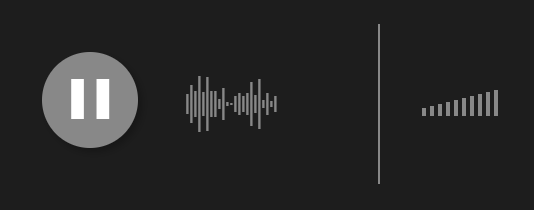
But at smaller widths, half the waveform is missing:
Wavesurfer.js version(s):
1.3.7
Browser version(s):
Chrome 61
Code needed to reproduce the issue:
 ffxsam
All 15 comments
@katspaugh Any ideas on this? I couldn't get the recommended audiowaveform app compiled properly for Amazon Linux, so I'm using something else on the server side, using a special WebAudio implementation in Node.js.
ffxsam
on 13 Oct 2017
BTW, I managed to get audiowaveform compiled on Amazon Linux. The result was not so great:

😆
I followed the exact recommended usage, audiowaveform -i some-file.mp3 --pixels-per-second 10 -b 8 -o some-file.json and this is what it came up with. I don't think this program spits out the proper peaks:
[0,0,0,0,-22,24,-31,22,-26,23,-17,18,-11,11,-23,16,-21,13,-11,12,-41,45, ...
Pretty sure it should be a double ranging from -1 to 1.
EDIT: I took the output of audiowaveform and scaled it properly (divided by 126) and plugged that into Wavesurfer. The peaks now look ok, but they're still cut off. 😢
ffxsam
on 14 Oct 2017
@ffxsam Excuse me sir, what did you mean by
I took the output of audiowaveform and scaled it properly (divided by 126) and plugged that into Wavesurfer. ?
I've got the same issue and can't fix it.
 alexlarichev
on 14 Oct 2017
alexlarichev
on 14 Oct 2017
@alexlarichev Pretty simple. JavaScript code below:
const peaks = audiowaveformResult.data.map(d => d / 126);
Can confirm. Also happens with v2beta-02. Also happens with mp3 and with WebAudio backend. Only happens when the width of the waveform is small (~ smaller than 250px) – I think this is maybe the same as #1207
Apparently https://github.com/katspaugh/wavesurfer.js/pull/1198 didn't fix everything.
UPDATE: apparently I was mistaken. (see below)
 mspae
on 15 Oct 2017
mspae
on 15 Oct 2017
I'm willing to pay anyone who's able to fix this issue this week. Email me at c2FtQG1zZ2JveC5tZQ== if interested (base64-decode that to get my email address).
@mspae @katspaugh
ffxsam
on 15 Oct 2017
I'm sorry @ffxsam I currently don't have the time resources to commit on fixing this in a certain time frame. But of course we will try and fix it ASAP. Thank you for the offer!
I don't know if maybe somebody else wants to take you up on your offer.
mspae
on 22 Oct 2017
No problem. I actually wound up writing my own waveform play control from scratch, because I desperately needed something that works. 😊 All is well!
ffxsam
on 22 Oct 2017
Issue seems to be resolved when using 2.0.0-beta02 – Please check @ffxsam https://codesandbox.io/s/0yloo908pv
I can confirm it still happens on 1.4.0 (latest v1): https://codesandbox.io/s/ko4z2qk8y5
I'm changing the label on this issue.
Edit: Sorry, I had the wrong codesandbox link. should be working now.
mspae
on 23 Oct 2017
Glad to hear it's resolved in 2.0!
ffxsam
on 23 Oct 2017
I just ran into this. So glad there's a fix!
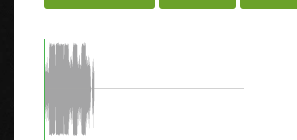
Testing 2.0 now...
Yep looks good, thanks so much for fixing that!

 dtbaker
on 25 Oct 2017
dtbaker
on 25 Oct 2017
Fixed in 2.0? cool, closing.
 thijstriemstra
on 21 Dec 2017
thijstriemstra
on 21 Dec 2017
@dtbaker could you share your demo ?
@ffxsam could you share your demo ?
 15838028035
on 14 Jan 2019
15838028035
on 14 Jan 2019
Hey,
My peak file values range from -1 to +1 but when loading back in with the same MP3 and passing in the peaks using 'MediaElement' i just get a massive block indistinguishable form the original waveform.
Am I missing something?
Thanks in advance!
 notonlybutalso
on 6 Mar 2019
notonlybutalso
on 6 Mar 2019
Hey,
My peak file values range from -1 to +1 but when loading back in with the same MP3 and passing in the peaks using 'MediaElement' i just get a massive block indistinguishable form the original waveform.
Am I missing something?
Thanks in advance!
Just in case anyone else finds themselves in this situation, its the peak file format it has to be [number, number] and not ["number","number"]
Hope that helps,
Mike
notonlybutalso
on 6 Mar 2019
Related issues
 ellVin
·
5Comments
ellVin
·
5Comments
 itamaker
·
4Comments
itamaker
·
4Comments
 Gabrielfcs
·
3Comments
thijstriemstra
·
5Comments
Gabrielfcs
·
3Comments
thijstriemstra
·
5Comments
 daslicht
·
3Comments
daslicht
·
3Comments
Most helpful comment
I just ran into this. So glad there's a fix!
Testing 2.0 now...
Yep looks good, thanks so much for fixing that!