Waveboxapp: Mac - Accounts -> Next Service menu & shortcut do not work
- Wavebox Version: 4.3.0
- Operating System & Version: macOS 10.13.6
- Account type (if applicable): Gmail
Expected & actual behavior
When I click Account->Next Service (or use keyboard shortcut) I expect it to change to the next service (in my case i have calendar, drive, sheets, docs, sheets services in my menu).
In actuality it does not do anything. If I click the menu button, nothing happens. If i type the keyboard shortcut the menu entry quickly flashes as if to indicate that it's been invoked, but it does not actually do anything.
The Account->Previous Service and it's corresponding shortcut work as expected.
Steps to reproduce
Attempt to use Account->Next Service
Is the bug persistent or intermittent?
Persistent - it never works
 madorb
All 14 comments
Are you having more then 1 service enabled in wavebox?
You have 2 different levels of services:
- Services
- Indexed services
So lets say you add gmail with all the underlaying apps in the same service. Then for example gmail inbox is in indexed service 1 and next in indexed service 2. So then you need to use a different type of command to change service for the indexed service.
Therefore I am wondering what more you have added since that command is for main services and not for indexed services.
 nmat
on 4 Oct 2018
nmat
on 4 Oct 2018
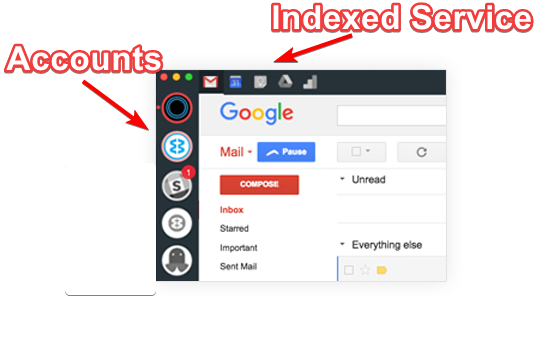
Example image above shows where "Accounts" are located in interface and where "Indexed Services" are located.
So they are separated.
nmat
on 4 Oct 2018
@nmat It's definitely a problem with the Indexed Service.
Presently I have two accounts (Google & Trello) and switching between them works fine, both via keyboard shortcut and Accounts -> Next Account / Accounts -> Previous Account menu entry.
Your image above is exactly as mine is, let's say I'm in my first Account (Google) and looking at Google Calendar (second indexed service).
If I enter the shortcut CmdOrCtrl+Alt+> or click Accounts -> Next Service the Accounts menu entry briefly flashes, but the viewport still shows Google Calendar. If I enter the shortcut CmdOrCtrl+Alt+< or click Accounts -> Previous Service it works as expected and the viewport changes to Gmail.
madorb
on 4 Oct 2018
What happens if you change the keybinding for: Keyboard Shortcuts - Account -> Service at Index to lets say Cmd+Shift+Number or something. Does that make the change work with the shortcut?
nmat
on 4 Oct 2018
Also please note that a service can overwrite the keyboard shortcuts so it might be something to that part also.
nmat
on 4 Oct 2018
@nmat
The Service at Index shortcut works as appropriate, and continues to work if i change it to Cmd+Shift+Number (at least Cmd+Shift+1 and 2 work, the rest are macos native shortcuts for screen capture :-) ). But in either case has no impact on behaviour of Accounts -> Next Service
I did briefly think that it could possibly be that the keyboard shortcut were being overridden. Though the fact that the Accounts menu actively blinks when I type the shortcut - leads me to believe that it's being correctly identified by Wavebox, just not correctly executed
madorb
on 4 Oct 2018
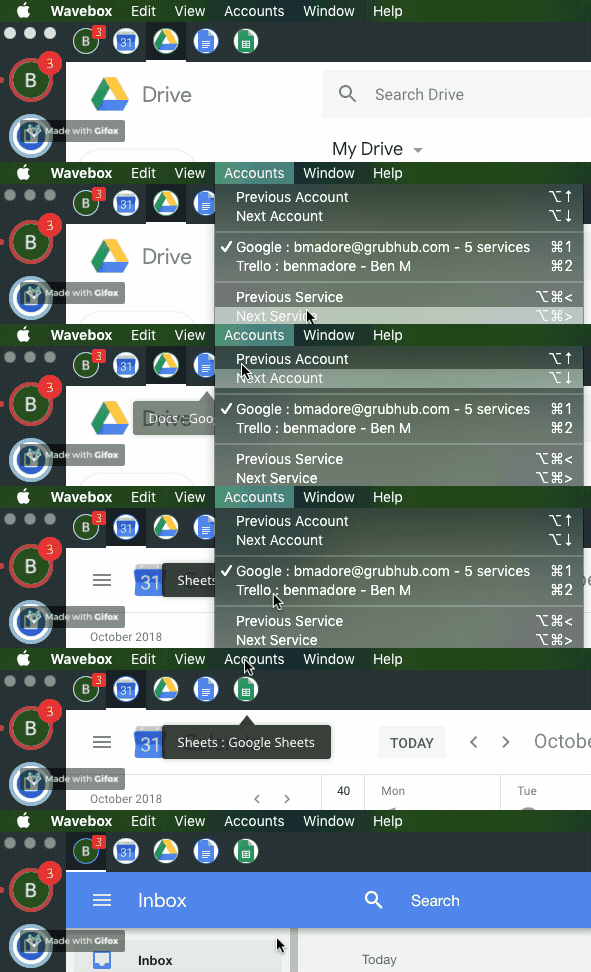
Hopefully this gif should explain the behaviour I'm seeing - though this uses the menu buttons directly and not the shortcut - but in any case, it doesn't work :-)
madorb
on 4 Oct 2018
That looks like a bug there. I'm guessing previous works ;-)
Fixed in https://github.com/wavebox/waveboxapp/commit/f6d52bff6a6844f22e810fa297d67748bcca772f
Thanks!
 Thomas101
on 4 Oct 2018
Thomas101
on 4 Oct 2018
Yep, previous is just fine :-) Thanks for the quick fix!
madorb
on 4 Oct 2018
Fix should go into the beta channel at end of this week or beginning of next :)
Thomas101
on 4 Oct 2018
Oops, i meant to write it here, but accidentally did it on the commit itself which may not give notification - but I have a question about the fix: https://github.com/wavebox/waveboxapp/commit/f6d52bff6a6844f22e810fa297d67748bcca772f
madorb
on 4 Oct 2018
Hi, we’ve just released this to the beta channel of Wavebox in version 4.3.1. If you want to give it a try there are some instructions on how to use the beta channel here. Thanks
Thomas101
on 11 Oct 2018
Yep, works as expected! Thanks so much!
madorb
on 11 Oct 2018
Hi, this has just been released in the latest version of Wavebox. You can get the update by using the Application/File menu and clicking Check for Update or by downloading the latest version from our download page. Thanks!
Thomas101
on 18 Oct 2018
Related issues
 dzg
·
4Comments
dzg
·
4Comments
 dep
·
4Comments
dep
·
4Comments
 bashfulrobot
·
4Comments
bashfulrobot
·
4Comments
 mgresko
·
4Comments
mgresko
·
4Comments
 yermulnik
·
3Comments
yermulnik
·
3Comments