Waveboxapp: Select services to show in sidebar
Which version of Wavebox are you using? 3.5.0
Which Operating System are you using? Ubuntu 16.04
It would be nice to allow a user to select which services to show in the sidebar. As is, it's an all or nothing option. For example, I would like to add calendar for office 365 to the sidebar in addition to email but I don't want to see all the other services. Same for gmail and hangouts. When all services are added the sidebar is too cluttered.
 maroc81
All 15 comments
You can do this if you right click the account and choose the services in there.
Regarding all services things are added one by one.
 nmat
on 1 Nov 2017
nmat
on 1 Nov 2017
You can follow this: https://wavebox.io/kb/services-toolbar
and if you scroll further down you can see the services which can be shown or hidden.
nmat
on 1 Nov 2017
Right, but I still want to be able to access the other services through the top bar. So for example, if hangouts were in the side bar, I could go directly to hangouts from the sidebar as messages come in, but I can still access google drive occasionally as needed from the top bar.
The idea here is: Access frequently used services in the sidebar, and less frequently used services in the top bar.
I think the only options with 3.5.0 are:
- Show all enabled services in top bar
OR - Show all enabled services in side bar
As I understand it, there is no way to show some enabled services in the sidebar and some/all in the top bar. Is that correct?
maroc81
on 1 Nov 2017
ok you want to modify both bars in a custom way.
At the moment I do not believe this is possible. However you can. There are quite some work going on to the interface and maybe this will happen in the future. I thought you just couldn't disable the services in those specific accounts.
nmat
on 1 Nov 2017
Yep that's the idea. I have 6 accounts in wavebox and moving all services to sidebar overruns it. For now, I just have to click on google, then hangouts. So far, that's the only feature missing that I want.
maroc81
on 1 Nov 2017
then I am with you. Yeah I do not think it is possible to do that at the moment.
nmat
on 1 Nov 2017
I think there might be something we can look at doing here. In the meantime, when you show them in the sidebar, have you tried setting them to collapse when the account is inactive? It might help manage multiple accounts
 Thomas101
on 2 Nov 2017
Thomas101
on 2 Nov 2017
I believe this is "some what" fixed due to the new add dialog for wavebox where you can add a indexed service to the sidebar based on your need.
Is there any reason for it to be open at the moment?
nmat
on 14 Jan 2018
That might work. I will have to check it out. Right now, #482 would get me most of the way there.
maroc81
on 14 Jan 2018
Hi, we’ve just released this to the beta channel of Wavebox in version 3.14.8. You can now move each service to the sidebar or toolbar separately from the right-click menu.
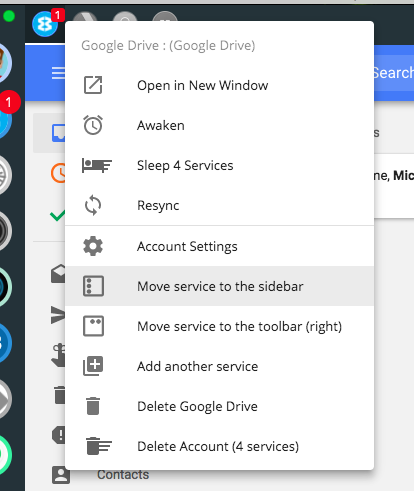
If you want to give it a try there are some instructions on how to use the beta channel here. Thanks
Thomas101
on 23 Jul 2018
Sweet! #482 is done as well! Pedro was right, if you vote for him, all your dreams _will_ come true!
maroc81
on 23 Jul 2018
I'm seeing a couple of issues with this. One of which, ironically, I think is caused by #482.
- If I add a service to the sidebar for office 365, it changes the primary service button as well as add it to the sidebar. I tried to add calendar to the sidebar and now both buttons in the sidebar are set to calendar instead of email with calendar below it. See screenshot below. It does this on both of my office 365 accounts for the first service that I add to the sidebar.

My fix for now is to add email to sidebar then calendar so now I have.

- For the one related to #482, I added hangouts to the sidebar which works as expected. However, if I click hangouts in the sidebar then click the main gmail account button, it stays on hangouts. This may be the expected behavior. I added gmail to the sidebar along with hangouts (similar to what I did with office365 above) and clicking that does go directly to gmail. So now my sidebar looks like below.
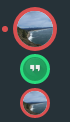
Let me know if I should create new issues for either of these.
Thanks!
maroc81
on 23 Jul 2018
To support this and a bunch of new features we've had to change the way that accounts work in the sidebar slightly. You've basically got a grouping (the large icon) and then the individual services within it.
By default the grouping doesn't have an icon, whereas each of the services has its own default icon (e.g. the Google hangouts logo) and then some of the ones that sync (e.g. your gmail account) have their own icon.
To provide an icon for the grouping we run through the services in-order looking for a specific set/synced icon, then if we can't find one of these we use the default icon of the first service. So to explain what's happened in the two cases above...
- O365 doesn't have an icon for your account (maybe there's not one set?) so it's only got default icons available. When you swap mail and calendar around it's using whichever one is first.
- Gmail has an icon that's synced, so we're always using that one regardless of the order.
We did it this way because we thought it would give the most similar experience when users update (i.e. nothing changes). We've also added the option to set your own icon in settings for the grouping which will keep it consistently the icon you set...
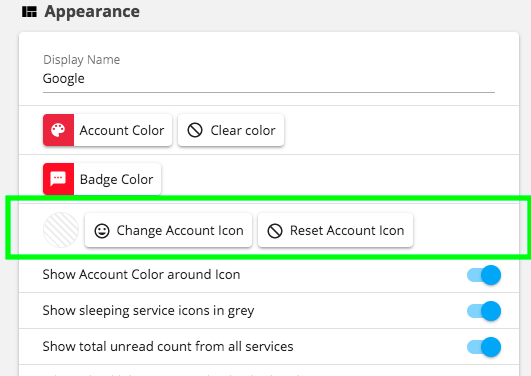
All that said though we're happy to take feedback on this, perhaps we can be a bit cleverer about which icon to pick or what to do! For the most part we want it to just-work with minimum configuration, but also want to give tools for those who want to customize the behaviour and appearance
Thomas101
on 24 Jul 2018
With the latest beta it appears to be working the way I expect.
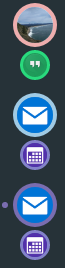
With my setup like the screenshot above, what I see is
- Clicking on hangouts/calendar always loads the respective service
- Clicking the main account icon loads the last selected service
:+1:
Only feature missing now is system notification for calendar events :)
maroc81
on 27 Jul 2018
Hi, this has just been released in the latest version of Wavebox (4.0.0). You can get the update by using the Application/File menu and clicking Check for Update or by downloading the latest version from our releases page or download page. Thanks!
Thomas101
on 10 Sep 2018
Related issues
 dep
·
4Comments
dep
·
4Comments
 MichaelTunnell
·
4Comments
MichaelTunnell
·
4Comments
 dctucker
·
4Comments
dctucker
·
4Comments
 texelate
·
3Comments
texelate
·
3Comments
 mgresko
·
4Comments
mgresko
·
4Comments
Most helpful comment
Hi, we’ve just released this to the beta channel of Wavebox in version 3.14.8. You can now move each service to the sidebar or toolbar separately from the right-click menu.
If you want to give it a try there are some instructions on how to use the beta channel here. Thanks