Waveboxapp: [Feature Request] compatible external links should open in Wavebox
- Which version of Wavebox are you using? [e.g. 3.0.0]
3.4.0 - Which Operating System are you using? [e.g. Windows 10, Mac OSX 10, Ubuntu 14.04]
[solus 3](https://solus-project.com/)
For example, if someone sends me an email with a youtube link, and on my Wavebox account I have the youtube tab enabled, then rather than opening an external browser, or Wavebox's browser, it would take me to the youtube tab and play the video.
 thewithz
All 25 comments
I agree - should probably gate this behind a setting for users who don't want to use it
 Thomas101
on 20 Oct 2017
Thomas101
on 20 Oct 2017
Same for trello. I get notifications for trello updates and they should open in the trello tab
 durandom
on 4 Nov 2017
durandom
on 4 Nov 2017
There are multiple places I'd like to see this. I'm using wavebox with my work gmail and slack accounts and there are a number of services my company uses. My default browser isn't logged into most of these services in an attempt to keep my work sandboxed.
Currently I use right click on link -> open in account profile -> <service name> which is fairly clunky, although I am fine with them opening in new windows. The list of links I click on from both gmail and slack is something like:
- zendesk links
- notion links
- 7geese links
- google drive links
- JIRA links
An interim solution would be a way to have the "open in profile" options available directly on the context menu instead of a submenu.
Alternatively, a way to define regular expressions for links to open in specific account profiles would be neat (and put most of the work on me to define them instead of a pattern matching engine in wavebox).
 TheSpyder
on 7 Jan 2019
TheSpyder
on 7 Jan 2019
Ah I just noticed that slack links, when clicked on, actually load https://slack-redir.net/link?url=<encoded url> so those will be _much_ harder to filter into opening with the correct wavebox profile. Sigh.
[edit] actually gmail does the same thing, https://google.com/url?q=url 😂
TheSpyder
on 7 Jan 2019
Hi, we’ve just released this to the beta channel of Wavebox in version 4.5.11. If you've not configured where you want a link to open, you'll be asked where to open it...

In addition to this, if you want to trigger this option on an individual link you can use Ctrl / Shift / Cmd & click to open it. (Check out Settings > Links to change what each of these combinations do).
To give the beta channel a try there are some instructions on how to use the beta channel here. Thanks
Thomas101
on 23 Jan 2019
Looks good, I'll give it a go 😁
TheSpyder
on 24 Jan 2019
I spent a solid day with the update at work, I've been using wavebox for a few weeks now and it's quite heavily integrated into my daily routine.
My initial thoughts:
- I was expecting something along the lines of the context menu "open link in account profile" feature, which opens new windows, not to re-use the existing application tabs. It's oddly jarring and I don't see much point to choosing which service within an account should open the link.
- The account picker doesn't scale with screen size, on my 27" display it's barely a third of the window height and I the 16 options I have to scroll through only show 3 at a time.
- This might be a bit off topic, but as I suggested earlier remembering this choice based on the link URL details would be the most useful. I assume the current remember checkbox works by source account, this seems weird. I might have links in my email that need to open in any of 5 different accounts, so I'm stuck using this popup for every single link I click?
- More keyboard access would be nice. Filtering the accounts by typing is great, but then I'd like to use the arrow keys and enter to choose which account to open (I use the popup a lot due to the above point).
At this stage it's only marginally less convenient for me than manually going through the context menu as I have been doing, and in some cases it's worse (I had set shift+click to open in a wavebox window, now I have to reserve that for the "ask me" popup. I'm not sure if the direction I'd like it to go in is the one you're aiming for though 😅
TheSpyder
on 24 Jan 2019
Thanks for the feedback! That's really helpful. Lets see if we can add a few of these in :)
I was expecting something along the lines of the context menu "open link in account profile" feature, which opens new windows, not to re-use the existing application tabs. It's oddly jarring and I don't see much point to choosing which service within an account should open the link.
There are definately two different use-cases here. I think having two buttons in the right side of the account options is the way to go, one for window, one for tab. To be honest having used it, I think opening in a window is the best default for when clicking anywhere in the account list item
The account picker doesn't scale with screen size, on my 27" display it's barely a third of the window height and I the 16 options I have to scroll through only show 3 at a time.
Yep, I don't know why we haven't used more of the space :)
This might be a bit off topic, but as I suggested earlier remembering this choice based on the link URL details would be the most useful. I assume the current remember checkbox works by source account, this seems weird. I might have links in my email that need to open in any of 5 different accounts, so I'm stuck using this popup for every single link I click?
I think we're going to drop the Remember my chose for this account checkbox and include a dropdown at the bottom. This can then be used for one of the following...
- As me again next time
- Do this again for every link in this account
- Do this again for all
the.link.that.was.clicked.domainlinks
We can then add a section into settings where you can clear these choices out if you change your mind later.
More keyboard access would be nice. Filtering the accounts by typing is great, but then I'd like to use the arrow keys and enter to choose which account to open (I use the popup a lot due to the above point).
Yep, that should be added too
Thomas101
on 25 Jan 2019
Thanks for the feedback! That's really helpful. Lets see if we can add a few of these in :)
Happy to help 😁
There are definately two different use-cases here. I think having two buttons in the right side of the account options is the way to go, one for window, one for tab. To be honest having used it, I think opening in a window is the best default for when clicking anywhere in the account list item
I'm glad you agree! For the new window option would you also change the list to every account instead of every service, as seen in the context menu? That would be a much easier list to scroll through 🤔
I think we're going to drop the
Remember my chose for this accountcheckbox and include a dropdown at the bottom. This can then be used for one of the following...
- As me again next time
- Do this again for every link in this account
- Do this again for all
the.link.that.was.clicked.domainlinks
That sounds very interesting! As I mentioned above, though, both gmail and slack add their own redirect to links so you would need some special cases there for it to work as expected.
I'm looking forward to trying this!
TheSpyder
on 26 Jan 2019
- As me again next time
- Do this again for every link in this account
- Do this again for all
the.link.that.was.clicked.domainlinksThat sounds very interesting! As I mentioned above, though, both gmail and slack add their own redirect to links so you would need some special cases there for it to work as expected.
After using this for a few days, I'm noticing that a lot of the time the top suggested app in the popup is the correct one for the link I just clicked on, even in gmail. This makes me hopeful you've already solved this 😁
TheSpyder
on 30 Jan 2019
I'm noticing that a lot of the time the top suggested app in the popup is the correct one
There are some additional improvements to that too, so it should be a bit more reliable.
As for the initial feedback, I've been adding quite a bit to this screen. In the next beta, you will be able to specify rules based on the link you're trying to open :). Here's a sneak peek...
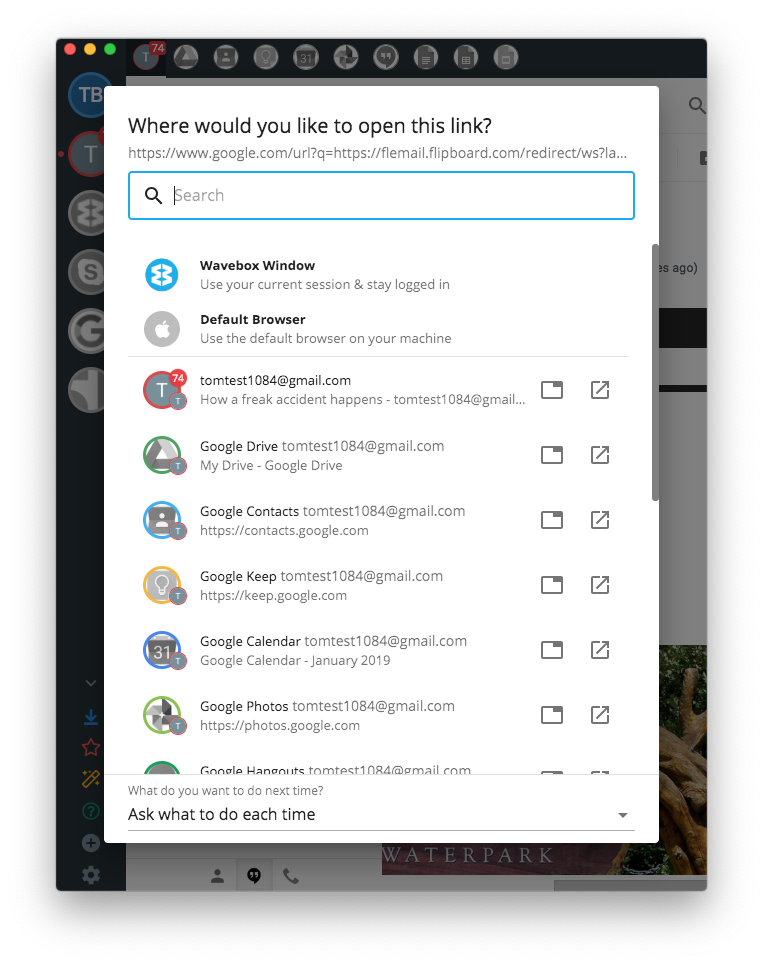
Updated UI (fills screen 👍) with keyboard navigation 👍, and option to open in the running tab or in a new window 👍. New window is now the default behaviour for just bashing the list item
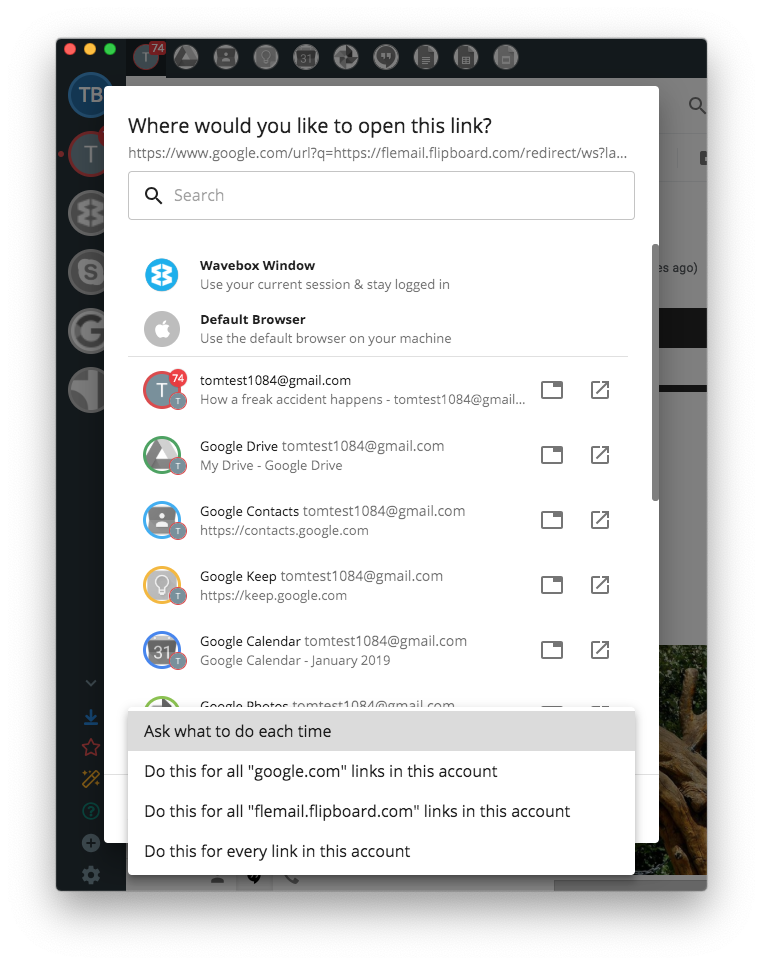
You can set rules on what to do next time, based on the opened link. In this example google tries to run a redirect to the actual link (e.g. google.com/redirect?q=https://wavebox.io) so we try to capture that behaviour too. This should allow you to set that trello links always open a certain way, slack links another etc etc 👍...
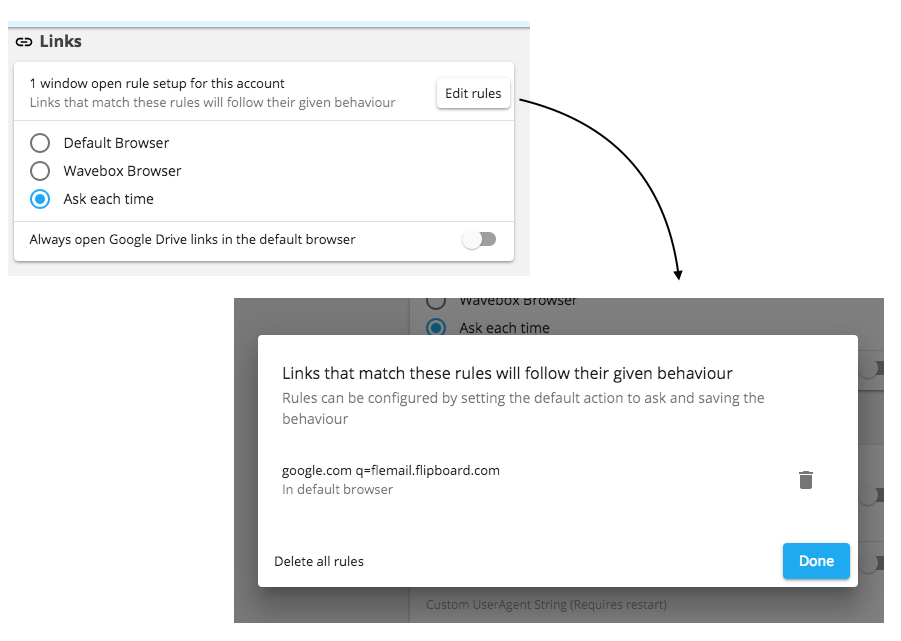
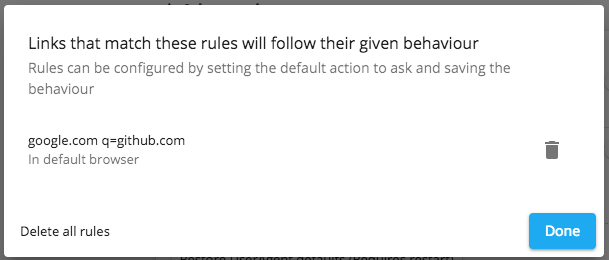
Finally a new links section under settings to change and review the settings at a later date :)
Hoping to ship the next beta this week/beginning of next so you can try it out :)
Thomas101
on 30 Jan 2019
looks fantastic, thank you 😁
TheSpyder
on 30 Jan 2019
Hey, this has just gone out in 4.5.12. Thanks for the early feedback. Let me know if there is anything else missing or that needs work!
Thomas101
on 5 Feb 2019
Sweet! I'll give it a good run at work tomorrow, but I have to admit I wasn't expecting the popup to lack the "what do you want to do next time" option at the bottom when explicitly triggered (during the last beta I set it to appear on shift+click in my email account).
I can see how the behaviour makes sense - I've triggered the ask prompt manually, why would there be a "what to do next time" prompt - but my instinct was the dialog could be used to change the configured target for a link without digging through the detailed options.
Then again, while that would be a handy shortcut maybe it would be too confusing to explain 🤔
TheSpyder
on 5 Feb 2019
@TheSpyder the reason it got left out, is it makes it really easy to break certain apps/sites. This is a long explaination, I'd recommend making a coffee before reading 🙂, sorry...
When you click on a link, there are a set of built-in rules the app runs through. For example, Ctrl+Click/Shift+Click on a Gmail compose button should open it in an attached window. (Not doing this results in a new window, either in Wavebox or the default browser, which just comes up blank). When the app runs through all these rules, if it gets to the end and fails to match any it then falls into the default behaviour - which is bringing the popup up or using one of the users rules.
Doing it this way, means that links we know need to open in a certain way will do and other links can be given to the user to decide what to do with.
When you configure Shift+Click or Ctrl+Click to open the ask dialog, it overwrites all of the in-built rules and always brings up the ask dialog, which can put you into a broken state. (You can actually try this with your current config, Shift+Click on a Gmail compose and open it in the default browser. You'll end up with a blank window 🙂). There are a couple of things we can do here...
- Break badly (our current behaviour) - not great but the behaviour isn't ever-lasting destructive. Some links that have rules attached do work if you overwrite them too.
- Let the user know they're heading into a broken state - this would be my ideal solution, but because of technical reasons, we're not able to pass this out to the user and wait for them to respond, we have to have the window prepped and opened immediately othewise the internet breaks.
- Ignore the user and stick to our built in rules - this then appears like the users setting is just being ignored, which isn't what we want.
If you start setting rules around this behaviour with its caveats, it becomes really easy to give a broke behaviour without knowing that you're going to do this. If we allow rules to be created from the ask dialog you can end up in a few states...
- With the current window opening engine, you trigger the ask dialog, create a rule to always to always do the action. Click the link again and your setting isn't respected - it does one of the built in settings. This looks like your settings are being ignored.
- Change the window opening engine to always respect the users setting first. It then becomes trivial to create a user rule that breaks a behaviour (e.g. on Gmail, set it to always open in the default browser. Shift+Click Compose no longer works).
You could change the rule matching to be specific enough to only match on certain types of links. At the moment, in the dropdown you're given the option to Do this for all "wavebox.io" links in this account, but realistically you're looking at creating rules more along the lines of Do this for all "wavebox.io" links, that originate from "mail.google.com" with a disposition of "foreground-tab" (to give the simplest of examples), which then just become confusing in theirselves and next time you open a link that you expect to work, there's a high chance it wont match and it wont do what you want.
All in, we don't want to put a user in a broken state and we never want to put them in a permanently broken state.
The remember option that's only available on links that we know don't need special treatment keeps them safe in that way.
The Shift/Ctrl+Click overwrite can expose users to a broken state, but we felt it was an okay trade-off against feature because...
- Knowing that Shift/Ctrl click changes behaviour is normally not known by a big percentage of users
- It's not the default and needs to be activated manually
- When you do end up in a broken state, its easy to see a cause & effect
- You're not forever left in a broken state
- You can use Ctrl+click or Shift+click as an alternative depending on your config
🤔 ...and that's why we left it out. Sorry for the huge message!
Thomas101
on 5 Feb 2019
@Thomas101 I'm a web developer myself, so I understand everything you're talking about and appreciate the detailed response 🙂
It does make me wonder whether having the ability to ask on shift+click is even a good idea, since the entire use case should be solved by setting ask to be the default click behaviour 🤔
Long term it would be nice to have some way to open the ask prompt to edit the link rule, perhaps on the context menu, but for now I'm really happy with how this works 😁
TheSpyder
on 6 Feb 2019
Actually, I do have one more comment - for opening in an external window, my understanding is it doesn't matter which service of an account is used as they are just like tabs within a regular browser.
Knowing this, could the popup be optimised somehow? 🤔 Google is taking up a lot of space in the popup for me when it could perhaps be one entry with a dropdown or expando button.
TheSpyder
on 6 Feb 2019
Long term it would be nice to have some way to open the ask prompt to edit the link rule, perhaps on the context menu, but for now I'm really happy with how this works 😁
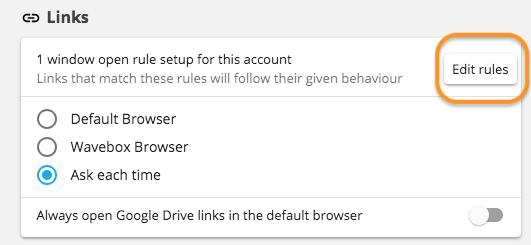
You can remove a rule and then re-create it from account settings. It's clunky but we wanted to keep it simple...
Actually, I do have one more comment - for opening in an external window, my understanding is it doesn't matter which service of an account is used as they are just like tabs within a regular browser.
For the external window you're right - there's technically no difference between service A - Z in an account unless you're using the tabs. Let me take a look at this :)
Thomas101
on 6 Feb 2019
You can remove a rule and then re-create it from account settings. It's clunky but we wanted to keep it simple...
I found that, but it seems a little too clunky after that nice easy list I had to choose from 😂
I'm also finding in regular use that having wavebox ask about links that aren't wavebox related is kind of annoying. Email and Slack in particular often have random links to domains that aren't ever repeated, so making rules for them doesn't seem right. This harks back to the OP request; I'd like to reach a setup where links to wavebox accounts open with that account - and the ask prompt would still be great for that - but everything else goes to the default browser.
I'd even accept a weird setup like
- default browser for all links
- shift+click opens the ask prompt
- making a choice there overrides the default for that target link domain only
Although that certainly would complicate the logic given everything you talked about earlier.
This is really coming up for me because the the link rules are per source account; my work gmail and slack are going to end up with an _identical_ set of rules for a lot of domains, and every other random link I click asking for a target rule is going to get old fast.
Sharing the rules between accounts might be an option, but I can also see how that might not be desirable in all cases (e.g. multiple google.com accounts). This has turned out to be quite an interesting discussion 🤔
TheSpyder
on 6 Feb 2019
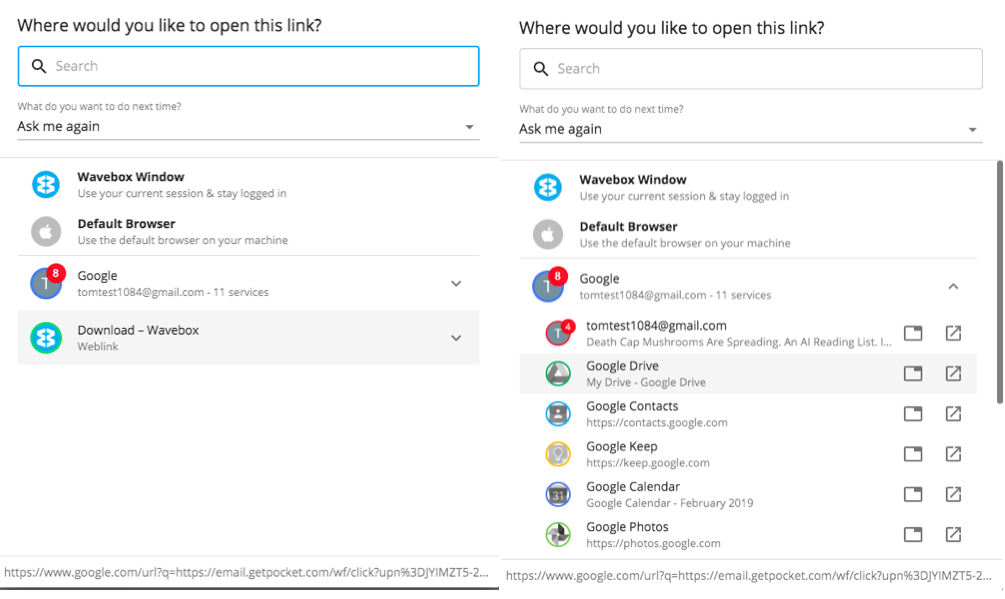
So we've made some tweaks to the popup, accounts are now shown rather than services. You can also drill down through the accounts if you want to open a link in a specific tab/service. Search still works across all services and the most likely service(s) that we think the link is for are suggested at the top.
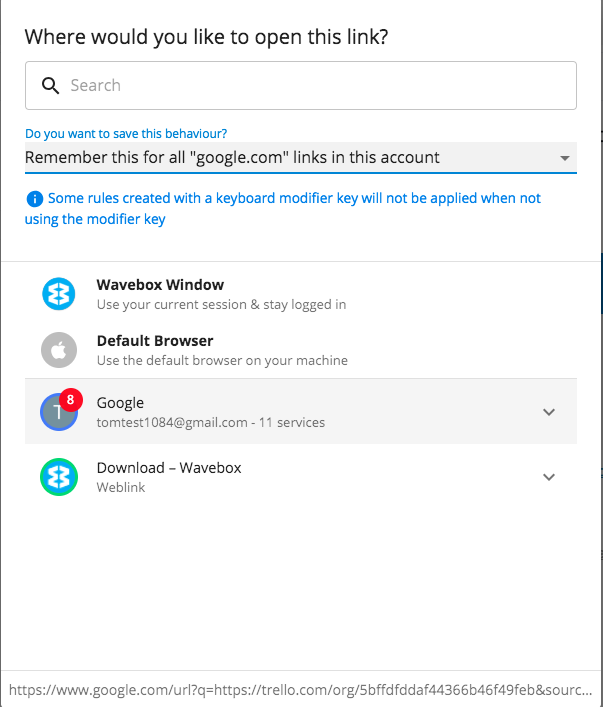
As for opening links with a keyboard modifier, I've updated it so you can save the behaviour. Duplicate rules will overwrite each other, so the last one wins. When using the modifier it displays a warning to inform that the rule in this instance may be ignored. At least this gives you the tools to open up links, but you're also alerted about caveats.
Sharing the rules between accounts might be an option, but I can also see how that might not be desirable in all cases (e.g. multiple google.com accounts)
That's not something we're looking at adding at the moment, but might be something we'll revisit. We don't want to make it too complicated with cascading rules etc and get into a pickle 🤔
It's starting to look really good now though!
Thomas101
on 6 Feb 2019
accounts are now shown rather than services
Excellent 😁
As for opening links with a keyboard modifier, I've updated it so you can save the behaviour.
I think this will suit my needs, thank you! I look forward to trying it in the next beta release.
It's starting to look really good now though!
Agreed, I am finding wavebox fits into my workflow much better already 😁
TheSpyder
on 7 Feb 2019
The latest set of changes have just rolled out in 4.6.1 :)
Thomas101
on 8 Feb 2019
I’m excited 😁
TheSpyder
on 9 Feb 2019
Having used this during the beta process it's taken me a while to remember that what I now want is to configure each account to "default browser" instead of "ask" and use the modifier override to ask and save the preference. The limitations of this setup have been seamless so far; this is _perfect_ 👍
TheSpyder
on 12 Feb 2019
@TheSpyder great to hear, and thanks for the early feedback 🙂. This has just gone out in 4.7.0 stable. Thanks!
Thomas101
on 12 Feb 2019
Related issues
 lots0logs
·
3Comments
lots0logs
·
3Comments
 texelate
·
3Comments
texelate
·
3Comments
 MichaelTunnell
·
3Comments
MichaelTunnell
·
3Comments
 phcyso
·
4Comments
phcyso
·
4Comments
 Tahini-123
·
4Comments
Tahini-123
·
4Comments
Most helpful comment
There are some additional improvements to that too, so it should be a bit more reliable.
As for the initial feedback, I've been adding quite a bit to this screen. In the next beta, you will be able to specify rules based on the link you're trying to open :). Here's a sneak peek...
Updated UI (fills screen 👍) with keyboard navigation 👍, and option to open in the running tab or in a new window 👍. New window is now the default behaviour for just bashing the list item

You can set rules on what to do next time, based on the opened link. In this example google tries to run a redirect to the actual link (e.g.

google.com/redirect?q=https://wavebox.io) so we try to capture that behaviour too. This should allow you to set that trello links always open a certain way, slack links another etc etc 👍...Finally a new links section under settings to change and review the settings at a later date :)

Hoping to ship the next beta this week/beginning of next so you can try it out :)