Watermelondb: [Bug][iOS] 'jsi/jsi.h' file not found
Hi!
After update from 0.16.0 to 0.16.1 I get this error:
In file included from /node_modules/@nozbe/watermelondb/native/ios/WatermelonDB/JSLockPerfHack.mm:1:

/node_modules/@nozbe/watermelondb/native/ios/WatermelonDB/JSLockPerfHack.h:3:10: fatal error: 'jsi/jsi.h' file not found
#include <jsi/jsi.h>
         ^~~~~~~~~~~
1 error generated.

 kesha-antonov
All 22 comments
@kesha-antonov RN version? are you using cocoa pods or classic Xcode projects?
 radex
on 19 May 2020
radex
on 19 May 2020
@radex
"react-native": "0.63.0-rc.1"
I'm using Pods
kesha-antonov
on 19 May 2020
Okay. I will investigate sometime soon. Sorry about this - for now, just use 0.16.0 ;)
radex
on 19 May 2020
Okay. I will investigate sometime soon. Sorry about this - for now, just use 0.16.0 ;)
thanks!
kesha-antonov
on 19 May 2020
Same here, downgrading to 0.16.0 works.
react-native: 0.61.5
Using pods
 thiagobrez
on 22 May 2020
thiagobrez
on 22 May 2020
have the same error with 0.16.0 =(((
react-native: 0.61.5
X-code 11.5
Using pods
 zeo1986
on 22 May 2020
zeo1986
on 22 May 2020
Yep - seems to effect >=0.16.
Had to drop down to 0.15 here.
RN v0.62.2
Xcode 11.4.1
Cocoapods
 mtford90
on 23 May 2020
mtford90
on 23 May 2020
@mtford90 - would you happen to have a repo that you could make public? I've struggled all morning to get this lib running properly 😅
 iamclaytonray
on 23 May 2020
iamclaytonray
on 23 May 2020
@iamclaytonray I don't have a public repo I can show you but I've had a rather wonky experience getting this library running myself and I can summarise that below which will perhaps help
0.15.0
- Runs in dev mode, doesn't run in release mode (swift compilation issues in release mode)
0.16.0,0.16.1
- Will not run in either debug mode or release mode (swift compilation issues in release mode, the jsi.h error in debug mode)
0.16.1-0
- Runs in both debug & release mode
So I'm not sure what changed 0.16.1-0 onwards and it's obviously some kind of alpha build, but it's currently the only one that's working for me, so perhaps try that version and see what happens?
mtford90
on 23 May 2020
Unfortunately I'm getting this error with all three of these versions 😔
I just added React Native Web, which may be contributing - I'm running RN version 0.62.2
 annie-elequin
on 24 May 2020
annie-elequin
on 24 May 2020
I can confirm that 0.16.1-0 still works.
 j92
on 24 May 2020
j92
on 24 May 2020
@j92 @mtford90 thanks !!! 0.16.1-0 working for me
zeo1986
on 25 May 2020
@j92 0.16.1-0 worked here as well! Tks.
FYI: tried running it with version 0.17.0-2, just for curiosity, and I got the same issue.
 davidsonsns
on 27 May 2020
davidsonsns
on 27 May 2020
@davidsonsns on RN 0.62?
radex
on 28 May 2020
@radex sorry, I forgot to put this info. So yep.
I'm using 0.62, being more specific version 0.62.2
davidsonsns
on 28 May 2020
I had this issue too. For this I added a Header Search Path to the xcode project target build settings.
- Find file
node_modules/@noze/watermelondb/native/ios/WatermelonDB.xcodeprojand open it in Xcode - Add
$(SRCROOT)/../../../../../ios/Pods/Headers/Public/React-jsirecursive path to your settings like in the pic below.
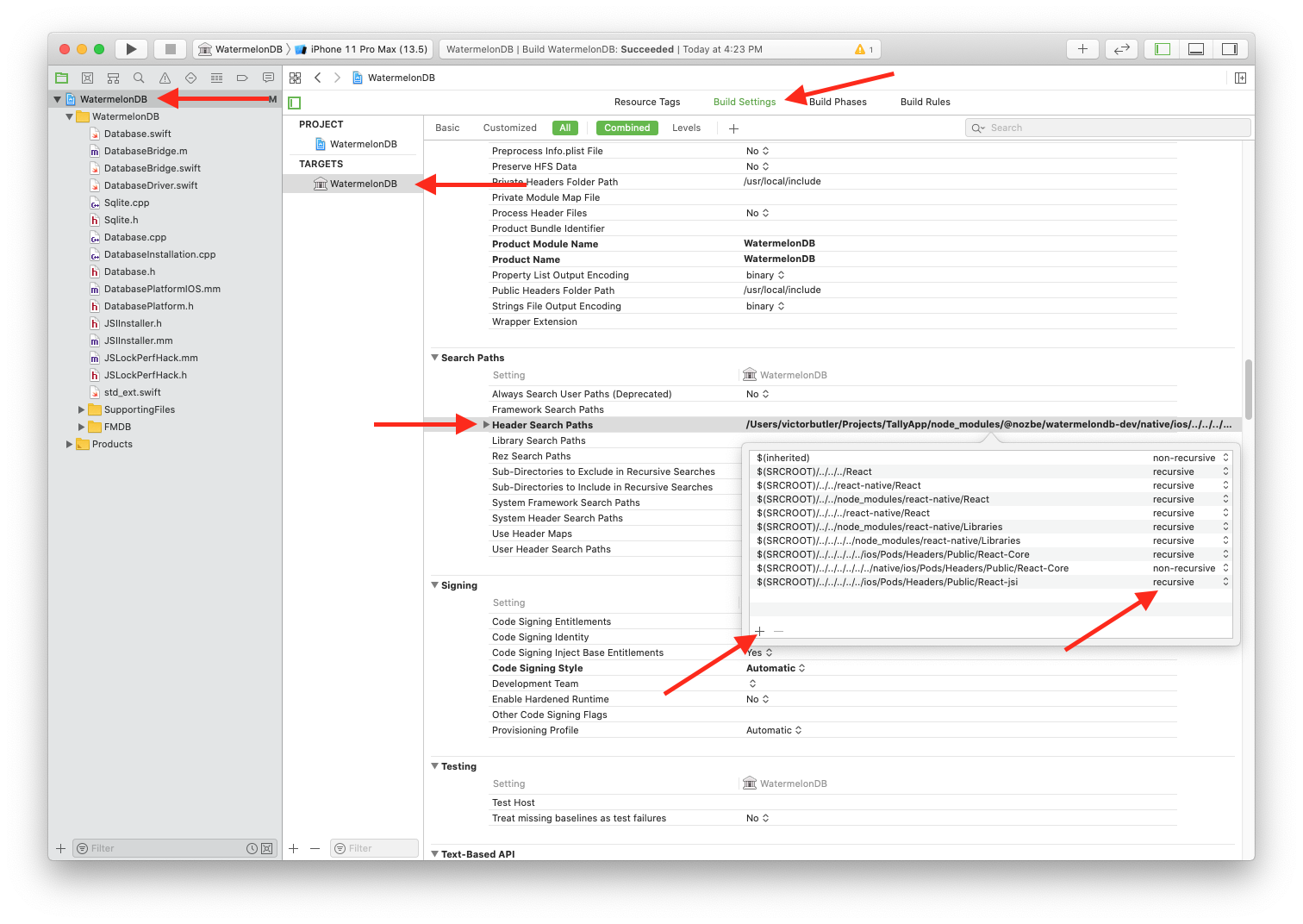
- Click off the popover window to make it disappear and try to build ios again.
Notes: This only works if you have the ios directory in your project root. So if you have it set up differently, it will still fail. This might not be the correct way to include these headers, but it's what I found. jsi/jsi.h is all over the place. In the react-native package it's inside ReactCommon but I had more issues when I added that path.
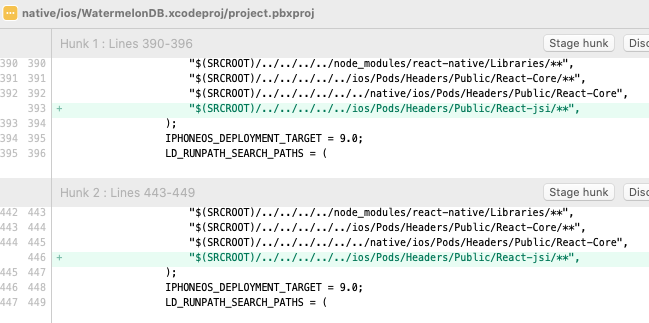
@radex I tried to fork and create a PR for this but it looks like master isn't up to date with the 0.17.0-2 tag so I had some trouble testing.
 victorbutler
on 29 May 2020
victorbutler
on 29 May 2020
@victorbutler worked for me, thank you!
 finom
on 2 Jun 2020
finom
on 2 Jun 2020
I'm getting the error every time when I reinstall dependencies by removing node_modules folder. @victorbutler fix is helpful but that bug needs to be definitely fixed.
finom
on 16 Jun 2020
@finom use patch-package to make the patch persistent. Watermelon v0.17 will have the patch
radex
on 16 Jun 2020
@radex did you mean to run npx patch-package @nozbe/watermelondb? It says
⁉️  Not creating patch file for package '@nozbe/watermelondb'
⁉️  There don't appear to be any changes.
@finom You have to change the files directly on node_modules folder as mentioned on https://github.com/Nozbe/WatermelonDB/issues/691#issuecomment-635648157 and then run patch-package.
It's going to create a patch like we ours here
 diegolmello
on 17 Jun 2020
diegolmello
on 17 Jun 2020
Closing this now, as fix has been out for a long time
radex
on 5 Oct 2020
Related issues
 ieschalier
·
8Comments
ieschalier
·
8Comments
 K4stor
·
7Comments
K4stor
·
7Comments
 giniedp
·
4Comments
giniedp
·
4Comments
 markorusic
·
4Comments
radex
·
6Comments
markorusic
·
4Comments
radex
·
6Comments
Most helpful comment
I had this issue too. For this I added a Header Search Path to the xcode project target build settings.
node_modules/@noze/watermelondb/native/ios/WatermelonDB.xcodeprojand open it in Xcode$(SRCROOT)/../../../../../ios/Pods/Headers/Public/React-jsirecursive path to your settings like in the pic below.Notes: This only works if you have the
iosdirectory in your project root. So if you have it set up differently, it will still fail. This might not be the correct way to include these headers, but it's what I found.jsi/jsi.his all over the place. In thereact-nativepackage it's insideReactCommonbut I had more issues when I added that path.@radex I tried to fork and create a PR for this but it looks like master isn't up to date with the 0.17.0-2 tag so I had some trouble testing.