Watermelondb: Debug x Release - Performance
@radex Is there any difference of performance of running the application (using watermelondb) in debug mode?
I'm asking because I was developing using the Chrome Debugger and everything was going well but when I've disabled it, my app started to take much time to render the items fetched from my local database - maybe it could be caused by the process of the objects?.
Do you have any idea about what could be happening here? I remember that when I was using RealmDB I had some issues related to the data processing (it takes a bit to process the data, so all the UI is blocked until then)
const getCropList = (queryStr = '') => {
  return async dispatch => {
    dispatch(cropListActions.GET_CROP_LIST());

    InteractionManager.runAfterInteractions(async () => {
      try {
        const db = Database.getRef();
        const cropCountry = await db.collections.get('crop_country');

        // BEGIN - Get highlighted crops
        let cropCountryHighlighted = await cropCountry.query(Q.where('flagHighlight', 'Y')).fetch();
        const highlightedCropIds = _getIdsFromCropCountry(cropCountryHighlighted);
        const highlightedCrops = await db.collections
          .get('crop')
          .query(Q.where('remoteId', Q.oneOf(highlightedCropIds)))
          .fetch();
        // END - Get highlighted crops

        // BEGIN - Get searchable
        const searchableCrops = await db.collections
          .get('crop')
          .query()
          .fetch();
        // END - Get searchable

        // BEGIN = Other
        let cropCountryOther = await cropCountry
          .query(Q.and(Q.where('flagHighlight', 'N'), Q.where('flagOnSearch', '0')))
          .fetch();
        const cropCountryOtherIds = _getIdsFromCropCountry(cropCountryOther);
        const otherCrops = await db.collections
          .get('crop')
          .query(Q.where('remoteId', Q.oneOf(cropCountryOtherIds)))
          .fetch();
        // End - Other

        dispatch(cropListActions.GET_CROP_LIST_SUCCESS(highlightedCrops, searchableCrops, otherCrops));
      } catch (error) {
        const errorMsg = 'CropListUseCase ' + error;
        dispatch(cropListActions.GET_CROP_LIST_FAILURE(errorMsg));
      }
    });
  };
};
EDIT
I just noticed that it could be caused by a circular reference on the result fetched by my query (collection, table, row, collections, etc attributes)
So I added a code in order to remove all the attributes added by the Model (watermelon) and keep only the attributes I need. It's faster than previously but it's just a workaround. Is there a way to solve it in a better way?
I also had to avoid batched calls with more than 5k items, because it crashes the application. In order to solve it, I decided to batch each collection separately.
 rafaelcamaram
All 5 comments
I'm asking because I was developing using the Chrome Debugger and everything was going well but when I've disabled it, my app started to take much time to render the items fetched from my local database - maybe it could be caused by the process of the objects?.
It _could_. Chrome has faster javascript than a RN app so if you're doing a lot of processing, you might get really slow.
I just noticed that it could be caused by a circular reference on the result fetched by my query (collection, table, row, collections, etc attributes)
I don't understand.
I also had to avoid batched calls with more than 5k items, because it crashes the application. In order to solve it, I decided to batch each collection separately.
are you running on Android? Have you tried adopting jsc-android?
. . .
How many items are queried an fetched in this function? You're making empty queries which suggests you might be fetching and processing A LOT of data — which in RN will always be a problem
 radex
on 9 Nov 2018
radex
on 9 Nov 2018
@radex
It could. Chrome has faster javascript than a RN app so if you're doing a lot of processing, you might get really slow.
I got it, it makes sense. Thanks :)
I don't understand.
I may be wrong in my analysis, but let's go step by step.
First of all, I made a query to fetch all the benefits from my local database:
let selectedProductBenefits = await benefitCollection.query(Q.where('productId', productId)).fetch();
And the code above returned an array of Benefits, as you can see on the following screenshot:
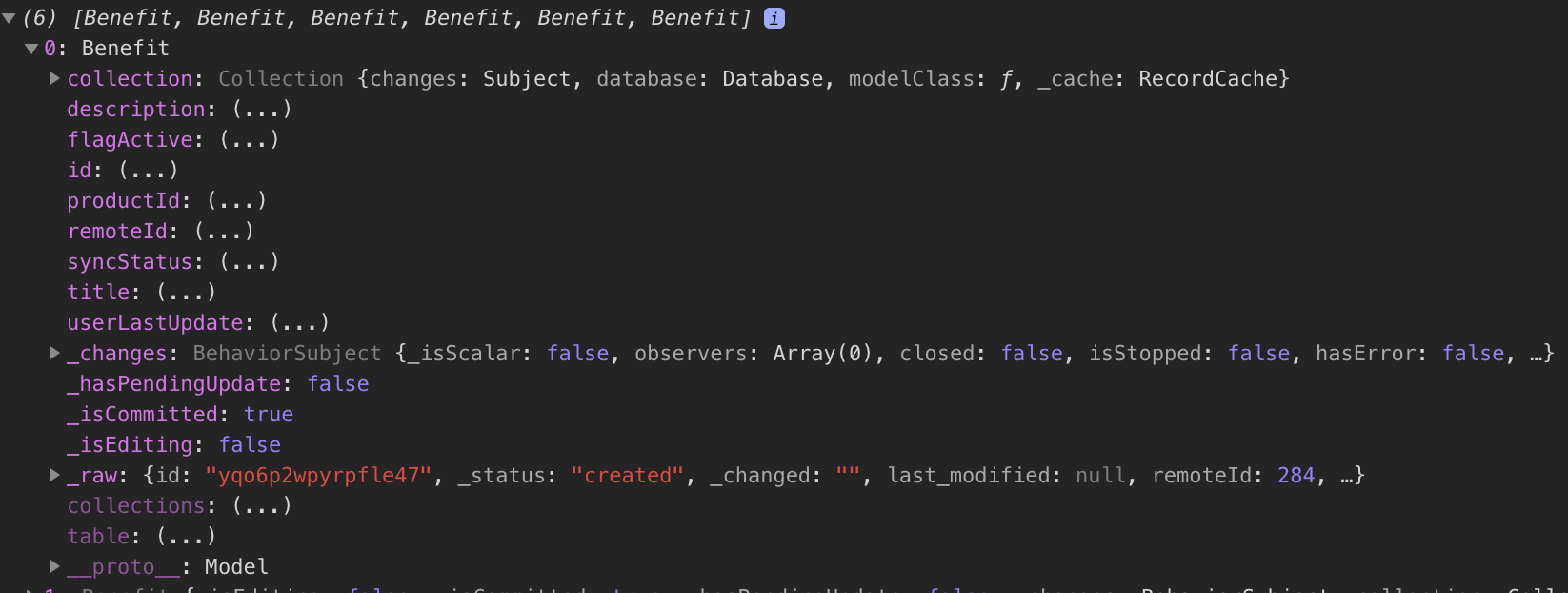
But, as I could see (Watermelon Model file), Watermelon added some properties to my object as the collection attribute. This collection attribute has some other properties and one of them is the database attribute. And if you keep opening these properties, you'll notice that at a given time (collection.database.collections.map.benefit) we find another database attribute; which will restart all this loop again and again... Creating a circular reference.
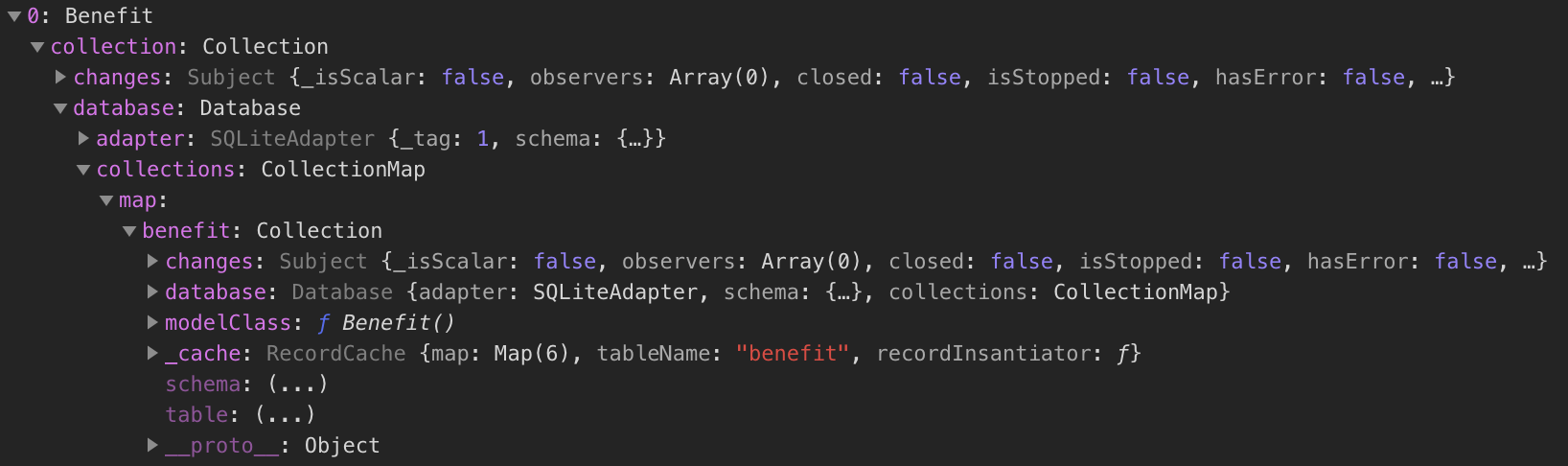
I tried to print one of these elements with JSON.stringify and it throws an exception:
JSON.stringify(selectedProductBenefits[0])
Uncaught TypeError: Converting circular structure to JSON
I've found a workaround to solve this problem:
const benefitCollection = await db.collections.get('benefit');

let selectedProductBenefits = await benefitCollection.query(Q.where('productId', productId)).fetch();

let result = [];

selectedProductBenefits.forEach(benefit => {
   let filteredBenefit = buildBenefitSchema(benefit);
   result.push(filteredBenefit);
});

console.log({result)}
This buildBenefitSchema(benefit) is the responsible to get the object returned by Watermelon and filter all the properties that were not added by me. So, in this way, the application got much faster since it did not have to try to process all this circular structure.
Am I doing something wrong?
Thank you very much for your attention and for dedicating some time to this issue.
rafaelcamaram
on 15 Nov 2018
This buildBenefitSchema(benefit) is the responsible to get the object returned by Watermelon and filter all the properties that were not added by me. So, in this way, the application got much faster since it did not have to try to process all this circular structure.
I still don't understand WHY you're trying to do this.
Watermelon doesn't have to "process" circular references. It's _references_, not data copies.
It would only make a difference if you're serializing Watermelon objects. Which you shouldn't be doing — you should just pass references. Yes, if you'll console.log a list of Watermelon objects, it will be massively inefficient — but you shouldn't be doing this other than for debugging
radex
on 15 Nov 2018
This buildBenefitSchema(benefit) is the responsible to get the object returned by Watermelon and filter all the properties that were not added by me. So, in this way, the application got much faster since it did not have to try to process all this circular structure.
I still don't understand WHY you're trying to do this.
Watermelon doesn't have to "process" circular references. It's _references_, not data copies.
It would only make a difference if you're serializing Watermelon objects. Which you shouldn't be doing — you should just pass references. Yes, if you'll
console.loga list of Watermelon objects, it will be massively inefficient — but you shouldn't be doing this other than for debugging
I got it but can it be related to the fact that I'm trying to save these Watermelon objects to a Redux store? Because this is the only thing that I'm doing with these records and, as I can see, is not a good practice store non-serializable objects into a Redux Store.
Still, you should do your best to keep the state serializable. Don't put anything inside it that you can't easily turn into JSON.
It is highly recommended that you only put plain serializable objects, arrays, and primitives into your store. It's technically possible to insert non-serializable items into the store, but doing so can break the ability to persist and rehydrate the contents of a store, as well as interfere with time-travel debugging.
rafaelcamaram
on 15 Nov 2018
I got it but can it be related to the fact that I'm trying to save these Watermelon objects to a Redux store?
I do not recommend doing that. It's going to cause you a lot of pain, because you're going against _both_ the architecture and philosophy of Redux (serializable, immutable) _and_ the architecture and philosophy of Watermelon (reactive).
radex
on 15 Nov 2018
Related issues
 vdlindenmark
·
7Comments
vdlindenmark
·
7Comments
 binbinla
·
3Comments
binbinla
·
3Comments
 K4stor
·
7Comments
K4stor
·
7Comments
 mjstelly
·
7Comments
mjstelly
·
7Comments
 ScreamZ
·
8Comments
ScreamZ
·
8Comments
Most helpful comment
I do not recommend doing that. It's going to cause you a lot of pain, because you're going against _both_ the architecture and philosophy of Redux (serializable, immutable) _and_ the architecture and philosophy of Watermelon (reactive).