Waterfox Current - Broken URL in Preferences to a Mozilla Help Page
Description
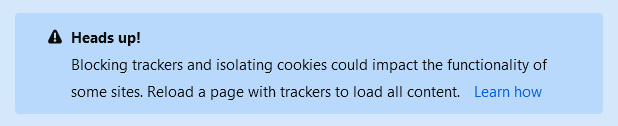
A broken URL in the preferences page. When the "Strict" privacy setting is turned on in about:preferences#privacy, there is a "Heads up!" box with a hyperlink which is supposed to lead to a Mozilla article about disabling content blocking for individual sites. Clicking the URL leads to a non-existent page.
To Reproduce
- Go to Preferences or
about:preferences - Click on Privacy & Security
- Under Content Blocking select Strict
- Inside the Heads up! box, click on the Learn how hyperlink
- A new tab opens with the URL
?step=3&newtab=true
Expected behavior
When clicking on the Learn how hyperlink, the following webpage should open in a new tab:
https://support.mozilla.org/en-US/kb/content-blocking#w_turn-content-blocking-off-on-individual-sites_2
Screenshots

My configuration
- Device: PC
- OS: Linux 5.8.16-2
- Version: Current 2020.08
Also tested on:
- Device: PC
- OS: Windows 10
- Version: Current 2020.08
 mrn
mrn
All 2 comments
Issue-Label Bot is automatically applying the label bug to this issue, with a confidence of 0.98. Please mark this comment with :thumbsup: or :thumbsdown: to give our bot feedback!
Links: app homepage, dashboard and code for this bot.
![issue-label-bot[bot] picture](https://avatars2.githubusercontent.com/in/27079?v=4&s=40) issue-label-bot[bot]
on 22 Oct 2020
issue-label-bot[bot]
on 22 Oct 2020
The issue comes from this wrong variable assignment:
https://github.com/MrAlex94/Waterfox/blob/d16501708969ff79b00098437e18d0d4b7e6377f/browser/components/preferences/in-content/privacy.js#L695
It could be that privacy.trackingprotection.introURL is not defined, so the target is set only by the concatenation:
+ `?step=3&newtab=true`
Related issues
 iGlitch
·
3Comments
iGlitch
·
3Comments
 514guy
·
3Comments
514guy
·
3Comments
 aquaspy
·
3Comments
aquaspy
·
3Comments
 ATRescue
·
3Comments
ATRescue
·
3Comments
 9jkh
·
4Comments
9jkh
·
4Comments
Most helpful comment
Issue-Label Bot is automatically applying the label
bugto this issue, with a confidence of 0.98. Please mark this comment with :thumbsup: or :thumbsdown: to give our bot feedback!Links: app homepage, dashboard and code for this bot.