Waterfox Classic 2020.09+ - GitHub doesn't work
GitHub stopped working few hours ago. Things doesn't work and grayed out:

 Z0nder
All 25 comments
Issue-Label Bot is automatically applying the label bug to this issue, with a confidence of 0.98. Please mark this comment with :thumbsup: or :thumbsdown: to give our bot feedback!
Links: app homepage, dashboard and code for this bot.
![issue-label-bot[bot] picture](https://avatars2.githubusercontent.com/in/27079?v=4&s=40) issue-label-bot[bot]
on 14 Oct 2020
issue-label-bot[bot]
on 14 Oct 2020
As an extend the notification page is broken too. Clicking on buttons navigates to the page the form POST action is pointing to, rather than staying on the notification page. GitHub definitely deployed something to production some hours ago and now everything is broken in Waterfox :(
GitHub is slowly killing browsers which aren't Chromium-based I can feel it.
 magiruuvelvet
on 15 Oct 2020
magiruuvelvet
on 15 Oct 2020
Yeah, seems that it works only if you enable webcomponents, but when you do that, then some other pages could be broken, because webcomponents support in Classic is incomplete.
 hawkeye116477
on 15 Oct 2020
hawkeye116477
on 15 Oct 2020
Yeah I cannot see if I have a new push on my branch on Pull Requests page, nor can I create a PR.
Also if I want to merge/squash and merge someone's PR, the button is not working at all.
What gives?
 mkruselj
on 15 Oct 2020
mkruselj
on 15 Oct 2020
Yeah, seems that it works only if you enable webcomponents, but when you do that, then some other pages could be broken, because webcomponents support in Classic is incomplete.
Thanks for the hint.
So far it works with dom.webcomponents.enabled = true
 Purfview
on 15 Oct 2020
Purfview
on 15 Oct 2020
Alternative hint from Reddit should globally activating webcomponents break other sites for you: Install Polly from here, which was "created to allow users of Waterfox Classic (and possibly other Firefox derivatives) to load polyfills at will". Then go to Github. Once the page is loaded, open Polly's popup menu (the icon looks like a puzlle piece) and tick the Webcomponents-Bundle.js check-box. Reload the page, works again.
 IzzySoft
on 15 Oct 2020
IzzySoft
on 15 Oct 2020
Most of everything on GitHub is now broken. Have you tried adding an image? I cannot it with Classic Waterfox.
Look what happens when you try to edit your post
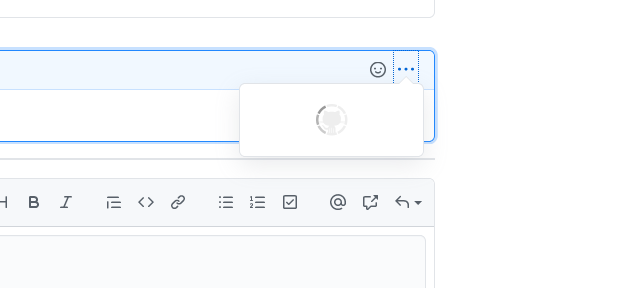
Also, I just tried the GitHub third party login access to a site. When I click on "Authorize," nothing happens.
 tcreek
on 22 Oct 2020
tcreek
on 22 Oct 2020
@tcreek have you tried Polly, from my post just before yours?
Have you tried adding an image?
Yes, works fine (see below).
Look what happens when you try to edit your post

Yes? And yes, I'm using Waterfox Classic. With Polly, as described in my previous comment. Just give it a try :wink:
IzzySoft
on 22 Oct 2020
I did give it a try, and why I am posting the issue here also I am using this version on Windows and Linux, and it's the same exact same issue across the board on both of them.Not just this GitHub site, but also issues on many many sites starting as a few days ago: "Update your browser" "Version no longer supported" and it goes on and on.
tcreek
on 22 Oct 2020
Tested Polly, but not working....
Always impossible to drag a screenshot into the comment form by example.
I follow the instruction:
"Once the page is loaded, open Polly's popup menu (the icon looks like a puzlle piece) and tick the Webcomponents-Bundle.js check-box. Reload the page, works again."
 decembre
on 22 Oct 2020
decembre
on 22 Oct 2020
@decembre well, it worked for me. Though I must admit that I still notice some rare cases (like, 1 out of 50) where it seems to fail. So far, simply reloading again did the trick then. Not sure if the OS makes a difference here (I'm on Linux Mint if it matters).
IzzySoft
on 22 Oct 2020
Retested for GitHub (with Polly and not the tweak in aboout:config ) and ... the drag screenshot function don't work.
Same for YouTube Music...
Like i said in:
Waterfow Classic 56.3 : Problem in YouTube Music (no drag possible in right playlist)

The drag item function don't work with Polly.
What settings i need to choose in Polly for solving this issue ?
My config:
Waterfox 56.3 and Win10
decembre
on 22 Oct 2020
@decembre glad it works for you with Github as well (I was already confused). No idea with YT as I don't use that. You could try ticking the other 3 boxes as well, but no guarantees – it might be something completely different altogether.
What did I read recently sums it up nicely: 10..20 years ago we had web browsers to view HTML web pages. Today they've mutated into VMs running some operating system to work web applications… So your VM lacks some instructions for the YT application – or the OS in it needs an update…
IzzySoft
on 23 Oct 2020
Sorry , nothing work... (was confused with my different profiles when testing...)
You answer too quickly, before i re edit my comment!
:-)
About Youtube music, with the setting 'tick the Webcomponents-Bundle.js check-box", the playlist don't load.
And whit the others... nothing load!
Actually, the only thing which work for both issues, is the about:config tweak:
dom.webcomponents.enabled to "true"
decembre
on 23 Oct 2020
Well, then there might be a difference between WF running on Linux (where the addon does the trick) and WF running on Windows. No further ideas then, sorry.
(did I wait long enough this time before pressing the green button? You didn't edit your comment yet … :speak_no_evil: :smile:)
IzzySoft
on 23 Oct 2020
Thanks for your patience !
Yes, that's a hell all these changes:
Yet, we need tweak too much (just to maintain things working) and sometime with wrong idea or future disappointment .
I think we take more time to play around issue than make other things more interesting.
decembre
on 23 Oct 2020
very cool (Polly), thanks for the hint - github working fine here again in WF classic 2020.10 macOS.
@hawkeye116477 : do you have a rough timeline for completion of webcomponents support in Classic?
@Z0nder : can you please edit the title to
Waterfox Classic 2020.09+ - GitHub doesn't work
(simply add a +) - thank you.
 LeeBinder
on 26 Oct 2020
LeeBinder
on 26 Oct 2020
do you have a rough timeline for completion of webcomponents support in Classic?
I was counting more on Moonchild Team that they continue some work, but seems that for now nothing moved, they even changed the due date to unknown. So I'll tell you same what they said, it'll be ready when it will be ready :smile:.
hawkeye116477
on 27 Oct 2020
gotcha!
LeeBinder
on 27 Oct 2020
I have also noticed the old Microsoft Edge Browser is no longer functioning on GitHub also
tcreek
on 3 Nov 2020
Seems that GH/MS have fun again, changed labels colors. So there's another thing to implement => https://bugzilla.mozilla.org/show_bug.cgi?id=1519519.
hawkeye116477
on 9 Dec 2020
use https://github.com/JustOff/github-wc-polyfill instead, less crashy
 Squall-Leonhart
on 3 Jan 2021
Squall-Leonhart
on 3 Jan 2021
Please note that github-wc-polyfill requires e10s to be disabled as Mozilla failed to fix bug #1261585.
 JustOff
on 4 Jan 2021
JustOff
on 4 Jan 2021
@JustOff I read though bug #1261585 briefly but don't have the slightest idea what "e10s" are, if they are enabled by default in WF, and how to disable them. Could you share a brief summary about this "e10s" requirement? Thank you.
LeeBinder
on 4 Jan 2021
e10s (electrolysis) == multi-process mode, i.e.:
about:preferences -> General -> Startup -> Enable multi-process Waterfox - should be unchecked.
JustOff
on 4 Jan 2021
Related issues
 grahamperrin
·
4Comments
grahamperrin
·
4Comments
 ATRescue
·
3Comments
ATRescue
·
3Comments
 iGlitch
·
3Comments
iGlitch
·
3Comments
 GitCurious
·
3Comments
GitCurious
·
3Comments
 fghsgh
·
4Comments
fghsgh
·
4Comments
Most helpful comment
Alternative hint from Reddit should globally activating webcomponents break other sites for you: Install Polly from here, which was "created to allow users of Waterfox Classic (and possibly other Firefox derivatives) to load polyfills at will". Then go to Github. Once the page is loaded, open Polly's popup menu (the icon looks like a puzlle piece) and tick the Webcomponents-Bundle.js check-box. Reload the page, works again.