Waterfox: Home button now irremovable + immovable, after the address bar fix in waterfox-current-2020.07.2.1
For some reason, the latest update seems to forcefully readd the home button, and also make it impossible to move or remove.
To Reproduce
- Update to waterfox-current-2020.07.2.1
- Try to move or remove the home button
Expected behavior
Well, I didn't expect the home button to be readded without my intent, or for it to become permanent.
Screenshots
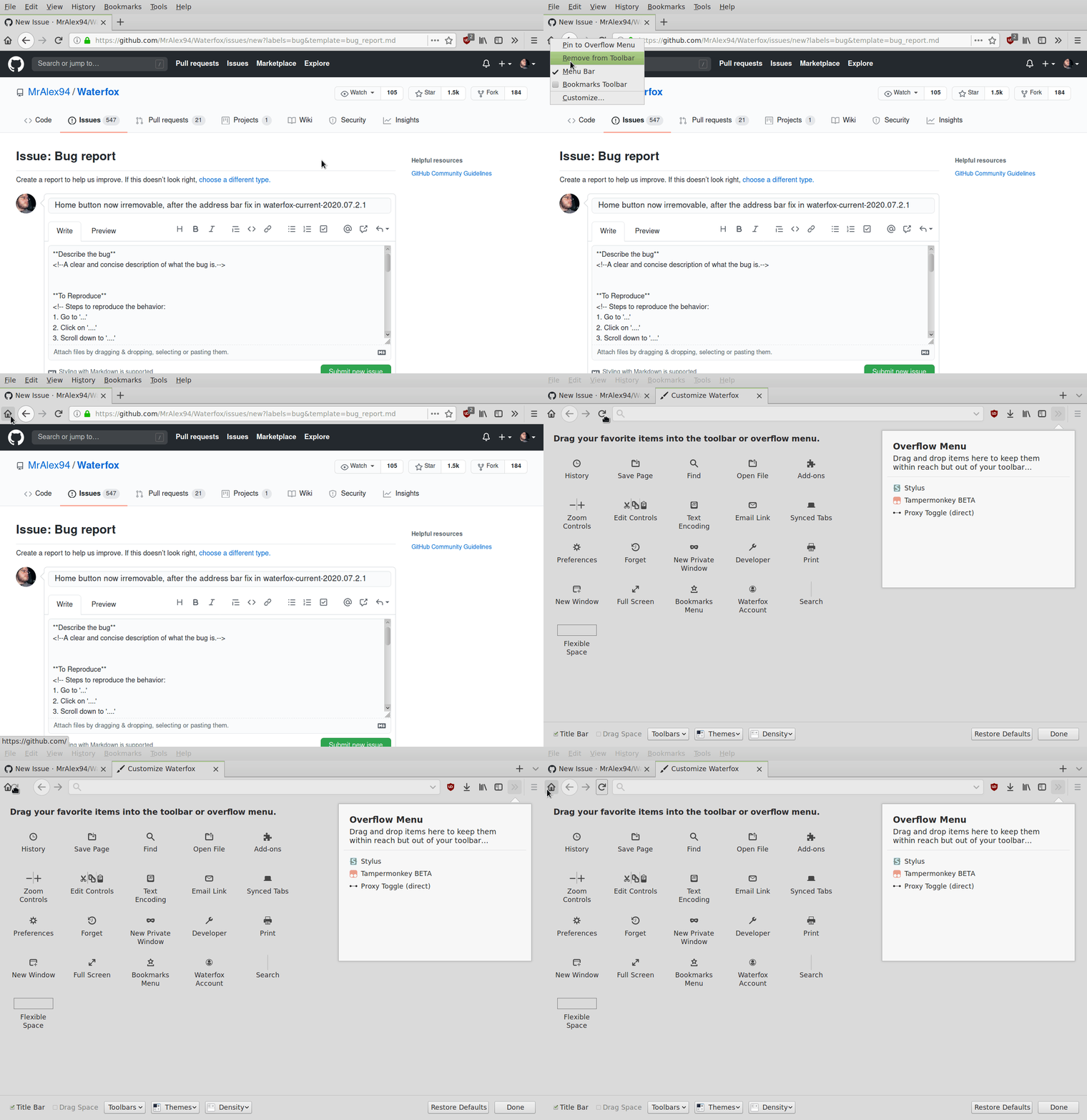
My configuration
- Device: PC
- OS: Arch Linux
- Version: Current 2020.07.2.1/68
 Daviljoe193
All 17 comments
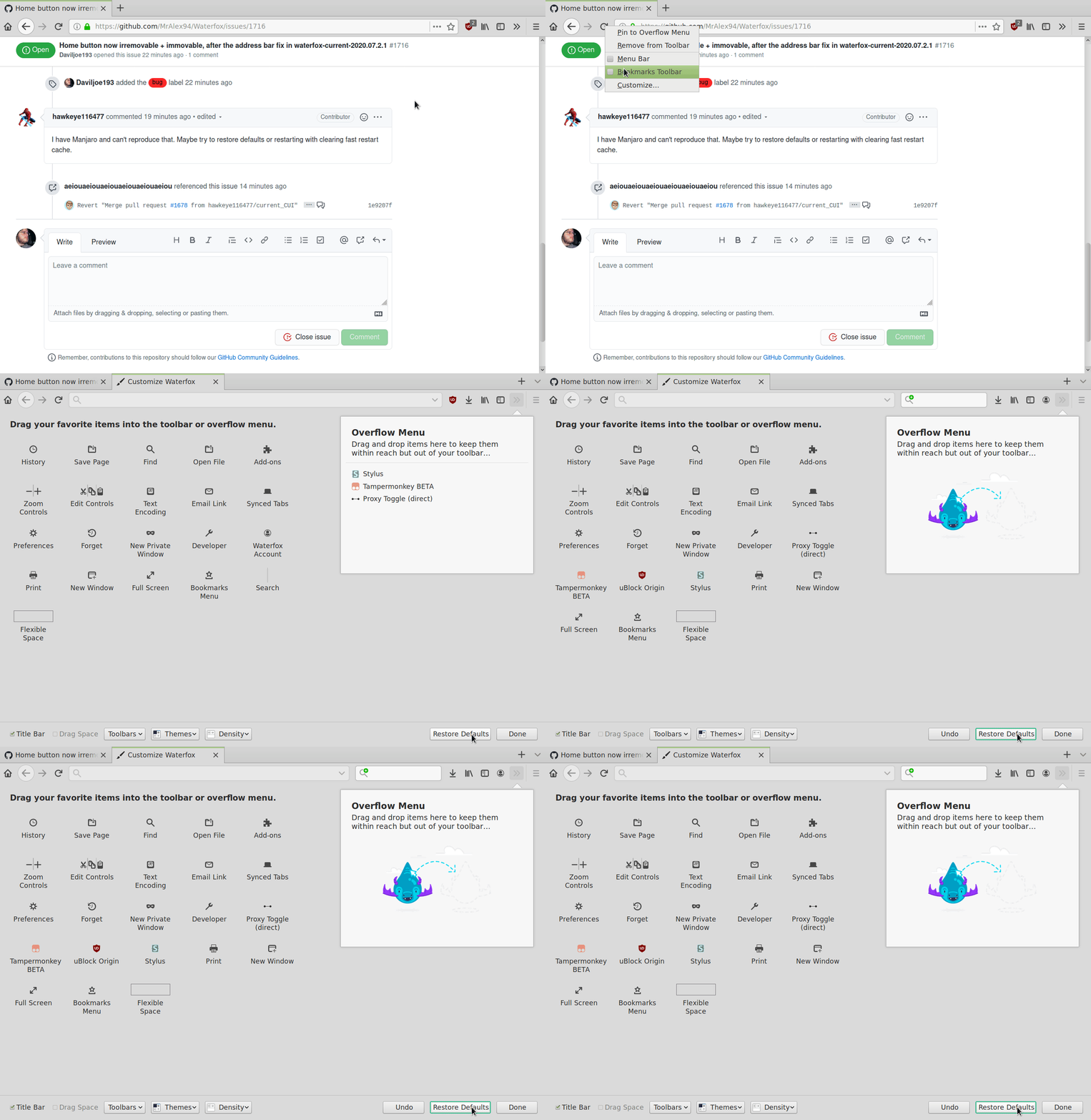
I have Manjaro and can't reproduce that. Maybe try to restore defaults or restarting with clearing fast restart cache.
 hawkeye116477
on 15 Aug 2020
hawkeye116477
on 15 Aug 2020
@hawkeye116477 Neither of those suggestions worked.
Daviljoe193
on 15 Aug 2020
@hawkeye116477 Well, they _kinda_ did, if I then opened a new window, the home button would snap back where it was supposed to be, and I could then remove it. Problem now is, removing the home button and restarting caused the permanent one to reappear, so I'm back to step 1.
Daviljoe193
on 15 Aug 2020
I confirm the issue!
After the update to 2020.07.2.1 I tried to remove the Home Button I had there and restarted my browser.
After the restart the Home Button is forced on the very left part of the toolbar, impossible to get rid of! -_-
What's going on?
 InvisibleManX
on 15 Aug 2020
InvisibleManX
on 15 Aug 2020
@hawkeye116477 I suspect that the real solution to all the recent problems is yet to be found.
So this recent update just forces that Home Button to be there no matter what, so that the bug symptoms aren't being noticeable.
But getting rid of the symptoms isn't going to fix the problem. And eventually it might lead to even worse interconnected issues.
InvisibleManX
on 15 Aug 2020
@InvisibleManX If I had to guess, the workaround the devs made is supposed to have the home button always there, but swap the full size one with an invisible one, so that the address bar isn't bugged, and something isn't happening correctly in the code to make the perma-button invisible. If this is the workaround they're using, it's kinda horrible
Daviljoe193
on 15 Aug 2020
Current state is same just like Mozilla did that. Problematic changes which restored toolbar with currentset for extensions were reverted, so it's same as it was on 2020.07. So if you hadn't problem with 2020.07.0, then you shouldn't have problem now also.
hawkeye116477
on 15 Aug 2020
@hawkeye116477 I jumped on the Waterfox train with 2020.07.1, and neither the perma-home or address bar bug were present on that version, even when downgrading from 2020.07.2 to 2020.07.1 (Removing compatibility.ini to do so). I've got no experience with prior versions.
Daviljoe193
on 15 Aug 2020
@hawkeye116477 Well, the Home Button stuck on the left bug IS present in 2020.07.2.1 for me... It wasn't a problem prior this update.
InvisibleManX
on 16 Aug 2020
@hawkeye116477
@Daviljoe193
I just found a fix to this whole thing!
Apparently the consecutive updating from 2020.07 to 2020.07.1 / 2020.07.2 / 2020.07.2.1 result in a corrupted file "xulstore.json" for some people.
The fix:
You just need to close the browser, then remove the file "xulstore.json" from your user profile folder and start a browser again.
Everything works!
And after closing a browser again a new xulstore.json file is created, but it's not broken anymore!
I noticed, that the broken xulstore.json was noticeably bigger than the newly created one that isn't broken anymore apparently.
P.S. To everyone who tries to fix this thing, you can find that profile folder by typing about:support in the address bar, hitting Enter, and then clicking the "Open Folder" button in the "Profile Folder" section in the table there.
InvisibleManX
on 16 Aug 2020
@InvisibleManX I was ready to say "Well actually...", but that really worked! The home button is gone, stays gone through multiple restarts, AND the address bar doesn't break as a direct result. 🎉
Daviljoe193
on 16 Aug 2020
Perhaps Waterfox should do some cleanup of xulstore.json on every update, as to mitigate the chances of this popping up in the future.
Daviljoe193
on 16 Aug 2020
Apparently, occasional resetting of the file "xulstore.json" is in the official support recommendations for Firefox!
https://support.mozilla.org/en-US/kb/firefox-support-troubleshooting-guide#w_reset-xulstore-or-localstore-file
The xulstore.json file in the Firefox profile folder stores information about toolbars, window positioning, and other interface elements in Firefox 34 and above. If changes to toolbars and window sizes are not saved, toolbar icons are missing, or if there are strange problems with the browser interface, resetting this file can help.
Using the Refresh Firefox feature will reset the xulstore or localstore file to its default settings but this will remove other user customizations such as extensions, themes, and modified preferences.
You can also reset the file by removing it from the profile folder manually.
Seems like it can cause problems from time to time in general.
InvisibleManX
on 16 Aug 2020
Resetting xulstore.json will reset how everyone has customised their screen - might have been okay for the 2020.07.2.1 release, but doing it after won't help and will probably confuse users. Hopefully if someone is having similar issues, they will post and we can direct them to deleting the file, rather than doing it for everyone :-)
 MrAlex94
on 17 Aug 2020
MrAlex94
on 17 Aug 2020
@MrAlex94
You know what's weird then?
It didn't reset my buttons and their positions on the toolbar or overflow menu content! O_O
I did exect my customization be gone, but after removing the file, all that happened after I restarted my browser is that glitched Home Button (and a search bar stuck on the left) to be gone. Somehow it all resetted to how it was before the last few updates...
I suspect that browser stores the settings for customization somewhere else as well. Maybe in about:config, because there I found there "browser.uiCustomization.state" variable.
But seriously, for some reason, my toolbar customization was intact.
InvisibleManX
on 17 Aug 2020
The solution to that is very simple and it's not resetting or removing the xulstore.json file. I was Googling for how to remove the home button and found this issue here. After finding out which file was responsible, it was easy to fix it (remove the home button).
For both Linux and Windows: open the file with any text editor, press Ctrl+H and in the "find" box type "home-button," (without the quotes and with the comma). In the "replace with" box type NOTHING, then press the button "replace all" and "Save". This will effectively remove all home-button strings from the file, along with the comma separating the string from the other strings. Then restart the browser as many times as you wish and the home button won't be there anymore.
For Linux you could make the file hard read-only (or as I like to call it - immortal) but if you make any changes to the toolbar, they won't be saved, so it's not a good idea to make the file immortal. However, you could copy the file to a special location which you will remember thus making a backup of it. I'm constantly creating backups of the entire browser profile after each change I make but if you're too lazy to do that or don't know how, copying this json fle to somewhere else could save you the trouble if that bug resurfaces one day.
Version of my browser:
aur/waterfox-current-bin 2020.10-1 [installed] [9+] [1.43%] [21 Oct 2020]
 IvoAndonov
on 1 Nov 2020
IvoAndonov
on 1 Nov 2020
The solution to that is very simple and it's not resetting or removing the xulstore.json file. I was Googling for how to remove the home button and found this issue here. After finding out which file was responsible, it was easy to fix it (remove the home button).
For both Linux and Windows: open the file with any text editor, press Ctrl+H and in the "find" box type "home-button," (without the quotes and with the comma). In the "replace with" box type NOTHING, then press the button "replace all" and "Save". This will effectively remove all home-button strings from the file, along with the comma separating the string from the other strings. Then restart the browser as many times as you wish and the home button won't be there anymore.
For Linux you could make the file hard read-only (or as I like to call it - immortal) but if you make any changes to the toolbar, they won't be saved, so it's not a good idea to make the file immortal. However, you could copy the file to a special location which you will remember thus making a backup of it. I'm constantly creating backups of the entire browser profile after each change I make but if you're too lazy to do that or don't know how, copying this json fle to somewhere else could save you the trouble if that bug resurfaces one day.Version of my browser:
aur/waterfox-current-bin 2020.10-1 [installed] [9+] [1.43%] [21 Oct 2020]
@IvoAndonov I'll have to try that, since I'm behind a few versions (As in, I'm on the same version since I made this issue. I know, I'm evil). Will post back if this works.
Daviljoe193
on 1 Nov 2020
Related issues
 grahamperrin
·
4Comments
grahamperrin
·
4Comments
 GitCurious
·
3Comments
GitCurious
·
3Comments
 9jkh
·
4Comments
grahamperrin
·
4Comments
9jkh
·
4Comments
grahamperrin
·
4Comments
 zakius
·
4Comments
zakius
·
4Comments