Waterfox: Problem to login on a site.
Hello,
I can no longer log in to the Webmail of my provider : https://www.proximus.be/login/fr/webmail.html.
With the same version of Waterfox and the same profile, I can log in under Win 7, but not under Win 8.1. (the login window keeps coming back).
Any idea in which direction I could look?
Thank you.
 PiliJ
PiliJ
All 25 comments
On the Waterfox blog the advice is to wait for an updated build.
If you're in a hurry run Windows 8.1 System Restore and choose a Restore point dated prior to when you updated to 2019.10 You'll find it by right clicking the Start button and go to System ---> System Protection ---> System Restore. If you can't see a Restore point dated prior to the upgrade checkmark the box to "Show more restore points".
Windows System Restore takes about 30 minutes to run depending on how much data you have installed. Most of the time all you'll see is a black screen, but just sit back and wait for the tool to do its job. You'll eventually see the usual login screen and you'll be back to 56.2.14 again.
Oh, and before I forget: disable your anti-virus before running the tool usually by right clicking the AV icon in the systray and choose Exit.
 Telmesomething
on 25 Oct 2019
Telmesomething
on 25 Oct 2019
@PiliJ which version of Waterfox, exactly?
Describing (and organising) installations of Waterfox
On the Waterfox blog the advice is to wait for an updated build.
Results of the builds are now at https://www.waterfox.net/releases/
 grahamperrin
on 25 Oct 2019
grahamperrin
on 25 Oct 2019
Hi Graham,
It happens for the first time with version 56.2.14.
I just updated to 10.2019 Classic and it's always the same thing.
PiliJ
on 25 Oct 2019
One thing I've noticed already with 2019.10 is that it performs badly if multi-process is disabled. Try re-enabling it again and you should get a different result.
Telmesomething
on 25 Oct 2019
@Telmesomething thanks, but that's not likely to affect login.
grahamperrin
on 25 Oct 2019
@Telmesomething It was enabled. Thank you.
PiliJ
on 26 Oct 2019
Hi,
I was able to get my hands on an old profile.
I then uninstalled Waterfox and reinstalled Waterfox Classic 10/2019 with this profile.
I then installed the updates of additional modules, but with verification after each of them...
I saved the module "I Don't Care about cookies" for the end (because I already suspected something with this one) and... something happened when the login page opened (closing/opening the page that didn't happen with the others) and I no longer had access to the webmail!
So it seems that the latest update of the module corrupts something only under Win 8.1x64 (because the update went smoothly under Win 7x64).
I informed the developer.
Thank you for your help !
PiliJ
on 26 Oct 2019
grahamperrin
on 26 Oct 2019
3.0.5. I went back to the previous version and it works.
PiliJ
on 27 Oct 2019
I mean, which build of Waterfox Classic 2019.10?
The soft launch of Waterfox Classic 2019.10 was significantly bugged.
The hard launch of Waterfox Classic 2019.10 resulted in a different application, with bug fixes, with a confusingly identical version.
We need the build ID to tell whether your 2019.10 is the bugged one of the two 2019.10s.
You'll find the build ID at:
grahamperrin
on 27 Oct 2019
OK Graham... it's 20191022125504** !
But the phenomenon started with the version 56.2.14.
PiliJ
on 27 Oct 2019
Thanks.
First,
I can log in under Win 7, but not under Win 8.1. (the login window keeps coming back).
At the Windows 8.1 computer please run these two commands, then restart the operating system:
netsh winsock reset catalog
netsh int ipv4 reset reset.log
grahamperrin
on 27 Oct 2019
Done !
Secondly ?
PiliJ
on 28 Oct 2019
Any improvement?
grahamperrin
on 29 Oct 2019
You said "first" and i was waiting for the rest... sorry !
I made a copy of my profile first, then I updated the module.
The fault was always there! So I'm taking back my copy of the profile
When I tried to log in again, under the login data appeared (for the first time) in red: unknown error.
On the other hand, the removal of the module does not remove the fault
No improvement thus.
PiliJ
on 29 Oct 2019
Have you tried restarting WF in Safe Mode? I'm assuming in that respect that you have some addons installed although they would be WebExtensions rather than legacy addons since the latter won't run if you have multi-process enabled.
I'm mentioning this specifically because I encountered a similar issue last night when I discovered I couldn't login to my online bank a/c. That sent me into a bit of a frenzy because I had some bills to pay and not being able to clear those would have put me in dire straits with the company administering the accounts. Restarting in WF Safe Mode allowed me to login which meant the problem was being caused by an addon. It was subsequently a case of disabling them one-by-one until the problem cleared. The culprit turned out to be uBlock Origin. I guess I had too many filters in play and after uninstalling/reinstalling uBlock everything was back to normal.
On my system which is also Win 8.1 I've disabled multi-process because my addons are primarily legacy.
I guess you already know how to restart WF in Safe Mode, but just in case you don't the link is located in the Help menu.
If it doesn't help there's one more thing you can check which is a setting called privacy.firstparty.isolate in about:config. The default is _false_, but if you've reset it to true that could be the problem.
Telmesomething
on 29 Oct 2019
I tried this already at the moment that the fault occured Telmesomething, but in my case, that did not change anything.
Everything works fine with version 3.0.4 (and previous versions) of the module "I Don't Care about Cookies". As soon as i do the update to the version 3.0.5, Waterfox becames corrupt (and that seems not related to the profile).
I also notified the module developer, but I don't hear anything from that side at the moment.
The modification you propose in the configuration does not bring any change either.
Thank you.
PiliJ
on 29 Oct 2019
Do you have either Adblock Plus or uBlock Origin installed? If so you could add the "I don't care about cookies" filter which you can subscribe to on FilterLists It's located on page 86. Here's a pix of it.
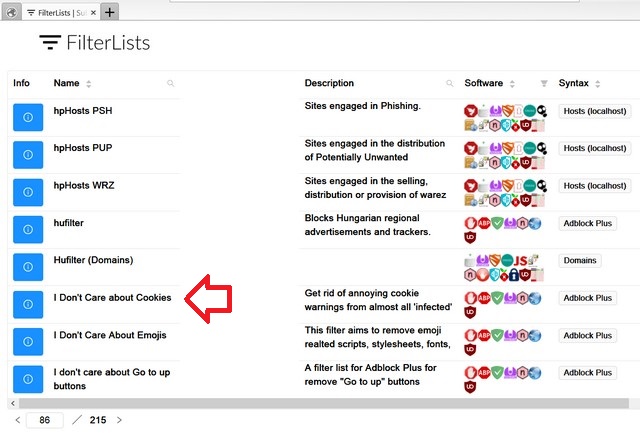
With that subscription you don't need to use the Mozilla addon at all.
Telmesomething
on 30 Oct 2019
Neither AdBlock Plus nor uBlock Origin was installed.
I deactivated the module and installed AdBlock Plus with the filter and everything seems OK.
Thank you for the good suggestion Telmesomething.
Let's hope an update of the filter doesn't screw it up again.
PiliJ
on 30 Oct 2019
everything seems OK.
@PiliJ I lost track, was this an issue with Waterfox, or an issue with an extension?
grahamperrin
on 31 Oct 2019
I deactivated the module and installed AdBlock Plus with the filter and everything seems OK.
Glad to hear your webmail is working again PiliJ. I suggest you create a manual System Restore point now so that in the event something goes wrong again you can always restore Win 8.1 to that point and you'll be back to where you are now again.
If you don't know how to do that please say and I'll post instructions.
Telmesomething
on 31 Oct 2019
@ Grahamperrin
I really don't know finally ! And why it happens under 8.1 and not under win 7... a mystery.
@Telmesomething
I'm a user of Rollback Rx for that... this is what allowed me to find a healthy situation prior to the update of the module.
PiliJ
on 31 Oct 2019
I'm a user of Rollback Rx for that....
OK, fair enough. SR has always worked for me though so I'll stick with it I think. But I always create a new system image every month even though it's usually around 60GB. I've only had occasion to use it once and watched what happened at the time. Seeing it reformat my HD was a bit nerve wracking, but it restored all my files, drivers and software to the date the image was created on.
Telmesomething
on 31 Oct 2019
Thanks. Time to close this issue?
grahamperrin
on 1 Nov 2019
Yes, thank you Grahamperrin
PiliJ
on 1 Nov 2019
Related issues
 Kallinteris-Andreas
·
3Comments
Kallinteris-Andreas
·
3Comments
 hook321
·
4Comments
hook321
·
4Comments
 foreachthing
·
3Comments
grahamperrin
·
4Comments
foreachthing
·
3Comments
grahamperrin
·
4Comments
 ghost
·
4Comments
ghost
·
4Comments