Waterfox: Amazon … video can not be viewed in HD (1080p) – content restrictions – in some environments
2019-07-05: _Amazon Prime_ (region unknown US) not working in HD
https://www.reddit.com/comments/c9oe2e/-/eti4bne/?context=2 in particular:
All I know is, it was working on July 4th. On July 5th, I had this message come up. Nothing changed. I didn't have any updates from Windows Update, I didn't install any new programs or extensions or anything. Nothing changed. Absolutely nothing - except for this message on Amazon Prime Videos. I only installed 56.2.11 in response to this problem hoping that it would solve it.
I assume that Waterfox Classic 56.2.10.1 (2019-06-07) was in use when the restriction first appeared.
2019-07-15: _Amazon Prime India_ working in HD
For a problem with HD that was reported on 2019-06-29, around two weeks later:
… working , even HD …
Used this string
Mozilla/5.0 (Windows NT 10.0; Win64; x64; rv:67.0) Gecko/20100101 Firefox/67.0
2019-08-30: _Amazon Prime_ (region unknown) not working, then working, in HD
Anyone else use Youtube TV and Amazon Prime having issues? : waterfox
From the opening post:
56.2.13 … Amazon Prime … doesn't support HD
– and later the same day from the OP:
got Prime working with User Agent
/u/TwoCables_from_OCN observed:
… HD … User Agent didn't fix that for me.
Other discussions
https://www.reddit.com/comments/ctg797/-/exm69yn/?context=1 (2019-08-21, /u/TwoCables_from_OCN) with uncertainty https://www.reddit.com/comments/ctg797/-/exrn0fj/ about the relationship to the opening post.
56.2.14 still doesn't play Amazon Prime Videos in HD : waterfox (2019-09-10, /u/TwoCables_from_OCN)
https://www.reddit.com/comments/deuzev/-/f31pz23/ (2019-10-09, /u/TwoCables_from_OCN) under a post about Waterfox Current 68.0b1.
Any others?
Unknowns
It might help to know the addresses of some affected videos, and a region.
Meta, tracking
538
 grahamperrin
All 10 comments
Can anyone reproduce this issue with Waterfox Current?
grahamperrin
on 20 Oct 2019
It might help to know the addresses of some affected videos…
https://www.reddit.com/comments/c9oe2e/-/f4ekvw7/?context=2
Any video on Amazon Prime Video that is in HD. Any. Pick one and go for it.
I live in the U.S.
I don't have Amazon Prime, I do have just one Amazon Video https://www.amazon.co.uk/gp/video/detail/B00X674KKU

- available in HD
- I paid £4.99 (UK) so I _assume_ that whenever I found it playing (in Waterfox Classic on Windows 10), playback was HD … honestly, I never paid attention to the quality in the virtual machine.
Retesting now with Waterfox Classic 2019.10 (20191016181224), success:
https://put.re/player/CS4NUPKJ.34.mp4
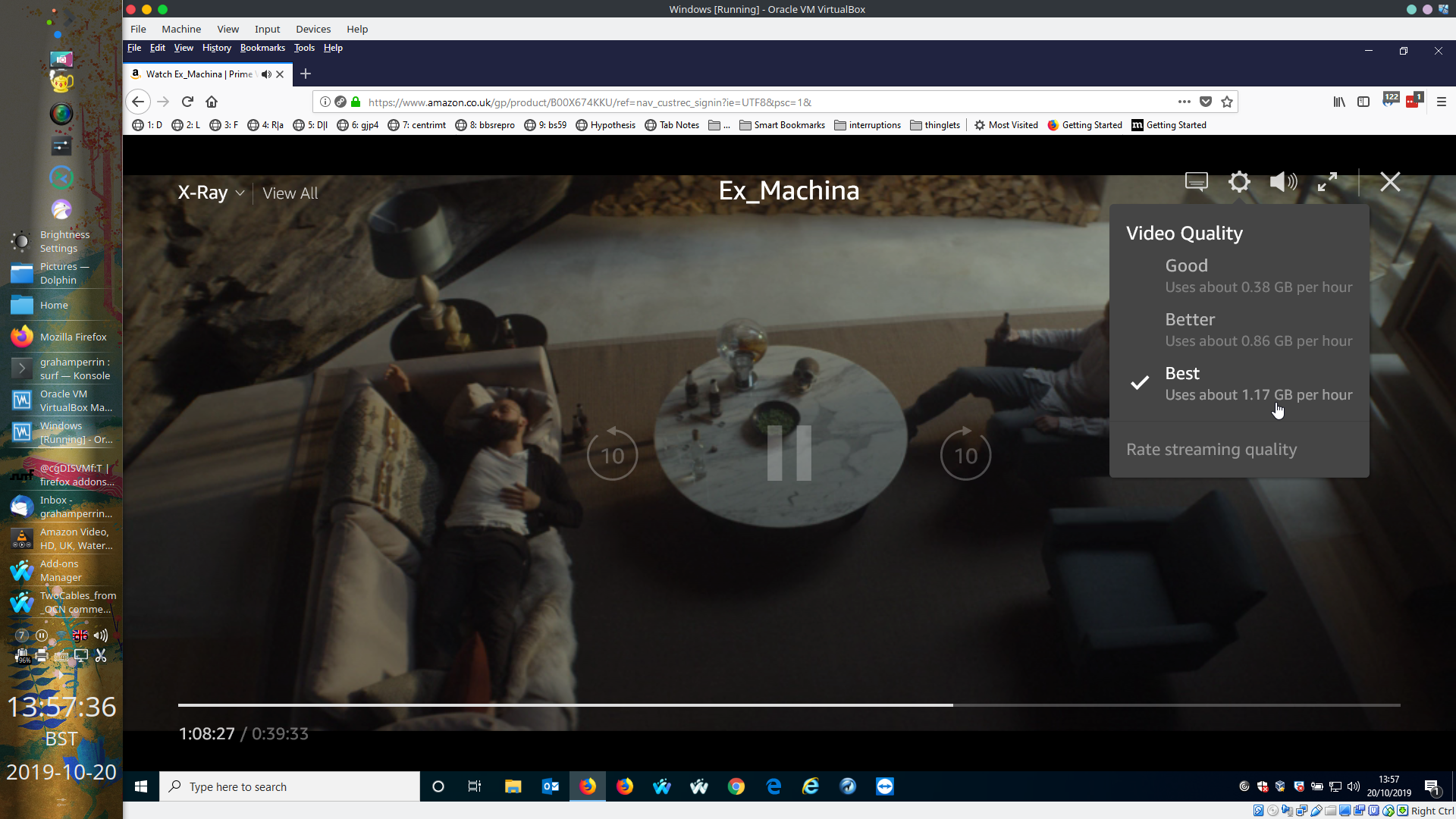
A frame from the recording:

- best quality –
is this HD?HD, not _HD 1080p_.
The same video in Firefox ESR 60.9.0 in the same virtual machine:
grahamperrin
on 20 Oct 2019
From https://www.reddit.com/r/waterfox/comments/deuzev/-/f4ir5pg/:
… it seems I’ve managed to get some videos to play in HD again - seeing what I can do to get it to work on Classic branch.
– from which, I assume that issues affecting HD or HD (1080p) are not limited to Waterfox Classic.
grahamperrin
on 22 Oct 2019
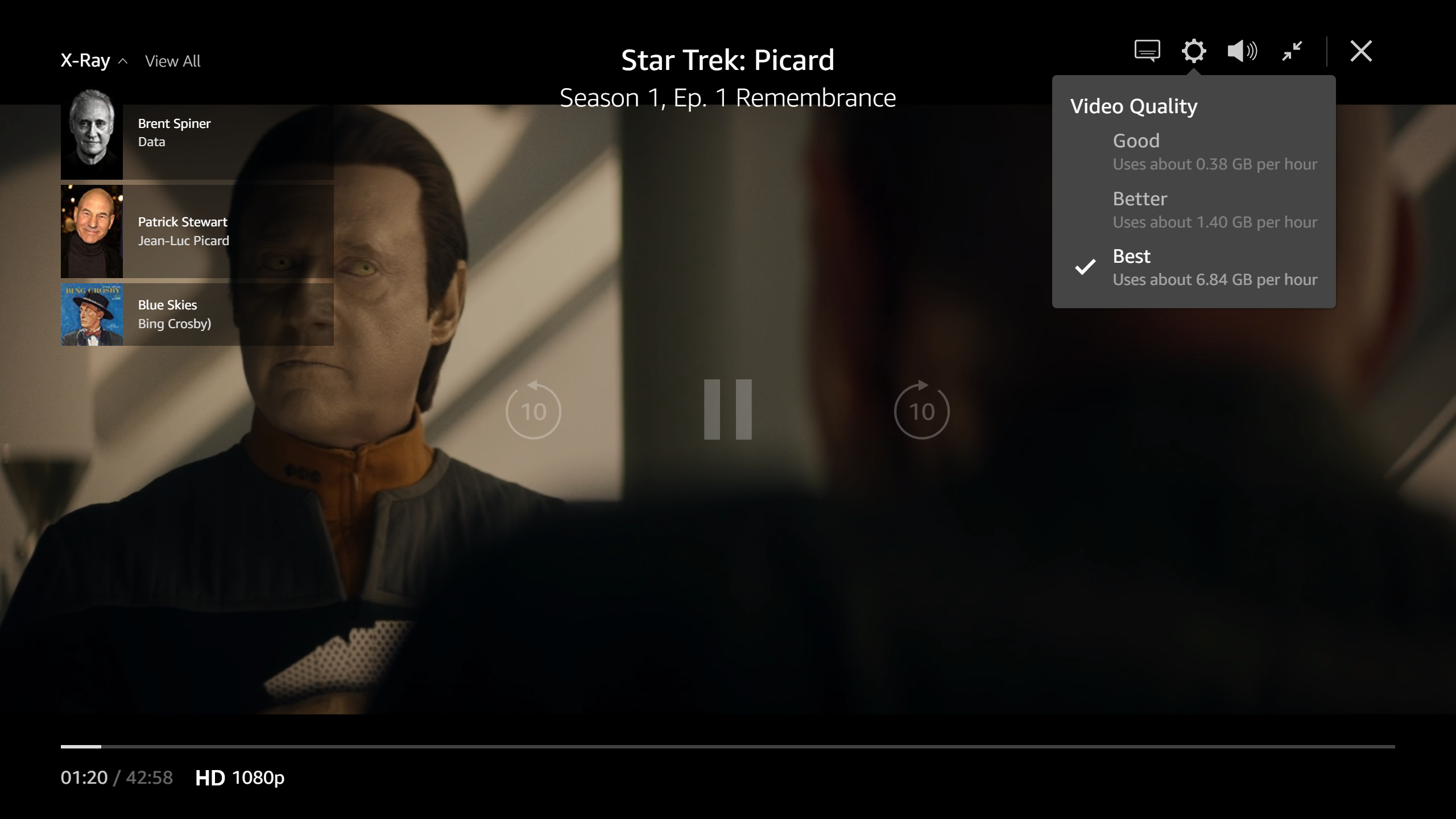
I have just run across this issue in Waterfox Classic 2020.01 (64-bit) on Windows 10 1909. Honestly, it is the first time I have tried to watch Prime Video content in Waterfox for a while and I get the "Your browser does not support High-Definition playback due to content restrictions" message when trying to play Episode 1 of Star Trek Picard on Amazon UK.

The desired behaviour would be HD playback as can be achieved in Chrome and Firefox. Chrome 79.0.3945.130 will display in HD 1080p in the bottom left of the screen during full screen playback and HD (e.g. 720p) when windowed.


Firefox 72 starts off in HD in both windowed and fill-screen, and will sometimes end up in HD 1080p after a few (tens of) seconds playback.
When playing back in HD, the "best" video quality should use "about 6.84 GB per hour"
Removing Waterfox/56.3 from the UserAgent (e.g. changing it to Mozilla/5.0 (Windows NT 10.0; Win64; x64; rv:56.0) Gecko/20100101 Firefox/56.0 Waterfox/56.3) completely blocks video playback with a "Mozilla Firefox Update Required" screen:

I decided to do a bit of futzing with the useragent to see if I could find something that worked. Unfortunately, everything that I have tried did not remove the message or broke playback completely. I tried::
- Firefox 67 as suggested further up
Mozilla/5.0 (Windows NT 10.0; Win64; x64; rv:67.0) Gecko/20100101 Firefox/67.0 - latest Firefox
Mozilla/5.0 (Windows NT 10.0; Win64; x64; rv:72.0) Gecko/20100101 Firefox/72.0 - latest Chrome
Mozilla/5.0 (Windows NT 10.0; Win64; x64) AppleWebKit/537.36 (KHTML, like Gecko) Chrome/79.0.3945.130 Safari/537.36 - Latest Opera
Mozilla/5.0 (Windows NT 10.0; Win64; x64) AppleWebKit/537.36 (KHTML, like Gecko) Chrome/79.0.3945.123 Safari/537.36 OPR/66.0.3515.44 - Latest Edge
Mozilla/5.0 (Windows NT 10.0; Win64; x64) AppleWebKit/537.36 (KHTML, like Gecko) Chrome/70.0.3538.102 Safari/537.36 Edge/18.18363(this one threw the "Unsupported Browser" error)

- Latest Safari
Mozilla/5.0 (Macintosh; Intel Mac OS X 10_13_6) AppleWebKit/605.1.15 (KHTML, like Gecko) Version/13.0 Safari/605.1.15resulted in a black screen with no playback - Firefox Mac
Mozilla/5.0 (Macintosh; Intel Mac OS X 10.14; rv:72.0) Gecko/20100101 Firefox/72.0
In other words, it looks like a user-agent only fix like exists for Netflix on Mac is not possible here.
Hopefully this gives some more insight into this issue - if you need any more info or more testing, I am happy to help.
 heliosfa
on 25 Jan 2020
heliosfa
on 25 Jan 2020
Further to my last comment on this, I can confirm that the same issue is present on Mac.
heliosfa
on 31 Jan 2020
just here to confirm this issue is still present on latest windows release.
 RocketBun
on 2 Feb 2020
RocketBun
on 2 Feb 2020
Can anyone reproduce this issue with Waterfox Current?
Yes, it occurred for me today with Current 2020.02
 Roykirk1701
on 24 Feb 2020
Roykirk1701
on 24 Feb 2020
@grahamperrin HD is not available generally for Linux and Waterfox Classic (on all OS). Best quality isn't always HD, when is HD then on bottom left you should see HD mark. Now you can test on free Prime videos.
 hawkeye116477
on 31 Mar 2020
hawkeye116477
on 31 Mar 2020
No comments in several months, chiming in to report that 2020.07.2.1 (64-bit) current branch, latest update still exhibits this issue.
 oblivion2k
on 8 Sep 2020
oblivion2k
on 8 Sep 2020
At this point I have to say the issue is likely malicious action on Amazons part they are clearly doing something more invasive than simply checking the user agent. As Waterfox does have the same capabilities of the current Firefox at this point I feel we need to make an effort to figure out what amazon is checking and implement stealth countermeasures in the code to ensure Amazon will not be able to detect that Waterfox is not a standard FF build.
As stated in https://github.com/MrAlex94/Waterfox/issues/985
there should already be a UA override in place for amazon so it is doing something more invasive than simply checking UA
 mikeloeven
on 3 Jan 2021
mikeloeven
on 3 Jan 2021
Related issues
grahamperrin
·
4Comments
 foreachthing
·
3Comments
foreachthing
·
3Comments
 9jkh
·
4Comments
9jkh
·
4Comments
 fghsgh
·
4Comments
fghsgh
·
4Comments
 aquaspy
·
3Comments
aquaspy
·
3Comments
Most helpful comment
Yes, it occurred for me today with Current 2020.02