Waterfox: Unable to Download Add-Ons from Mozilla Website
It appears that the only browser capable of downloading add-ons at the website https://addons.mozilla.org/en-US/firefox/ is FireFox 66.0.4, which is the latest after the terrible bug that shut down add-ons for almost all users after security signing expired. I have not been able to download any add-ons with older versions of FireFox, nor with latest version of Waterfox.
When you try to download with Waterfox 56.2.9, you get an error that says "Download failed. Please check your Internet connection."
Is this being implemented so that only users who have updated to latest FireFox can download add-ons from the Mozilla website?
Can't get anything from FireFox team except "We're working on it."
 Petros606
All 32 comments
working on it."
True. Please see today's brief update for Waterfox users:
 grahamperrin
on 7 May 2019
grahamperrin
on 7 May 2019
Awesome! :-)
Hopefully the following image is helpful in some way as well...
Waterfox for Android - Addon Error
~Ibuprophen
 Ibuprophen
on 7 May 2019
Ibuprophen
on 7 May 2019
Okay grahamperrin. Thanks for that link. Hope the next release of Waterfox will include fix to download add-ons from Mozilla website again. At least all important plugins I have installed are working with WaterFox:
Ghostery
uBlock Origin
Enhancer for YouTube
Petros606
on 7 May 2019
Just as an aside, I thought the following was interesting, if not suspicious: I have two hard drives, and I clone one periodically for backup. Firefox V56 is what I was using when the recent bug knocked out all my add-ons. I fixed that by switching to Waterfox. I was wondering if on my backup hard drive with the V56 still installed there would it work with the same installed add-ons. It did! While browsing maybe 10 minutes or so Ghostery and uBlock were still blocking adds as expected --until I did one other thing.
I went to the Firefox website to see if I could download a new add-on. INSTANTLY, I got a popup that said, "Some of your add-ons have been disabled...." and I lost Ghostery and uBlock. And of course, no download of an add-on was possible. I got the same error as noted above.
If the Firefox team knows what the problem is, but yet just by connecting to the Mozilla Add-on download website an older version of Firefox again gets hit with the bug, there's got to be something they're not telling users.
Petros606
on 7 May 2019
I shouldn't treat it as suspicious.
Yesterday (Tuesday) my remote view of a managed installation of outdated Firefox ESR 52.something was (as expected) bitten by armagadd-on 2.0. I span my chair around to mention the bite to my manager (he and I had chatted about the 52.x situation earlier in the day), he nodded, can't recall exactly what he said but I got the impression that his installation had been bitten around the same time.
grahamperrin
on 8 May 2019
Using Waterfox 56.2.9, on the Mozilla add-ons page today, if you right click on the "Add to Firefox" button to install an add-on, a new window pops up with the message box: "Waterfox prevented this site from asking you to install software on your computer."
Is that the expected behavior at this time for Waterfox 56.2.9? And there will be some fix for this in the next version of Waterfox 56?
Petros606
on 9 May 2019
Is that the expected behavior at this time for Waterfox 56.2.9?
The same behaviour with Firefox 66.0.4. As far as I know, it's by design.
- OK the dialogue
- click the address (the URL that includes the path to the
.xpi) - reload.
grahamperrin
on 9 May 2019
The same behaviour with Firefox 66.0.4. As far as I know, it's by design.
No. That was my point. When I used the portable version of FireFox 66.0.4, I was able to download an add-on with no issues. That's what led me to believe the FireFox team wants as many users to switch to latest version as possible.
Petros606
on 9 May 2019
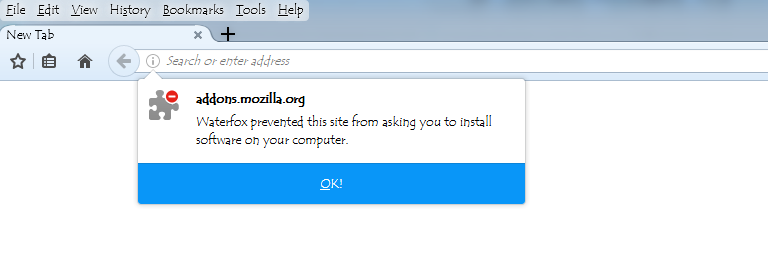
When you OK the dialog, the box just disappears. There's no URL with a .xpi to copy, even if you view page info.
Using "Inspect element" on the specific add-on webpage https://addons.mozilla.org/en-US/firefox/addon/autoplayblocker/?src=search only revealed this:
https://addons.mozilla.org/firefox/downloads/file/1160530/autoplayblocker-1.0.0-fx.xpi?src=search
If you click on the link just above using Waterfox 56.2.9 you will get the same dialog box that's in the image above.
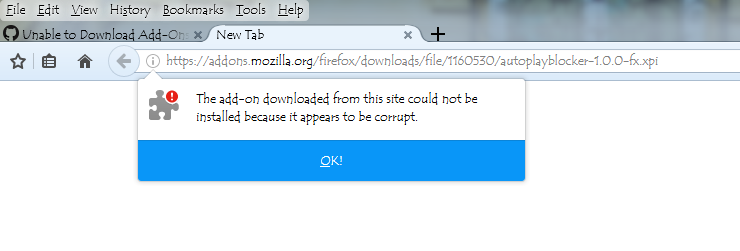
If you try to truncate the link to end with .xpi you then get this dialog box:
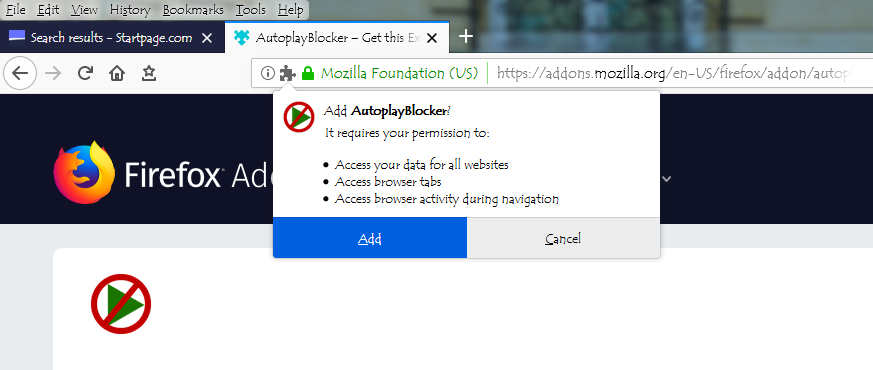
As I said above, using Firefox 66.0.4 works when you click on the "Add to Firefox" button. First you get this:
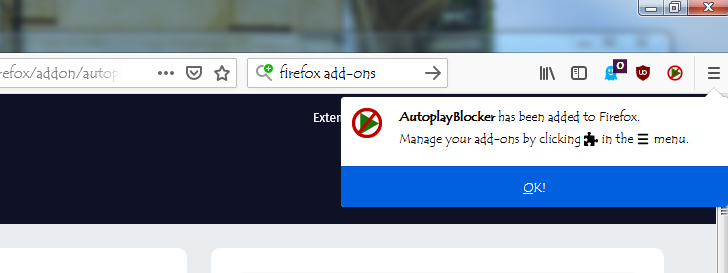
And then confirmation it was successful:
Most users of Firefox 56 know that downloads will not work, and you get an error message saying: "Download failed. Check your internet connection." And yes, I understand that Waterfox 56.2.9 is based on Firefox 56, so it's not a surprise that neither works.
Interestingly, even using Firefox 66, if you right click the "Add to Firefox" button to open the download link in a new window, you get this (similar to Waterfox):
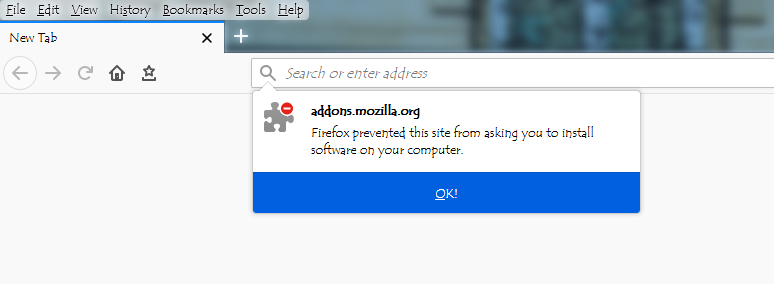
So like I said, it appears the only way any user can download an add-on at the Mozilla website is if they are using Firefox 66 and click the "Add to Firefox" button.
Petros606
on 9 May 2019
@Petros606 this issue is duplicate of https://github.com/MrAlex94/Waterfox/issues/936#issuecomment-489872863 , and the mentioned pull request has been merged.
 laniakea64
on 9 May 2019
laniakea64
on 9 May 2019
@Petros606 this issue is duplicate of #936 (comment) , and the mentioned pull request has been merged.
Yes, I'm also following #936 (comment)
--I think I'm doing a better job of comparing the performance of three different browsers here, so please don't close this issue. Leave it merged.
Can't the problem be the Mozilla add-ons website? My issue #1046 (comment) started at the Mozilla Github link was LOCKED and I suspect that's because they don't want it to be widely known that only Firefox 66 users can download add-ons at the moment. Waterfox at Github is the only help I seem to have.
Petros606
on 9 May 2019
In other words, why is it at the Mozilla website only if you are using the latest version of Firefox (66) can you download add-ons?
*Most importantly, is it really about certificates expiring? Waterfox is supposed to work with xpinstall.signatures.required set to false. So then why is the browser blocking my ability to download if at the Mozilla website that's supposedly about signatures?
Since your browser can be detected, can't Mozilla be intentionally blocking all users EXCEPT the ones using the latest version of Firefox (66) ?
Petros606
on 9 May 2019
In other words, why is it at the Mozilla website only if you are using the latest version of Firefox (66) can you download add-ons?
Right-click the "Add to Firefox" button > Save Link As
Is it really about certificates expiring? Waterfox is supposed to work with xpinstall.signatures.required set to false. So then why is the browser blocking my ability to download if at the Mozilla website that's supposedly about signatures?
It's blocking your ability to _install_ the addon. Downloading should work fine.
It's like I wrote in the other issue. Autoplay Blocker is a WebExtension that doesn't specify its addon ID in manifest.json. And specifying the addon ID is required for WebExtensions that are not properly signed. Which after the certificate expiring, Waterfox thinks they're not.
There's a workaround in the other issue explaining how to add the addon ID. I tried it with Autoplay Blocker, and it installed fine in a Waterfox build from before the fix. (Didn't try to get the actual addon ID, I just made one up)
laniakea64
on 9 May 2019
I made a mistake to close this issue.
Petros606
on 9 May 2019
Right-click the "Add to Firefox" button > Save Link As
Yes that works. Got the .xpi flie. Question is: Why do I have to do it this way?
It's blocking your ability to _install_ the addon. Downloading should work fine.
------But what is "it" that's blocking? ------the website or Waterfox? Again, Waterfox should work with xpinstall.signatures.required set to false
Will see about installing.
Petros606
on 9 May 2019
Question is: Why do I have to do it this way?
That's the way to download an addon without Waterfox trying to install it.
------But what is "it" that's blocking? ------the website or Waterfox?
Waterfox.
Again, Waterfox should work with xpinstall.signatures.required set to false
It does. Signature is not required for WebExtensions with addon ID specified in manifest.json, nor is it required for legacy addons. The preference does not affect WebExtensions that don't specify addon ID in manifest.json, those always need to be signed and it has always been this way.
laniakea64
on 9 May 2019
Not finding information how to specify addon ID in manifest.json. Is manifest.json file in the program folder? Still not finding how to do this.
Petros606
on 9 May 2019
Is this the instruction from other issue:
Carve-up XPI, open
manifest.jsonand add JSON block:"applications": { "gecko": { "id": "<your_addon_id>" } },Repack XPI and you are good to go.
By the way this bug forces browser to delete "corrupted" addons.
Petros606
on 9 May 2019
Yes that's it.
.xpi is just a .zip file. For where exactly to put the addon ID in manifest.json, maybe the example https://developer.mozilla.org/en-US/docs/Mozilla/Add-ons/WebExtensions/manifest.json#Example will help? (not sure why they use browser_specific_settings instead of applications)
And, when repacking the .xpi, make sure not to change the file layout - in particular, manifest.json needs to be at the top level of the .zip archive, not in a subfolder.
laniakea64
on 9 May 2019
Okay thanks. Will give it a try.
Petros606
on 9 May 2019
Unpacked .xpi file to .zip
found manifest.json
added the above JSON block at the top using Notepad
Made up a 32 character long ID between two quotes as indicated
Saved file
Repacked .zip file
Changed extension back to .xpi
Same error occurred in Waterfox: "This add-on cannot be installed because it appears to be corrupt."
Petros606
on 9 May 2019
Tried additional names for "id" including the name of the add-on autoplayblocker-1.0.0-fx and also an email type format as https://developer.mozilla.org/en-US/docs/Mozilla/Add-ons/WebExtensions/manifest.json#Example suggests, using [email protected], but still will not install and same error occurs: "This add-on cannot be installed because it appears to be corrupt."
Petros606
on 9 May 2019
using
[email protected]
This should have worked.
Would be helpful if I could look at the modified xpi you created, but I'm pretty sure the Autoplay Blocker license "All Rights Reserved" doesn't allow sharing modified versions. Are you looking to do this with any addons that have a more permissive license?
laniakea64
on 9 May 2019
As per the example here: https://developer.mozilla.org/en-US/docs/Mozilla/Add-ons/WebExtensions/manifest.json#Example
"browser_specific_settings": {
"gecko": {
"id": "[email protected]",
"strict_min_version": "42.0"
}
},
Replaced "browser_specific_setting" with "applications"
Replaced "[email protected]" with made-up ID [email protected]
Do you need the line "strict_min_version" ?
You successfully installed autoplay blocker add-on with Waterfox 56.2.9 ?
Petros606
on 9 May 2019
Do you need the line "strict_min_version" ?
no
You successfully installed autoplay blocker add-on with Waterfox 56.2.9 ?
Yes, I got it to install in an unpatched Waterfox 56.2.9 following these steps -
1) extract Autoplay Blocker xpi
2) add ID to manifest.json - the first few lines should be
{
  "applications": {
    "gecko": {
      "id": "[email protected]"
    }
  },
  "background": {
3) delete META-INF folder
4) in the directory with the manifest.json, select all, right-click > Create archive. Create a .zip archive
5) rename .zip to .xpi
laniakea64
on 9 May 2019
Finally...
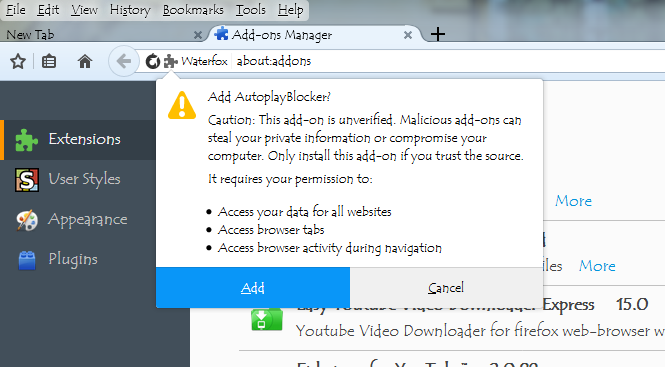
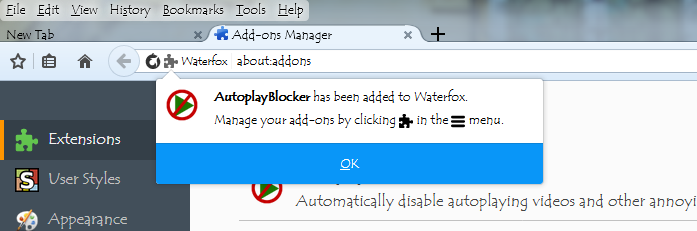
Two things I didn't do that you instructed:
Did not delete META-INF folder
Did not create new archive by right click "select all" in the directory with the manifest.json file. I was closing the archive first. Not sure that mattered.
So, in the event anyone else wants to do the manual install for downloading add-ons for Waterfox 56.2.9 from the Mozilla website until an official fix arrives, I'll just repeat the steps:
Go to Mozilla add-ons download website. https://addons.mozilla.org/en-US/firefox/
Search for add-on. When add-on download page is found, you can't install the add-on thru the website but you can download it. Right click on the "Add to Firefox" button and select "Save link as..."
Go to Waterfox about:addons and select "Install Add-on From File..." If you get an error that says add-on is corrupt alter the .xpi file for the add-on as follows:
Extract .xpi file using 7zip.
Find manifest.json file. Add ID to manifest.json - the first few lines should be
{
"applications": {
"gecko": {
"id": "name of [email protected]"
}
},
"background": {
Delete META-INF folder
In the directory with the manifest.json, select all, right-click > Create archive. Create a .zip archive
Rename .zip to .xpi
Return to about:addons in Waterfox and manually install modified .xpi file by selecting "Install Addons From File..." and it should install.
Thanks so much for your help, laniakea64. Definitely learned something important about Waterfox today. And my hunch about add-ons from the Mozilla website being altered must be wrong. Hope a permanent fix is out soon for Waterfox 56 so future download of add-ons is easier.
Petros606
on 9 May 2019
I thought this was going to have a happy ending, but it's still not right.
Waterfox is disabling the add-on every time I close the browser.
Petros606
on 10 May 2019
Waterfox is disabling the add-on every time I close the browser.
:confused: Not seeing this here in an unpatched Waterfox 56.2.9, neither in my main profile nor in a clean profile. I have no idea why this would happen in Waterfox.
Does it still get disabled in a new, clean profile with only the modified xpi installed?
laniakea64
on 10 May 2019
With new profile in Waterfox and only autoplay blocker installed the add-on is not disabled when you close and then re-open browser. Now I have to find what add-on is causing a conflict with autoplay blocker by disabling each one at a time until problem surfaces again? Using these add-ons:
Ghostery
uBlock Origin
Youtube Enhancer
Autoplay Blocker
Petros606
on 10 May 2019
I am really at a loss for understanding this but as of right now, after I created a new profile and then re-installed add-ons including the modified autoplay blocker, everything is working as expected and nothing is disabling itself when I close the browser.
Plus, I was able to go to Mozilla website and could install from there Ghostery, uBlock Origin, and YouTube Enhancer. I still could not install Autoplay Blocker and used the modified .xpi file.
Yet, same add-ons using the default profile (the one I've used for days after installing Waterfox) causing some kind of conflict and autoplay blocker keeps getting disabled.
- Is my new profile going to inevitably get messed up because bug is not fixed yet in Waterfox 56?
Petros606
on 10 May 2019
I can't believe it.
As I was writing the above post, all add-ons except the modified Autoplay Blocker DISAPPEARED in Waterfox about:addons. The Autoplay Blocker add-on is disabled.
This is crazy. How am I supposed to use a browser that's so unstable?
Petros606
on 10 May 2019
DISAPPEARED
Please raise separate issues for this, and for other things that are not download-related.
Thanks
grahamperrin
on 10 May 2019
Related issues
 RaitaroH
·
3Comments
grahamperrin
·
4Comments
RaitaroH
·
3Comments
grahamperrin
·
4Comments
 zakius
·
4Comments
zakius
·
4Comments
 aquaspy
·
3Comments
aquaspy
·
3Comments
 ghost
·
4Comments
ghost
·
4Comments
Most helpful comment
Awesome! :-)
Hopefully the following image is helpful in some way as well...
Waterfox for Android - Addon Error
~Ibuprophen