Waterfox: Checkboxes in some addons are not displayed
Describe the bug
I've installed some addons such as "Tab Wrangler" and "Auto Tab Discard" and noticed that the checkboxes in their preferences are not displayed.
To Reproduce
- Install addon "Tab Wrangler" or "Auto Tab Discard"
- Go to Preferences
Expected behavior
Display checkboxes
Desktop (please complete the following information):
- OS: Arch Linux
- Version 56.2.8
 hubitor
All 8 comments
What version of GTK 3 do you have?
What GTK theme are you using?
 laniakea64
on 20 Mar 2019
laniakea64
on 20 Mar 2019
I'm using KDE Plasma 5.15.3 with Breeze Dark theme.
hubitor
on 20 Mar 2019
FWIW, I do see those checkboxes with Breeze-Dark GTK theme on Xubuntu 18.04.
Again, what version of GTK 3 do you have?
laniakea64
on 20 Mar 2019
This package is installed:
gtk3 1:3.24.7+11+g3a959e984f-1
hubitor
on 20 Mar 2019
I tested official Waterfox 56.2.8 in Antergos + KDE + Breeze-Dark theme (set as desktop theme and as GTK 2/3 theme). The checkboxes are visible there too.
The GTK 3 version I got in Antergos is 1:3.24.7+25+g17665f06e3-1. Since Antergos directly uses Arch Linux repos, can you check if that update is available to you?
laniakea64
on 20 Mar 2019
Thanks for checking!
The package:
gtk3 1:3.24.7+25+g17665f06e3-1 is available and I've just installed it. I've rebooted and checked again. The problem persists.
I've checked other installed addons and this the result:
Affected addons:
- HTTPS Everywhere
- NoScript
- Restart
- Snap Links
- Tab Mix Plus
- Export Tabs URLs
- Tree Style Tab
- Session Manager
Not Affected addons:
- Adblock Plus
As example, this is how Tree Style Tab normally looks like:
http://johnbokma.com/mexit/2011/07/22/tree-style-tab-1-appearance.png
and in my case:
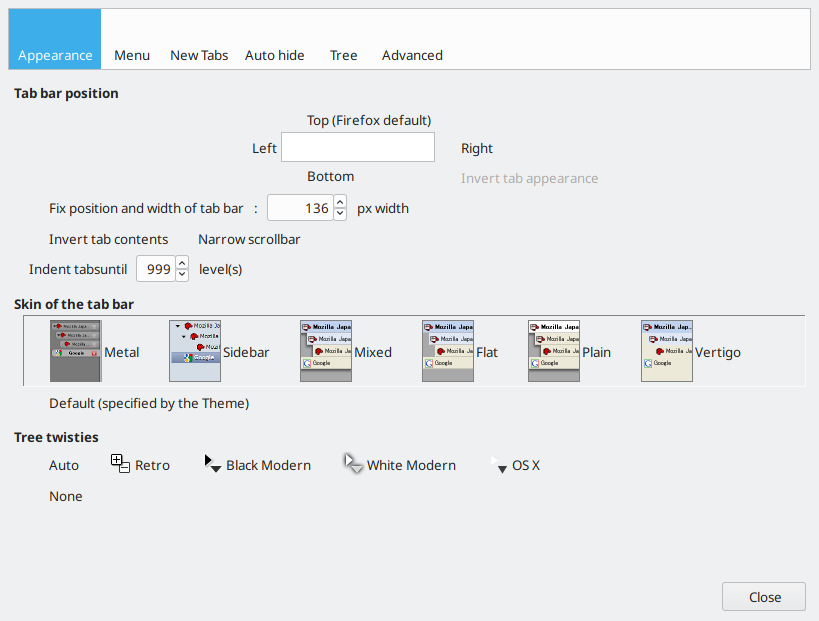
check boxes and radio boxes are not visible anymore. I know for sure that e.g. Tab Mix Plus was working fine before but I have no idea what has changed.
hubitor
on 21 Mar 2019
check boxes and radio boxes are not visible anymore.
Nor is the entire Breeze-Dark theme! Your Tree Style Tab options is supposed to look like this -

Check your settings in System Settings > Application Style > GNOME/GTK Application Style
laniakea64
on 21 Mar 2019
@laniakea64: Many thanks!
check boxes are back...
The selected GTK2 and GTK3 themes were Breeze and not Breeze Dark. Somehow the settings were changed.
hubitor
on 21 Mar 2019
Related issues
 foreachthing
·
3Comments
foreachthing
·
3Comments
 ATRescue
·
3Comments
ATRescue
·
3Comments
 fghsgh
·
4Comments
fghsgh
·
4Comments
 grahamperrin
·
3Comments
grahamperrin
·
3Comments
 hook321
·
4Comments
hook321
·
4Comments
Most helpful comment
@laniakea64: Many thanks!
check boxes are back...
The selected GTK2 and GTK3 themes were Breeze and not Breeze Dark. Somehow the settings were changed.