Waterfox: (no bug and solved) "Recently closed tabs" menu item always greyed out
Describe the bug
Can't reopen "recently closed tabs", the menu item is always greyed out although history is on in settings. I've created a new profile, did not help. This worked fine on the version I had before (56.2.? from Nov 18) and fails since updating to 56.2.7.1. I might have missed an update or two in between.
To Reproduce
Steps to reproduce the behavior: Close a tab and check the history menu.
Desktop (please complete the following information):
- OS: Linux Debian stable
 ilu33
ilu33
All 10 comments
Not reproducible with 56.2.7.1 on Lubuntu Linux with a new profile:

 grahamperrin
on 16 Feb 2019
grahamperrin
on 16 Feb 2019
I can't reproduce this with Waterfox 56.2.7.1 on Debian stable.
How did you update Waterfox?
 laniakea64
on 16 Feb 2019
laniakea64
on 16 Feb 2019
@laniakea64, You can always manually download Waterfox via the https://github.com/MrAlex94/Waterfox/issues/418 issue.
It gets updated as new releases are pushed.
~Ibuprophen
 Ibuprophen
on 16 Feb 2019
Ibuprophen
on 16 Feb 2019
56.2.7.1 is current, not outdated.
grahamperrin
on 17 Feb 2019
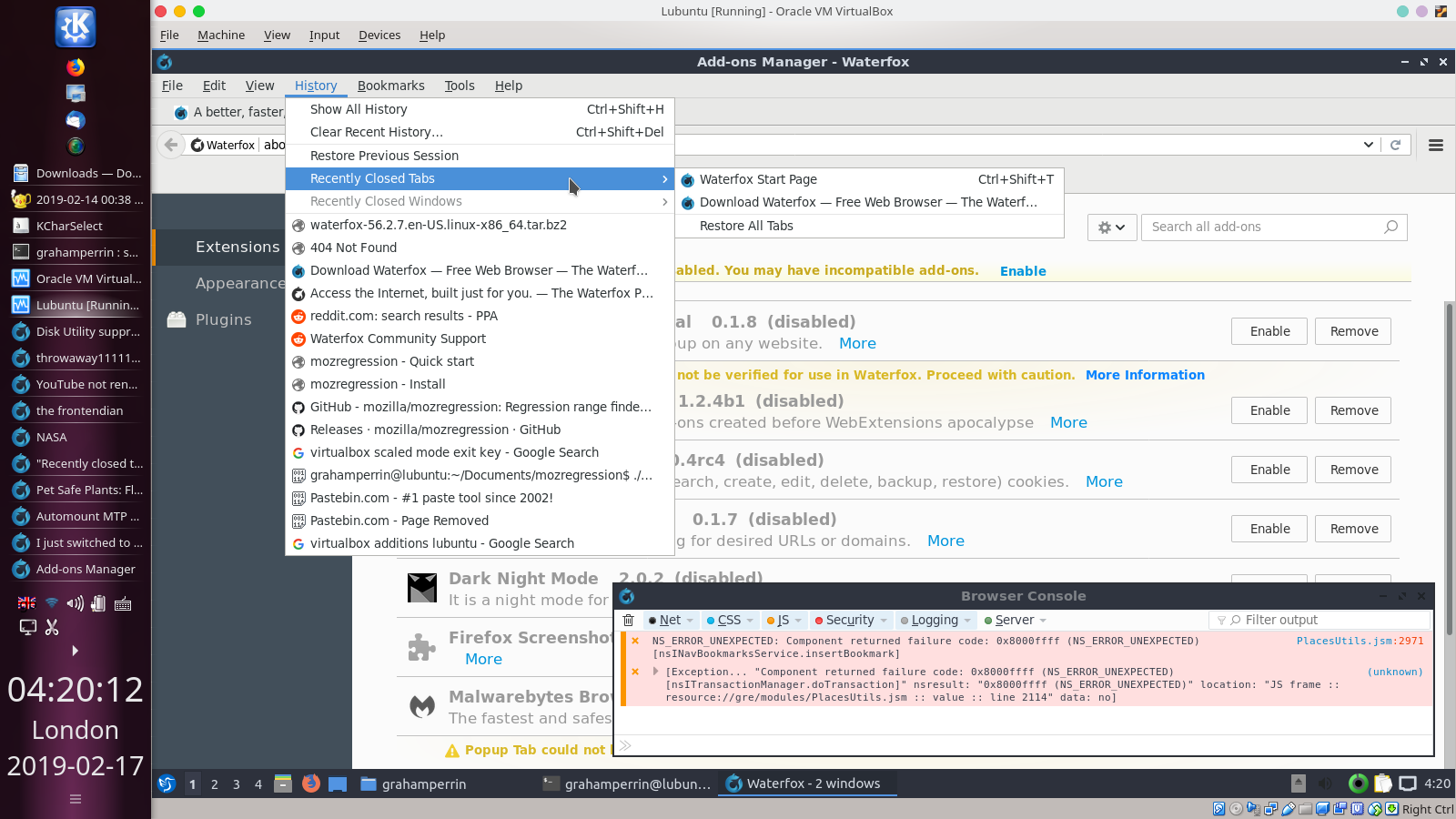
@ilu33 a few hours ago I had an instance of 56.2.7.1 that quietly had trouble with bookmarks. Not realised at first because the bookmarks toolbar was populated. Realised after after silent failure to save changes to the properties of a bookmark (expected: the address set by me; actual result: the preset address).
Maybe the same underlying issue. I'm not sure where I encountered the bug (I was focused on something else at the time), it might have been in my Lubuntu virtual machine …
grahamperrin
on 17 Feb 2019
Ok thank you. I managed to do a really clean install now and waterfox behaves. I'm using a lot of custom configuration and I thought it had not carried over into the new install but somehow it still did and somehow it behaves weirdly with the new version. Do you have any hints how I could further debug the issue? Any about:config settings that might be involved? I'd like to find out why this is happening without having to ditch my whole config. I can't find anything about tab history.
ilu33
on 17 Feb 2019
I managed to do a really clean install now and waterfox behaves. I'm using a lot of custom configuration and I thought it had not carried over into the new install but somehow it still did and somehow it behaves weirdly with the new version.
So are you saying the issue is now specific to your Waterfox profile, and you no longer see it in a new, clean profile?
laniakea64
on 17 Feb 2019
I wrote:
… Maybe the same underlying issue. …
Unfortunately not. Here's the affected profile (NB I don't seek help with this), not affecting history:
grahamperrin
on 17 Feb 2019
So are you saying the issue is now specific to your Waterfox profile, and you no longer see it in a new, clean profile?
Yes.
And I found the culprit. It's "browser.sessionstore.max_tabs_undo=0". Idiotically this setting is not part of the "history = off" setting and so Mozillas privacy task force recommends to set it manually. That's nonsense if the user chooses history to be on.
The setting got into my config via some copy/paste operation. Don't tell me to not copy/paste settings, I'm testing different settings on a regular basis to find the best config to recommend to others. I should have investigated more before asking here though. It was just coincidence that I noticed the change after the update. Sorry for bothering you, but your comment that you don't see the same behaviour helped a lot.
Thanks again and please close this.
ilu33
on 17 Feb 2019
Thanks,
please close this.
@ilu33 as the opening poster, you should find the option to close. Near the foot of the page.
grahamperrin
on 18 Feb 2019
Related issues
 zakius
·
4Comments
zakius
·
4Comments
 sutex
·
3Comments
sutex
·
3Comments
 aquaspy
·
3Comments
grahamperrin
·
3Comments
aquaspy
·
3Comments
grahamperrin
·
3Comments
 fghsgh
·
4Comments
fghsgh
·
4Comments
Most helpful comment
Yes.
And I found the culprit. It's "browser.sessionstore.max_tabs_undo=0". Idiotically this setting is not part of the "history = off" setting and so Mozillas privacy task force recommends to set it manually. That's nonsense if the user chooses history to be on.
The setting got into my config via some copy/paste operation. Don't tell me to not copy/paste settings, I'm testing different settings on a regular basis to find the best config to recommend to others. I should have investigated more before asking here though. It was just coincidence that I noticed the change after the update. Sorry for bothering you, but your comment that you don't see the same behaviour helped a lot.
Thanks again and please close this.