Waterfox: 'Corrupted Content Error' while attempting to access Gmail
I cleared my cache/cookies/offline data and it seemed to worked for a moment, but then the error immediately returned.
 anonymous3930
All 15 comments
Anyone?
anonymous3930
on 16 Nov 2018
I had this happen as well in the current version of Waterfox Portable, even in Safe Mode. However, when I renamed my profile folder to oldprofile and let Waterfox Portable create a new clean profile, and then immediately tried logging into GMail without changing anything, that did work, and stayed working. I can't test this right now, but from what I can find, reclean your cache/cookies/offline data, and then go to about:serviceworkers, and remove/unregister the mail.google.com service worker. You could go overboard and do the same for other Google domains as well. Then, restart Waterfox, and retry GMail.
 mindwarp42
on 17 Nov 2018
mindwarp42
on 17 Nov 2018
Thanks, but I managed to fix the problem by refreshing the browser via 'Troubleshooting Information'. Hopefully it stays working this time.
anonymous3930
on 17 Nov 2018
Same error, fixed by clear cache and remove gmail service worker.
 hyno111
on 20 Nov 2018
hyno111
on 20 Nov 2018
Cross reference: https://www.reddit.com/comments/9wfdrn/-/e9nzaxc/?context=1
 grahamperrin
on 20 Nov 2018
grahamperrin
on 20 Nov 2018
Since I just had it happen again, while I was running Waterfox Portable in my normal profile, I decided to try just unregistering the mail.google.com service worker in about:serviceworkers without touching the cache or cookies, and then reloading GMail without rebooting Waterfox as a test. That worked as well, and may save people some time in the future. Edit: since I've seen people comment about using this workaround, and have the problem come back, please note that this isn't a bug fix. I've had to do this workaround at least once a day myself. Thanfully, it's a quick workaround to do.
mindwarp42
on 21 Nov 2018
https://www.reddit.com/r/waterfox/comments/9wfdrn/-/ecr2enj/ refers to:
- Mozilla bug 1495275 - Corrupted Content Error for gmail
grahamperrin
on 28 Dec 2018
@anonymous3930 or @MrAlex94 considering the bug in the Mozilla area, you might like to reopen this issue.
We have e.g. Shift-reload as a workaround, which is simple enough, however the bug will probably be an annoyance to some users of Gmail, so (I reckon) let's aim for a fix in either 56.x or 60.x 68.x
grahamperrin
on 1 Jan 2019
… can't test this right now, but from what I can find, reclean your cache/cookies/offline data, and then … remove/unregister the mail.google.com service worker. …
… fixed by clear cache and remove gmail service worker.
… just unregistering the mail.google.com service worker … without touching the cache or cookies, and then reloading GMail without rebooting Waterfox as a test. That worked …
@anonymous3930 thanks for reopening this issue. Please see:
– there's an extension, Block Service Workers.
Does it block the worker for Gmail?
(Results may vary.)
grahamperrin
on 28 Feb 2019
This has been an ongoing issue on Windows I’ve found. Been looking into it
but not much luck as to why.
On Thu, 28 Feb 2019 at 01:58, Graham Perrin notifications@github.com
wrote:
… can't test this right now, but from what I can find, reclean your
cache/cookies/offline data, and then … remove/unregister the
mail.google.com service worker. …… fixed by clear cache and remove gmail service worker.
… just unregistering the mail.google.com service worker … without
touching the cache or cookies, and then reloading GMail without rebooting
Waterfox as a test. That worked …@anonymous3930 https://github.com/anonymous3930 thanks for reopening
this issue. Please see:
- Service Workers: round-up for users of Waterfox
https://www.reddit.com/r/waterfox/comments/ara5ia/service_workers_roundup_for_users_of_waterfox/– there's an extension, Block Service Workers.
Does it block the worker for Gmail?
(Results may vary.)
—
You are receiving this because you were mentioned.Reply to this email directly, view it on GitHub
https://github.com/MrAlex94/Waterfox/issues/794#issuecomment-468105427,
or mute the thread
https://github.com/notifications/unsubscribe-auth/AEgoWKTptzvvfQCXYIxvOL26dcJoOcItks5vRzfHgaJpZM4YkpJb
.
 MrAlex94
on 28 Feb 2019
MrAlex94
on 28 Feb 2019
Waterfox ~56.2.7.1 on FreeBSD-CURRENT with a new service worker (installed today) for scope https://mail.google.com/mail/u/0/, a relatively clean profile and 1/1 web content process:
- I could not reproduce the error.
Note, this is not an encouragement to people to refresh their profile.
I used the tab context menu for Gmail to open in a new non-e10s window, closed the original Gmail tab, brought the non-e10s window to front, opened a new tab, clicked the (single-process) Gmail tab, closed it then used the History menu to reopen it:
- corrupted content error.
Then:
- about:addons
- re-enable Block Service Workers
- click the Gmail tab
- Shift-reload
- wait
- observe the block
… still, the corrupted content error was reproducible in the single-process window because (d'oh!) I had omitted some key steps.
Postscript
I had omitted https://www.reddit.com/comments/ara5ia/-/ehjy6g7/ steps 1 and 2.
grahamperrin
on 28 Feb 2019
The result of a more orderly test – I'm _almost_ certain that I un-registered the worker before opening Gmail:
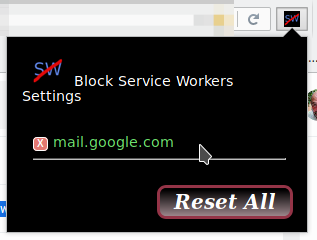
– OK, at a glance.
Broader inspection, there was a problem:
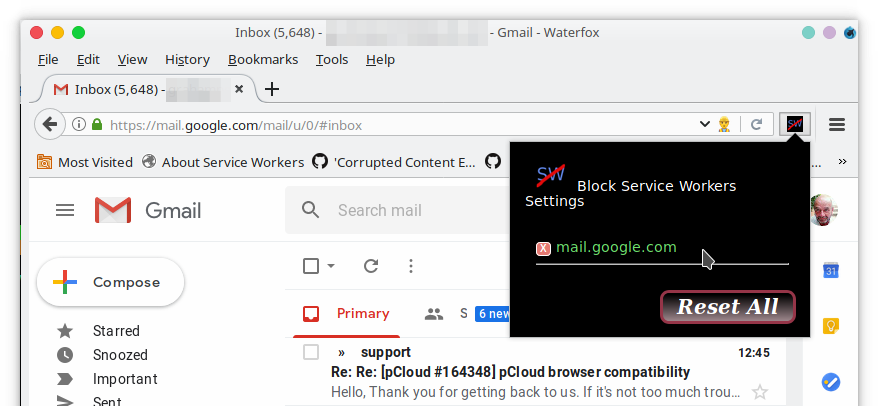
– the yellow in the address bar is the icon of Service Worker Detector and sure enough, after having the worker active, the _corrupted content_ error was easily reproducible – closure followed by use of the History menu to reopen.
Two possible explanations:
- I merely imagined (did not truly perform) un-registration of the service worker
- the intended block was evaded (maybe _momentary_ ineffectiveness e.g. Mozilla bug 1378459 - (webextensions-startup) [meta] Allow some addon functionality to load prior to any content loading).
Some add-ons are more susceptible to bug 1378459 than others. If (2) it's true that the block was evaded in this case, honestly I'm not worried; in all subsequent tests with the same profile, Block Service Workers was entirely robust.
grahamperrin
on 1 Mar 2019
Review in the context of https://github.com/MrAlex94/Waterfox/pull/1203#issuecomment-547815402
Reproducible with Waterfox Classic 56.2.14 (20191007063316) on FreeBSD-CURRENT with a newly registered service worker. Default UA:
Mozilla/5.0 (X11; FreeBSD amd64; rv:56.0) Gecko/20100101 Firefox/56.0 Waterfox/56.2.14
Not yet reproducible with Waterfox Classic 2019.10 (20191023220600) on Manjaro. More specifically:
- the usual 'tricks' to get the service worker have not yet gained the worker.
Default UA:
Mozilla/5.0 (X11; Linux x86_64; rv:56.0) Gecko/20100101 Firefox/56.0 Waterfox/56.3
grahamperrin
on 1 Nov 2019
the usual 'tricks' to get the service worker have not yet gained the worker.
Ignore that. My bad, apologies.
I forgot, Block Service Workers was enabled and at some time in the past, I had carelessly allowed a block.
With the (Block Service Workers) allowance removed – after gaining the worker – the bug is reproducible with Waterfox Classic 2019.10 on Linux.
grahamperrin
on 1 Nov 2019
Waterfox Classic
Speed-reading #1331 alongside #1333
Rewind to mid-March 2019. tl;dr
- service workers were enabled by default in Waterfox 56.2.7.1, disabled by default in 56.2.8 (2019-03-14) – https://github.com/MrAlex94/waterfox/compare/56.2.7.1...56.2.8
- after 56.2.8 was released, for Gmail (and for WhatsApp Web) I advised users to re-enable service workers to allow un-registration of the worker – https://www.reddit.com/r/waterfox/comments/b1tm2f/-/eiogqvc/ (and https://www.reddit.com/r/waterfox/comments/b151j7/-/eijtejp/, which refers to https://github.com/MrAlex94/Waterfox/commit/521afd50114f7814ad7f0c013fd7c3dfad15d4e5#commitcomment-32749782).
From the latter:
Simply disabling service workers might not make … reliable for users who gained a worker before the change of preferences. …
I never found enough time to make the situation consistently reproducible, but I do recall being surprised at the apparent need to un-register – not only disable – a service worker in some cases.
Defocusing from Gmail with Waterfox Classic …
Watefox Current
See #1076
grahamperrin
on 30 Dec 2019
Related issues
 GitCurious
·
3Comments
GitCurious
·
3Comments
 sutex
·
3Comments
sutex
·
3Comments
 iGlitch
·
3Comments
GitCurious
·
3Comments
iGlitch
·
3Comments
GitCurious
·
3Comments
 foreachthing
·
3Comments
foreachthing
·
3Comments