Waterfox: Scrollbars disappear on Github
Waterfox 56.1.0 (Self build, but not 100% sure the exact commit. This issue definitely started before the update to new Skia.)
Xubuntu 18.04 64-bit
new profile
Steps to reproduce:
1) un-maximise the Waterfox window if it's maximised
2) go to about:addons by typing it in the address bar
3) go to github.com/MrAlex94/Waterfox/issues by typing it in the address bar
Expected results: see a scrollbar on the right
Actual results: No scrollbar. It's not even invisible-but-there. It's just gone. I have to use mouse wheel to scroll.
I'm not 100% sure the exact commits of my good build & my bad build, but maybe we can guess from build ID? I'm pretty sure all my recent builds are from latest master at the time. Certainly the first bad one was.
Good:
Services.appinfo.platformBuildID
"20180430210556"
Likely built from https://github.com/MrAlex94/Waterfox/commit/d5c25411b0838a4578f8a96aa2e09568d900e9b6
Bad:
Services.appinfo.platformBuildID
"20180512115828"
Likely built from https://github.com/MrAlex94/Waterfox/commit/2bb1a86e5dbd601cd3b8812e45b69060e1f636de
 laniakea64
All 9 comments
These messages appear in the Browser Console when this issue occurs -
Content Security Policy: The page’s settings blocked the loading of a resource at chrome://global/content/bindings/scrollbar.xml (“default-src 'none'”).  (unknown)
Content Security Policy: The page’s settings blocked the loading of a resource at chrome://global/content/platformHTMLBindings.xml (“default-src 'none'”).  (unknown)
This regression is caused by https://github.com/MrAlex94/Waterfox/commit/55bef81d59af600d8b68bfd51d654dc887203176 . Reverting that commit fixes this issue.
laniakea64
on 13 May 2018
Can you reproduce with e10s disabled? 55bef81d59af caused 2 more regressions (425c5a6ff8fc, e8f515046724) but they look unrelated.
 jbeich
on 13 May 2018
jbeich
on 13 May 2018
Can you reproduce with e10s disabled?
I'm not seeing this with e10s disabled.
laniakea64
on 13 May 2018
Yep, https://testpilot.firefox.com/ is similarly affected with multi-process enabled:
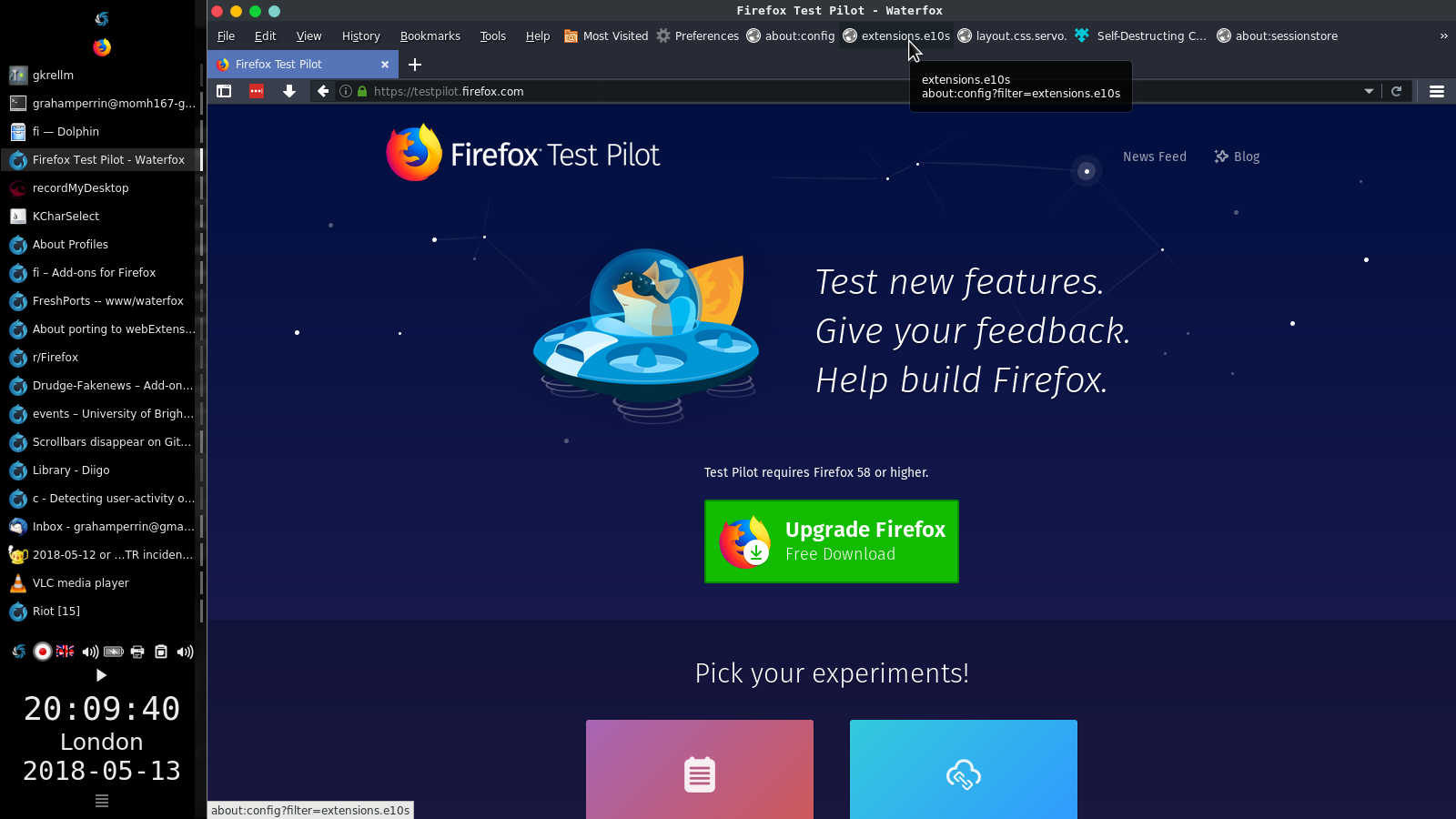
Content Security Policy: The page's settings blocked the loading of a resource at chrome://global/content/bindings/scrollbar.xml ("default-src https://testpilot.firefox.com").
56.1.0.89 on FreeBSD-CURRENT.
 grahamperrin
on 13 May 2018
grahamperrin
on 13 May 2018
So the "fix" is this bug, but even after applying it CSP still blocks. Since Mozilla marked as Firefox 60 and below unaffected, I'm going to revert the patch for now, unless anyone else has any ideas.
 MrAlex94
on 15 May 2018
MrAlex94
on 15 May 2018
It's probably obscure enough to not block 56.2.0 release. I say _probably_ because (with e10s disabled so often) I might have missed other examples.
Maybe mention it in the 56.2.0 blog post amongst a shortlist of known issues, with a simple workaround:
- tab ▶ context menu ▶ Open in new non-e10s window
… any ideas.
Yesterday I thought of https://github.com/mozilla/testpilot/issues/2827 wondering whether it (or a related commit) might help to more positively identify a fix but somehow I doubt it.
grahamperrin
on 15 May 2018
already reverted - https://github.com/MrAlex94/Waterfox/commit/f18036641cb4f7921782d58598ffae1c13609ec8
laniakea64
on 15 May 2018
It causes other issues, if a website uses strict CSP then it blocks
in-browser elements (such as XML, which is why the scroll bar ends up being
blocked).
On 15 May 2018 at 04:49, laniakea64 notifications@github.com wrote:
already reverted - f180366
https://github.com/MrAlex94/Waterfox/commit/f18036641cb4f7921782d58598ffae1c13609ec8—
You are receiving this because you commented.
Reply to this email directly, view it on GitHub
https://github.com/MrAlex94/Waterfox/issues/554#issuecomment-389034275,
or mute the thread
https://github.com/notifications/unsubscribe-auth/AEgoWBGQudIykjQEoOnoCSGlr-ac3E_fks5tylBEgaJpZM4T8pLi
.
MrAlex94
on 15 May 2018
538
grahamperrin
on 15 May 2018
Related issues
 9jkh
·
4Comments
9jkh
·
4Comments
 fghsgh
·
4Comments
fghsgh
·
4Comments
 GitCurious
·
3Comments
GitCurious
·
3Comments
 hook321
·
4Comments
hook321
·
4Comments
 ghost
·
4Comments
ghost
·
4Comments