Is there no way to install chrome style extensions through the program? I want to be able to install them whether it be from a file on github or the local hard drive.
My first extension for waterfox: https://github.com/kaecy/waterfox_uri
It just redirects waterfox.org to the actual waterfox home page. But there's no way to install it locally like a regular extension.
 kaecy
kaecy
All 5 comments
I think that this is what you want:
https://addons.mozilla.org/firefox/addon/chrome-store-foxified/
_Keep in mind though, if the developer offers the same extension for Firefox / Waterfox, installing the FF/WF version is always preferable._
 Peacock365
on 9 May 2018
Peacock365
on 9 May 2018
there's no way to install it locally like a regular extension.
What happens when you attempt to do so?
 laniakea64
on 9 May 2018
laniakea64
on 9 May 2018
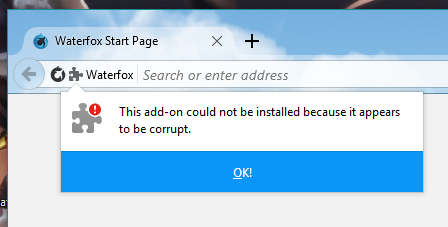
It works with signed extensions but not with non-signed extensions.
kaecy
on 9 May 2018
Unsigned WebExtensions work fine for me. Your example extension requires signing because its manifest.json doesn't specify an addon ID. See https://developer.mozilla.org/Add-ons/WebExtensions/WebExtensions_and_the_Add-on_ID
laniakea64
on 9 May 2018
Yeah that was it. I saw that error in the browser window but I didn't think it was important. Thanks. I'll be releasing unsigned extensions from now on. 😄
kaecy
on 9 May 2018
Related issues
 sutex
·
3Comments
laniakea64
·
3Comments
sutex
·
3Comments
laniakea64
·
3Comments
 grahamperrin
·
4Comments
grahamperrin
·
4Comments
 hook321
·
4Comments
hook321
·
4Comments
 fghsgh
·
4Comments
fghsgh
·
4Comments
Most helpful comment
Unsigned WebExtensions work fine for me. Your example extension requires signing because its
manifest.jsondoesn't specify an addon ID. See https://developer.mozilla.org/Add-ons/WebExtensions/WebExtensions_and_the_Add-on_ID