watchman CI artifacts download failed.
I tried to download the latest windows binaries on https://github.com/facebook/watchman/runs/351164043.
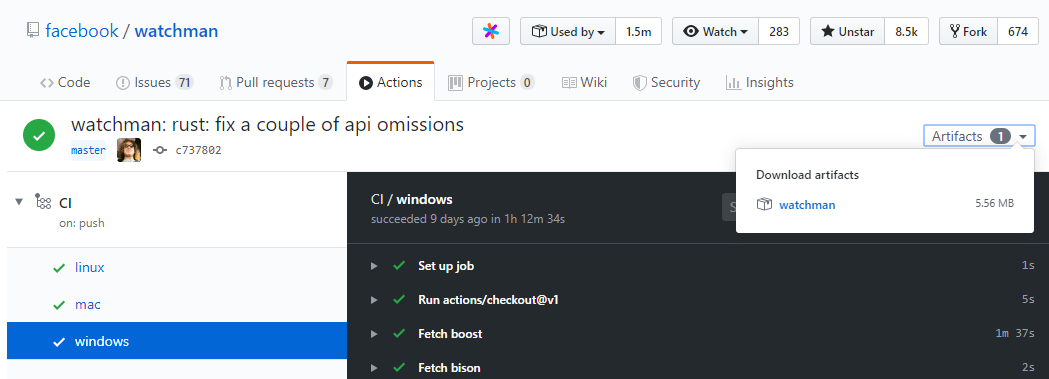
But When I click the link and try to download, the downloaded file changes everytime. I have tried many times, all failed.
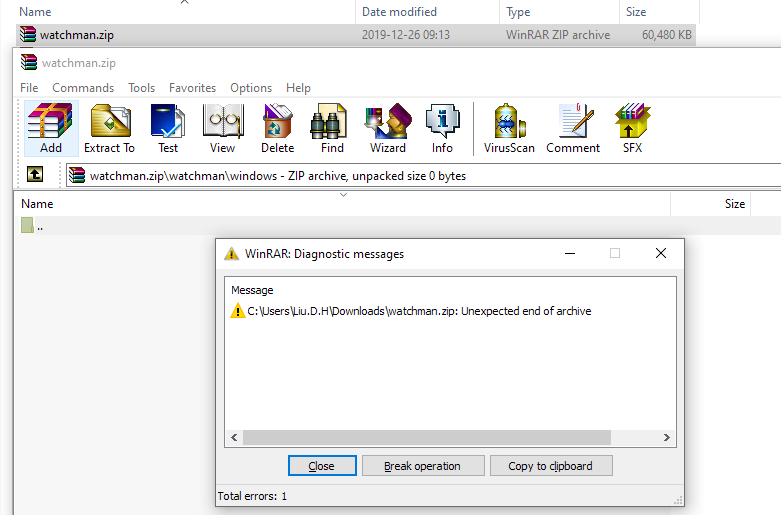
Could we publish the files in the github release. It is more easy for downloading.
 liudonghua123
All 12 comments
Watchman is required for Flipper. I can't believe this is still unresolved. It's been more than 2 months.
 jamolkhon
on 1 Mar 2020
jamolkhon
on 1 Mar 2020
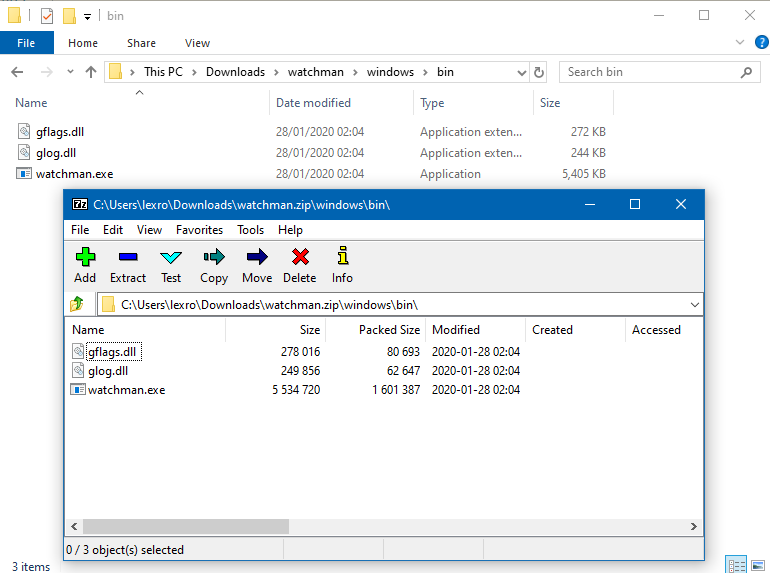
I'm able to download https://github.com/facebook/watchman/suites/423326153/artifacts/1382043 and extract it with 7zip without trouble?
 Lexicality
on 4 Mar 2020
Lexicality
on 4 Mar 2020
It seems like the artifacts link only works when you are authenticated to GitHub. So for example, simply downloading via curl will not be sufficient.
 milesrichardson
on 15 Mar 2020
milesrichardson
on 15 Mar 2020
@milesrichardson Hi, I have logined to Github, but the problem still exists.
Can we push the binary to the release page? It's more easier for downloading.
liudonghua123
on 15 Mar 2020
Same here. I want to be able to wget this from a shell script for unattended install. This is a nightmare and a completely non-standard way of doing things...
Also, your Linux CI builds try to load their libraries from relative paths that do not exist in the archive:
> ldd watchman | grep 'not found'
    _artifacts/linux/lib/libgflags.so.2.2 => not found
    _artifacts/linux/lib/libglog.so.0 => not found
No amount of LD_LIBRARY_PATH is going to solve that without creating more paths, or I have to use patchelf to fix the paths in the binary. Not very helpful.
Sorry if I sound pissed, that's because I am :smiley_cat: I've now switched to trying to build it on CentOS 6.x, but that fails because of undefined references (to internal functions)...
 woopla
on 1 Apr 2020
woopla
on 1 Apr 2020
@woopla I got watchman to work in docker a few weeks ago. I was just testing it, and am not running this in production (no guarantees), but it builds. You still need to figure out how to configure watchman. But, feel free to use it as a starting point
build_watchman.sh
#!/usr/bin/env bash

THIS_DIR="$(cd -P -- "$(dirname -- "$0")" && pwd -P)"

WATCHMAN_TAG="${WATCHMAN_TAG-"v4.9.0"}"

export DOCKER_BUILDKIT=1
docker build "$THIS_DIR" -f watchman.dockerfile \
    --build-arg WATCHMAN_TAG"=${WATCHMAN_TAG}" \
    -t acmeco/watchman:${WATCHMAN_TAG} \
&& docker tag acmeco/watchman:${WATCHMAN_TAG} acmeco/watchman:latest \
&& exit 0

exit 1
watchman.dockerfile
# syntax = docker/dockerfile:experimental

FROM ubuntu:latest AS build_phase

RUN --mount=type=cache,target=/var/cache/apt --mount=type=cache,target=/var/lib/apt apt-get update -qq \
    && apt-get install -yy \
    wget \
    autoconf \
    automake \
    build-essential \
    git \
    libssl-dev \
    libtool \
    pkg-config \
    python-dev \
    python-setuptools

ARG WATCHMAN_TAG=v4.9.0

RUN git clone https://github.com/facebook/watchman.git -b "${WATCHMAN_TAG}" --depth 1

RUN cd watchman \
    && ./autogen.sh \
    && ./configure \
    && make \
    && make install

FROM ubuntu:latest

COPY --from=build_phase \
    /usr/lib/x86_64-linux-gnu/libcrypto.so.1.1 \
    /usr/lib/x86_64-linux-gnu/libstdc++.so.6 \
    /usr/lib/x86_64-linux-gnu/

COPY --from=build_phase /lib64/ld-linux-x86-64.so.2 /lib64/ld-linux-x86-64.so.2

COPY --from=build_phase /lib/x86_64-linux-gnu/libpthread.so.0 \
    /lib/x86_64-linux-gnu/libgcc_s.so.1 \
    /lib/x86_64-linux-gnu/libc.so.6 \
    /lib/x86_64-linux-gnu/libdl.so.2 \
    /lib/x86_64-linux-gnu/libm.so.6 \
    /lib/x86_64-linux-gnu/

COPY --from=build_phase /watchman/watchman /usr/local/bin

ENTRYPOINT ["watchman"]
libraries are loaded:
root@0eed32194f8c:/# ldd $(which watchman)
        linux-vdso.so.1 (0x00007ffdec0da000)
        libcrypto.so.1.1 => /usr/lib/x86_64-linux-gnu/libcrypto.so.1.1 (0x00007f4287efd000)
        libpthread.so.0 => /lib/x86_64-linux-gnu/libpthread.so.0 (0x00007f4287cde000)
        libstdc++.so.6 => /usr/lib/x86_64-linux-gnu/libstdc++.so.6 (0x00007f4287955000)
        libgcc_s.so.1 => /lib/x86_64-linux-gnu/libgcc_s.so.1 (0x00007f428773d000)
        libc.so.6 => /lib/x86_64-linux-gnu/libc.so.6 (0x00007f428734c000)
        libdl.so.2 => /lib/x86_64-linux-gnu/libdl.so.2 (0x00007f4287148000)
        /lib64/ld-linux-x86-64.so.2 (0x00007f42886b1000)
        libm.so.6 => /lib/x86_64-linux-gnu/libm.so.6 (0x00007f4286daa000)
Thanks, @milesrichardson. I started playing with the Docker instance, but the container kept erroring out because it could not create files in /usr/local/var/run. That looked weird to me (var belongs to /, never saw it in /usr/local), plus I wanted this to be available from CentOS 6.x anyway (Docker ain't properly supported there).
In the end, I got it working natively by using the DTS6 compiler collection from RedHat, along with ./configure --enable-lenient and a patch to get a test to pass. I gleaned the last two items from other issues on Github.
woopla
on 10 Apr 2020
Starting today, we have weekly tags with binaries uploaded to them: https://github.com/facebook/watchman/releases/latest
 wez
on 14 Jul 2020
wez
on 14 Jul 2020
@wez you need to build the watchman binary differently:
> ldd bin/watchman
    linux-vdso.so.1 (0x00007fff2cf68000)
    /usr/local/lib/libgflags.so.2.2 => not found
    /usr/local/lib/libglog.so.0 => not found
    libcrypto.so.1.1 => /lib64/libcrypto.so.1.1 (0x00007f75dd71f000)
    libdl.so.2 => /lib64/libdl.so.2 (0x00007f75dd51b000)
    libpthread.so.0 => /lib64/libpthread.so.0 (0x00007f75dd2fb000)
    libstdc++.so.6 => /lib64/libstdc++.so.6 (0x00007f75dcf66000)
    libm.so.6 => /lib64/libm.so.6 (0x00007f75dcbe4000)
    libgcc_s.so.1 => /lib64/libgcc_s.so.1 (0x00007f75dc9cc000)
    libc.so.6 => /lib64/libc.so.6 (0x00007f75dc609000)
    libz.so.1 => /lib64/libz.so.1 (0x00007f75dc3f2000)
    /lib64/ld-linux-x86-64.so.2 (0x00007f75e8572000)
The libraries search path should not be /usr/local/lib, because that forces me to put them there, not on (say) an NFS mount so it's available to our thousands of hosts that our users might choose.
woopla
on 14 Jul 2020
These binaries are built for deployment to /usr/local/.
I have a doc update pending review that will explain this a bit better.
For relocatable watchman, my rough plan is to ship an AppImage so that it is self contained and can run from anywhere.
wez
on 14 Jul 2020
AppImage ain't gonna work :( We still (sigh) have a lot of CentOS 6.x boxes... Guess I'll have to keep building it manually :)
woopla
on 14 Jul 2020
Support for centos would be nice. We also have a lot of centos 7 and soon 8 boxes
 sluongng
on 18 Jul 2020
sluongng
on 18 Jul 2020
Related issues
 the-simian
·
5Comments
the-simian
·
5Comments
 artem-solovev
·
4Comments
artem-solovev
·
4Comments
 yangzhichina
·
5Comments
yangzhichina
·
5Comments
 habeebrahmanpt
·
5Comments
habeebrahmanpt
·
5Comments
 marco-ms
·
3Comments
marco-ms
·
3Comments
Most helpful comment
@milesrichardson Hi, I have logined to Github, but the problem still exists.
Can we push the binary to the release page? It's more easier for downloading.