Watchman: Downloading latest windows builds gives non-functional watchman
The link to download the latest watchman build leads users to download builds which are failing on Appveyor. This leads them to raise issues like #681 and #675. Expecting them to download dlls provided by other well meaning peers is not secure, as seen here: https://github.com/facebook/watchman/issues/627#issuecomment-464461216.
The workaround
The trick is to download a build from Appveyor which is passing. So, head to the source of the Windows builds: https://ci.appveyor.com/project/wez/watchman/history, and keep scrolling down and click Show More until you see a build which is passing (green border):
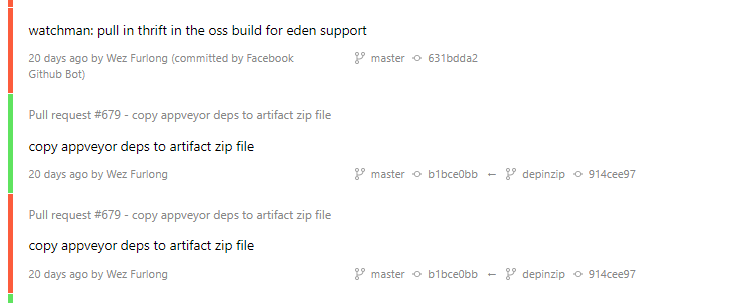
Click on the commit message to go to that build, then click the "Artifacts" link to view the artifacts page:
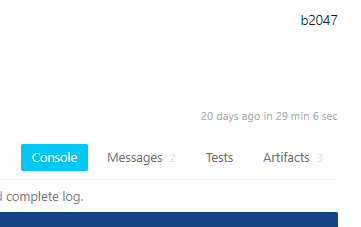
where you can download the watchman.zip file:

Extract all the useful contents (*.exe, *.dll) and put them somewhere in your path. I put them in a folder called C:\bin\misc. Then open a new cmd or powershell, and run watchman version. It should work.
 kumarharsh
All 6 comments
For the record, this is the latest passing build for Windows: https://ci.appveyor.com/project/wez/watchman/builds/22125585/artifacts
Follow the instructions above to get a working watchman.
kumarharsh
on 25 Feb 2019
Thanks for digging into this; I'm glad you found a build with those deps included.
 wez
on 27 Feb 2019
wez
on 27 Feb 2019
I've adjusted the download link to reference that particular build for the time being
wez
on 28 Feb 2019
第一次用,就不会安装
 chaojiangcn
on 20 Jun 2019
chaojiangcn
on 20 Jun 2019
I've kept scrolling but all builds seem to be failing
 damiangreen
on 11 Sep 2019
damiangreen
on 11 Sep 2019
@damiangreen This was the latest build I found that was passing: https://ci.appveyor.com/project/wez/watchman/builds/24658997/artifacts
 zeldafreak
on 14 Sep 2019
zeldafreak
on 14 Sep 2019
Related issues
 1st1
·
3Comments
1st1
·
3Comments
 ideahitme
·
5Comments
ideahitme
·
5Comments
 czbaker
·
7Comments
czbaker
·
7Comments
 rahulk8
·
5Comments
rahulk8
·
5Comments
 habeebrahmanpt
·
5Comments
habeebrahmanpt
·
5Comments
Most helpful comment
@damiangreen This was the latest build I found that was passing: https://ci.appveyor.com/project/wez/watchman/builds/24658997/artifacts