Wasm-pack: docs: add documentation for working with wasm-pack outside of template
💡 Feature description
Although the template is a helpful resource to get started with wasm-pack, I find that documentation for working with it in more complex situation is lacking.
I am hoping that people who are also working outside of the provided template might jump in with some of the things they've had to tweak, so we can gather a wider range of use cases \o/
I've gathered a few things that I've ran into. Hopefully at least some of this information is useful for putting together more extensive documentation.
Importing async
To be able to add .wasm to the project, it needs to be imported async. Templates use a wrapper file to wrap the entire application in an async import. Subsequently, you can do a standard import of your webpack module. @ashleygwilliams helped me out figuring this out with a drawing, I made v2.0 of the said drawing:
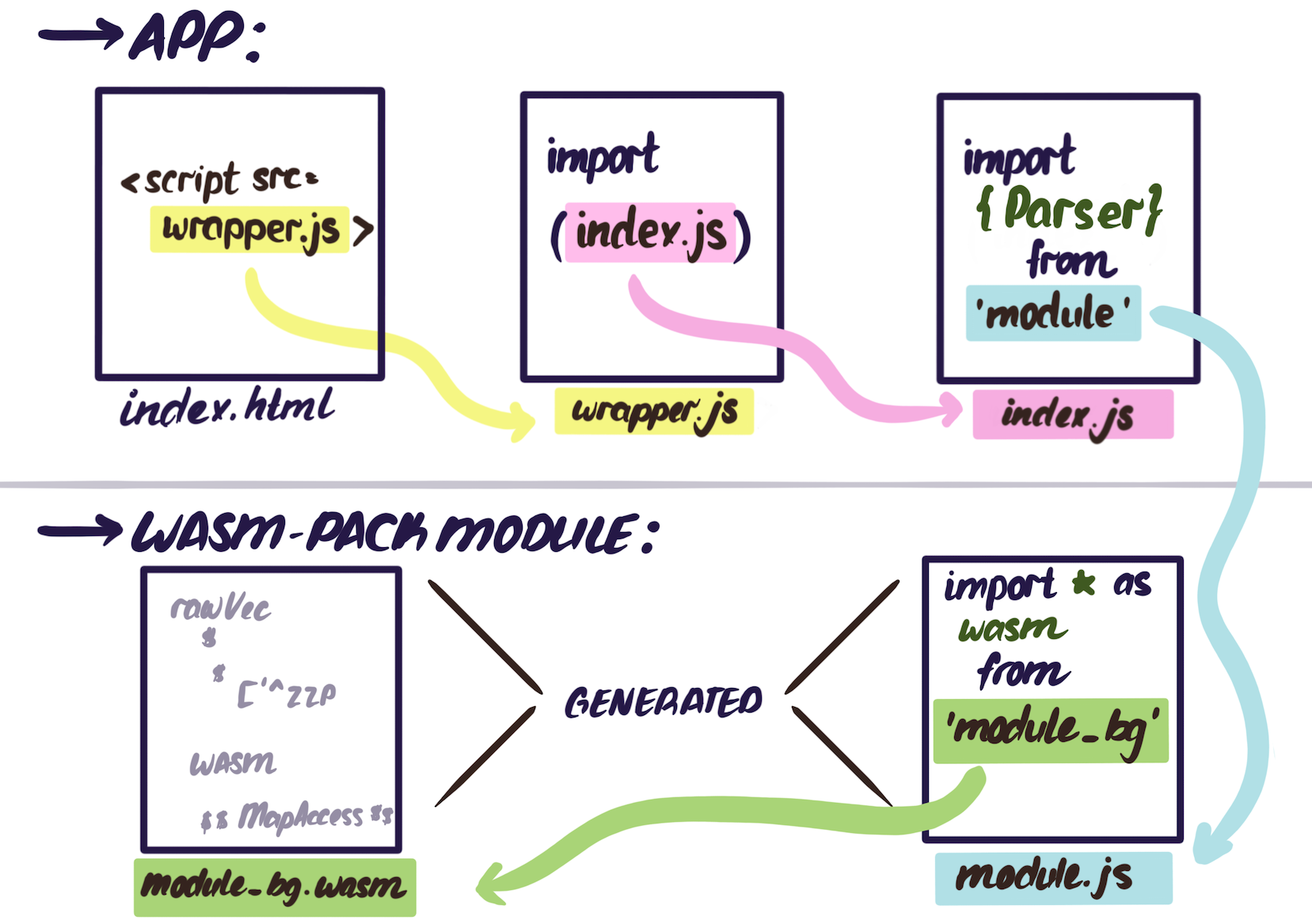
This approach works if you are able to change the way your application builds. For those who are _not_ able to change to their build, I solved the problem with just a dynamic import of the my module:
Dynamic import does not work everywhere (can i use), so one will very likely require a babel plugin to handle this. babel-plugin-syntax-dynamic-import is what i used:
js
  // in .babelrc
  {
    "plugins": [
      "syntax-dynamic-import"
    ]
  }
Otherwise you end up with this error:

Then inside the project something like this can be done:
```js
// initial import that will have to be used as a promise later on in code
const schemaWasm = import('mongodb-schema-parser');function getSchema(doc) {
// .then on the previously imported module
schemaWasm
.then(module => {
// use the module's API
const schemaParser = new module.SchemaParser();
schemaParser.write(doc)
return schemaParser.toJson();
})
.catch(e => return new Error(Error in mongodb-schema-parser ${e}))
}
```
Webpack configuration
Depending on people's webpack version and build target a few options are possible:
- build target that's _not_
electron-renderercan use webpack < 4.x, but a few things might need to be added:
- if default resolve extensions were overwritten by base config, might have to add
.wasmto that array. For example:
js
extensions: ['.js', '.jsx', '.json', 'less', '.wasm']
Otherwise you get errors like these:

- if default resolve extensions were overwritten by base config, might have to add
- _i think_ (but might be wrong) you might need to add a wasm loader plugin. I've used this one when experimenting and it worked quite well. It just needs to be added to module rules:
js
    module: {
      rules: [{
        test: /\.wasm$/,
        include: [/node_modules/],
        use: [ { loader: 'wasm-loader'} ]
      }]
    }
Otherwise you get a bunch of these errors:

- if people are building electron (like me), webpack did not support wasm with electron target so people will need to upgrade to webpack > 4.16.0. Likely nothing will have to be done to the loader, but depending on whether
resolve extensionshave been overwritten,.wasmmight need to be added to that.
 lrlna
lrlna
All 7 comments
@lrlna would you be interested in adding some of this documentation? I'd welcome PRs and would be happy to help you get started if you'd like! Let me know!
 ashleygwilliams
on 22 Feb 2019
ashleygwilliams
on 22 Feb 2019
hey @ashleygwilliams yea I can add some of this in sometime in the next two weeks. If anyone has different experiences, we can always update I suppose! Where does the book's source live exactly? And what section would you like me to add this to?
lrlna
on 25 Feb 2019
Thanks for writing such a detailed issue! I'm having the issue you describe can result from not having
@babel/plugin-syntax-dynamic-import ... but i think I do have this plugin. It's possible I've just made other webpack errors, but posting this in case others are experiencing the problem
 MaxBittker
on 4 Mar 2019
MaxBittker
on 4 Mar 2019
oh... there's a bug in webpack 4.29.0
https://github.com/webpack/webpack/issues/8656
MaxBittker
on 4 Mar 2019
@MaxBittker, yep there was a bug last week! Try and see if 4.29.6 works for you (it worked for me).
lrlna
on 4 Mar 2019
Hi @lrlna, thanks for the drawing. It makes the whole import process very clear. I am now trying to figure out how to import a wasm module in an Electron app and have no idea to do so. Is that possible to provide some more information about how to do it please?
 lirhtc
on 5 Apr 2019
lirhtc
on 5 Apr 2019
hey @lirhtc! if you have webpack > 4.16.0, you should be able to import as is wherever you need it. If you have babel running, I'd also add this babel-dynamic-import-plugin. I think the first two steps I've outlined in Importing Async + having webpack > 4.16.0 _should_ work. Let me know if it doesn't! Happy to help brainstorm!
// import that works in my setup with electron 3.0.7 and webpack 4.29.6
var wasm = import('wasm')
function runWasmAction (param) {
  // .then on the previously imported module
  wasm
    .then(module => {
      // use your module's API
    })
    .catch(e => return new Error(`Error in wasm module ${e}`))
}
Related issues
 jsheard
·
4Comments
jsheard
·
4Comments
 rpjohnst
·
5Comments
rpjohnst
·
5Comments
 gliheng
·
3Comments
gliheng
·
3Comments
 turboladen
·
4Comments
turboladen
·
4Comments
 Outpox
·
4Comments
Outpox
·
4Comments