Warehouse: Autocomplete in the project search box
Tip
Support for autocomplete in the project search box on the home page. Maybe using algolia (https://www.algolia.com) would be a good solution.
 renatoassis01
All 14 comments
Thanks for the suggestion, @renatoassis! I think #3462 and #727 might be relevant here -- in fact, depending on how we decide on #3462, this may be a duplicate of that.
@renatoassis are you by any chance interested in working on this?
 brainwane
on 1 Apr 2018
brainwane
on 1 Apr 2018
I think this could probably be done with our existing Elasticsearch queries (which we already have) rather than another tool.
 di
on 2 Apr 2018
di
on 2 Apr 2018
@brainwane I'd love to, but I'm still new to programming = /. One day I'll contribute to some opensource project. Thanks for the invitation :)
renatoassis01
on 2 Apr 2018
I would like to look into this @brainwane
 waseem18
on 2 Apr 2018
waseem18
on 2 Apr 2018
@waseem18 great, looking forward to you working on it! I'm not sure how autocomplete stuff would end up affecting caching, performance, and stuff like that, so it's probably going to be an iterative process, adding that feature, where you share thoughts with us and we talk about pitfalls.
Thanks so much.
brainwane
on 2 Apr 2018
I've been working on this issue since a couple of days and this is what I came up with. This is an initial version and can be improved in terms of both UX/UI and ES queries. After some more changes, I'll put in a WIP PR.
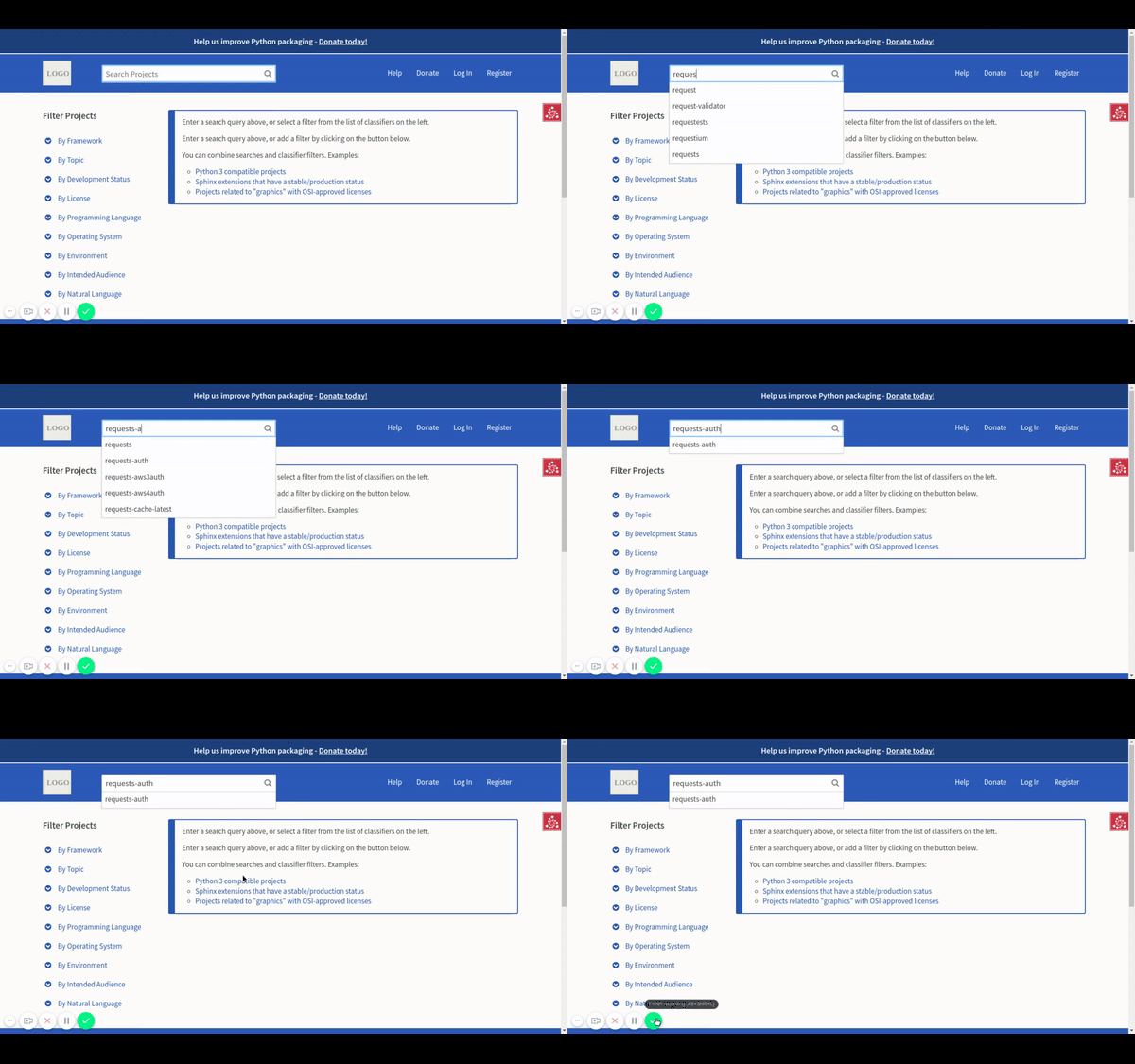
@nlhkabu Whenever you're free could you please help me with the UX? Thanks
waseem18
on 8 Apr 2018
hi @waseem18 - this is awesome!
I think for this feature we should very heavily model ourselves on Google auto complete. One thing they do which is cool is highlight the section of the search term which is unmatched:
Example:
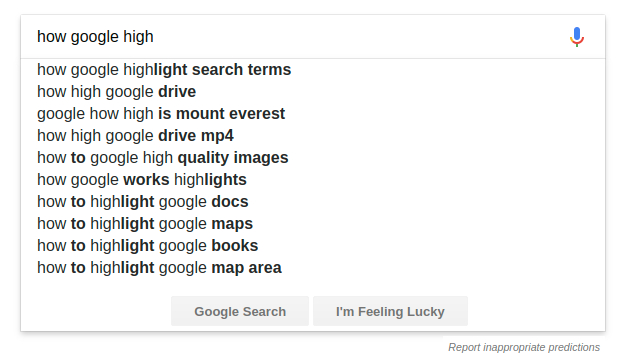
Would something like this be possible?
It's worth also testing in advance how this works for users using only their keyboard. Can they tab through the suggestion list?
Thanks again!!!
 nlhkabu
on 9 Apr 2018
nlhkabu
on 9 Apr 2018
Can they tab through the suggestion list?
I feel using up and down arrow keys would be more intuitive (that's what Google does). :)
 pradyunsg
on 9 Apr 2018
pradyunsg
on 9 Apr 2018
@nlhkabu Highlighting the matched or unmatched terms is really cool. I got an idea on how to implement this and will put it in my PR today.
And as @pradyunsg pointed it would be more intuitive to use up and down arrow keys rather than tabs.
waseem18
on 9 Apr 2018
@waseem18 How's that PR coming?
di
on 19 Apr 2018
Hey @di
Sorry for the delay. I couldn't put the PR due to office work load. I'll create a PR today.
waseem18
on 19 Apr 2018
@waseem18 No worries! Just wanted to help get you unstuck if you were blocked on something.
di
on 19 Apr 2018
We made a working demo of this with the open source MeiliSearch:
https://pypi.meilisearch.com/
https://github.com/meilisearch/meilisearch-python
This could also be extended to support the more advanced features discussed in #727. If the warehouse devs are interested in using MeiliSearch we'd be happy to discuss it here or by email: [email protected]
 erlend-sh
on 27 May 2020
erlend-sh
on 27 May 2020
Hi @erlend-sh, thanks! I opened https://github.com/pypa/warehouse/issues/8002 to discuss so we don't get off-topic here.
di
on 27 May 2020
Related issues
nlhkabu
·
4Comments
 gautamkrishnar
·
4Comments
gautamkrishnar
·
4Comments
 zt2
·
4Comments
zt2
·
4Comments
 toddrme2178
·
3Comments
toddrme2178
·
3Comments
 ewjoachim
·
3Comments
ewjoachim
·
3Comments
Most helpful comment
We made a working demo of this with the open source MeiliSearch:
https://pypi.meilisearch.com/
https://github.com/meilisearch/meilisearch-python
This could also be extended to support the more advanced features discussed in #727. If the warehouse devs are interested in using MeiliSearch we'd be happy to discuss it here or by email: [email protected]