Currently links to pypi.org shared on Twitter look pretty plain:

The grey icon is Twitter's default. We're setting an og:image meta tag, but there seems to be some additional metadata tags we can add.
https://github.com/pypa/warehouse/issues/2211 proposes being able to set this per-project, but for now, it'd be nice if this was the PyPI logo instead.
Also, Twitter provides a validator to test with: https://cards-dev.twitter.com/validator
Good First Issue: This issue is good for first time contributors. If you've already contributed to Warehouse, please work on another issue without this label instead. If there is not a corresponding pull request for this issue, it is up for grabs. For directions for getting set up, see our Getting Started Guide. If you are working on this issue and have questions, please feel free to ask them here, #pypa-dev on Freenode, or the pypa-dev mailing list.
 di
di
All 10 comments
Hi all, I'd like to give this a go
 jMuzsik
on 4 Mar 2018
jMuzsik
on 4 Mar 2018
@jMuzsik Sure, go ahead! (In case you didn't see the thumbs-up from Dustin.)
 brainwane
on 6 Mar 2018
brainwane
on 6 Mar 2018
Ok, forking right now, saw the triaging reference so I thought you guys were still talking about it. I think I'd like to pick up another good first issue as well as this one looks very easy.
jMuzsik
on 6 Mar 2018
Thanks, @jMuzsik! I am doing a big issue sweep right now and will be updating metadata for a bunch of issues -- whether they need triaging, which milestone (if any) they belong in, and so on. Sorry for the miscommunication.
Once you're done with this one, maybe you could do #3139, if no one has done it by then?
brainwane
on 6 Mar 2018
The confusing part about this issue is that (correct me if I am wrong) I cannot see if it works unless the code gets pulled in because I have no way to validate a card unless the site exists.
The problem is here:
I have two guesses, one is very likely the problem.
- SVG is not supported: Twitter Docs state:
twitter:image
A URL to a unique image representing the content of the page. You should not use a generic image such as your website logo, author photo, or other image that spans multiple pages. Images for this Card support an aspect ratio of 1:1 with minimum dimensions of 144x144 or maximum of 4096x4096 pixels. Images must be less than 5MB in size. The image will be cropped to a square on all platforms. JPG, PNG, WEBP and GIF formats are supported. Only the first frame of an animated GIF will be used. SVG is not supported.
- Or because the image is stored statically it is not being rendered.
I need something like this:
<meta property="og:image" content="http://graphics8.nytimes.com/images/2011/12/08/technology/bits-newtwitter/bits-newtwitter-tmagArticle.jpg" />
So ought I to add a jpg of the svg in the static images and then rewrite the metadata as so:
html
<meta property="og:image" content="{{ request.static_url('warehouse:static/dist/images/logo-large.jpg') }}">
jMuzsik
on 7 Mar 2018
@jMuzsik
The confusing part about this issue is that (correct me if I am wrong) I cannot see if it works unless the code gets pulled in because I have no way to validate a card unless the site exists.
Yes, this is true unless you use a service like https://ngrok.com/ to give you a public URL to your local dev environment to test.
SVG is not supported
Good catch! Seems like this is why. We'll have to generate a PNG from the SVG and add it to the pypi-theme repo (which is private). I'll create an issue there and put the blocked label on this issue until it's done and the image is available.
di
on 7 Mar 2018
We now have the following image which can be used for Twitter:

Which can be used with request.static_url('warehouse:static/dist/images/twitter.jpg'
di
on 16 Mar 2018
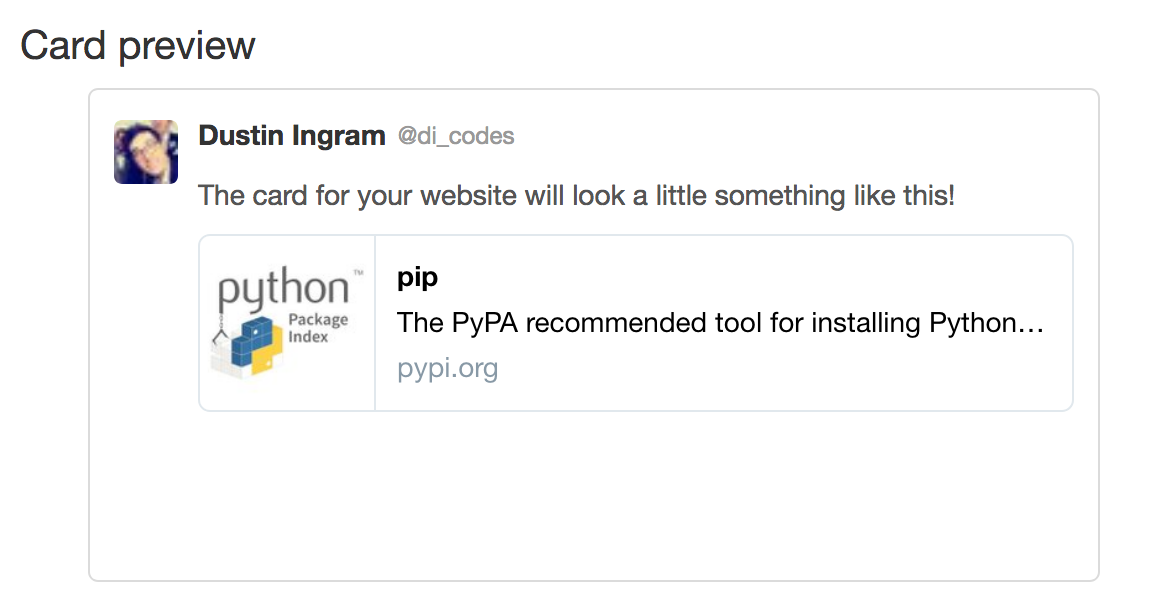
Looks great!
di
on 20 Mar 2018
I'm not sure why https://twitter.com/yera_ee/status/976472212889796609 by @yeraydiazdiaz doesn't look like that. Yeray tweeted it after we deployed the change on pypi.org. Screenshot:

brainwane
on 21 Mar 2018
Looks correct to me now:

Likely the project page hadn't fallen out of the cache yet, and this isn't really worth issuing a purge-all for.
di
on 21 Mar 2018
Related issues
 nlhkabu
·
4Comments
nlhkabu
·
4Comments
 gcochard
·
3Comments
gcochard
·
3Comments
 dstufft
·
3Comments
dstufft
·
3Comments
 NathanBnm
·
3Comments
nlhkabu
·
4Comments
NathanBnm
·
3Comments
nlhkabu
·
4Comments