Wappalyzer: Corrupted in Edge Chromium
Platform
Which platform does the bug apply to?
- Microsoft Edge Chromium Extension
- MacOS Catalina and Microsoft Windows
Describe the bug
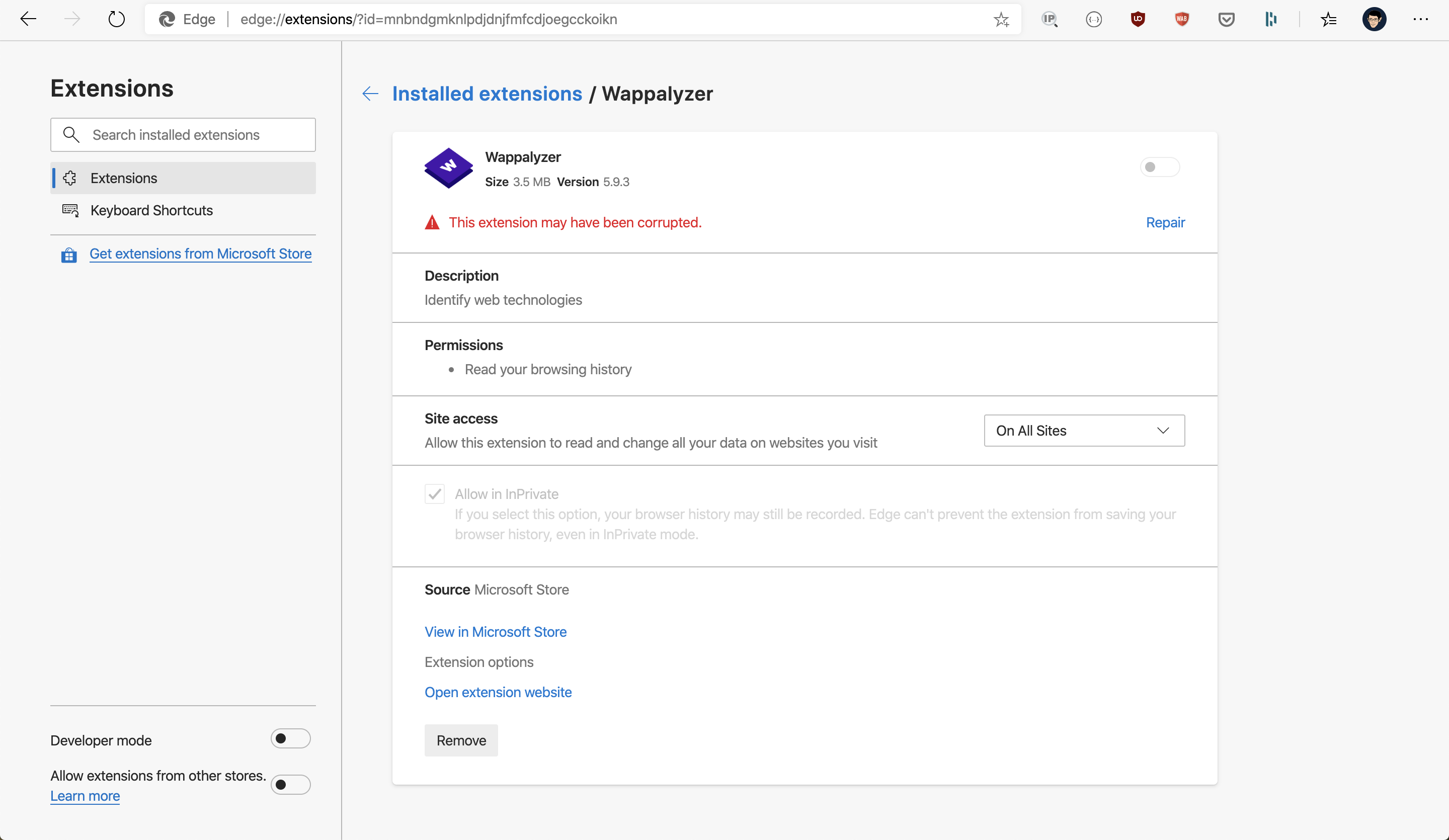
Additional context
I tried to repair, but it still happens.
 riipandi
All 13 comments
I'm getting the same exact error.
 Uriel1339
on 5 Feb 2020
Uriel1339
on 5 Feb 2020
I agree, I am also having issues with wappalyzer in the Edge Chromium browser as well.
 frederickalcantara
on 5 Feb 2020
frederickalcantara
on 5 Feb 2020
For me installing the chrome web store version fixes it atm
 unbekannt3DE
on 16 Feb 2020
unbekannt3DE
on 16 Feb 2020
Exact same error here. It shows the error messages sometimes though. It should be fixed asap as Edge seems to be an excellent alternative to Chrome.
 eristavi
on 15 Mar 2020
eristavi
on 15 Mar 2020
The latest version was just approved, please let me know if that fixes it.
 AliasIO
on 16 Mar 2020
AliasIO
on 16 Mar 2020
@AliasIO - nope, still breaks.
Uriel1339
on 17 Mar 2020
Same, still break for me.
riipandi
on 18 Mar 2020
Currently also getting this issue. I can repair it and it re-enables the plugin. Once I reload a website and click on the plugin it disappears from the toolbar and it shows the same error message again in the extensions overview.
 TheUnriashol
on 29 Mar 2020
TheUnriashol
on 29 Mar 2020
Just saw that the plugin got upgraded to 5.9.30 and got really excited since it was working while I stayed on Google. I went to YouTube and it immediately crashed again and shows the error message in the extensions overview.
So I repaired it and tried not going to YouTube but other websites and it seems to work. But as soon as I go back to YouTube it crashes again. Seems like some sort of technology that is running on YouTube causes Wappalyzer to crash.
TheUnriashol
on 1 Apr 2020
I'm unsure how to debug this as the console crashes along with the extension. I noticed on some sites it works fine (e.g. https://example.com), on some it crashes when the popup opens (https://www.wappalyzer.com) and on others it crashes immediately (https://www.youtube.com).
It only happens when the extension is installed from the Edge store. No issues installing it locally or from the Chrome store.
AliasIO
on 2 Apr 2020
After updating to 5.9.30, It's still broken.
 MarkSky
on 2 Apr 2020
MarkSky
on 2 Apr 2020
Microsoft has assured me they fixed the issue on their end. A new version is waiting approval now, as soon as that becomes available this should be resolved.
AliasIO
on 6 Apr 2020
This has now been resolved.
AliasIO
on 7 Apr 2020
Related issues
 smokeyflavor
·
8Comments
smokeyflavor
·
8Comments
 AlexByte
·
4Comments
AlexByte
·
4Comments
 madhavprabhu
·
11Comments
madhavprabhu
·
11Comments
 AdityaAnand1
·
8Comments
AdityaAnand1
·
8Comments
 faheel
·
3Comments
faheel
·
3Comments
Most helpful comment
Microsoft has assured me they fixed the issue on their end. A new version is waiting approval now, as soon as that becomes available this should be resolved.