Wappalyzer: Dropdown from Wappalyzer Icon Broken on Many Websites in Chrome
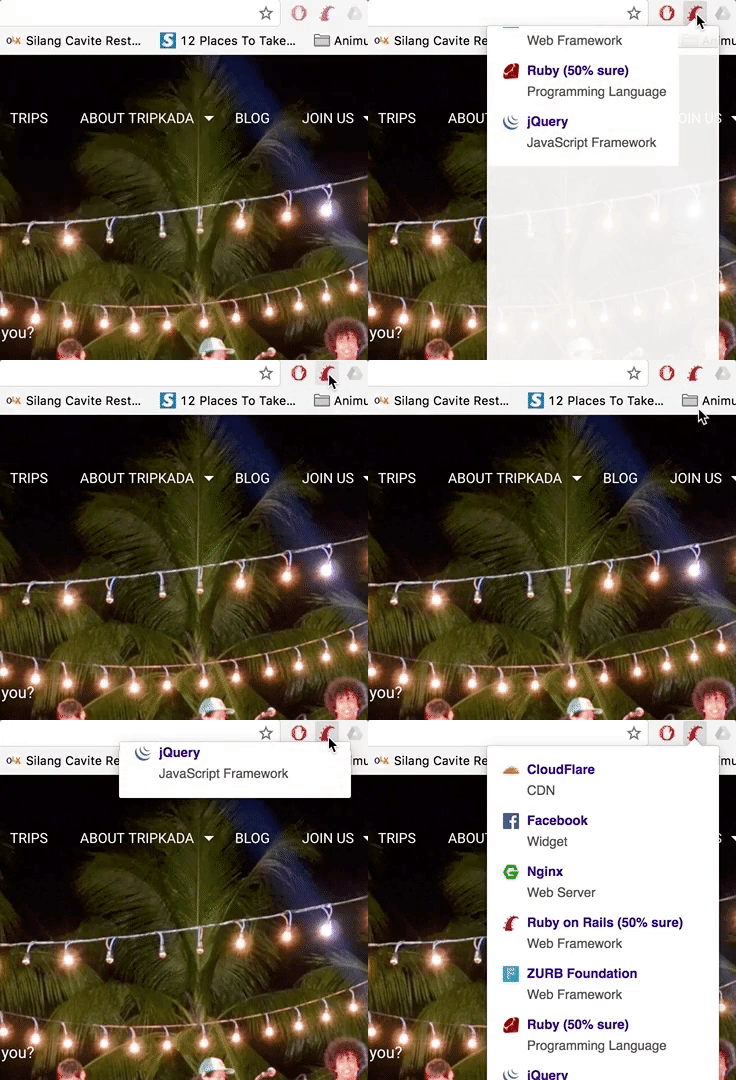
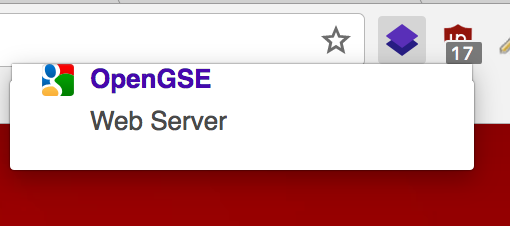
The dropdown display that appears when you click on the icon in Chrome is broken. It flashes for about a half second and then collapses so that you can only see one of the listed items. There's no way for you to see the rest of the items.
The weird thing is that sometimes it does work. I've attached two screenshots below that showcase what I'm talking about. One that is listed as "broken" and one that is listed as "not-broken". This is not my website, it's from the University of Cincinnati, although, this does happen on other sites as well.
I haven't encountered this issue in Firefox yet. Although it's possible I've been lucky so far using that browser.
I also want to note that I have tried disabling each extension and nothing changes this behavior in Wappalyzer.
Extensions I have installed on Chrome
- Accessibility Developer Tools
- Application Launcher for Drive (by Google) (Disabled)
- aXe
- Full Page Screen Capture
- Go Back with Backspace
- Google Docs
- Google Docs Offline (Disabled)
- Google Sheets
- Google Slides
- LastPass: Free Password Manager
- lipsum.com extension
- Page Analytics (by Google) (Disabled)
- uBlock Origin
- Wappalyzer
- Web Developer
Broken

Not Broken

 ghost
ghost
All 46 comments
Adding issue scenario sample in GIF
 edmandiesamonte
on 7 Apr 2017
edmandiesamonte
on 7 Apr 2017
Same error for me ,after upgrading to 4th version.
Chrome extensions:
Chameleon
JSON Viewer
 rezaghanbari
on 7 Apr 2017
rezaghanbari
on 7 Apr 2017
@PatriotRDX, @edmandiesamonte, @RezaGhanbari What version of Chrome do you have? You all seem to be on Mac OS. Also, please look around in the debugger for CSS or markup issues if you may: https://developer.chrome.com/extensions/tut_debugging#inspect-popup
 DaAwesomeP
on 9 Apr 2017
DaAwesomeP
on 9 Apr 2017
@DaAwesomeP I have the latest stable version, no Beta updates or anything along those lines...same with the extensions... I'll need to wait until I get back to work on Monday to try inspecting the pop-up.
ghost
on 9 Apr 2017
@DaAwesomeP Chrome version 55.0.2883.95 (64-bit) on macOS Sierra.
According to debugging link there is a css issue:
chrome-extension://gppongmhjkpfnbhagpmjfkannfbllamg/css/widgets.css Failed to load resource: net::ERR_FILE_NOT_FOUND
rezaghanbari
on 9 Apr 2017
@PatriotRDX @RezaGhanbari Thanks for checking! It's either that CSS file issue or another known Chromium issue:
https://bugs.chromium.org/p/chromium/issues/detail?id=307912
https://bugs.chromium.org/p/chromium/issues/detail?id=428044
https://bugs.chromium.org/p/chromium/issues/detail?id=317880
https://github.com/gorhill/uMatrix/issues/423
On 4/9/17 1:25, Reza wrote
@DaAwesomePhttps://github.com/DaAwesomeP Chrome version 55.0.2883.95 (64-bit) on macOS Sierra.
I also checked on Windows 8.1 and Ubuntu 16.04. That was okay.
DaAwesomeP
on 9 Apr 2017
@DaAwesomeP inspecting did not turn up much besides the console message that @RezaGhanbari found, that chrome-extension://gppongmhjkpfnbhagpmjfkannfbllamg/css/widgets.css was missing.
Granted I don't know a lot about Chrome development, since I'm just a regular old web designer/dev, but maybe this was a built-in file that was removed from Chrome on Mac for whatever reason?
ghost
on 10 Apr 2017
I appear to be reeving the same error on Windows, but I don't have any issues. I don't think that widget.css is really meant to exist anymore. It's probably residue in the HTML from the older Chrome-only driver. There is some other issue here.

Could you attach the extension file (in a ZIP or other archive) as it appears on your system? It should be the folder at ~/Library/Application Support/Google/Chrome/Default/Extensions/gppongmhjkpfnbhagpmjfkannfbllamg.
Have you tried completely uninstalling and reinstalling the extension? I don't have a Mac, so I can't reproduce this issue.
The only (and unrelated) issue I have on Chrome for Windows is that Chrome sometimes butchers the box shadow on the popup and just shows an ugly, thick black border.
DaAwesomeP
on 11 Apr 2017
@DaAwesomeP Yes I have tried completely uninstalling and reinstalling.
There is a link to widgets.css in popup.html but widgets.css file does not exist.

rezaghanbari
on 11 Apr 2017
Same issue here with Chrome 57.0.2987.133 on MacOS.
Need to click multiple on icon to show popup with info till the info will be shown correctly.
Same behavior on my macbook pro with same Chrome version.
 dmetzler1988
on 12 Apr 2017
dmetzler1988
on 12 Apr 2017
@RezaGhanbari Yes, widgets.css doesn't even exist in the source, but that is not the cause of the problem. There used to be a widgets.css, but it's not needed anymore. It's just still referenced in the HTML by mistake. I have a strong feeling that this is a very specific issue with Chrome for Mac.
@AliasIO thoughts?
DaAwesomeP
on 13 Apr 2017
@DaAwesomeP yes , it is a wrong reference in popup.html
rezaghanbari
on 13 Apr 2017
@DaAwesomeP I did uninstall/reinstall. I've attached the extension in a .zip file for you.
gppongmhjkpfnbhagpmjfkannfbllamg.zip
ghost
on 13 Apr 2017
Perhaps the issue is that Wappalyzer changes the height of the popup (by adding applications as it find it) during the opening animation on OS X.
 AliasIO
on 14 Apr 2017
AliasIO
on 14 Apr 2017
@AliasIO the weird thing is that sometimes it does work. And the extension used to work...and now I wish I knew which version started this. Definitely after the logo change went into effect though.
ghost
on 14 Apr 2017
It could just be timing. There have only been slight CSS changes to the pop-up CSS, nothing major.
AliasIO
on 14 Apr 2017
Same issue here on MacOS, Chrome 58.0.3029.81, and Wappalyzer 4.0.1. This bug is really annoying, hopefully there'll be a fix for it soon.
 petercunha
on 26 Apr 2017
petercunha
on 26 Apr 2017
Same here too. MacOS, Chrome Version 58.0.3029.81 (64-bit) and Wappalyzer 4.0.1. It happens all the time and you simply can't read the list. Such an awful glitch...
 kstratis
on 27 Apr 2017
kstratis
on 27 Apr 2017
Same issue here, Chrome 57 on macOS. Makes my favourite extension unusable :(
 deanylev
on 28 Apr 2017
deanylev
on 28 Apr 2017
@AliasIO were there any changes in code other than CSS? Perhaps in the Javascript that for some reason Chrome does not like?
ghost
on 28 Apr 2017
Chrome uses the polyfill now, and promises to query the tabs. That may be causing a timing issue. I can reproduce the issue but very inconsistently, perhaps one out of ten times when I click the icon to expand the popup.
AliasIO
on 29 Apr 2017
I rewrote most of the popup code in 70ecdf0899d7e4b02c866dbd1a31847f4acf96a7, hopefully it's better now. There are two asynchronous calls that happen; one to get the active tab and one to get the detected applications. Previously they fired on document ready. Now they fire immediately, which means the markup is in the popup earlier (and gets updated only once instead of once for each application to further reduce flashing). I'm also forcing a redraw of the popup after 600ms in case it does get stuck.
AliasIO
on 29 Apr 2017
I can confirm that the problem is still there after upgrading to the latest version v4.1.0.
kstratis
on 15 May 2017
Happens less frequently now, but definitely still happens.
deanylev
on 15 May 2017
I am experiencing this issue with this site: https://www.ymcahnlonlinereg.org/Activities/ActivitiesAdvSearch.asp
 sgnl
on 25 May 2017
sgnl
on 25 May 2017
It's happening in several sites for me, for example:
http://www.internetbrands.com/
https://trprize.org/
www.google.com
..etc.
Using Chrome Version 55.0.2883.87 (64-bit) on Linux Mint 17.3 if that helps
EDIT: After updating Chrome to latest version (As of writing, Version 58.0.3029.110 (64-bit)). Problem resolved itself.
 bitclaw
on 25 May 2017
bitclaw
on 25 May 2017
Have the same issue
MacOS 10.12 / Chrome 58
 mr-devboy
on 27 May 2017
mr-devboy
on 27 May 2017
@AliasIO @DaAwesomeP I haven't experienced a problem for the past several days. Everything seems to be resolved. Perhaps the other people haven't updated yet? I'll keep checking just in case.
ghost
on 27 May 2017
I'm definitely still having this problem on many sites. Almost always the popup is broken but if I click it about 3 times it works correctly.
MacOS 10.12.4 / Chrome 58
 jswny
on 28 May 2017
jswny
on 28 May 2017
@jswny I second that! It's exactly what's happening to me too!
The popup is totally broken.
MacOS 10.12.5/ Chrome 58.0.3029.110 (64-bit) / Wappalyzer 4.1.2
kstratis
on 1 Jun 2017
@PatriotRDX what version of Wappalyzer, Chrome (specifically), and macOS do you have installed?
DaAwesomeP
on 7 Jun 2017
I'm trying something else to work around this (99579252d238c8182206f8976e8318a1fe9db88f). The issue is with Chrome on MacOS though.
AliasIO
on 11 Jun 2017
I think that latest update might've done it! Fingers crossed :)
deanylev
on 11 Jun 2017
I'm still encountering this issue on the latest update, using Chrome on macOS.
 RamanMaan
on 13 Jun 2017
RamanMaan
on 13 Jun 2017
Same here:
MacOS 10.12.5/ Chrome 60.0.3112.40 (64-bit) / Wappalyzer 4.1.3
I've tried one of the link suggested by @bitclaw and that is the result:

 simonepri
on 30 Jun 2017
simonepri
on 30 Jun 2017
Please let me know if this is still happening in version 5.
AliasIO
on 30 Jul 2017
Still happening:
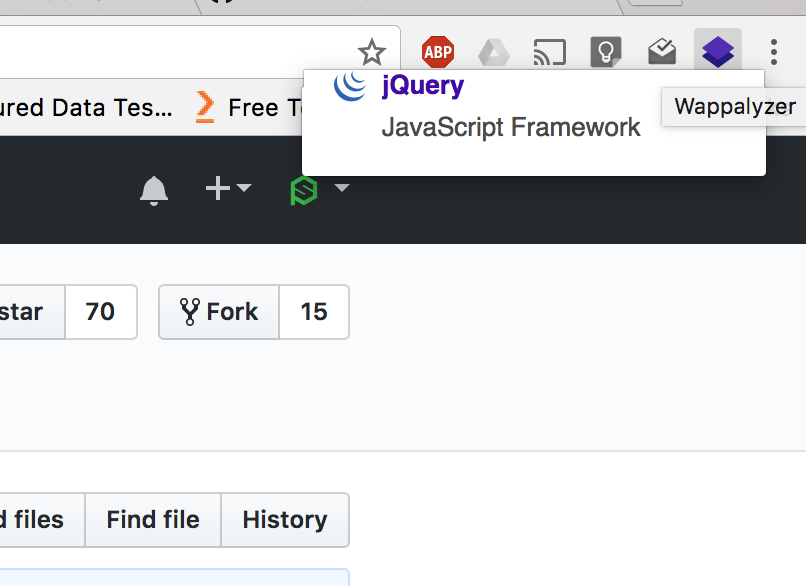
(This is on GitHub)
MacOS 10.12.6/ Chrome 60.0.3112.78 (64-bit) / Wappalyzer 5.0.3
simonepri
on 30 Jul 2017
I'm having this issue too. Sometimes it works, other times the stack collapses. Also on Chrome on MacOS. (Also, Wappalyzer logo remains in toolbar, despite checking 'Use application icon instead of Wappalyzer logo')
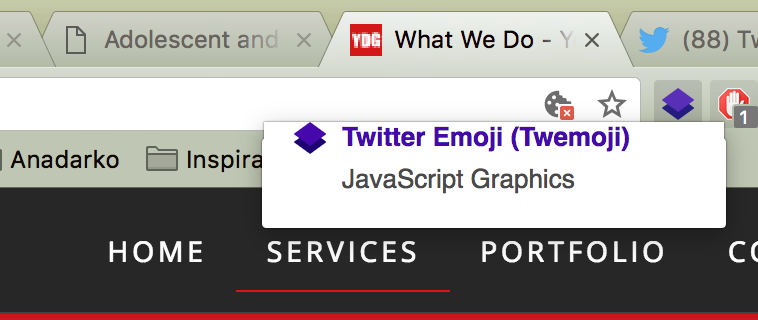
 mlbdenver
on 1 Aug 2017
mlbdenver
on 1 Aug 2017
I'm hopeful that the workaround in c4328afa302c657e796e2889d8cdd06a29e35903 fixes this. Looks out for v5.0.5.
AliasIO
on 5 Aug 2017
@AliasIO still there:
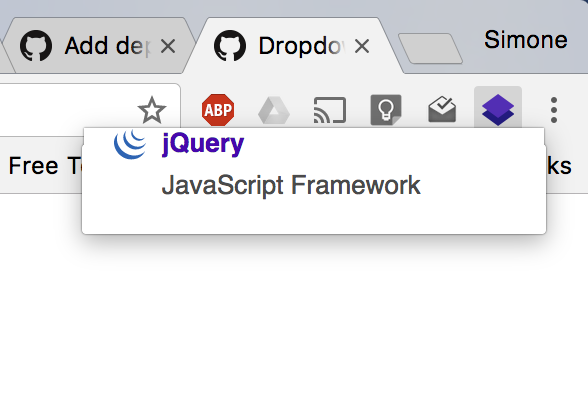
MacOS 10.12.6/ Chrome 60.0.3112.78 (64-bit) / Wappalyzer 5.0.5
simonepri
on 5 Aug 2017
Yep still present.
macOS 10.12.6 | Chrome 60.0.3112.90 | Wappalyzer 5.0.5
deanylev
on 5 Aug 2017
@AliasIO Did you mean 5.0.6? Just got the update, and so far, every time it seemed like the problem was about to happen, the popup forced itself open.
deanylev
on 5 Aug 2017
Still present. MacOS 10.12.6, Chrome 60, Wappalyzer 5.0.6.
 alayek
on 6 Aug 2017
alayek
on 6 Aug 2017
@deanylev Yes, v5.0.6. It should behave like you said but I'll reopen the issue as it doesn't appear to be working for everyone.
AliasIO
on 6 Aug 2017
I think it's related to this Chrome issue:
https://bugs.chromium.org/p/chromium/issues/detail?id=307912
AliasIO
on 6 Aug 2017
Fixed in v5.1.0.
AliasIO
on 28 Aug 2017
Related issues
 craiglondon
·
3Comments
craiglondon
·
3Comments
 patheticcockroach
·
6Comments
patheticcockroach
·
6Comments
 ocassio
·
5Comments
ocassio
·
5Comments
 realstephenzhao
·
10Comments
realstephenzhao
·
10Comments
 smokeyflavor
·
8Comments
smokeyflavor
·
8Comments
Most helpful comment
I'm definitely still having this problem on many sites. Almost always the popup is broken but if I click it about 3 times it works correctly.
MacOS 10.12.4 / Chrome 58