Walletwasabi: Coinjoin selection icons either don't work, or are misleading.
General Description
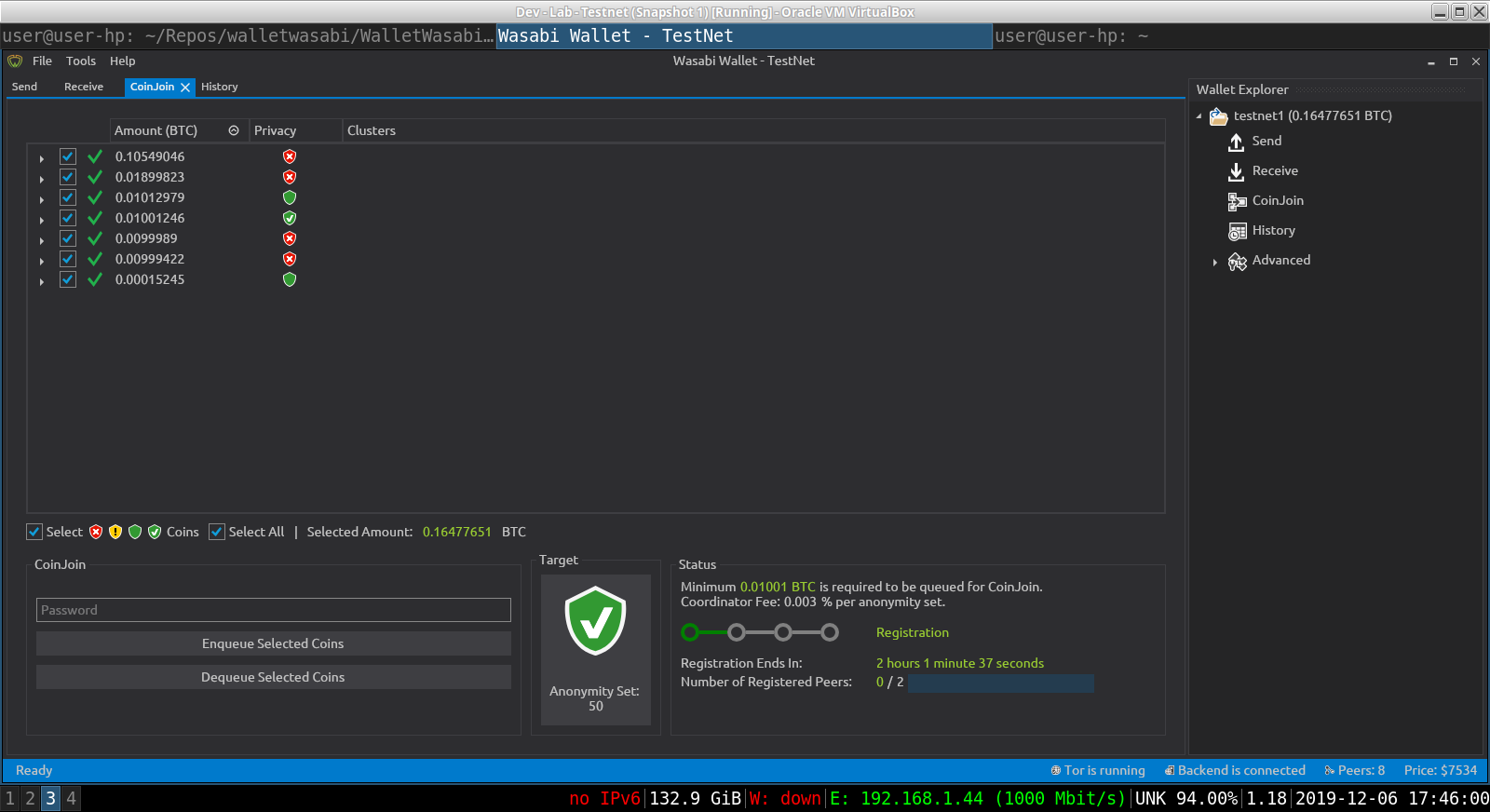
I'm confused as to the purpose of the different coinjoin anonymity level badges next to the "Select" button, on the Coinjoin page. As you can see in the attached screenshot, I have a variety of testnet coins with various levels of anonymity sets, ranging from zero to above the threshold of my higher target....so red, plain green, and checked green.
It would appear that those badges are next to the "Select" button to give the user an easy way to select all coins of a certain anonymity level for more mixing. When I click on any of those badges, all of my coins are selected, and the "Select All" box becomes checked.
Additionally, when I hover my mouse over any of the various badges, in each case I get a popup message that says "Coins that have not acquired the anonymity set target" This happens even when I hover my mouse over a checkmarked green badge.
Something isnt right. Either the badges aren't functioning as filter buttons, if that was their intent, or at best, they and the incorrect popup texts create confusion.
How To Reproduce?
- Best to reproduce if you have coins in each level of anonymity, as defined by the colored badges.
- Go to Coinjoin page
- Hover mouse over the various badges to the right of the "Select" button
- Click any and all badges, and see if you get the identical result for each.
Screenshots
If applicable, add screenshots to help explain your problem.
Operating System
Ubuntu 19.04 + i3
 davterra
All 13 comments
Related https://github.com/zkSNACKs/WalletWasabi/pull/2509#issuecomment-553229491
 yahiheb
on 7 Dec 2019
yahiheb
on 7 Dec 2019
OK, now I understand this. Closing the issue.
davterra
on 7 Dec 2019
Not a bug, so 0 points.
It takes a bit to understand the logic, but it works as designed as far as I understand.
 MaxHillebrand
on 8 Dec 2019
MaxHillebrand
on 8 Dec 2019
Yes, I was not totally up to speed on the logic. When I figured it out, I closed the issue. It works fine.
davterra
on 8 Dec 2019
It doesn't work as intended, we shouldn't get 4 icons (all) at the same time, or we shouldn't get no icon at all.
yahiheb
on 8 Dec 2019
Ok, I guess I need to experiment more with this....
davterra
on 8 Dec 2019
When I opened the issue, I was getting 4 icons at the same time, which, as noted seemed wrong.
After opening the issue, and further experimenting, I was no longer getting 4 icons, and it seemed to work correctly. Unfortunately, I didnt keep ongoing notes, so I can't reproduce yet.
davterra
on 8 Dec 2019
The issue was already known.
yahiheb
on 8 Dec 2019
@yahiheb If so, then how to reproduce it?
 nopara73
on 9 Dec 2019
nopara73
on 9 Dec 2019
Something isnt right. Either the badges aren't functioning as filter buttons, if that was their intent, or at best, they and the incorrect popup texts create confusion.
Actually this is a good idea. Of course it's not how it is intended to work, but maybe it should. So when you click on the "Select Text" you get nothing, but when you hover over the badges they get a grow animation and if you click then the coins should be selected. (And the badge highlighted somehow.)
This would also enable us to remove some functionality, that'd be interesting.
Anyhow it's outside the scope of this issue.
nopara73
on 9 Dec 2019
- Start with default anonset levels (yellow = 2, green = 21, green check = 50)
- Go to CoinJoin tab and choose the smallest anonymity set target (yellow shield)
- Go to Tools --> Settings --> Anonymity Levels --> Set the anonymity set of the yellow shield to be the highest (60 for example)
- Close Wasabi Wallet and reopen it again
- Go to CoinJoin tab (ignore the anonset 0 target issue it is already reported) and select the highest anonymity target (60)
- Go to Settings and change that highest anonymity set back to 2
- Close Wasabi and reopen it
- Go to CoinJoin tab and you will see 4 icon shields, and in Send tab you will see not shield
yahiheb
on 9 Dec 2019
Thanks, so it requires messing with the settings. Then it's no priority by any means.
nopara73
on 9 Dec 2019
I am closing this as these issues were a result of hacking.
 molnard
on 21 Jan 2020
molnard
on 21 Jan 2020
Related issues
yahiheb
·
3Comments
 gabridome
·
3Comments
gabridome
·
3Comments
 trading2835
·
3Comments
davterra
·
3Comments
trading2835
·
3Comments
davterra
·
3Comments
 kenny47
·
3Comments
kenny47
·
3Comments