Walletwasabi: Target Anonymity Set: 0
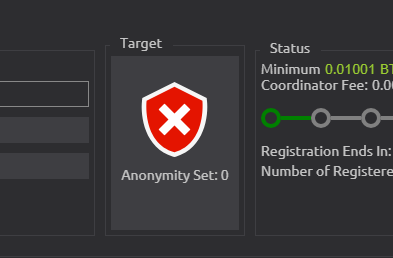
- Go to CoinJoin tab and choose the smallest anonymity set target the yellow shield
- Go to Tools --> Settings --> Anonymity Levels --> Set the anonymity set of the yellow shield to be the highest
- Close Wasabi Wallet and reopen it again
- Go to CoinJoin tab and see
Anonymity Set: 0
Note that after changing the target the Anonymity Set: 0 will not appear again
Also in CoinJoin tab when you change the target now there is no yellow shield and no green shield (green shield without check) only red shield and green shield (with check)
 yahiheb
👍2
All 2 comments
oh this is odd, I can reproduce.
- go to settings, set yellow shield to value of checkmark & restart wasabi
- after restart, I have one red shield worth the value of green shield, and two green checkmarks with value of ckeckmark.
 MaxHillebrand
on 13 Nov 2019
MaxHillebrand
on 13 Nov 2019
👍1
We need to make sure that at any point in time:
yellow shield < green shield < green checkmark shield
yahiheb
on 13 Nov 2019
👍1
Was this page helpful?
0 / 5 - 0 ratings
Related issues
 RiccardoMasutti
·
3Comments
yahiheb
·
3Comments
yahiheb
·
3Comments
yahiheb
·
3Comments
RiccardoMasutti
·
3Comments
yahiheb
·
3Comments
yahiheb
·
3Comments
yahiheb
·
3Comments
 trading2835
·
3Comments
trading2835
·
3Comments