Walletwasabi: Password input display bug on Windows 7 w/ JP region settings
General Description
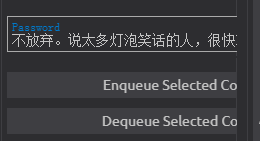
Running Wasabi v1.1.0 under Windows 7 with Japanese system locale for non-unicode programs causes a display bug when entering characters into the password field. Instead of displaying asterisks for each character, Wasabi displays assorted unicode characters (generally Chinese characters). This bug was not present in older versions of Wasabi. The issue seems limited to just a display bug as Wasabi will still accept correct password entry and reject incorrect password entry so it is not especially high-priority.
How To Reproduce?
- Run your Windows system in Japanese region settings (potentially others as well).
- Run Wasabi and enter characters in the password field.
Screenshots
Entering characters into the password field looks something like this (with varying character patterns, though whatever the pattern is, it stays the same regardless of user input).

If you enter enough characters the other UI text is pushed right.
Operating System
Win 7 Ultimate SP1
 4n4n4
4n4n4
All 8 comments
Same thing happens in Mac OSX 10.14.2
 patrickmichalina
on 13 Jan 2019
patrickmichalina
on 13 Jan 2019
It is related to this issue:
https://github.com/zkSNACKs/WalletWasabi/issues/439
Have fun with it! ;-)
 molnard
on 13 Jan 2019
molnard
on 13 Jan 2019
Same issue on Ubuntu Mate 18.04.
 bruceleeroy18
on 13 Jan 2019
bruceleeroy18
on 13 Jan 2019

 nopara73
on 14 Jan 2019
nopara73
on 14 Jan 2019
Hahaha!
P.s.(A caps lock warning would be useful.)
bruceleeroy18
on 14 Jan 2019
@bruceleeroy18 That's a good and nobrainer idea. Opened an issue for that: https://github.com/zkSNACKs/WalletWasabi/issues/1077
nopara73
on 14 Jan 2019
I can definitely represent the nobrainers. Gave myself a good scare for about 2 minutes before I realized caps lock was on.
(Thanks again. One more donation coming your way since I finished my coinjoins. Everything went smoothly.)
bruceleeroy18
on 15 Jan 2019
@bruceleeroy18 Thanks a lot! Btw, I just upvoted your comment on Reddit:)
Anyway, closing this.
nopara73
on 15 Jan 2019
Related issues
 the-metalworker
·
3Comments
the-metalworker
·
3Comments
 trading2835
·
3Comments
nopara73
·
3Comments
trading2835
·
3Comments
nopara73
·
3Comments
 2pac1
·
3Comments
2pac1
·
3Comments
 UkolovaOlga
·
3Comments
UkolovaOlga
·
3Comments
Most helpful comment
Same thing happens in Mac OSX 10.14.2