Using the latest version of WB as of today. I'm attempting to create an IFTTT recipe to watch for any new Pocket saves, and if found, send it on over to my WB installation. I have only used IFTTT once or twice, a long time ago, so I might be missing something obvious(?) but, I currently have it set to watch Pocket, then send via a WebHook using the URL in the BookMarklet (i.e. https://mydomain.com/wallabag/web/bookmarklet?url=URL) ...
During testing, it gives me a 302 error when trying to send the bookmark over; presumably because when using the bookmarklet, there's also a redirect when trying to save a link, and WB's just not handling it properly for this cause (or maybe IFTTT isn't). Below is the recipe I have at the moment (btw, I'm really surprised to find that there are no WB recipes there already 😮)
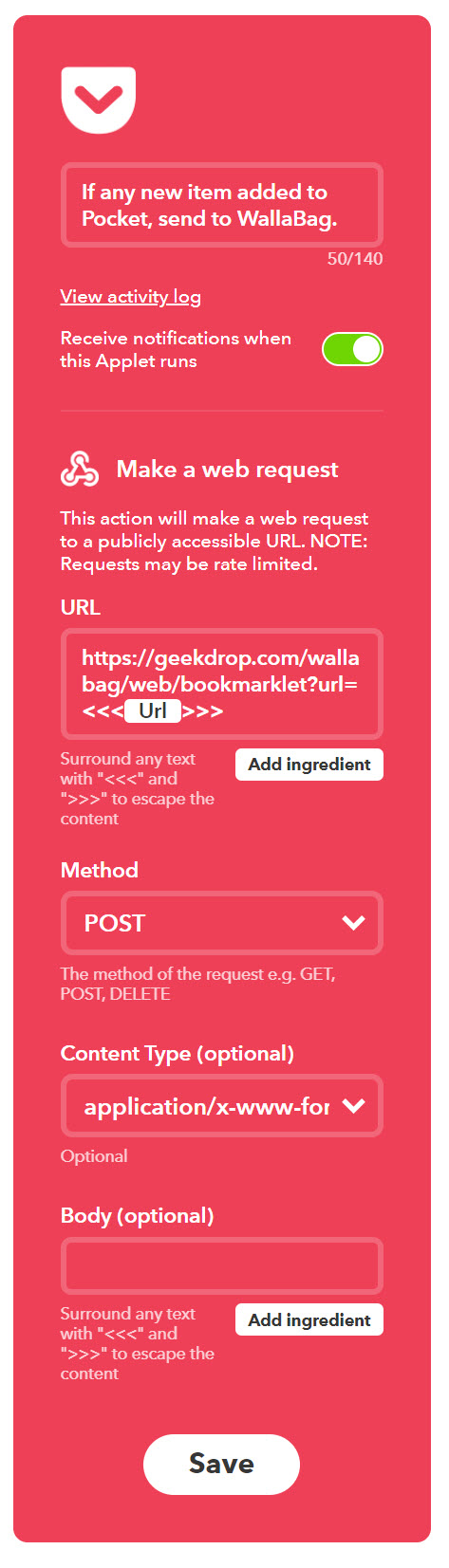
Am I doing something wrong? And/or is there another/better way to accomplish this?
TIA
 STaRDoGG
All 5 comments
Any chance to share the final recipe from IFTT, so we can try it on your own without copy/pasting what you already did?
 j0k3r
on 20 Apr 2018
j0k3r
on 20 Apr 2018
@j0k3r sure thing, not sure yet how to share them publicly, ill take a look. Also not sure how to share it publicly while removing my personal WB URL, unless I just remove it entirely from the recipe.
STaRDoGG
on 20 Apr 2018
According to their docs, I guess I can't share it:
If you've made a personal Applet via ifttt.com/create or in the IFTTT app, you can't publish or share it — it's just for you to use
I can tell ya the steps to whip it up real fast though.
- Go to that link in the quote
- Add The Pocket -> Any New Item service
- for the 'then', search for 'webhook', and add it. Make a web request.
- for the WB URL, I used the WB Bookmarklet URL (https://geekdrop.com/wallabag/web/bookmarklet?url=), and added the "URL" ingredient to the end of it.
- Method: Post. Content Type: Urlencoded (tried them all though)
That should do it.
STaRDoGG
on 20 Apr 2018
How does this work with multiuser wallabag? How does ifttt know which wallabag account to add the items to? The bookmarklet only works because you're already signed in on the browser you're using, or else wallabag asks you to sign in.
This is why the API requires a token -- to identify and authenticate the user account to interact with.
What is really needed is for the API to be a little more transparent and for users to be able to get an auth token directly from the interface
 apiontek
on 27 May 2018
apiontek
on 27 May 2018
Has anyone managed a solution to this? I really would like an automation like that.
 rodrigoswz
on 8 Jun 2018
rodrigoswz
on 8 Jun 2018
Related issues
 anarcat
·
4Comments
anarcat
·
4Comments
 amereservant
·
5Comments
amereservant
·
5Comments
 andre-faria
·
5Comments
andre-faria
·
5Comments
 valvin1
·
4Comments
valvin1
·
4Comments
 lapineige
·
4Comments
lapineige
·
4Comments
Most helpful comment
Has anyone managed a solution to this? I really would like an automation like that.